04미디어 기본 비율 고정 — 이미지와 영상이 부모 너비를 넘지 않게 맞추는 틀
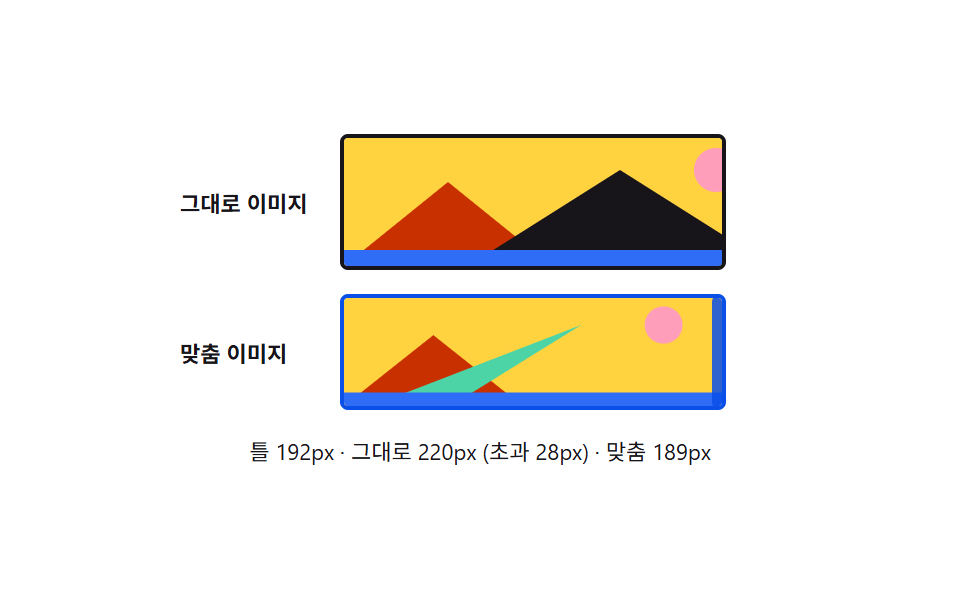
이미지와 영상이 줄 안의 글자처럼 취급돼 아래 여백이 생기던 문제를 없애고, 부모 너비를 넘지 않으면서 원래 비율을 유지한 채 표시됩니다.
쓰임블로그 본문 이미지, 카드 안 썸네일 영상
max-width: 100%height: autogetBoundingClientRect
<main class="stage">
<div class="wrap is-demo" id="wrap">
  <div class="row">
    <span class="rowLabel">그대로 이미지</span>
    <div class="frame rawFrame" id="rawFrame">
      <img class="rawImg" id="rawImg" alt="풍경 샘플 이미지" src="data:image/svg+xml;utf8,<svg xmlns='http://www.w3.org/2000/svg' width='220' height='64'><rect width='220' height='64' fill='%23ffd23f'/><circle cx='186' cy='16' r='11' fill='%23ff9ebb'/><polygon points='0,64 52,22 104,64' fill='%23c93000'/><polygon points='62,64 138,16 214,64' fill='%2317141a'/><rect y='56' width='220' height='8' fill='%232f6df6'/></svg>">
    </div>
  </div>
  <div class="row">
    <span class="rowLabel">맞춤 이미지</span>
    <div class="frame fitFrame" id="fitFrame">
      <img class="fitImg" id="fitImg" alt="풍경 샘플 이미지" src="data:image/svg+xml;utf8,<svg xmlns='http://www.w3.org/2000/svg' width='220' height='64'><rect width='220' height='64' fill='%23ffd23f'/><circle cx='186' cy='16' r='11' fill='%23ff9ebb'/><polygon points='0,64 52,22 104,64' fill='%23c93000'/><polygon points='62,64 138,16 16,64' fill='%234cd4a6'/><rect y='56' width='220' height='8' fill='%232f6df6'/></svg>">
      <div class="handle" id="handle" role="separator" aria-label="틀 너비 조절"></div>
    </div>
  </div>
  <div class="readout" id="readout">틀 —px</div>
</div>
</main>
@use "../../../../site/static/demo-tokens" as *;
// 계산 겹은 index.html 의 apply() 에 있다 — 틀 너비가 실시간으로 줄어들 때 그대로 이미지는
// 자연 폭(220px)을 지키다 틀 밖으로 삐져나가고(초과 px 를 문구로 세준다), 맞춤 이미지는
// max-width: 100% 로 틀 안으로 줄어든다. 실측은 getBoundingClientRect 로 매 프레임 다시.
@include stage($stage-paper);
.wrap {
width: 300px;
display: flex;
flex-direction: column;
gap: $sp-3;
}
.row {
display: flex;
align-items: center;
gap: $sp-2;
}
.rowLabel {
width: 72px;
flex: 0 0 auto;
color: $subject-ink;
font-size: 11px;
font-weight: 700;
}
.frame {
position: relative;
border: 2px solid $subject-ink;
border-radius: $r-xs;
overflow: hidden;
transition: width $dur-base $ease-out;
}
.fitFrame { border-color: $subject-blue-deep; }
// 리셋 항목의 주인공 — img { max-width: 100%; } 를 .fitImg 에만 걸어 나란히 비교한다
.fitImg {
display: block;
max-width: 100%;
height: auto;
}
.rawImg {
display: block;
}
.handle {
position: absolute;
top: -2px;
right: -9px;
width: 14px;
height: calc(100% + 4px);
border-radius: $r-xs;
background: $subject-blue-deep;
cursor: ew-resize;
opacity: .85;
transition: opacity $dur-instant $ease-out;
&::after {
content: "";
position: absolute;
top: 50%;
left: 50%;
width: 2px;
height: 14px;
border-radius: $r-xs;
background: $subject-cream;
transform: translate(-50%, -50%);
}
&:hover { opacity: 1; }
}
.readout {
color: $subject-ink;
font-size: 11px;
text-align: center;
}
@media (max-width: 340px) {
.wrap { width: 260px; }
.rowLabel { width: 60px; font-size: 10px; }
}
@media (prefers-reduced-motion: reduce) {
// reduce: 자동 루프의 사인 진동만 멈춘다(핸들로 하는 실사용 조절은 즉시 반영)
.frame { transition: none; }
}html, body {
margin: 0;
overflow: hidden;
}
.stage {
box-sizing: border-box;
min-height: 100vh;
display: grid;
place-items: center;
margin: 0;
background: #ffffff;
font-family: -apple-system, "Segoe UI", "Noto Sans KR", sans-serif;
padding: clamp(8px, 4vw, 24px);
}
.wrap {
width: 300px;
display: flex;
flex-direction: column;
gap: 12px;
}
.row {
display: flex;
align-items: center;
gap: 8px;
}
.rowLabel {
width: 72px;
flex: 0 0 auto;
color: #17141a;
font-size: 11px;
font-weight: 700;
}
.frame {
position: relative;
border: 2px solid #17141a;
border-radius: 4px;
overflow: hidden;
transition: width 300ms ease-out;
}
.fitFrame {
border-color: #0a4fe8;
}
.fitImg {
display: block;
max-width: 100%;
height: auto;
}
.rawImg {
display: block;
}
.handle {
position: absolute;
top: -2px;
right: -9px;
width: 14px;
height: calc(100% + 4px);
border-radius: 4px;
background: #0a4fe8;
cursor: ew-resize;
opacity: 0.85;
transition: opacity 140ms ease-out;
}
.handle::after {
content: "";
position: absolute;
top: 50%;
left: 50%;
width: 2px;
height: 14px;
border-radius: 4px;
background: #fff7e6;
transform: translate(-50%, -50%);
}
.handle:hover {
opacity: 1;
}
.readout {
color: #17141a;
font-size: 11px;
text-align: center;
}
@media (max-width: 340px) {
.wrap {
width: 260px;
}
.rowLabel {
width: 60px;
font-size: 10px;
}
}
@media (prefers-reduced-motion: reduce) {
.frame {
transition: none;
}
}(function () {
var MIN_FRAME_PX = 130;
var MAX_FRAME_PX = 230;
var reduce = window.matchMedia('(prefers-reduced-motion: reduce)').matches;
var wrap = document.getElementById('wrap');
var rawFrame = document.getElementById('rawFrame');
var rawImg = document.getElementById('rawImg');
var fitFrame = document.getElementById('fitFrame');
var fitImg = document.getElementById('fitImg');
var handle = document.getElementById('handle');
var readout = document.getElementById('readout');
var isDemo = true;
var frameW = 180;
function apply() {
rawFrame.style.width = frameW + 'px';
fitFrame.style.width = frameW + 'px';
// 실측 — 두 이미지의 실제 렌더 폭을 매 프레임 다시 잰다 (자연 폭 220px 는 svg width 에서 온다)
var fitW = fitImg.getBoundingClientRect().width;
var rawW = rawImg.getBoundingClientRect().width;
var over = Math.max(0, Math.round(rawW - frameW));
readout.textContent = '틀 ' + Math.round(frameW) + 'px · 그대로 ' + Math.round(rawW) +
'px (초과 ' + over + 'px) · 맞춤 ' + Math.round(fitW) + 'px';
}
var start = 0;
function loop(ts) {
if (!start) start = ts;
if (isDemo && !reduce) { frameW = 180 + 50 * Math.sin((ts - start) / 900); }
apply();
requestAnimationFrame(loop);
}
function human() { if (isDemo) { wrap.classList.remove('is-demo'); isDemo = false; } }
function onMove(e) {
var rect = fitFrame.getBoundingClientRect();
frameW = Math.min(MAX_FRAME_PX, Math.max(MIN_FRAME_PX, e.clientX - rect.left));
}
function onUp() {
window.removeEventListener('pointermove', onMove);
window.removeEventListener('pointerup', onUp);
}
handle.addEventListener('pointerdown', function (e) {
human();
e.preventDefault();
onMove(e);
window.addEventListener('pointermove', onMove);
window.addEventListener('pointerup', onUp);
});
requestAnimationFrame(loop);
})();// MediaBlock — vanilla 판(run/376/demo/04-media-block/index.html) 의 React 포트.
// 틀 너비를 핸들로 끌면 두 이미지의 실제 렌더 폭(getBoundingClientRect)을 다시 재
// "그대로 이미지" 는 자연 폭을 지키다 넘치고 "맞춤 이미지" 는 max-width:100% 로 줄어드는
// 차이를 초과 px 문구로 보여준다.
import { useEffect, useRef } from "react";
import styles from "./MediaBlock.module.scss";
type Box<T> = { current: T };
const MIN_FRAME_PX = 130;
const MAX_FRAME_PX = 230;
const SAMPLE_SVG =
"data:image/svg+xml;utf8,<svg xmlns='http://www.w3.org/2000/svg' width='220' height='64'><rect width='220' height='64' fill='%23ffd23f'/><circle cx='186' cy='16' r='11' fill='%23ff9ebb'/><polygon points='0,64 52,22 104,64' fill='%23c93000'/><polygon points='62,64 138,16 214,64' fill='%2317141a'/><rect y='56' width='220' height='8' fill='%232f6df6'/></svg>";
export default function MediaBlock() {
const wrapRef = useRef(null) as unknown as Box<HTMLDivElement>;
const rawFrameRef = useRef(null) as unknown as Box<HTMLDivElement>;
const rawImgRef = useRef(null) as unknown as Box<HTMLImageElement>;
const fitFrameRef = useRef(null) as unknown as Box<HTMLDivElement>;
const fitImgRef = useRef(null) as unknown as Box<HTMLImageElement>;
const handleRef = useRef(null) as unknown as Box<HTMLDivElement>;
const readoutRef = useRef(null) as unknown as Box<HTMLDivElement>;
const rafRef = useRef(0) as unknown as Box<number>;
useEffect(() => {
const reduce = window.matchMedia("(prefers-reduced-motion: reduce)").matches;
const wrap = wrapRef.current;
const rawFrame = rawFrameRef.current;
const rawImg = rawImgRef.current;
const fitFrame = fitFrameRef.current;
const fitImg = fitImgRef.current;
const handle = handleRef.current;
const readout = readoutRef.current;
if (!wrap || !rawFrame || !rawImg || !fitFrame || !fitImg || !handle || !readout) return;
let isDemo = true;
let frameW = 180;
function apply() {
rawFrame!.style.width = frameW + "px";
fitFrame!.style.width = frameW + "px";
const fitW = fitImg!.getBoundingClientRect().width;
const rawW = rawImg!.getBoundingClientRect().width;
const over = Math.max(0, Math.round(rawW - frameW));
readout!.textContent = "틀 " + Math.round(frameW) + "px · 그대로 " + Math.round(rawW) +
"px (초과 " + over + "px) · 맞춤 " + Math.round(fitW) + "px";
}
let start = 0;
function loop(ts: number) {
if (!start) start = ts;
if (isDemo && !reduce) { frameW = 180 + 50 * Math.sin((ts - start) / 900); }
apply();
rafRef.current = requestAnimationFrame(loop);
}
function human() { if (isDemo) { wrap!.classList.remove(styles.isDemo); isDemo = false; } }
function onMove(e: PointerEvent) {
const rect = fitFrame!.getBoundingClientRect();
frameW = Math.min(MAX_FRAME_PX, Math.max(MIN_FRAME_PX, e.clientX - rect.left));
}
function onUp() {
window.removeEventListener("pointermove", onMove);
window.removeEventListener("pointerup", onUp);
}
function onDown(e: PointerEvent) {
human();
e.preventDefault();
onMove(e);
window.addEventListener("pointermove", onMove);
window.addEventListener("pointerup", onUp);
}
handle.addEventListener("pointerdown", onDown as unknown as EventListener);
rafRef.current = requestAnimationFrame(loop);
return () => {
handle!.removeEventListener("pointerdown", onDown as unknown as EventListener);
window.removeEventListener("pointermove", onMove);
window.removeEventListener("pointerup", onUp);
cancelAnimationFrame(rafRef.current);
};
}, []);
return (
<main className={styles.stage}>
<div className={styles.wrap + " " + styles.isDemo} ref={wrapRef}>
<div className={styles.row}>
<span className={styles.rowLabel}>그대로 이미지</span>
<div className={styles.frame + " " + styles.rawFrame} ref={rawFrameRef}>
<img className={styles.rawImg} ref={rawImgRef} alt="풍경 샘플 이미지" src={SAMPLE_SVG} />
</div>
</div>
<div className={styles.row}>
<span className={styles.rowLabel}>맞춤 이미지</span>
<div className={styles.frame + " " + styles.fitFrame} ref={fitFrameRef}>
<img className={styles.fitImg} ref={fitImgRef} alt="풍경 샘플 이미지" src={SAMPLE_SVG} />
<div className={styles.handle} ref={handleRef} role="separator" aria-label="틀 너비 조절"></div>
</div>
</div>
<div className={styles.readout} ref={readoutRef}>틀 —px</div>
</div>
</main>
);
}04 미디어 기본 비율 고정 — 이미지와 영상이 부모 너비를 넘지 않게 맞추는 틀 — 측정 누적면적 11.703% · 움직인 프레임 18/23GODRICH 원작 · zip 에 SCSS·React 포함 · css 초기화 9종 — 리셋부터 안전 영역까지 한 번에 정리
이 데모가 속한 글
 css 초기화 9종 — 리셋부터 안전 영역까지 한 번에 정리아홉 개의 css 초기화 패턴 중 하나는 화면 노치를 감지해 안전 영역만큼 여백을 다시 계산하고, 하나는 모션을 줄이는 환경에서 전환 시간이 거의 0에 가깝게 줄어들고, 하나는 각진 기본 모서리가 매끈한 곡선 모양으 이 글의 데모 전부 보기