05폼 요소 글꼴 상속 — 버튼과 입력창이 주변 글자와 같은 서체를 쓰게 맞추는 규칙
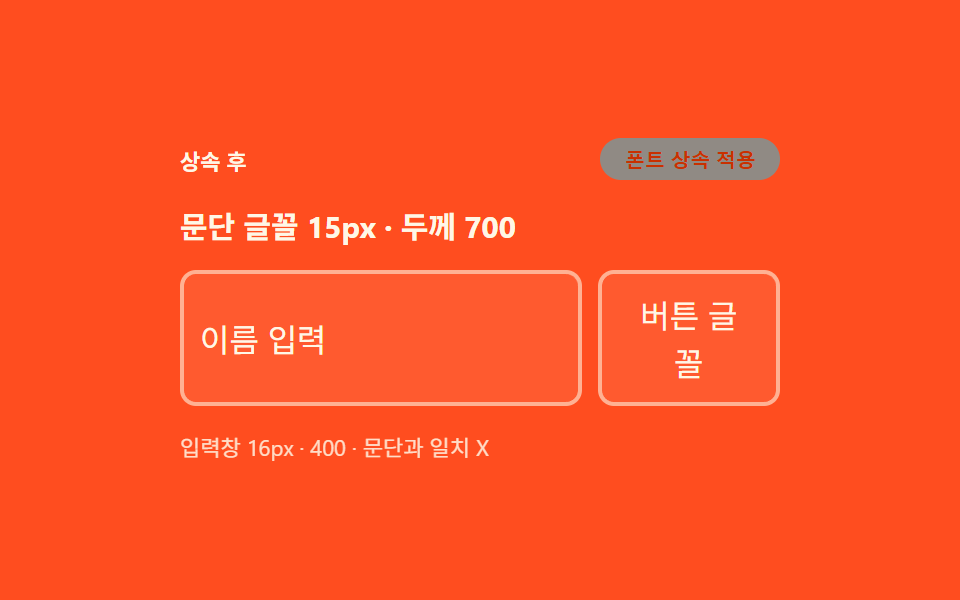
브라우저가 버튼과 입력창에 따로 정해주던 글꼴과 글자 크기를 지우고, 주변 문단과 똑같은 서체·크기·색을 그대로 물려받게 합니다.
쓰임커스텀 디자인 폼, 다크모드 대응 입력창
font-family: inheritfont-weight: inheritfont-size: inherit
<main class="stage">
<div class="wrap is-demo" id="wrap">
  <div class="head">
    <span class="stateLabel" id="stateLabel">상속 전</span>
    <button class="toggleBtn" id="toggleBtn" type="button" aria-pressed="false">폰트 상속 적용</button>
  </div>
  <p class="sample" id="sample">문단 글꼴 15px · 두께 700</p>
  <div class="fieldRow">
    <input class="field inheritField" id="fieldA" type="text" value="이름 입력" aria-label="입력창 예시">
    <button class="ghostBtn" id="ghostBtn" type="button">버튼 글꼴</button>
  </div>
  <div class="readout" id="readout">입력창 —px · 문단과 일치 —</div>
</div>
</main>
@use "../../../../site/static/demo-tokens" as *;
// 계산 겹은 index.html 의 measure() 에 있다 — 문단과 입력창의 실제 렌더 font-size·font-weight
// 를 getComputedStyle 로 다시 잡아 두 값이 같은지를 문구로 판정한다. 여기는 상속 전(브라우저
// 기본 13.33px · 400)과 상속 후(inherit) 두 규칙과 화면 구성만 맡는다.
@include stage($stage-orange);
.wrap {
width: 300px;
display: flex;
flex-direction: column;
gap: $sp-3;
}
.head {
display: flex;
align-items: center;
justify-content: space-between;
gap: $sp-2;
}
.stateLabel {
color: $subject-cream;
font-size: 11px;
font-weight: 700;
}
.toggleBtn {
appearance: none;
border: none;
border-radius: $r-pill;
background: $subject-ink;
color: $subject-cream;
padding: $sp-1 $sp-3;
font-size: 10px;
font-weight: 600;
cursor: pointer;
transition: background $dur-instant $ease-out, transform $dur-instant $ease-out;
&:hover { background: $subject-blue-deep; }
&:active { transform: scale(.96); }
&[aria-pressed="true"] { background: $subject-cream; color: $subject-orange-deep; }
&:focus-visible { outline: 2px solid $subject-cream; outline-offset: 2px; }
}
// 문단 기준 — 이 폰트로 입력창·버튼이 맞춰지는지가 주제다
.sample {
margin: 0;
color: $subject-cream;
font-size: 15px;
font-weight: 700;
}
.fieldRow {
display: flex;
gap: $sp-2;
align-items: stretch;
}
.field {
flex: 1 1 auto;
min-width: 0;
border: 2px solid rgba($subject-cream, .55);
border-radius: $r-sm;
background: rgba($subject-cream, .08);
padding: $sp-2;
color: $subject-cream;
transition: color $dur-base $ease-out, border-color $dur-base $ease-out;
}
.ghostBtn {
appearance: none;
border: 2px solid rgba($subject-cream, .55);
border-radius: $r-sm;
background: rgba($subject-cream, .08);
padding: $sp-2 $sp-3;
color: $subject-cream;
cursor: pointer;
transition: color $dur-base $ease-out;
}
// 리셋의 주인공 — font: inherit 계열을 토글로 비교한다
.wrap.inherited {
.field, .ghostBtn { font-size: inherit; font-weight: inherit; font-family: inherit; color: $subject-cream; }
}
.readout {
color: $subject-cream;
font-size: 11px;
opacity: .85;
}
@media (max-width: 340px) {
.wrap { width: 260px; }
.ghostBtn { padding: $sp-2; }
}
@media (prefers-reduced-motion: reduce) {
// reduce: 전환의 완만함만 지운다 — 상태 자체는 토글로 계속 바뀐다(값 전환이라 유지)
.toggleBtn, .field, .ghostBtn { transition: none; }
}html, body {
margin: 0;
overflow: hidden;
}
.stage {
box-sizing: border-box;
min-height: 100vh;
display: grid;
place-items: center;
margin: 0;
background: #ff4d1f;
font-family: -apple-system, "Segoe UI", "Noto Sans KR", sans-serif;
padding: clamp(8px, 4vw, 24px);
}
.wrap {
width: 300px;
display: flex;
flex-direction: column;
gap: 12px;
}
.head {
display: flex;
align-items: center;
justify-content: space-between;
gap: 8px;
}
.stateLabel {
color: #fff7e6;
font-size: 11px;
font-weight: 700;
}
.toggleBtn {
appearance: none;
border: none;
border-radius: 999px;
background: #17141a;
color: #fff7e6;
padding: 4px 12px;
font-size: 10px;
font-weight: 600;
cursor: pointer;
transition: background 140ms ease-out, transform 140ms ease-out;
}
.toggleBtn:hover {
background: #0a4fe8;
}
.toggleBtn:active {
transform: scale(0.96);
}
.toggleBtn[aria-pressed=true] {
background: #fff7e6;
color: #c93000;
}
.toggleBtn:focus-visible {
outline: 2px solid #fff7e6;
outline-offset: 2px;
}
.sample {
margin: 0;
color: #fff7e6;
font-size: 15px;
font-weight: 700;
}
.fieldRow {
display: flex;
gap: 8px;
align-items: stretch;
}
.field {
flex: 1 1 auto;
min-width: 0;
border: 2px solid rgba(255, 247, 230, 0.55);
border-radius: 8px;
background: rgba(255, 247, 230, 0.08);
padding: 8px;
color: #fff7e6;
transition: color 300ms ease-out, border-color 300ms ease-out;
}
.ghostBtn {
appearance: none;
border: 2px solid rgba(255, 247, 230, 0.55);
border-radius: 8px;
background: rgba(255, 247, 230, 0.08);
padding: 8px 12px;
color: #fff7e6;
cursor: pointer;
transition: color 300ms ease-out;
}
.wrap.inherited .field, .wrap.inherited .ghostBtn {
font-size: inherit;
font-weight: inherit;
font-family: inherit;
color: #fff7e6;
}
.readout {
color: #fff7e6;
font-size: 11px;
opacity: 0.85;
}
@media (max-width: 340px) {
.wrap {
width: 260px;
}
.ghostBtn {
padding: 8px;
}
}
@media (prefers-reduced-motion: reduce) {
.toggleBtn, .field, .ghostBtn {
transition: none;
}
}(function () {
var STEP_MS = 260;
var reduce = window.matchMedia('(prefers-reduced-motion: reduce)').matches;
var wrap = document.getElementById('wrap');
var toggleBtn = document.getElementById('toggleBtn');
var ghostBtn = document.getElementById('ghostBtn');
var stateLabel = document.getElementById('stateLabel');
var sample = document.getElementById('sample');
var fieldA = document.getElementById('fieldA');
var readout = document.getElementById('readout');
var isDemo = true;
var on = false;
function measure() {
// 실측 — 문단과 입력창의 렌더 글꼴 크기를 getComputedStyle 로 매 토글 뒤 다시 잰다
var ps = getComputedStyle(sample).fontSize;
var fs = getComputedStyle(fieldA).fontSize;
var pw = getComputedStyle(sample).fontWeight;
var fw = getComputedStyle(fieldA).fontWeight;
var match = ps === fs && pw === fw;
readout.textContent = '입력창 ' + fs + ' · ' + fw + ' · 문단과 일치 ' + (match ? 'O' : 'X');
}
function apply(next) {
on = next;
wrap.classList.toggle('inherited', on);
stateLabel.textContent = on ? '상속 후' : '상속 전';
toggleBtn.setAttribute('aria-pressed', String(on));
measure();
}
function human() { if (isDemo) { wrap.classList.remove('is-demo'); isDemo = false; } }
toggleBtn.addEventListener('click', function () { human(); apply(!on); });
ghostBtn.addEventListener('click', human);
fieldA.addEventListener('input', human);
fieldA.addEventListener('focus', human);
var last = 0;
function loop(ts) {
if (!last) last = ts;
if (isDemo && !reduce && ts - last >= STEP_MS) { last = ts; apply(!on); }
requestAnimationFrame(loop);
}
apply(false);
requestAnimationFrame(loop);
})();// FormInherit — vanilla 판(run/376/demo/05-form-inherit/index.html) 의 React 포트.
// 상속 전/후를 토글해 입력창·버튼의 렌더 font-size·font-weight 를 getComputedStyle 로 다시 재
// 문단 값과 일치하는지 판정한다.
import { useEffect, useRef } from "react";
import styles from "./FormInherit.module.scss";
type Box<T> = { current: T };
const STEP_MS = 260;
export default function FormInherit() {
const wrapRef = useRef(null) as unknown as Box<HTMLDivElement>;
const toggleBtnRef = useRef(null) as unknown as Box<HTMLButtonElement>;
const ghostBtnRef = useRef(null) as unknown as Box<HTMLButtonElement>;
const stateLabelRef = useRef(null) as unknown as Box<HTMLSpanElement>;
const sampleRef = useRef(null) as unknown as Box<HTMLParagraphElement>;
const fieldARef = useRef(null) as unknown as Box<HTMLInputElement>;
const readoutRef = useRef(null) as unknown as Box<HTMLDivElement>;
const rafRef = useRef(0) as unknown as Box<number>;
useEffect(() => {
const reduce = window.matchMedia("(prefers-reduced-motion: reduce)").matches;
const wrap = wrapRef.current;
const toggleBtn = toggleBtnRef.current;
const ghostBtn = ghostBtnRef.current;
const stateLabel = stateLabelRef.current;
const sample = sampleRef.current;
const fieldA = fieldARef.current;
const readout = readoutRef.current;
if (!wrap || !toggleBtn || !ghostBtn || !stateLabel || !sample || !fieldA || !readout) return;
let isDemo = true;
let on = false;
function measure() {
const ps = getComputedStyle(sample!).fontSize;
const fs = getComputedStyle(fieldA!).fontSize;
const pw = getComputedStyle(sample!).fontWeight;
const fw = getComputedStyle(fieldA!).fontWeight;
const match = ps === fs && pw === fw;
readout!.textContent = "입력창 " + fs + " · " + fw + " · 문단과 일치 " + (match ? "O" : "X");
}
function apply(next: boolean) {
on = next;
wrap!.classList.toggle(styles.inherited, on);
stateLabel!.textContent = on ? "상속 후" : "상속 전";
toggleBtn!.setAttribute("aria-pressed", String(on));
measure();
}
function human() { if (isDemo) { wrap!.classList.remove(styles.isDemo); isDemo = false; } }
function onToggleClick() { human(); apply(!on); }
function onGhostClick() { human(); }
function onFieldEvent() { human(); }
toggleBtn.addEventListener("click", onToggleClick);
ghostBtn.addEventListener("click", onGhostClick);
fieldA.addEventListener("input", onFieldEvent);
fieldA.addEventListener("focus", onFieldEvent);
let last = 0;
function loop(ts: number) {
if (!last) last = ts;
if (isDemo && !reduce && ts - last >= STEP_MS) { last = ts; apply(!on); }
rafRef.current = requestAnimationFrame(loop);
}
apply(false);
rafRef.current = requestAnimationFrame(loop);
return () => {
toggleBtn!.removeEventListener("click", onToggleClick);
ghostBtn!.removeEventListener("click", onGhostClick);
fieldA!.removeEventListener("input", onFieldEvent);
fieldA!.removeEventListener("focus", onFieldEvent);
cancelAnimationFrame(rafRef.current);
};
}, []);
return (
<main className={styles.stage}>
<div className={styles.wrap + " " + styles.isDemo} ref={wrapRef}>
<div className={styles.head}>
<span className={styles.stateLabel} ref={stateLabelRef}>상속 전</span>
<button className={styles.toggleBtn} ref={toggleBtnRef} type="button" aria-pressed="false">폰트 상속 적용</button>
</div>
<p className={styles.sample} ref={sampleRef}>문단 글꼴 15px · 두께 700</p>
<div className={styles.fieldRow}>
<input className={styles.field + " " + styles.inheritField} ref={fieldARef} type="text" defaultValue="이름 입력" aria-label="입력창 예시" />
<button className={styles.ghostBtn} ref={ghostBtnRef} type="button">버튼 글꼴</button>
</div>
<div className={styles.readout} ref={readoutRef}>입력창 —px · 문단과 일치 —</div>
</div>
</main>
);
}05 폼 요소 글꼴 상속 — 버튼과 입력창이 주변 글자와 같은 서체를 쓰게 맞추는 규칙 — 측정 누적면적 13.463% · 움직인 프레임 22/23GODRICH 원작 · zip 에 SCSS·React 포함 · css 초기화 9종 — 리셋부터 안전 영역까지 한 번에 정리
이 데모가 속한 글
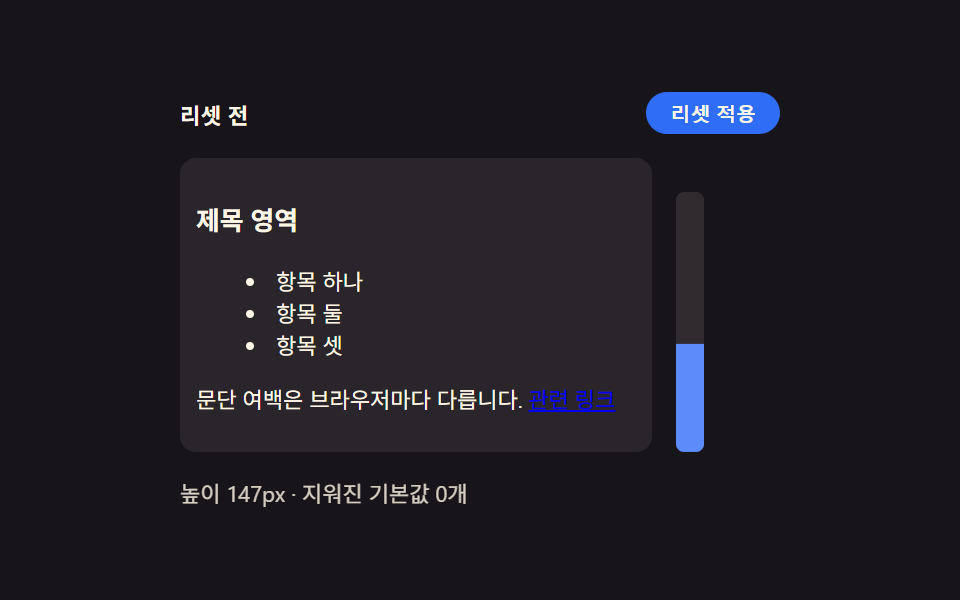 css 초기화 9종 — 리셋부터 안전 영역까지 한 번에 정리아홉 개의 css 초기화 패턴 중 하나는 화면 노치를 감지해 안전 영역만큼 여백을 다시 계산하고, 하나는 모션을 줄이는 환경에서 전환 시간이 거의 0에 가깝게 줄어들고, 하나는 각진 기본 모서리가 매끈한 곡선 모양으 이 글의 데모 전부 보기