02모서리부터 벗겨지는 스티커
카드에 커서를 올리면 한쪽 모서리가 종이처럼 뒤로 말리며 들리고, 그 밑에 숨어 있던 다른 색이 살짝 드러난다 (133의 홀로그램 배지 필+스윕 조합과 다른 시연 — 여긴 벗겨지는 각도 자체가 커서 위치를 따라간다).
쓰임쿠폰·배지 카드 강조, 갤러리 썸네일
clip-pathatan2pointermove
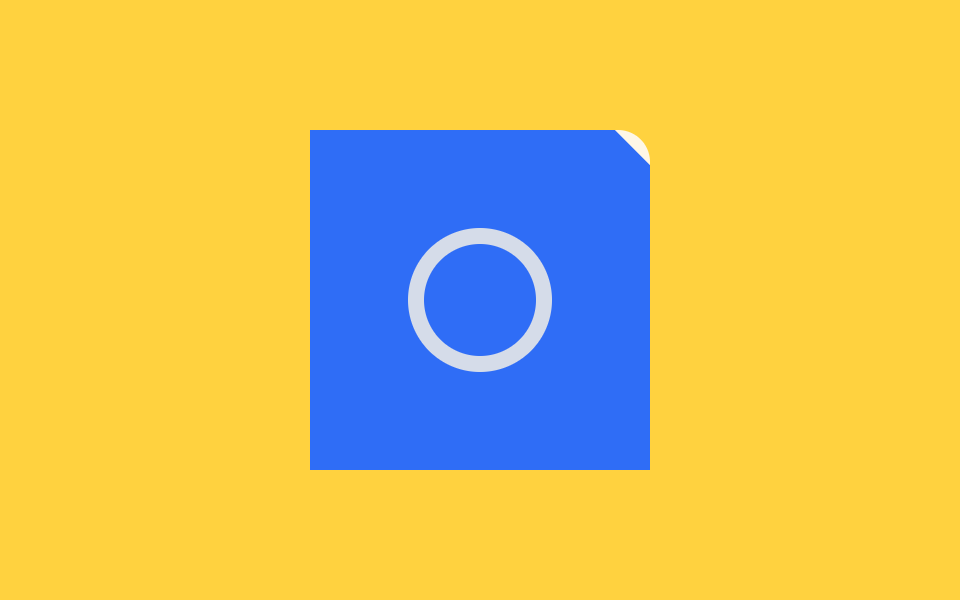
<main class="stage">
<div class="wrap is-demo" id="wrap">
  <div class="cardZone" id="zone">
    <div class="backing" aria-hidden="true"></div>
    <button class="card" id="card" type="button" aria-label="스티커 카드, 커서를 모서리 쪽으로 움직이면 벗겨진다">
      <span class="cardMark" aria-hidden="true"></span>
      <span class="peelShade" id="shade" aria-hidden="true"></span>
    </button>
  </div>
</div>
</main>
@use "../../../../site/static/demo-tokens" as *;
// 계산 겹은 index.html 의 applyFromPoint(px, py) 에 있다 — 카드 우상단 꼭짓점에서 포인터까지의
// 거리로 벗겨지는 크기(--peel-size)를, atan2 각도로 그라디언트 방향(--peel-deg)을 매 프레임 다시 잰다.
// 여기는 그 두 변수를 clip-path 코너 컷과 그라디언트에 그대로 꽂아 쓴다(레이아웃을 건드리지 않는 paint 계산).
@include stage($stage-yellow);
.wrap { display: grid; place-items: center; }
.cardZone {
position: relative;
width: 170px;
height: 170px;
}
.backing {
position: absolute;
inset: 0;
border-radius: $r-card;
background: $subject-cream;
}
.card {
position: absolute;
inset: 0;
border: 0;
padding: 0;
appearance: none;
cursor: pointer;
background: $subject-blue;
--peel-size: 0px;
clip-path: polygon(0 0, calc(100% - var(--peel-size)) 0, 100% var(--peel-size), 100% 100%, 0 100%);
&:focus-visible { outline: 2px solid $subject-blue-light; outline-offset: 4px; }
}
.cardMark {
position: absolute;
inset: 0;
margin: auto;
width: 56px;
height: 56px;
border-radius: 50%;
border: 8px solid rgba($subject-cream, .8);
}
.peelShade {
position: absolute;
top: 0;
right: 0;
width: var(--peel-size, 0px);
height: var(--peel-size, 0px);
--peel-deg: 45deg;
clip-path: polygon(100% 0, 100% 100%, 0 0);
background: linear-gradient(var(--peel-deg), rgba(255, 247, 230, .95), rgba(255, 247, 230, 0) 72%);
pointer-events: none;
}
@media (max-width: 340px) {
.cardZone { width: 130px; height: 130px; }
.cardMark { width: 42px; height: 42px; border-width: 6px; }
}
@media (prefers-reduced-motion: reduce) {
.card { transition: none; }
}html, body {
margin: 0;
overflow: hidden;
}
.stage {
box-sizing: border-box;
min-height: 100vh;
display: grid;
place-items: center;
margin: 0;
background: #ffd23f;
font-family: -apple-system, "Segoe UI", "Noto Sans KR", sans-serif;
padding: clamp(8px, 4vw, 24px);
}
.wrap {
display: grid;
place-items: center;
}
.cardZone {
position: relative;
width: 170px;
height: 170px;
}
.backing {
position: absolute;
inset: 0;
border-radius: 16px;
background: #fff7e6;
}
.card {
position: absolute;
inset: 0;
border: 0;
padding: 0;
appearance: none;
cursor: pointer;
background: #2f6df6;
--peel-size: 0px;
clip-path: polygon(0 0, calc(100% - var(--peel-size)) 0, 100% var(--peel-size), 100% 100%, 0 100%);
}
.card:focus-visible {
outline: 2px solid #5b8cf8;
outline-offset: 4px;
}
.cardMark {
position: absolute;
inset: 0;
margin: auto;
width: 56px;
height: 56px;
border-radius: 50%;
border: 8px solid rgba(255, 247, 230, 0.8);
}
.peelShade {
position: absolute;
top: 0;
right: 0;
width: var(--peel-size, 0px);
height: var(--peel-size, 0px);
--peel-deg: 45deg;
clip-path: polygon(100% 0, 100% 100%, 0 0);
background: linear-gradient(var(--peel-deg), rgba(255, 247, 230, 0.95), rgba(255, 247, 230, 0) 72%);
pointer-events: none;
}
@media (max-width: 340px) {
.cardZone {
width: 130px;
height: 130px;
}
.cardMark {
width: 42px;
height: 42px;
border-width: 6px;
}
}
@media (prefers-reduced-motion: reduce) {
.card {
transition: none;
}
}(function () {
var PEEL_CORNER_SIZE = 24; // 커서가 모서리에 딱 붙었을 때 벗겨지는 기본 크기(px) — 변형은 44px
var PEEL_REACH = 190; // 이 거리(px) 밖이면 벗겨짐이 0 이 된다
var LERP_RATE = .18;
var ORBIT_MS = 2600; // 자동 루프가 코너 주변을 도는 한 바퀴 시간
var reduce = window.matchMedia('(prefers-reduced-motion: reduce)').matches;
var wrap = document.getElementById('wrap');
var zone = document.getElementById('zone');
var card = document.getElementById('card');
var shade = document.getElementById('shade');
var isDemo = true;
var targetSize = 0, targetDeg = 45;
var shownSize = 0, shownDeg = 45;
// 카드 우상단 꼭짓점(pivot)에서 포인터까지의 벡터로 벗겨짐 크기와 그라디언트 각도를 계산한다.
// 거리(distance)가 가까울수록 크게 벗겨지고, 각도(atan2)는 그라디언트가 흐르는 방향을 정한다 —
// 포인터 각도 → clip-path/그라디언트 계산.
function applyFromPoint(px, py) {
var r = card.getBoundingClientRect();
var pivotX = r.right, pivotY = r.top;
var dx = pivotX - px, dy = py - pivotY;
var distance = Math.hypot(dx, dy);
var amt = Math.max(0, Math.min(1, 1 - distance / PEEL_REACH));
targetSize = amt * PEEL_CORNER_SIZE;
targetDeg = (Math.atan2(dy, dx) * 180 / Math.PI + 360) % 360;
}
function human() { if (isDemo) { wrap.classList.remove('is-demo'); isDemo = false; } }
function onMove(e) { human(); applyFromPoint(e.clientX, e.clientY); }
function onLeave() { human(); targetSize = 0; }
zone.addEventListener('pointermove', onMove);
zone.addEventListener('pointerleave', onLeave);
card.addEventListener('focus', function () { human(); applyFromPoint(card.getBoundingClientRect().left, card.getBoundingClientRect().top); });
card.addEventListener('blur', function () { human(); targetSize = 0; });
var last = 0;
function autoAdvance(ts) {
if (!last) last = ts;
var r = card.getBoundingClientRect();
var t = ((ts - last) % ORBIT_MS) / ORBIT_MS;
var angle = t * Math.PI * 2;
var px = r.right - 26 + Math.cos(angle) * 30;
var py = r.top + 26 + Math.sin(angle) * 30;
applyFromPoint(px, py);
}
function loop(ts) {
if (isDemo && !reduce) autoAdvance(ts);
if (reduce) { shownSize = targetSize; shownDeg = targetDeg; }
else {
shownSize += (targetSize - shownSize) * LERP_RATE;
shownDeg += (targetDeg - shownDeg) * LERP_RATE;
}
card.style.setProperty('--peel-size', shownSize.toFixed(2) + 'px');
shade.style.setProperty('--peel-deg', shownDeg.toFixed(1) + 'deg');
requestAnimationFrame(loop);
}
requestAnimationFrame(loop);
})();// PeelCorner — vanilla 판(run/378/demo/02-sticker-peel-corner/index.html) 의 React 포트.
// 카드 우상단 꼭짓점에서 포인터까지의 벡터로 벗겨짐 크기와 그라디언트 각도(atan2)를 계산한다.
import { useEffect, useRef } from "react";
import styles from "./PeelCorner.module.scss";
type Box<T> = { current: T };
const PEEL_CORNER_SIZE = 24; // 변형: 44px
const PEEL_REACH = 190;
const LERP_RATE = 0.18;
const ORBIT_MS = 2600;
export default function PeelCorner() {
const rootRef = useRef(null) as unknown as Box<HTMLDivElement>;
const zoneRef = useRef(null) as unknown as Box<HTMLDivElement>;
const cardRef = useRef(null) as unknown as Box<HTMLButtonElement>;
const shadeRef = useRef(null) as unknown as Box<HTMLSpanElement>;
const rafRef = useRef(0) as unknown as Box<number>;
useEffect(() => {
const reduce = window.matchMedia("(prefers-reduced-motion: reduce)").matches;
const wrap = rootRef.current;
const zone = zoneRef.current;
const card = cardRef.current;
const shade = shadeRef.current;
if (!wrap || !zone || !card || !shade) return;
let isDemo = true;
let targetSize = 0, targetDeg = 45;
let shownSize = 0, shownDeg = 45;
function applyFromPoint(px: number, py: number) {
const r = card!.getBoundingClientRect();
const pivotX = r.right, pivotY = r.top;
const dx = pivotX - px, dy = py - pivotY;
const distance = Math.hypot(dx, dy);
const amt = Math.max(0, Math.min(1, 1 - distance / PEEL_REACH));
targetSize = amt * PEEL_CORNER_SIZE;
targetDeg = (Math.atan2(dy, dx) * 180 / Math.PI + 360) % 360;
}
function human() { if (isDemo) { wrap!.classList.remove(styles.isDemo); isDemo = false; } }
function onMove(e: PointerEvent) { human(); applyFromPoint(e.clientX, e.clientY); }
function onLeave() { human(); targetSize = 0; }
function onFocus() { human(); const r = card!.getBoundingClientRect(); applyFromPoint(r.left, r.top); }
function onBlur() { human(); targetSize = 0; }
zone.addEventListener("pointermove", onMove);
zone.addEventListener("pointerleave", onLeave);
card.addEventListener("focus", onFocus);
card.addEventListener("blur", onBlur);
let last = 0;
function autoAdvance(ts: number) {
if (!last) last = ts;
const r = card!.getBoundingClientRect();
const t = ((ts - last) % ORBIT_MS) / ORBIT_MS;
const angle = t * Math.PI * 2;
const px = r.right - 26 + Math.cos(angle) * 30;
const py = r.top + 26 + Math.sin(angle) * 30;
applyFromPoint(px, py);
}
function loop(ts: number) {
if (isDemo && !reduce) autoAdvance(ts);
if (reduce) { shownSize = targetSize; shownDeg = targetDeg; }
else {
shownSize += (targetSize - shownSize) * LERP_RATE;
shownDeg += (targetDeg - shownDeg) * LERP_RATE;
}
card!.style.setProperty("--peel-size", shownSize.toFixed(2) + "px");
shade!.style.setProperty("--peel-deg", shownDeg.toFixed(1) + "deg");
rafRef.current = requestAnimationFrame(loop);
}
rafRef.current = requestAnimationFrame(loop);
return () => {
zone!.removeEventListener("pointermove", onMove);
zone!.removeEventListener("pointerleave", onLeave);
card!.removeEventListener("focus", onFocus);
card!.removeEventListener("blur", onBlur);
cancelAnimationFrame(rafRef.current);
};
}, []);
return (
<main className={styles.stage}>
<div className={styles.wrap + " " + styles.isDemo} ref={rootRef}>
<div className={styles.cardZone} ref={zoneRef}>
<div className={styles.backing} aria-hidden="true"></div>
<button className={styles.card} ref={cardRef} type="button" aria-label="스티커 카드, 커서를 모서리 쪽으로 움직이면 벗겨진다">
<span className={styles.cardMark} aria-hidden="true"></span>
<span className={styles.peelShade} ref={shadeRef} aria-hidden="true"></span>
</button>
</div>
</div>
</main>
);
}02 모서리부터 벗겨지는 스티커 — 측정 누적면적 0.108% · 움직인 프레임 22/23GODRICH 원작 · zip 에 SCSS·React 포함 · 스티커 효과 9종 — 흰 테두리부터 홀로그램 스윕까지
이 데모가 속한 글
 스티커 효과 9종 — 흰 테두리부터 홀로그램 스윕까지스티커 효과 아홉 가지 중 하나는 흰 테두리와 그림자만으로 다이컷 스티커처럼 보이게 하고, 하나는 마우스를 올리면 표면 위로 무지개빛이 각도 따라 쓸고 지나가며, 하나는 커서를 따라 살짝 기울어져 진짜 스티커를 만지 이 글의 데모 전부 보기