06서브 내비 스티키
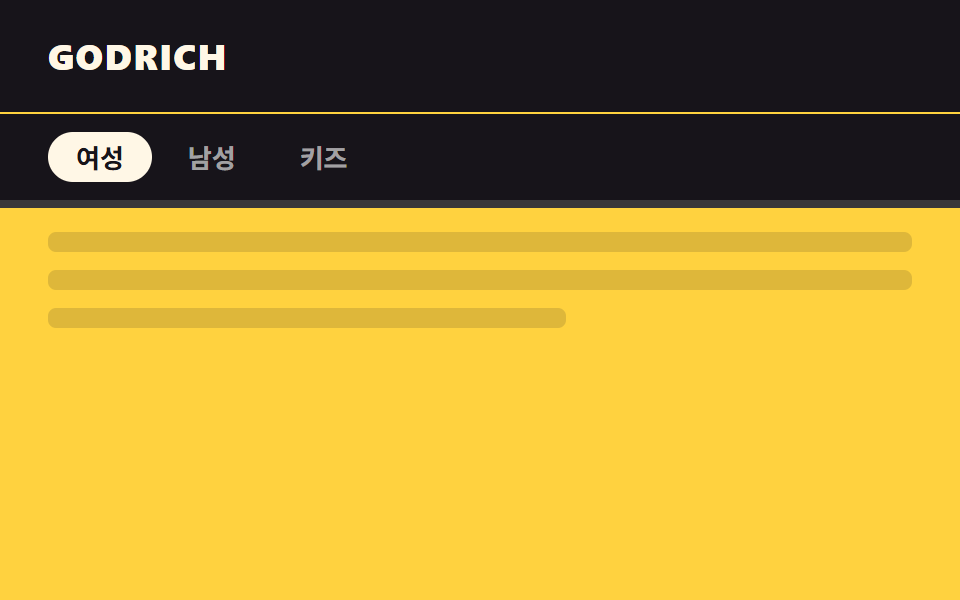
메인 헤더 아래 카테고리 탭이 스크롤하면 헤더 바로 밑에 두 번째 줄로 붙어 함께 고정된다.
쓰임쇼핑몰 카테고리 탭, 문서 사이트 목차 탭
top:헤더높이이중 sticky겹침 없음
<main class="stage">
  <header class="head">GODRICH</header>
  <div class="sentinel"></div>
  <nav class="subnav is-demo">
    <span class="subnav__tab is-active">여성</span>
    <span class="subnav__tab">남성</span>
    <span class="subnav__tab">키즈</span>
  </nav>
  <div class="page">
    <p class="page__line"></p>
    <p class="page__line"></p>
    <p class="page__line short"></p>
  </div>
</main>
@use "../../../../site/static/demo-tokens" as *;
// ── 변수 3개 ──────────────────────────────────────────
$head-h: 56px; // 메인 헤더 높이 — 서브 내비가 이 값 아래 붙는다
$duration: $dur-quick; // 테두리가 켜지는 시간
$color: $subject-ink; // 서브 내비 배경
// ── 데모 무대 ──────────────────────────────────────────
html, body { margin: 0; overflow: hidden; }
.stage {
min-height: 100vh;
margin: 0;
background: $stage-yellow;
font-family: -apple-system, "Segoe UI", "Noto Sans KR", sans-serif;
}
.sentinel { height: 1px; }
.head {
position: sticky;
top: 0;
z-index: 2;
height: $head-h;
display: flex;
align-items: center;
padding: 0 clamp(16px, 5vw, 24px);
background: $stage-ink;
color: $subject-cream;
font-weight: 800;
font-size: 18px;
line-height: 1;
font-family: inherit;
letter-spacing: .04em;
}
// 서브 내비는 메인 헤더 바로 아래에 두 번째 줄로 붙는다 (이중 sticky, 겹침 없음)
.subnav {
position: sticky;
top: $head-h;
z-index: 1;
display: flex;
gap: 4px;
padding: clamp(6px, 3vh, 10px) clamp(16px, 5vw, 24px);
background: $color;
border-bottom: 4px solid transparent;
transition: border-color $duration $ease-out;
&.is-stuck { border-bottom-color: $subject-cream; }
&__tab {
padding: 6px 14px;
border-radius: $r-pill;
font-weight: 600;
font-size: 13px;
line-height: 1;
font-family: inherit;
color: rgba(255, 255, 255, .6);
&.is-active { color: $stage-ink; background: $subject-cream; }
}
}
// ── 데모(.is-demo): 테두리가 켜졌다 꺼졌다 2초 루프 ────────
.subnav.is-demo {
animation: stuck-loop $dur-loop $ease-out infinite;
}
@keyframes stuck-loop {
0%, 5% { border-bottom-color: transparent; }
40%, 60% { border-bottom-color: $subject-cream; }
95%, 100% { border-bottom-color: transparent; }
}
// ── 배경: 문서처럼 보이는 자리 (칸이 좁으면 줄인다) ────────────
.page { padding: clamp(8px, 4vh, 20px) 24px 0; }
.page__line {
height: 10px;
margin: 0 0 clamp(6px, 3vh, 14px);
border-radius: 4px;
background: rgba($stage-ink, .14);
&.short { width: 60%; }
}
@media (prefers-reduced-motion: reduce) {
.subnav { transition: none; }
.subnav.is-demo { animation: none !important; border-bottom-color: $subject-cream; }
}html, body {
margin: 0;
overflow: hidden;
}
.stage {
min-height: 100vh;
margin: 0;
background: #ffd23f;
font-family: -apple-system, "Segoe UI", "Noto Sans KR", sans-serif;
}
.sentinel {
height: 1px;
}
.head {
position: sticky;
top: 0;
z-index: 2;
height: 56px;
display: flex;
align-items: center;
padding: 0 clamp(16px, 5vw, 24px);
background: #17141a;
color: #fff7e6;
font-weight: 800;
font-size: 18px;
line-height: 1;
font-family: inherit;
letter-spacing: 0.04em;
}
.subnav {
position: sticky;
top: 56px;
z-index: 1;
display: flex;
gap: 4px;
padding: clamp(6px, 3vh, 10px) clamp(16px, 5vw, 24px);
background: #17141a;
border-bottom: 4px solid transparent;
transition: border-color 220ms ease-out;
}
.subnav.is-stuck {
border-bottom-color: #fff7e6;
}
.subnav__tab {
padding: 6px 14px;
border-radius: 999px;
font-weight: 600;
font-size: 13px;
line-height: 1;
font-family: inherit;
color: rgba(255, 255, 255, 0.6);
}
.subnav__tab.is-active {
color: #17141a;
background: #fff7e6;
}
.subnav.is-demo {
animation: stuck-loop 2s ease-out infinite;
}
@keyframes stuck-loop {
0%, 5% {
border-bottom-color: transparent;
}
40%, 60% {
border-bottom-color: #fff7e6;
}
95%, 100% {
border-bottom-color: transparent;
}
}
.page {
padding: clamp(8px, 4vh, 20px) 24px 0;
}
.page__line {
height: 10px;
margin: 0 0 clamp(6px, 3vh, 14px);
border-radius: 4px;
background: rgba(23, 20, 26, 0.14);
}
.page__line.short {
width: 60%;
}
@media (prefers-reduced-motion: reduce) {
.subnav {
transition: none;
}
.subnav.is-demo {
animation: none !important;
border-bottom-color: #fff7e6;
}
}// 실제 페이지: 서브 내비가 헤더 밑에 닿는 순간 테두리를 켠다 (IntersectionObserver, 6줄)
var sub = document.querySelector('.subnav');
new IntersectionObserver(function (es) {
sub.classList.toggle('is-stuck', !es[0].isIntersecting);
}, { rootMargin: '-56px 0px 0px 0px', threshold: 1 }).observe(document.querySelector('.sentinel'));import { useEffect, useRef } from "react";
import type { CSSProperties } from "react";
import styles from "./StickySubNav.module.scss";
export type StickySubNavProps = {
tabs: string[];
activeIndex?: number;
/** 메인 헤더 높이 (기본 56px) — 서브 내비가 이 값 아래 붙는다 */
headHeight?: number;
duration?: number;
color?: string;
};
type Vars = CSSProperties & { "--head-h"?: string; "--duration"?: string; "--color"?: string };
export default function StickySubNav({
tabs,
activeIndex = 0,
headHeight = 56,
duration = 220,
color = "#17141a",
}: StickySubNavProps) {
const nav = useRef<HTMLElement>(null);
const sentinel = useRef<HTMLDivElement>(null);
const vars: Vars = { "--head-h": `${headHeight}px`, "--duration": `${duration}ms`, "--color": color };
useEffect(() => {
if (!sentinel.current) return;
const io = new IntersectionObserver(
([e]) => nav.current?.classList.toggle("is-stuck", !e.isIntersecting),
{ rootMargin: `-${headHeight}px 0px 0px 0px`, threshold: 1 }
);
io.observe(sentinel.current);
return () => io.disconnect();
}, [headHeight]);
return (
<>
<div ref={sentinel} className={styles.sentinel} />
<nav ref={nav} className={styles.subnav} style={vars}>
{tabs.map((t, i) => (
<span key={t} className={i === activeIndex ? `${styles.tab} ${styles.active}` : styles.tab}>{t}</span>
))}
</nav>
</>
);
}06 서브 내비 스티키 — 측정 누적면적 1.333% · 움직인 프레임 14/23GODRICH 원작 · zip 에 SCSS·React 포함 · CSS 헤더 고정 스티키 9종 — AOS·GSAP 없이, JS 0줄
이 데모가 속한 글
 CSS 헤더 고정 스티키 9종 — AOS·GSAP 없이, JS 0줄CSS 헤더 고정 스티키는 페이지를 스크롤해도 헤더가 화면 위에 계속 붙어 있게 만드는 방식입니다. 아홉 개 중 넷(04·05·08·09 중 04·05)은 자바스크립트 없이 CSS만으로 움직입니다. 아래 격자에서 자 이 글의 데모 전부 보기