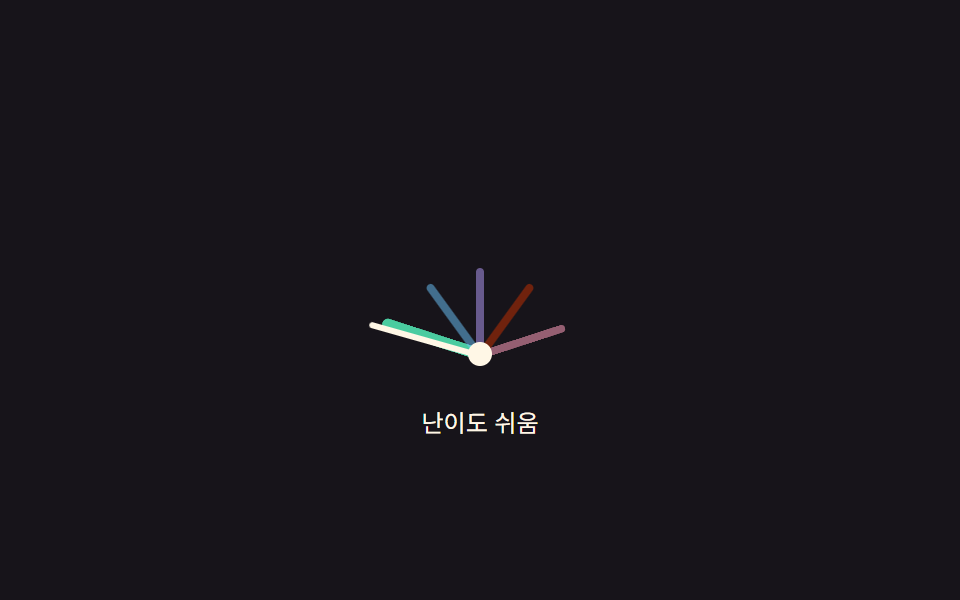
09드래그 각도로 값이 정해지는 반원 난이도 게이지
바늘을 손가락으로 끌면 중심에서 손가락까지의 각도를 구해 그 각도를 난이도 값으로 바꾸고, 호 안의 구간 색은 그 값 범위에 맞춰 다시 그린다.
쓰임설정 대시보드에서 손끝으로 난이도를 튜닝하는 자리
angleToValuezoneCenterDegpaint
<main class="stage">
<div class="gad is-demo" id="gad">
  <div class="gad__face" id="gadFace" role="slider" tabindex="0"
    aria-label="난이도" aria-valuemin="0" aria-valuemax="4" aria-valuenow="2" aria-valuetext="어려움">
    <div class="gad__zones" aria-hidden="true">
      <span class="gad__zone" data-i="0"></span>
      <span class="gad__zone" data-i="1"></span>
      <span class="gad__zone" data-i="2"></span>
      <span class="gad__zone" data-i="3"></span>
      <span class="gad__zone" data-i="4"></span>
    </div>
    <div class="gad__needle" id="gadNeedle" aria-hidden="true"></div>
    <div class="gad__pivot" aria-hidden="true"></div>
  </div>
  <p class="gad__label">난이도 <span id="gadOut">어려움</span></p>
</div>
</main>
@use "../../../../site/static/demo-tokens" as *;
// 변수 3개
$duration: $dur-quick;
$easing: $ease-out;
$color: $subject-pink;
// 계산 겹: angleToValue() 가 포인터-피벗 각도(atan2)를 0~4 값으로 매핑해 게이지를 직접 끌어서 정한다(JS)
@include stage($stage-ink);
.gad { display: flex; flex-direction: column; align-items: center; gap: $sp-3; }
.gad__face {
position: relative; width: 200px; height: 108px; cursor: grab; touch-action: none;
}
.gad__face:focus-visible { outline: 2px solid $subject-cream; outline-offset: 4px; }
.gad__zones { position: absolute; inset: 0; }
.gad__zone {
position: absolute; left: 50%; bottom: 0; width: 4px; height: 44px;
margin-left: -2px; transform-origin: bottom center; border-radius: $r-xs;
background: rgba($subject-cream, .28);
transition: background $duration $easing, height $duration $easing, width $duration $easing;
}
.gad__zone[data-i="0"] { background: rgba($subject-mint, .5); }
.gad__zone[data-i="1"] { background: rgba($subject-sky, .5); }
.gad__zone[data-i="2"] { background: rgba($subject-lilac, .5); }
.gad__zone[data-i="3"] { background: rgba($subject-orange-deep, .5); }
.gad__zone[data-i="4"] { background: rgba($color, .5); }
.gad__zone.is-active { height: 52px; width: 6px; margin-left: -3px; }
.gad__zone[data-i="0"].is-active { background: $subject-mint; }
.gad__zone[data-i="1"].is-active { background: $subject-sky; }
.gad__zone[data-i="2"].is-active { background: $subject-lilac; }
.gad__zone[data-i="3"].is-active { background: $subject-orange-deep; }
.gad__zone[data-i="4"].is-active { background: $color; }
.gad__needle {
position: absolute; left: 50%; bottom: 0; width: 3px; height: 58px; margin-left: -1.5px;
background: $subject-cream; border-radius: $r-xs; transform-origin: bottom center;
transition: transform $duration $easing;
}
.gad__pivot {
position: absolute; left: 50%; bottom: -5px; width: 12px; height: 12px; margin-left: -6px;
border-radius: 50%; background: $subject-cream;
}
.gad__label { font-size: 12px; color: $subject-cream; }
@media (max-width: 340px) {
.gad__face { width: 168px; height: 92px; }
.gad__zone { height: 36px; }
.gad__needle { height: 48px; }
}
@media (prefers-reduced-motion: reduce) {
// 실사용 경로 적용: 드래그 중엔 원래도 매 프레임 즉시 반영이라 트랜지션이 관여하지 않지만,
// 키보드로 값이 바뀔 때는 바늘·구역이 트랜지션 없이 즉시 목표 각도로 이동한다
.gad__needle, .gad__zone { transition: none; }
}html, body {
margin: 0;
overflow: hidden;
}
.stage {
box-sizing: border-box;
min-height: 100vh;
display: grid;
place-items: center;
margin: 0;
background: #17141a;
font-family: -apple-system, "Segoe UI", "Noto Sans KR", sans-serif;
padding: clamp(8px, 4vw, 24px);
}
.gad {
display: flex;
flex-direction: column;
align-items: center;
gap: 12px;
}
.gad__face {
position: relative;
width: 200px;
height: 108px;
cursor: grab;
touch-action: none;
}
.gad__face:focus-visible {
outline: 2px solid #fff7e6;
outline-offset: 4px;
}
.gad__zones {
position: absolute;
inset: 0;
}
.gad__zone {
position: absolute;
left: 50%;
bottom: 0;
width: 4px;
height: 44px;
margin-left: -2px;
transform-origin: bottom center;
border-radius: 4px;
background: rgba(255, 247, 230, 0.28);
transition: background 220ms ease-out, height 220ms ease-out, width 220ms ease-out;
}
.gad__zone[data-i="0"] {
background: rgba(76, 212, 166, 0.5);
}
.gad__zone[data-i="1"] {
background: rgba(110, 200, 255, 0.5);
}
.gad__zone[data-i="2"] {
background: rgba(185, 160, 255, 0.5);
}
.gad__zone[data-i="3"] {
background: rgba(201, 48, 0, 0.5);
}
.gad__zone[data-i="4"] {
background: rgba(255, 158, 187, 0.5);
}
.gad__zone.is-active {
height: 52px;
width: 6px;
margin-left: -3px;
}
.gad__zone[data-i="0"].is-active {
background: #4cd4a6;
}
.gad__zone[data-i="1"].is-active {
background: #6ec8ff;
}
.gad__zone[data-i="2"].is-active {
background: #b9a0ff;
}
.gad__zone[data-i="3"].is-active {
background: #c93000;
}
.gad__zone[data-i="4"].is-active {
background: #ff9ebb;
}
.gad__needle {
position: absolute;
left: 50%;
bottom: 0;
width: 3px;
height: 58px;
margin-left: -1.5px;
background: #fff7e6;
border-radius: 4px;
transform-origin: bottom center;
transition: transform 220ms ease-out;
}
.gad__pivot {
position: absolute;
left: 50%;
bottom: -5px;
width: 12px;
height: 12px;
margin-left: -6px;
border-radius: 50%;
background: #fff7e6;
}
.gad__label {
font-size: 12px;
color: #fff7e6;
}
@media (max-width: 340px) {
.gad__face {
width: 168px;
height: 92px;
}
.gad__zone {
height: 36px;
}
.gad__needle {
height: 48px;
}
}
@media (prefers-reduced-motion: reduce) {
.gad__needle, .gad__zone {
transition: none;
}
}(function () {
var LEVELS = ['쉬움', '보통', '어려움', '매우 어려움', '최고'];
var ZONE_DEG = 36; // 180deg / 5구역
var root = document.getElementById('gad');
var face = document.getElementById('gadFace');
var needle = document.getElementById('gadNeedle');
var zones = Array.prototype.slice.call(face.querySelectorAll('.gad__zone'));
var out = document.getElementById('gadOut');
var value = 2; // 0..4 연속값
var dragging = false;
function zoneCenterDeg(i) { return -90 + ZONE_DEG / 2 + i * ZONE_DEG; }
zones.forEach(function (z, i) { z.style.transform = 'rotate(' + zoneCenterDeg(i) + 'deg)'; });
// 계산 겹: 포인터 좌표와 피벗(바닥 중앙) 사이의 각도를 atan2 로 구해 -90~90도 구간을 0~4 값으로 매핑한다
function angleToValue(clientX, clientY) {
var r = face.getBoundingClientRect();
var px = r.left + r.width / 2;
var py = r.bottom;
var dx = clientX - px;
var dy = Math.min(clientY - py, -1); // 피벗 위쪽으로 강제해 좌측 경계에서 각도가 튀지 않게 한다
var theta = Math.atan2(dy, dx) * 180 / Math.PI; // -180..0
var t = (theta + 180) / 180;
t = Math.max(0, Math.min(1, t));
return t * 4;
}
function paint() {
var deg = -90 + (value / 4) * 180;
needle.style.transform = 'rotate(' + deg + 'deg)';
var zi = Math.round(value);
zones.forEach(function (z, i) { z.classList.toggle('is-active', i === zi); });
face.setAttribute('aria-valuenow', String(zi));
face.setAttribute('aria-valuetext', LEVELS[zi]);
out.textContent = LEVELS[zi];
}
function human() { root.classList.remove('is-demo'); clearInterval(timer); }
function setValue(v) { value = Math.max(0, Math.min(4, v)); paint(); }
face.addEventListener('pointerdown', function (e) {
human(); dragging = true; face.setPointerCapture(e.pointerId);
setValue(angleToValue(e.clientX, e.clientY));
});
face.addEventListener('pointermove', function (e) {
if (!dragging) return;
setValue(angleToValue(e.clientX, e.clientY));
});
face.addEventListener('pointerup', function (e) {
dragging = false; setValue(Math.round(value));
});
face.addEventListener('keydown', function (e) {
if (e.key === 'ArrowRight' || e.key === 'ArrowUp') { e.preventDefault(); human(); setValue(Math.round(value) + 1); }
else if (e.key === 'ArrowLeft' || e.key === 'ArrowDown') { e.preventDefault(); human(); setValue(Math.round(value) - 1); }
else if (e.key === 'Home') { e.preventDefault(); human(); setValue(0); }
else if (e.key === 'End') { e.preventDefault(); human(); setValue(4); }
});
var sequence = [4, 0, 3, 1, 2];
var si = 0;
function tick() { setValue(sequence[si % sequence.length]); si++; }
var reduce = window.matchMedia('(prefers-reduced-motion: reduce)').matches;
var timer = reduce ? null : setInterval(tick, 780);
paint();
}());import { useEffect, useRef } from 'react';
import styles from './DifficultySelectorGaugeArcDrag.module.scss';
const LEVELS = ['쉬움', '보통', '어려움', '매우 어려움', '최고'];
const ZONE_DEG = 36;
const SEQUENCE = [4, 0, 3, 1, 2];
const TICK_MS = 780;
export default function DifficultySelectorGaugeArcDrag() {
const rootRef = useRef<HTMLDivElement>(null);
const faceRef = useRef<HTMLDivElement>(null);
const needleRef = useRef<HTMLDivElement>(null);
const zoneRefs = useRef<HTMLSpanElement[]>([]);
const outRef = useRef<HTMLSpanElement>(null);
useEffect(() => {
const root = rootRef.current;
const face = faceRef.current;
const needle = needleRef.current;
const out = outRef.current;
if (!root || !face || !needle || !out || !zoneRefs.current) return undefined;
const zones = zoneRefs.current;
if (zones.length !== LEVELS.length) return undefined;
let value = 2;
let dragging = false;
function zoneCenterDeg(i: number) { return -90 + ZONE_DEG / 2 + i * ZONE_DEG; }
zones.forEach((z, i) => { z.style.transform = 'rotate(' + zoneCenterDeg(i) + 'deg)'; });
// 계산 겹: 포인터 좌표와 피벗(바닥 중앙) 사이의 각도를 atan2 로 구해 -90~90도 구간을 0~4 값으로 매핑한다
function angleToValue(clientX: number, clientY: number) {
const r = face!.getBoundingClientRect();
const px = r.left + r.width / 2;
const py = r.bottom;
const dx = clientX - px;
const dy = Math.min(clientY - py, -1);
const theta = Math.atan2(dy, dx) * 180 / Math.PI;
let t = (theta + 180) / 180;
t = Math.max(0, Math.min(1, t));
return t * 4;
}
function paint() {
const deg = -90 + (value / 4) * 180;
needle!.style.transform = 'rotate(' + deg + 'deg)';
const zi = Math.round(value);
zones.forEach((z, i) => { z.classList.toggle(styles['is-active'], i === zi); });
face!.setAttribute('aria-valuenow', String(zi));
face!.setAttribute('aria-valuetext', LEVELS[zi]);
out!.textContent = LEVELS[zi];
}
let timer = 0;
function human() { root!.classList.remove(styles['is-demo']); window.clearInterval(timer); }
function setValue(v: number) { value = Math.max(0, Math.min(4, v)); paint(); }
function onDown(e: PointerEvent) {
human(); dragging = true; face!.setPointerCapture(e.pointerId);
setValue(angleToValue(e.clientX, e.clientY));
}
function onMove(e: PointerEvent) {
if (!dragging) return;
setValue(angleToValue(e.clientX, e.clientY));
}
function onUp() {
dragging = false; setValue(Math.round(value));
}
function onKey(e: KeyboardEvent) {
if (e.key === 'ArrowRight' || e.key === 'ArrowUp') { e.preventDefault(); human(); setValue(Math.round(value) + 1); }
else if (e.key === 'ArrowLeft' || e.key === 'ArrowDown') { e.preventDefault(); human(); setValue(Math.round(value) - 1); }
else if (e.key === 'Home') { e.preventDefault(); human(); setValue(0); }
else if (e.key === 'End') { e.preventDefault(); human(); setValue(4); }
}
face.addEventListener('pointerdown', onDown);
face.addEventListener('pointermove', onMove);
face.addEventListener('pointerup', onUp);
face.addEventListener('keydown', onKey);
let si = 0;
function tick() { setValue(SEQUENCE[si % SEQUENCE.length]); si++; }
const reduce = window.matchMedia('(prefers-reduced-motion: reduce)').matches;
if (!reduce) timer = window.setInterval(tick, TICK_MS);
paint();
return () => {
face!.removeEventListener('pointerdown', onDown);
face!.removeEventListener('pointermove', onMove);
face!.removeEventListener('pointerup', onUp);
face!.removeEventListener('keydown', onKey);
window.clearInterval(timer);
};
}, []);
return (
<main className={styles.stage}>
<div className={styles.gad + ' ' + styles['is-demo']} ref={rootRef}>
<div
className={styles.gadFace}
ref={faceRef}
role="slider"
tabIndex={0}
aria-label="난이도"
aria-valuemin={0}
aria-valuemax={4}
aria-valuenow={2}
aria-valuetext="어려움"
>
<div className={styles.gadZones} aria-hidden="true">
{LEVELS.map((_, i) => (
<span key={i} className={styles.gadZone} data-i={i} ref={(el: HTMLSpanElement | null) => { if (el && zoneRefs.current) zoneRefs.current[i] = el; }} />
))}
</div>
<div className={styles.gadNeedle} ref={needleRef} aria-hidden="true" />
<div className={styles.gadPivot} aria-hidden="true" />
</div>
<p className={styles.gadLabel}>난이도 <span ref={outRef}>어려움</span></p>
</div>
</main>
);
}09 드래그 각도로 값이 정해지는 반원 난이도 게이지 — 측정 누적면적 2.203% · 움직인 프레임 9/23GODRICH 원작 · zip 에 SCSS·React 포함 · 난이도 선택 ui 9종 — 드래그 각도로 값이 바뀌는 계산까지
이 데모가 속한 글
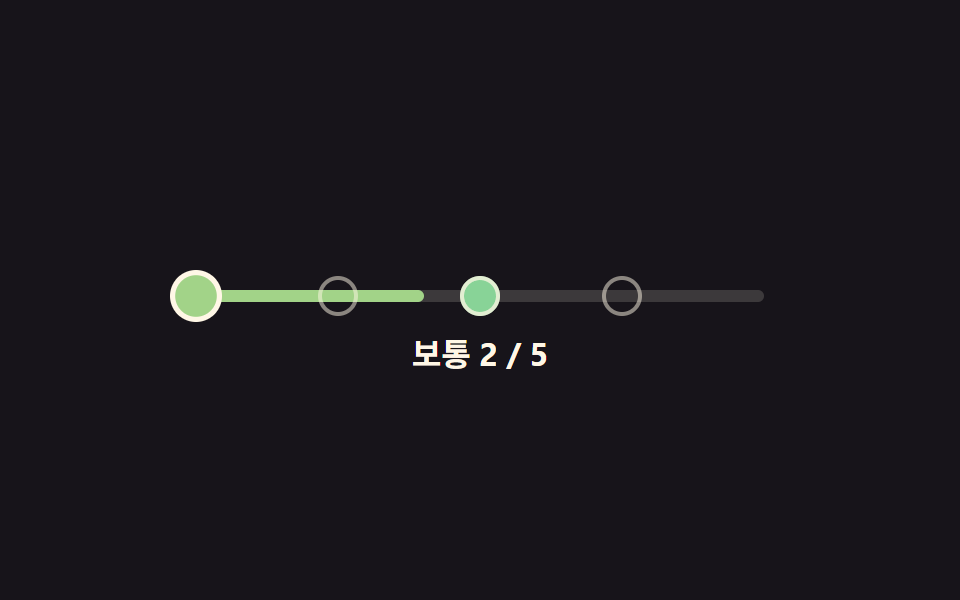 난이도 선택 ui 9종 — 드래그 각도로 값이 바뀌는 계산까지난이도 선택 ui 아홉 가지 가운데 하나는 손을 떼면 슬라이더 손잡이가 단계를 살짝 지나쳤다가 스프링 계산으로 되튕겨 멈추고, 하나는 배지 다섯 개의 색을 고정값이 아니라 단계 번호를 넣은 색상각 수식으로 계산하며, 이 글의 데모 전부 보기