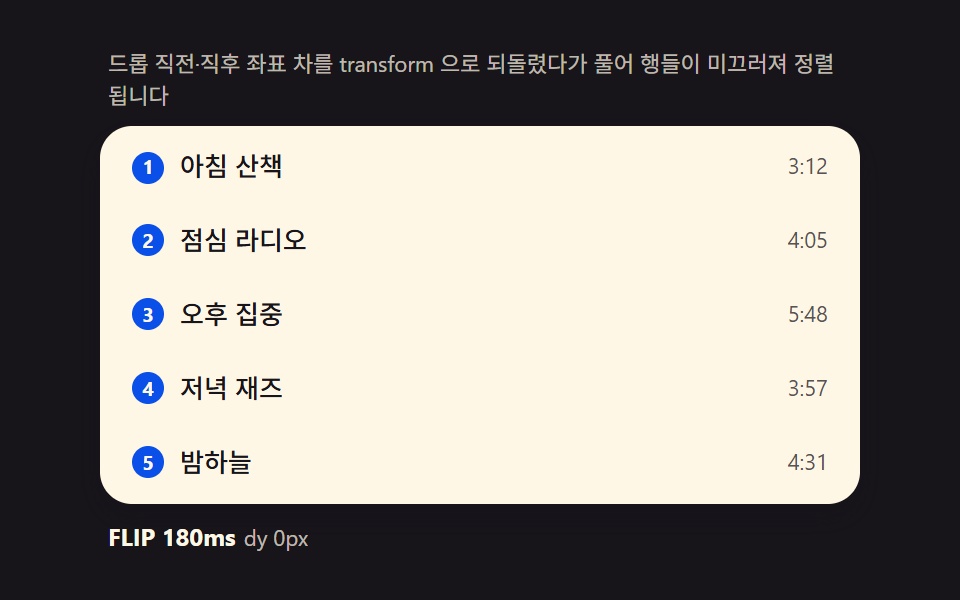
01FLIP 리스트 — 이동 전·후 좌표 차이를 계산해 되돌린 뒤 풀어주는 재정렬
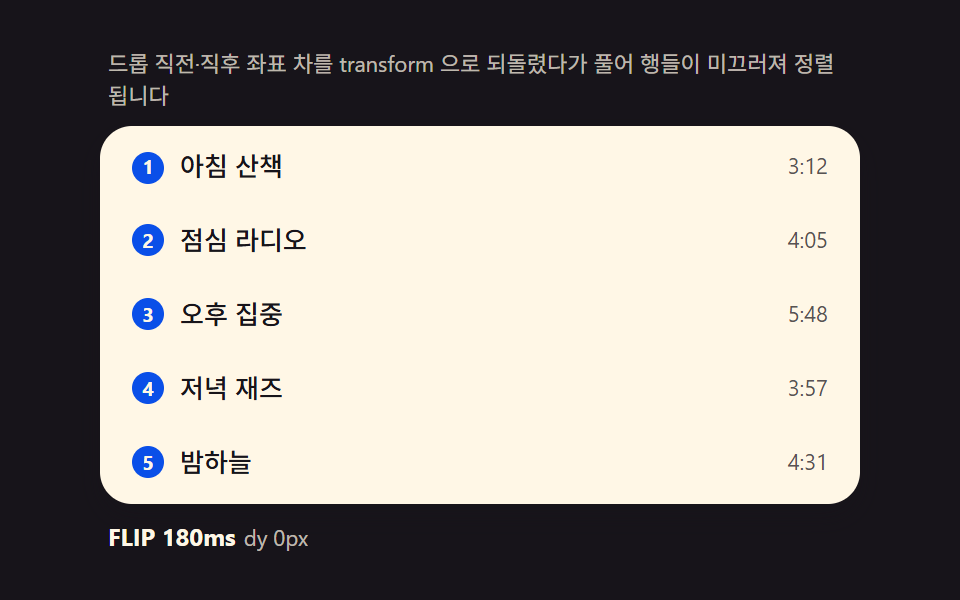
드롭 직후 각 행의 getBoundingClientRect 를 재측정해 이전 위치와의 차이를 transform 으로 즉시 되돌리고, 다음 프레임에 transition 으로 그 값을 0으로 풀면 행들이 자연스럽게 미끄러져 자리를 잡습니다. 드래그 중인 행은 이 계산에서 제외해 잔상과 겹치지 않게 합니다.
쓰임할 일 목록, 재생목록
getBoundingClientRecttransformtransition
<main class="stage">
<div class="fl">
  <p class="fl__hint">드롭 직전·직후 좌표 차를 transform 으로 되돌렸다가 풀어 행들이 미끄러져 정렬됩니다</p>
  <ul class="fl__list" id="flList" role="listbox" aria-label="재생목록" aria-describedby="flHint">
    <li class="fl__row" role="option" aria-selected="false" tabindex="0"><span class="fl__rank" aria-hidden="true">1</span><span class="fl__name">아침 산책</span><span class="fl__len">3:12</span></li>
    <li class="fl__row" role="option" aria-selected="false" tabindex="0"><span class="fl__rank" aria-hidden="true">2</span><span class="fl__name">점심 라디오</span><span class="fl__len">4:05</span></li>
    <li class="fl__row" role="option" aria-selected="false" tabindex="0"><span class="fl__rank" aria-hidden="true">3</span><span class="fl__name">오후 집중</span><span class="fl__len">5:48</span></li>
    <li class="fl__row" role="option" aria-selected="false" tabindex="0"><span class="fl__rank" aria-hidden="true">4</span><span class="fl__name">저녁 재즈</span><span class="fl__len">3:57</span></li>
    <li class="fl__row" role="option" aria-selected="false" tabindex="0"><span class="fl__rank" aria-hidden="true">5</span><span class="fl__name">밤하늘</span><span class="fl__len">4:31</span></li>
  </ul>
  <p class="fl__meta"><b class="fl__tag" id="flState">FLIP 180ms</b><span class="fl__unit" id="flDelta">dy 0px</span></p>
</div>
</main>
@use "../../../../site/static/demo-tokens" as *;
$duration: 180ms;
$easing: cubic-bezier(.2,.8,.2,1);
$color: $subject-blue-deep;
// 파스텔 강조(도구/파스텔.py to_pastel 결과: 채도 .34 · 명도 +.11)
$p-mint: #93d9c0;
@include stage($stage-ink);
.fl {
width: 100%;
max-width: 380px;
display: flex;
flex-direction: column;
gap: $sp-2;
}
.fl__hint {
margin: 0;
padding: 0 $sp-1;
font-weight: 400;
font-size: 11px;
line-height: 1.4;
color: rgba($subject-cream, .72);
}
.fl__list {
margin: 0;
padding: $sp-1;
list-style: none;
display: flex;
flex-direction: column;
gap: $sp-1;
background: $subject-cream;
border-radius: $r-card;
box-shadow: $shadow-press;
overflow-y: auto;
}
.fl__row {
display: flex;
align-items: center;
gap: $sp-2;
padding: $sp-2 $sp-3;
border-radius: $r-sm;
background: transparent;
color: $subject-ink;
font-weight: 500;
font-size: 13px;
line-height: 1.3;
cursor: grab;
// will-change 없이도 transform 만 움직인다 — top/left 재계산 금지(기본규칙)
transform: translateY(0);
}
.fl__row:hover {
background: $p-mint;
}
.fl__rank {
flex: 0 0 auto;
width: 16px;
height: 16px;
display: grid;
place-items: center;
border-radius: $r-pill;
background: $color;
color: $subject-cream;
font-weight: 700;
font-size: 10px;
}
.fl__name {
flex: 1 1 auto;
min-width: 0;
overflow: hidden;
white-space: nowrap;
text-overflow: ellipsis;
}
.fl__len {
flex: 0 0 auto;
font-weight: 400;
font-size: 11px;
color: rgba($subject-ink, .72);
}
.fl__meta {
margin: 0;
padding: 0 $sp-1;
display: flex;
align-items: baseline;
gap: $sp-1;
}
.fl__tag {
font-weight: 700;
font-size: 12px;
color: $subject-cream;
}
.fl__unit {
font-weight: 400;
font-size: 11px;
color: rgba($subject-cream, .72);
}
@media (max-width: 340px) {
.fl { max-width: 280px; gap: $sp-1; }
.fl__hint { font-size: 10px; }
.fl__row { font-size: 12px; padding: $sp-1 $sp-2; }
.fl__list { max-height: 92px; gap: 0; }
}
@media (prefers-reduced-motion: reduce) {
.fl__row {
transition: none !important;
transform: none !important;
}
}html, body {
margin: 0;
overflow: hidden;
}
.stage {
box-sizing: border-box;
min-height: 100vh;
display: grid;
place-items: center;
margin: 0;
background: #17141a;
font-family: -apple-system, "Segoe UI", "Noto Sans KR", sans-serif;
padding: clamp(8px, 4vw, 24px);
}
.fl {
width: 100%;
max-width: 380px;
display: flex;
flex-direction: column;
gap: 8px;
}
.fl__hint {
margin: 0;
padding: 0 4px;
font-weight: 400;
font-size: 11px;
line-height: 1.4;
color: rgba(255, 247, 230, 0.72);
}
.fl__list {
margin: 0;
padding: 4px;
list-style: none;
display: flex;
flex-direction: column;
gap: 4px;
background: #fff7e6;
border-radius: 16px;
box-shadow: 0 6px 12px rgba(23, 20, 26, 0.32);
overflow-y: auto;
}
.fl__row {
display: flex;
align-items: center;
gap: 8px;
padding: 8px 12px;
border-radius: 8px;
background: transparent;
color: #17141a;
font-weight: 500;
font-size: 13px;
line-height: 1.3;
cursor: grab;
transform: translateY(0);
}
.fl__row:hover {
background: #93d9c0;
}
.fl__rank {
flex: 0 0 auto;
width: 16px;
height: 16px;
display: grid;
place-items: center;
border-radius: 999px;
background: #0a4fe8;
color: #fff7e6;
font-weight: 700;
font-size: 10px;
}
.fl__name {
flex: 1 1 auto;
min-width: 0;
overflow: hidden;
white-space: nowrap;
text-overflow: ellipsis;
}
.fl__len {
flex: 0 0 auto;
font-weight: 400;
font-size: 11px;
color: rgba(23, 20, 26, 0.72);
}
.fl__meta {
margin: 0;
padding: 0 4px;
display: flex;
align-items: baseline;
gap: 4px;
}
.fl__tag {
font-weight: 700;
font-size: 12px;
color: #fff7e6;
}
.fl__unit {
font-weight: 400;
font-size: 11px;
color: rgba(255, 247, 230, 0.72);
}
@media (max-width: 340px) {
.fl {
max-width: 280px;
gap: 4px;
}
.fl__hint {
font-size: 10px;
}
.fl__row {
font-size: 12px;
padding: 4px 8px;
}
.fl__list {
max-height: 92px;
gap: 0;
}
}
@media (prefers-reduced-motion: reduce) {
.fl__row {
transition: none !important;
transform: none !important;
}
}// FLIP 리스트(01) — 드롭으로 배열이 바뀌는 순간, 바뀌기 전 각 행의 getBoundingClientRect().top(first)을
// 재 두었다가 바뀐 뒤 좌표(last)와의 차(invert)를 transform translateY 로 즉시 되돌리고, 다음 프레임에
// transform 을 0 으로 풀어(play) 행들이 자연스럽게 미끄러지게 한다. 문구 사전과 실제 이동 픽셀은
// rAF 시계가 매 프레임 갱신한다. 포인터 조작도 같은 함수를 탄다(라이브러리 0, Pointer Events 기반).
(function () {
var list = document.getElementById('flList');
var stateEl = document.getElementById('flState');
var deltaEl = document.getElementById('flDelta');
if (!list || !stateEl || !deltaEl) return;
var DUR = 180; // FLIP 정리 시간(ms) — 변형 칩이 이 값만 바꾼다
var ROWS = ['아침 산책', '점심 라디오', '오후 집중', '저녁 재즈', '밤하늘'];
var LENS = ['3:12', '4:05', '5:48', '3:57', '4:31'];
var reduce = window.matchMedia('(prefers-reduced-motion: reduce)').matches;
function rows() { return Array.prototype.slice.call(list.children); }
// FLIP — 순서 배열 order 를 적용하고 이동한 행을 되돌렸다가 푼다
function applyOrder(order) {
var rs = rows();
var first = rs.map(function (r) { return r.getBoundingClientRect().top; });
// 배열 순서대로 다시 붙인다
for (var i = 0; i < order.length; i++) list.appendChild(rs[order[i]]);
rs = rows();
var maxAbs = 0;
for (var j = 0; j < rs.length; j++) {
var dy = first[order[j]] - rs[j].getBoundingClientRect().top; // invert
if (Math.abs(dy) > Math.abs(maxAbs)) maxAbs = dy;
if (dy !== 0) {
rs[j].style.transition = 'none';
rs[j].style.transform = 'translateY(' + dy + 'px)';
}
}
deltaEl.textContent = 'dy ' + Math.round(maxAbs) + 'px';
// play — 다음 프레임에 되돌림을 푼다
requestAnimationFrame(function () {
rs.forEach(function (r) {
r.style.transition = 'transform ' + DUR + 'ms cubic-bezier(.2,.8,.2,1)';
r.style.transform = 'translateY(0)';
});
setTimeout(function () { rs.forEach(function (r) { r.style.transition = ''; }); }, DUR + 40);
});
// rank 갱신
rs.forEach(function (r, i) { r.querySelector('.fl__rank').textContent = String(i + 1); });
return rs;
}
// 사람 조작 — 행을 클릭해 아래로, Shift+클릭으로 위로 (같은 FLIP 경로)
list.addEventListener('click', function (e) {
stop();
var li = e.target.closest('.fl__row');
if (!li) return;
var idx = rows().indexOf(li);
var order = [0, 1, 2, 3, 4];
if (e.shiftKey) {
if (idx === 0) return;
order.splice(idx - 1, 0, order.splice(idx, 1)[0]);
} else {
if (idx === 4) return;
order.splice(idx + 1, 0, order.splice(idx, 1)[0]);
}
applyOrder(order);
});
// 자동 시연 — 시드 고정 시나리오: 3→1, 1→4, 원복. 한 사이클 2초.
var playing = true;
function stop() { playing = false; }
var CYCLE = [
{ pick: 2, to: 0, hold: 700 }, // 오후 집중 3번째 → 1번째
{ pick: 0, to: 3, hold: 700 }, // 아침 산책 1번째 → 4번째
{ pick: 0, to: 1, hold: 600 } // 1번째와 2번째 교환(원복 성분)
];
function permute(pick, to) {
var order = [0, 1, 2, 3, 4];
order.splice(to, 0, order.splice(pick, 1)[0]);
applyOrder(order);
}
if (reduce) {
permute(2, 0);
} else {
var seg = 0, segStart = performance.now();
(function step(now) {
if (playing) {
var s = CYCLE[seg];
if (now - segStart >= s.hold) {
seg = (seg + 1) % CYCLE.length;
segStart = now;
permute(CYCLE[seg].pick, CYCLE[seg].to);
}
}
requestAnimationFrame(step);
})(segStart);
}
})();// DragReorderList — vanilla 판(run/336/demo/01-drag-reorder-list/index.html)
// 의 React 포트. 배열 순서(order)를 실제 DOM 자식에 적용하기 전 각 행의 getBoundingClientRect().top
// (first)을 재 두었다가, 적용 후 좌표(last)와의 차(invert)를 transform translateY 로 즉시 되돌리고
// 다음 프레임에 transform 을 0 으로 풀어(play) 행이 미끄러지듯 정렬된다(FLIP). 사람 조작(클릭·Shift+클릭)
// 도 같은 applyOrder 를 타고, 자동 시연은 시드 고정 시나리오(CYCLE)로 같은 함수를 호출한다.
import { useEffect, useRef } from "react";
import styles from "./DragReorderList.module.scss";
export type DragReorderListProps = {
duration?: string;
easing?: string;
color?: string;
};
type Box<T> = { current: T };
const HINT = "드롭 직전·직후 좌표 차를 transform 으로 되돌렸다가 풀어 행들이 미끄러져 정렬됩니다";
const ARIA_LABEL = "재생목록";
const ROW_NAMES = ["아침 산책", "점심 라디오", "오후 집중", "저녁 재즈", "밤하늘"];
const LENS = ["3:12", "4:05", "5:48", "3:57", "4:31"];
type CycleStep = { pick: number; to: number; hold: number };
const CYCLE: CycleStep[] = [
{ pick: 2, to: 0, hold: 700 },
{ pick: 0, to: 3, hold: 700 },
{ pick: 0, to: 1, hold: 600 }
];
export default function DragReorderList({
duration = "180ms",
easing = "cubic-bezier(.2,.8,.2,1)",
color = "#0a4fe8"
}: DragReorderListProps) {
const listRef = useRef<HTMLUListElement | null>(null);
const stateRef = useRef<HTMLElement | null>(null);
const deltaRef = useRef<HTMLSpanElement | null>(null);
const rafRef = useRef(0) as Box<number>;
useEffect(() => {
const list = listRef.current;
const stateEl = stateRef.current;
const deltaEl = deltaRef.current;
if (!list || !stateEl || !deltaEl) return;
const DUR = parseFloat(duration) || 180;
function rows(): HTMLElement[] {
return Array.prototype.slice.call(list!.children);
}
function applyOrder(order: number[]): HTMLElement[] {
let rs = rows();
const first = rs.map((r) => r.getBoundingClientRect().top);
for (let i = 0; i < order.length; i++) list!.appendChild(rs[order[i]]);
rs = rows();
let maxAbs = 0;
for (let j = 0; j < rs.length; j++) {
const dy = first[order[j]] - rs[j].getBoundingClientRect().top;
if (Math.abs(dy) > Math.abs(maxAbs)) maxAbs = dy;
if (dy !== 0) {
rs[j].style.transition = "none";
rs[j].style.transform = "translateY(" + dy + "px)";
}
}
deltaEl!.textContent = "dy " + Math.round(maxAbs) + "px";
requestAnimationFrame(() => {
rs.forEach((r) => {
r.style.transition = "transform " + DUR + "ms " + easing;
r.style.transform = "translateY(0)";
});
setTimeout(() => {
rs.forEach((r) => { r.style.transition = ""; });
}, DUR + 40);
});
rs.forEach((r, i) => {
const rank = r.querySelector("." + styles.rank);
if (rank) rank.textContent = String(i + 1);
});
return rs;
}
function stop(): void {
playing = false;
}
function onClick(e: MouseEvent): void {
stop();
const target = e.target as HTMLElement;
const li = target.closest("." + styles.row) as HTMLElement | null;
if (!li) return;
const idx = rows().indexOf(li);
const order = [0, 1, 2, 3, 4];
if (e.shiftKey) {
if (idx === 0) return;
order.splice(idx - 1, 0, order.splice(idx, 1)[0]);
} else {
if (idx === 4) return;
order.splice(idx + 1, 0, order.splice(idx, 1)[0]);
}
applyOrder(order);
}
list.addEventListener("click", onClick as EventListener);
const reduce = window.matchMedia("(prefers-reduced-motion: reduce)").matches;
let playing = true;
function permute(pick: number, to: number): void {
const order = [0, 1, 2, 3, 4];
order.splice(to, 0, order.splice(pick, 1)[0]);
applyOrder(order);
}
if (reduce) {
permute(2, 0);
} else {
let seg = 0;
let segStart = performance.now();
const step = (now: number): void => {
if (playing) {
const s = CYCLE[seg];
if (now - segStart >= s.hold) {
seg = (seg + 1) % CYCLE.length;
segStart = now;
permute(CYCLE[seg].pick, CYCLE[seg].to);
}
}
rafRef.current = requestAnimationFrame(step);
};
rafRef.current = requestAnimationFrame(step);
}
return () => {
cancelAnimationFrame(rafRef.current);
list.removeEventListener("click", onClick as EventListener);
};
// eslint-disable-next-line react-hooks/exhaustive-deps
}, []);
return (
<main className={styles.stage}>
<div className={styles.fl}>
<p className={styles.hint} id="flHintReact">{HINT}</p>
<ul className={styles.list} ref={listRef} role="listbox" aria-label={ARIA_LABEL} aria-describedby="flHintReact">
{ROW_NAMES.map((name, i) => (
<li key={i} className={styles.row} role="option" aria-selected="false" tabIndex={0}>
<span className={styles.rank} aria-hidden="true" style={{ background: color }}>{i + 1}</span>
<span className={styles.name}>{name}</span>
<span className={styles.len}>{LENS[i]}</span>
</li>
))}
</ul>
<p className={styles.meta}>
<b className={styles.tag} ref={stateRef}>FLIP {duration}</b>
<span className={styles.unit} ref={deltaRef}>dy 0px</span>
</p>
</div>
</main>
);
}01 FLIP 리스트 — 이동 전·후 좌표 차이를 계산해 되돌린 뒤 풀어주는 재정렬 — 측정 누적면적 6.12% · 움직인 프레임 12/23GODRICH 원작 · zip 에 SCSS·React 포함 · 드래그 앤 드롭 UI 리스트 — 목표 인덱스 계산을 얹은 9종
이 데모가 속한 글
 드래그 앤 드롭 UI 리스트 — 목표 인덱스 계산을 얹은 9종포인터가 놓인 위치에서 목표 인덱스를 계산해 리스트·칸반·그리드가 자리를 바꾸고, 롱프레스·Alt 화살표·가장자리 자동 스크롤까지 — 드래그로 순서 바꾸는 리스트 9종, 코드는 비밀번호 zip으로 드립니다. 드래그 이 글의 데모 전부 보기