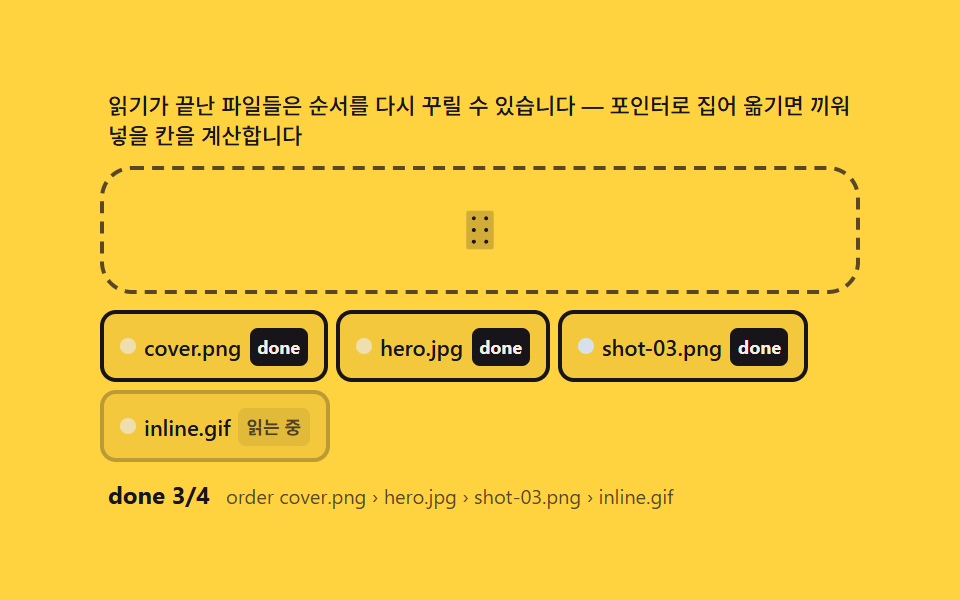
09업로드 뒤 재정렬 — 완료된 칩을 손으로 다시 배열하는 마무리
전부 읽힌 파일 칩들을 pointerdown 으로 다시 들어 목표 칸의 getBoundingClientRect 중심과 포인터를 비교해 삽입 위치를 계산하고, 배열 순서가 바뀌면 칩들 사이 간격을 transition 으로 다시 잡습니다. 업로드 순서가 아니라 사람이 정한 순서가 최종 배열이 됩니다.
쓰임슬라이드 순서 정리, 갤러리 배열
pointerdowngetBoundingClientRecttransition
<main class="stage">
<div class="rq" id="rq">
  <p class="rq__hint" id="rqHint">읽기가 끝난 파일들은 순서를 다시 꾸릴 수 있습니다 — 포인터로 집어 옮기면 끼워 넣을 칸을 계산합니다</p>
  <div class="rq__zone" id="rqZone" role="button" tabindex="0" aria-describedby="rqHint" aria-label="파일 드롭존">
    <input type="file" id="rqInput" multiple class="rq__file" aria-label="파일 선택">
    <svg class="rq__ic" viewBox="0 0 256 256" aria-hidden="true"><g fill="currentColor"><path d="M208 32v192a16 16 0 0 1-16 16H64a16 16 0 0 1-16-16V32a16 16 0 0 1 16-16h128a16 16 0 0 1 16 16" opacity=".2"/><path d="M104 60a12 12 0 1 1-12-12a12 12 0 0 1 12 12m60 12a12 12 0 1 0-12-12a12 12 0 0 0 12 12m-72 44a12 12 0 1 0 12 12a12 12 0 0 0-12-12m72 0a12 12 0 1 0 12 12a12 12 0 0 0-12-12m-72 68a12 12 0 1 0 12 12a12 12 0 0 0-12-12m72 0a12 12 0 1 0 12 12a12 12 0 0 0-12-12"/></g></svg>
  </div>
  <ul class="rq__list" id="rqList" aria-label="읽기 완료 파일 목록"></ul>
  <div class="rq__meta">
    <span class="rq__tag" id="rqTag">done 0</span>
    <span class="rq__unit" id="rqUnit">order —</span>
  </div>
</div>
</main>
@use "../../../../site/static/demo-tokens" as *;
$duration: 240ms; // 칩 자리 이동(FLIP transform)
$easing: $ease-spring;
$color: $subject-ink;
// 파스텔 강조(채도 .34 · 명도 +.11)
$p-creamline: #f6eede;
$p-mint: #93d9c0;
@include stage($stage-yellow);
.rq {
width: 100%;
max-width: 380px;
display: flex;
flex-direction: column;
gap: $sp-2;
}
.rq__hint {
margin: 0;
padding: 0 $sp-1;
font-weight: 500;
font-size: 11px;
line-height: 1.4;
color: $subject-ink;
}
.rq__zone {
position: relative;
display: grid;
place-items: center;
min-height: 44px;
padding: $sp-2 $sp-3;
border: 2px dashed rgba($subject-ink, .72);
border-radius: $r-card;
cursor: pointer;
overflow: hidden;
transition: border-color $dur-quick $ease-out, background $dur-quick $ease-out;
}
.rq__zone.is-over {
border-color: $p-mint;
background: rgba(147, 217, 192, .14);
}
.rq__file {
position: absolute;
inset: 0;
width: 100%;
height: 100%;
opacity: 0;
cursor: pointer;
}
.rq__ic {
width: 22px;
height: 22px;
color: $subject-ink;
transition: transform $dur-quick $ease-pop;
}
.rq__zone.is-over .rq__ic {
transform: scale(1.15);
}
.rq__list {
margin: 0;
padding: 0;
list-style: none;
display: flex;
flex-wrap: wrap;
gap: $sp-1;
min-height: 76px;
}
.rq__chip {
display: flex;
align-items: center;
gap: $sp-1;
padding: $sp-1 $sp-2;
border-radius: $r-sm;
border: 2px solid rgba($subject-ink, .25);
background: rgba($subject-ink, .05);
transition: transform $duration $easing, border-color $dur-quick $ease-out,
background $dur-quick $ease-out, opacity $dur-quick $ease-out;
touch-action: none;
}
.rq__chip.is-done {
border-color: $subject-ink;
cursor: grab;
}
.rq__chip.is-drag {
opacity: .85;
border-color: $subject-blue-deep;
background: rgba($subject-ink, .1);
cursor: grabbing;
}
.rq__dot {
flex: 0 0 auto;
width: 8px;
height: 8px;
border-radius: 50%;
}
.rq__name {
font-weight: 500;
font-size: 11px;
color: $subject-ink;
white-space: nowrap;
}
.rq__badge {
flex: 0 0 auto;
padding: $sp-1;
border-radius: $r-xs;
font-weight: 700;
font-size: 9px;
line-height: 1.2;
color: rgba($subject-ink, .72);
background: rgba($subject-ink, .08);
}
.rq__chip.is-done .rq__badge {
color: $p-creamline;
background: $subject-ink;
}
.rq__meta {
display: flex;
align-items: baseline;
gap: $sp-2;
padding: 0 $sp-1;
}
.rq__tag {
font-weight: 700;
font-size: 12px;
color: $subject-ink;
}
.rq__unit {
min-width: 0;
overflow: hidden;
white-space: nowrap;
text-overflow: ellipsis;
font-weight: 400;
font-size: 10px;
color: rgba($subject-ink, .72);
}
@media (max-width: 340px) {
.rq { max-width: 270px; gap: $sp-1; }
.rq__hint { font-size: 9px; line-height: 1.25; }
.rq__zone { min-height: 28px; padding: $sp-1 $sp-2; }
.rq__ic { width: 18px; height: 18px; }
.rq__name { font-size: 10px; }
.rq__list { min-height: 44px; gap: $sp-1; }
.rq__chip { padding: $sp-1; }
}
@media (prefers-reduced-motion: reduce) {
.rq__chip { transition: none; }
.rq__zone, .rq__ic { transition: none; }
.rq__zone.is-over .rq__ic { transform: none; }
}html, body {
margin: 0;
overflow: hidden;
}
.stage {
box-sizing: border-box;
min-height: 100vh;
display: grid;
place-items: center;
margin: 0;
background: #ffd23f;
font-family: -apple-system, "Segoe UI", "Noto Sans KR", sans-serif;
padding: clamp(8px, 4vw, 24px);
}
.rq {
width: 100%;
max-width: 380px;
display: flex;
flex-direction: column;
gap: 8px;
}
.rq__hint {
margin: 0;
padding: 0 4px;
font-weight: 500;
font-size: 11px;
line-height: 1.4;
color: #17141a;
}
.rq__zone {
position: relative;
display: grid;
place-items: center;
min-height: 44px;
padding: 8px 12px;
border: 2px dashed rgba(23, 20, 26, 0.72);
border-radius: 16px;
cursor: pointer;
overflow: hidden;
transition: border-color 220ms ease-out, background 220ms ease-out;
}
.rq__zone.is-over {
border-color: #93d9c0;
background: rgba(147, 217, 192, 0.14);
}
.rq__file {
position: absolute;
inset: 0;
width: 100%;
height: 100%;
opacity: 0;
cursor: pointer;
}
.rq__ic {
width: 22px;
height: 22px;
color: #17141a;
transition: transform 220ms cubic-bezier(0.2, 1.4, 0.4, 1);
}
.rq__zone.is-over .rq__ic {
transform: scale(1.15);
}
.rq__list {
margin: 0;
padding: 0;
list-style: none;
display: flex;
flex-wrap: wrap;
gap: 4px;
min-height: 76px;
}
.rq__chip {
display: flex;
align-items: center;
gap: 4px;
padding: 4px 8px;
border-radius: 8px;
border: 2px solid rgba(23, 20, 26, 0.25);
background: rgba(23, 20, 26, 0.05);
transition: transform 240ms cubic-bezier(0.2, 0.8, 0.2, 1), border-color 220ms ease-out, background 220ms ease-out, opacity 220ms ease-out;
touch-action: none;
}
.rq__chip.is-done {
border-color: #17141a;
cursor: grab;
}
.rq__chip.is-drag {
opacity: 0.85;
border-color: #0a4fe8;
background: rgba(23, 20, 26, 0.1);
cursor: grabbing;
}
.rq__dot {
flex: 0 0 auto;
width: 8px;
height: 8px;
border-radius: 50%;
}
.rq__name {
font-weight: 500;
font-size: 11px;
color: #17141a;
white-space: nowrap;
}
.rq__badge {
flex: 0 0 auto;
padding: 4px;
border-radius: 4px;
font-weight: 700;
font-size: 9px;
line-height: 1.2;
color: rgba(23, 20, 26, 0.72);
background: rgba(23, 20, 26, 0.08);
}
.rq__chip.is-done .rq__badge {
color: #f6eede;
background: #17141a;
}
.rq__meta {
display: flex;
align-items: baseline;
gap: 8px;
padding: 0 4px;
}
.rq__tag {
font-weight: 700;
font-size: 12px;
color: #17141a;
}
.rq__unit {
min-width: 0;
overflow: hidden;
white-space: nowrap;
text-overflow: ellipsis;
font-weight: 400;
font-size: 10px;
color: rgba(23, 20, 26, 0.72);
}
@media (max-width: 340px) {
.rq {
max-width: 270px;
gap: 4px;
}
.rq__hint {
font-size: 9px;
line-height: 1.25;
}
.rq__zone {
min-height: 28px;
padding: 4px 8px;
}
.rq__ic {
width: 18px;
height: 18px;
}
.rq__name {
font-size: 10px;
}
.rq__list {
min-height: 44px;
gap: 4px;
}
.rq__chip {
padding: 4px;
}
}
@media (prefers-reduced-motion: reduce) {
.rq__chip {
transition: none;
}
.rq__zone, .rq__ic {
transition: none;
}
.rq__zone.is-over .rq__ic {
transform: none;
}
}// 업로드 후 재정렬(09) — '읽기 완료' 상태가 된 파일 칩을 pointerdown 으로 집어 옮긴다.
// 포인터 x 와 각 칩 getBoundingClientRect().left+width/2 를 비교해 끼워 넣을 칸 인덱스를
// 계산하고, 순서 배열이 바뀌면 트랜지션으로 자리를 다시 꾸린다(FLIP: 이전·이후 위치 차이를
// transform 으로 되돌렸다 푼다). 드롭 → '읽는 중' 짧은 단계 → done 배지 → 재정렬 가능.
(function () {
var zone = document.getElementById('rqZone');
var input = document.getElementById('rqInput');
var listEl = document.getElementById('rqList');
var tagEl = document.getElementById('rqTag');
var unitEl = document.getElementById('rqUnit');
if (!zone || !input || !listEl || !tagEl || !unitEl) return;
var reduce = window.matchMedia('(prefers-reduced-motion: reduce)').matches;
function mulberry32(a) {
return function () {
a |= 0; a = a + 0x6D2B79F5 | 0;
var t = Math.imul(a ^ a >>> 15, 1 | a);
t = t + Math.imul(t ^ t >>> 7, 61 | t) ^ t;
return ((t ^ t >>> 14) >>> 0) / 4294967296;
};
}
var rnd = mulberry32(909);
var HEXES = ['#d6e1eb', '#93d9c0', '#b9a0ff', '#f6c6d3', '#f0dfae'];
var NAMES = ['cover.png', 'hero.jpg', 'shot-03.png', 'inline.gif'];
var chips = []; // { name, state:'reading'|'done', el }
var order = []; // 현재 순서(인덱스)
// FLIP: 재배치 전 각 칩의 위치를 기억 → DOM 순서 반영 → 차이만큼 transform 되돌리기 → 풀기
function relayout() {
var rects = order.map(function (i) { return chips[i].el.getBoundingClientRect(); });
order.forEach(function (i, k) { listEl.appendChild(chips[i].el); });
order.forEach(function (i, k) {
var now = chips[i].el.getBoundingClientRect();
var dx = rects[k].left - now.left;
var el = chips[i].el;
if (!dx) return;
if (reduce) return;
el.style.transition = 'none';
el.style.transform = 'translateX(' + dx + 'px)';
void el.offsetWidth;
el.style.transition = '';
el.style.transform = '';
});
unitEl.textContent = 'order ' + order.map(function (i) { return chips[i].name; }).join(' › ');
var done = order.filter(function (i) { return chips[i].state === 'done'; }).length;
tagEl.textContent = 'done ' + done + '/' + chips.length;
}
function insertionIndex(x) {
var idx = order.length;
for (var k = 0; k < order.length; k++) {
var r = chips[order[k]].el.getBoundingClientRect();
if (x < r.left + r.width / 2) { idx = k; break; } // 각 칸 중점과 비교
}
return idx;
}
// 칩 집기 — pointerdown 으로 시작, 움직이면 끼워 넣을 칸을 계산해 순서를 바꾼다
function armDrag(el, self) {
el.addEventListener('pointerdown', function (e) {
if (chips[self] && chips[self].state !== 'done') return; // 읽는 중엔 잠김
el.setPointerCapture(e.pointerId);
el.classList.add('is-drag');
var move = function (ev) {
var to = insertionIndex(ev.clientX);
var from = order.indexOf(self);
if (to !== from && to !== from + 1) {
order.splice(from, 1);
order.splice(to > from ? to - 1 : to, 0, self);
relayout();
}
};
var up = function () {
el.classList.remove('is-drag');
el.removeEventListener('pointermove', move);
el.removeEventListener('pointerup', up);
el.removeEventListener('pointercancel', up);
};
el.addEventListener('pointermove', move);
el.addEventListener('pointerup', up);
el.addEventListener('pointercancel', up);
});
}
function addChip(name) {
if (chips.length >= 4) {
var drop = order.shift();
chips[drop].el.remove();
chips[drop] = null;
}
var i = chips.length ? chips.length : 0;
var li = document.createElement('li');
li.className = 'rq__chip is-reading';
li.setAttribute('role', 'listitem');
var dot = document.createElement('span');
dot.className = 'rq__dot';
dot.style.background = HEXES[Math.floor(rnd() * HEXES.length)];
var nm = document.createElement('span');
nm.className = 'rq__name';
nm.textContent = name;
var badge = document.createElement('span');
badge.className = 'rq__badge';
badge.textContent = '읽는 중';
li.appendChild(dot); li.appendChild(nm); li.appendChild(badge);
listEl.appendChild(li);
chips[i] = { name: name, state: 'reading', el: li };
order.push(i);
relayout();
armDrag(li, i);
var settle = function () {
chips[i].state = 'done';
li.classList.remove('is-reading');
li.classList.add('is-done');
badge.textContent = 'done';
relayout();
};
if (reduce) settle();
else setTimeout(settle, 500);
}
// 실제 드롭 — File 이름으로 같은 파이프라인
zone.addEventListener('dragover', function (e) { e.preventDefault(); zone.classList.add('is-over'); });
zone.addEventListener('dragleave', function () { zone.classList.remove('is-over'); });
zone.addEventListener('drop', function (e) {
e.preventDefault(); zone.classList.remove('is-over');
var fs = e.dataTransfer && e.dataTransfer.files;
if (fs && fs.length) {
for (var i = 0; i < Math.min(fs.length, 2); i++) addChip(fs[i].name);
}
});
input.addEventListener('change', function () {
var fs = input.files;
if (fs && fs.length) {
for (var i = 0; i < Math.min(fs.length, 2); i++) addChip(fs[i].name);
}
input.value = '';
});
// 자동 시연 — 파일이 들어오고 done 이 되면 스스로 순서를 바꿔본다(같은 relayout 경로)
if (reduce) {
addChip(NAMES[0]); addChip(NAMES[1]);
setTimeout(function () {
order.reverse();
relayout();
}, 40);
} else {
var phase = 0, nextAt = 0;
(function loop(now) {
if (now >= nextAt) {
if (phase < 4) {
addChip(NAMES[phase]);
nextAt = now + 640;
} else {
var from = Math.floor(rnd() * order.length);
order.splice(0, 0, order.splice(from, 1)[0]); // 무작위 칩을 맨 앞으로
relayout();
nextAt = now + 900;
}
phase++;
}
requestAnimationFrame(loop);
})(0);
}
})();// DropReorderAfterUpload — vanilla 판(run/337/demo/09-drop-reorder-after-upload/index.html) 의
// React 포트. FLIP(First-Last-Invert-Play) 로 재배치를 부드럽게 잇는다: 재배치 전 각 칩의
// getBoundingClientRect() 를 먼저 찍고, DOM 순서를 바꾼 뒤 새 위치와의 차(dx)를 역방향
// transform 으로 즉시 걸어 리플로우로 확정한 다음 그 transform 을 지워 CSS 전환이 0 으로
// 되돌아가며 애니메이션되게 한다.
import { useEffect, useRef } from "react";
import styles from "./DropReorderAfterUpload.module.scss";
export type DropReorderAfterUploadProps = {
duration?: string;
easing?: string;
color?: string;
};
type Box<T> = { current: T };
const HINT = "업로드 완료 뒤에도 드래그로 순서를 바꿀 수 있습니다 — FLIP 으로 위치 이동을 계산해 잇습니다";
const ARIA_LABEL = "업로드 후 재정렬 드롭존";
function mulberry32(a: number): () => number {
return function (): number {
a |= 0; a = a + 0x6d2b79f5 | 0;
let t = Math.imul(a ^ a >>> 15, 1 | a);
t = t + Math.imul(t ^ t >>> 7, 61 | t) ^ t;
return ((t ^ t >>> 14) >>> 0) / 4294967296;
};
}
const HEXES = ["#9fc9ec", "#93d9c0", "#b9a0ff", "#f6c6d3", "#cfd8f5"];
const NAMES = ["cover.png", "profile.jpg", "banner.png", "thumb.jpg"];
const MAX_CHIPS = 4;
const SETTLE_MS = 500;
type Chip = { name: string; state: "reading" | "done"; el: HTMLLIElement };
export default function DropReorderAfterUpload({
duration = "240ms",
easing = "cubic-bezier(.2,.8,.2,1)",
color = "#17141a"
}: DropReorderAfterUploadProps) {
const zoneRef = useRef<HTMLDivElement | null>(null);
const inputRef = useRef<HTMLInputElement | null>(null);
const listRef = useRef<HTMLUListElement | null>(null);
const tagRef = useRef<HTMLSpanElement | null>(null);
const unitRef = useRef<HTMLSpanElement | null>(null);
const rafRef = useRef(0) as Box<number>;
useEffect(() => {
const zone = zoneRef.current;
const input = inputRef.current;
const listEl = listRef.current;
const tagEl = tagRef.current;
const unitEl = unitRef.current;
if (!zone || !input || !listEl || !tagEl || !unitEl) return;
const reduce = window.matchMedia("(prefers-reduced-motion: reduce)").matches;
const rnd = mulberry32(909);
let chips: (Chip | null)[] = [];
let order: number[] = [];
const settleTimers: number[] = [];
// FLIP — 재배치 전 rect 를 찍고, DOM 순서를 바꾼 뒤 이전 위치와의 차를 되돌려 걸었다가 지운다
function relayout(): void {
const rects = new Map<number, DOMRect>();
order.forEach((idx) => {
const c = chips[idx];
if (c) rects.set(idx, c.el.getBoundingClientRect());
});
order.forEach((idx) => {
const c = chips[idx];
if (c) listEl!.appendChild(c.el);
});
order.forEach((idx) => {
const c = chips[idx];
if (!c) return;
const before = rects.get(idx);
if (!before) return;
const now = c.el.getBoundingClientRect();
const dx = before.left - now.left;
if (Math.abs(dx) > 0.5 && !reduce) {
c.el.style.transition = "none";
c.el.style.transform = "translateX(" + dx + "px)";
void c.el.offsetWidth;
c.el.style.transition = "";
c.el.style.transform = "";
}
});
const doneCount = chips.filter((c) => c && c.state === "done").length;
const alive = chips.filter((c): c is Chip => !!c);
unitEl!.textContent = "order " + order.map((idx) => (chips[idx] ? chips[idx]!.name : "")).join(" › ");
tagEl!.textContent = "done " + doneCount + "/" + alive.length;
}
function insertionIndex(x: number): number {
for (let i = 0; i < order.length; i++) {
const c = chips[order[i]];
if (!c) continue;
const r = c.el.getBoundingClientRect();
const mid = r.left + r.width / 2;
if (x < mid) return i;
}
return order.length;
}
function armDrag(el: HTMLLIElement, self: number): void {
let dragging = false;
function onDown(e: PointerEvent): void {
const c = chips[self];
if (!c || c.state !== "done") return;
dragging = true;
try { el.setPointerCapture(e.pointerId); } catch (err) { /* noop */ }
el.classList.add(styles.chipDrag);
el.addEventListener("pointermove", onMove as EventListener);
el.addEventListener("pointerup", onUp as EventListener);
el.addEventListener("pointercancel", onUp as EventListener);
}
function onMove(e: PointerEvent): void {
if (!dragging) return;
const to = insertionIndex(e.clientX);
const from = order.indexOf(self);
if (to !== from && to !== from + 1) {
const moved = order.splice(from, 1)[0];
const adj = to > from ? to - 1 : to;
order.splice(adj, 0, moved);
relayout();
}
}
function onUp(): void {
dragging = false;
el.classList.remove(styles.chipDrag);
el.removeEventListener("pointermove", onMove as EventListener);
el.removeEventListener("pointerup", onUp as EventListener);
el.removeEventListener("pointercancel", onUp as EventListener);
}
el.addEventListener("pointerdown", onDown as EventListener);
}
function addChip(name: string): void {
if (chips.filter((c) => c).length >= MAX_CHIPS) {
const oldestIdx = order.shift();
if (oldestIdx !== undefined) {
const old = chips[oldestIdx];
if (old) old.el.remove();
chips[oldestIdx] = null;
}
}
const idx = chips.length;
const li = document.createElement("li");
li.className = styles.chip + " " + styles.chipReading;
const dot = document.createElement("span");
dot.className = styles.dot;
dot.style.background = HEXES[Math.floor(rnd() * HEXES.length)];
const nm = document.createElement("span");
nm.className = styles.name;
nm.textContent = name;
const badge = document.createElement("span");
badge.className = styles.badge;
badge.textContent = "읽는 중";
li.appendChild(dot); li.appendChild(nm); li.appendChild(badge);
const chip: Chip = { name, state: "reading", el: li };
chips.push(chip);
order.push(idx);
listEl!.appendChild(li);
relayout();
armDrag(li, idx);
const settle = (): void => {
chip.state = "done";
li.className = styles.chip + " " + styles.chipDone;
badge.textContent = "done";
relayout();
};
if (reduce) settle();
else settleTimers.push(window.setTimeout(settle, SETTLE_MS));
}
function onOver(e: DragEvent): void {
e.preventDefault();
zone!.classList.add(styles.zoneOver);
}
function onLeave(): void {
zone!.classList.remove(styles.zoneOver);
}
function onDrop(e: DragEvent): void {
e.preventDefault();
zone!.classList.remove(styles.zoneOver);
const files = e.dataTransfer && e.dataTransfer.files;
if (files) Array.prototype.slice.call(files, 0, 2).forEach((f: File) => addChip(f.name));
}
function onChange(): void {
const files = input!.files;
if (files) Array.prototype.slice.call(files, 0, 2).forEach((f: File) => addChip(f.name));
input!.value = "";
}
zone.addEventListener("dragover", onOver as EventListener);
zone.addEventListener("dragleave", onLeave);
zone.addEventListener("drop", onDrop as EventListener);
input.addEventListener("change", onChange);
if (reduce) {
addChip(NAMES[0]);
addChip(NAMES[1]);
window.setTimeout(() => {
order.reverse();
relayout();
}, 40);
} else {
let phase = 0;
let nextAt = 0;
const step = (now: number): void => {
if (now >= nextAt) {
if (phase < 4) {
nextAt = now + 640;
addChip(NAMES[phase % NAMES.length]);
phase++;
} else {
nextAt = now + 900;
const alive = order.filter((idx) => chips[idx]);
if (alive.length > 1) {
const from = 1 + Math.floor(rnd() * (order.length - 1));
const moved = order.splice(from, 1)[0];
order.splice(0, 0, moved);
relayout();
}
phase++;
}
}
rafRef.current = requestAnimationFrame(step);
};
rafRef.current = requestAnimationFrame(step);
}
return () => {
cancelAnimationFrame(rafRef.current);
settleTimers.forEach((id) => window.clearTimeout(id));
zone.removeEventListener("dragover", onOver as EventListener);
zone.removeEventListener("dragleave", onLeave);
zone.removeEventListener("drop", onDrop as EventListener);
input.removeEventListener("change", onChange);
};
// eslint-disable-next-line react-hooks/exhaustive-deps
}, []);
return (
<main className={styles.stage}>
<div className={styles.rq}>
<p className={styles.hint} id="rqHintReact">{HINT}</p>
<div
className={styles.zone}
ref={zoneRef}
role="button"
tabIndex={0}
aria-describedby="rqHintReact"
aria-label={ARIA_LABEL}
>
<input type="file" multiple className={styles.file} ref={inputRef} aria-label="파일 선택" />
<svg className={styles.ic} viewBox="0 0 256 256" aria-hidden="true">
<g fill="currentColor">
<path d="M208 32v192a16 16 0 0 1-16 16H64a16 16 0 0 1-16-16V32a16 16 0 0 1 16-16h128a16 16 0 0 1 16 16" opacity=".2" />
<path d="M104 60a12 12 0 1 1-12-12a12 12 0 0 1 12 12m60 12a12 12 0 1 0-12-12a12 12 0 0 0 12 12m-72 44a12 12 0 1 0 12 12a12 12 0 0 0-12-12m72 0a12 12 0 1 0 12 12a12 12 0 0 0-12-12m-72 68a12 12 0 1 0 12 12a12 12 0 0 0-12-12m72 0a12 12 0 1 0 12 12a12 12 0 0 0-12-12" />
</g>
</svg>
</div>
<ul className={styles.list} ref={listRef} aria-live="polite" />
<p className={styles.meta}>
<span className={styles.tag} ref={tagRef} style={{ color }}>done 0/0</span>
<span className={styles.unit} ref={unitRef}>order</span>
</p>
</div>
</main>
);
}09 업로드 뒤 재정렬 — 완료된 칩을 손으로 다시 배열하는 마무리 — 측정 누적면적 10.101% · 움직인 프레임 10/23GODRICH 원작 · zip 에 SCSS·React 포함 · 드래그 앤 드롭 파일 업로드 UI — 드롭존 9종, 파일 데이터 계산을 얹다
이 데모가 속한 글
 드래그 앤 드롭 파일 업로드 UI — 드롭존 9종, 파일 데이터 계산을 얹다놓인 파일의 종류·크기·개수를 데이터로 계산해 미리보기를 그리고, 이미지는 픽셀을 읽어 썸네일을 만들고, 거부된 파일은 이유와 함께 되돌리는 드롭존 9종 — 서버 없이 전부 브라우저에서, 코드는 비밀번호 zip으로 이 글의 데모 전부 보기