03그리드 재배치 — 포인터 좌표에서 행·열 인덱스를 역산하는 2차원 계산
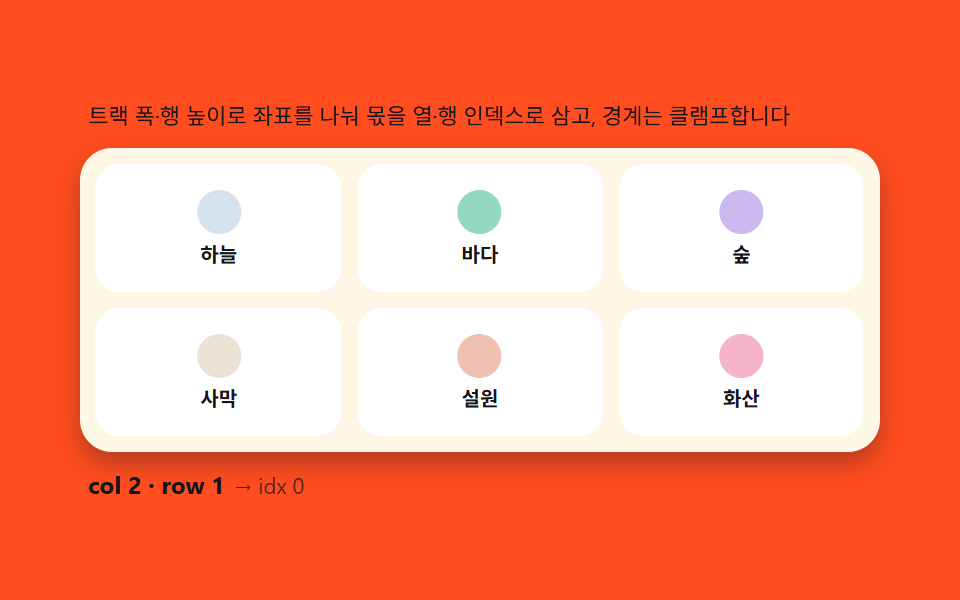
그리드 트랙 폭·행 높이를 기준으로 포인터의 x·y 를 나눠 몫으로 열·행 인덱스를 구하고, 그 인덱스를 1차원 순서 배열로 다시 펴서 스플라이스합니다. 경계에서는 인덱스를 클램프해 그리드 밖으로 드롭해도 마지막 칸으로 안전하게 떨어집니다.
쓰임이미지 정렬, 위젯 배치판
CSS custom propertiesgetBoundingClientRecttransition
<main class="stage">
<div class="gr">
  <p class="gr__hint">트랙 폭·행 높이로 좌표를 나눠 몫을 열·행 인덱스로 삼고, 경계는 클램프합니다</p>
  <div class="gr__board" id="grBoard">
    <div class="gr__cell"><span class="gr__dot gr__dot--a"></span><span class="gr__lbl">하늘</span></div>
    <div class="gr__cell"><span class="gr__dot gr__dot--b"></span><span class="gr__lbl">바다</span></div>
    <div class="gr__cell"><span class="gr__dot gr__dot--c"></span><span class="gr__lbl">숲</span></div>
    <div class="gr__cell"><span class="gr__dot gr__dot--d"></span><span class="gr__lbl">사막</span></div>
    <div class="gr__cell"><span class="gr__dot gr__dot--e"></span><span class="gr__lbl">설원</span></div>
    <div class="gr__cell"><span class="gr__dot gr__dot--f"></span><span class="gr__lbl">화산</span></div>
  </div>
  <p class="gr__meta"><b class="gr__state" id="grState">col 0 · row 0</b><span class="gr__unit">→ idx 0</span></p>
</div>
</main>
@use "../../../../site/static/demo-tokens" as *;
$duration: 240ms;
$easing: cubic-bezier(.2,.8,.2,1);
$color: $subject-ink;
// 파스텔 강조(도구/파스텔.py to_pastel 결과: 채도 .34 · 명도 +.11)
$p-pink: #f4b3c6;
$p-mint: #93d9c0;
$p-sky: #d6e2eb;
$p-lilac: #cbb9f0;
$p-sand: #ebe3d6;
$p-rose: #f0c0b3;
@include stage($stage-orange);
.gr {
width: 100%;
max-width: 400px;
display: flex;
flex-direction: column;
gap: $sp-2;
}
.gr__hint {
margin: 0;
padding: 0 $sp-1;
font-weight: 400;
font-size: 11px;
line-height: 1.4;
color: $subject-ink;
}
.gr__board {
display: grid;
grid-template-columns: repeat(3, 1fr);
gap: $sp-2;
padding: $sp-2;
background: $subject-cream;
border-radius: $r-card;
box-shadow: $shadow-press;
}
.gr__cell {
position: relative;
display: flex;
flex-direction: column;
align-items: center;
justify-content: center;
gap: $sp-1;
height: 64px;
border-radius: $r-control;
background: $stage-paper;
cursor: grab;
transition: transform $duration $easing;
}
.gr__cell:hover {
transform: scale(1.05);
transform-origin: center;
}
.gr__dot {
width: 22px;
height: 22px;
border-radius: $r-pill;
}
.gr__dot--a { background: $p-sky; }
.gr__dot--b { background: $p-mint; }
.gr__dot--c { background: $p-lilac; }
.gr__dot--d { background: $p-sand; }
.gr__dot--e { background: $p-rose; }
.gr__dot--f { background: $p-pink; }
.gr__lbl {
font-weight: 700;
font-size: 10px;
line-height: 1.2;
color: $subject-ink;
}
.gr__meta {
margin: 0;
padding: 0 $sp-1;
display: flex;
align-items: baseline;
gap: $sp-1;
}
.gr__state {
font-weight: 700;
font-size: 12px;
color: $subject-ink;
}
.gr__unit {
font-weight: 400;
font-size: 11px;
color: rgba($subject-ink, .72);
}
@media (max-width: 340px) {
.gr { max-width: 280px; gap: $sp-1; }
.gr__hint { font-size: 10px; }
.gr__board { padding: $sp-1; gap: $sp-1; }
.gr__cell { height: 40px; }
.gr__dot { width: 16px; height: 16px; }
}
@media (prefers-reduced-motion: reduce) {
.gr__cell {
transition: none !important;
transform: none !important;
}
}html, body {
margin: 0;
overflow: hidden;
}
.stage {
box-sizing: border-box;
min-height: 100vh;
display: grid;
place-items: center;
margin: 0;
background: #ff4d1f;
font-family: -apple-system, "Segoe UI", "Noto Sans KR", sans-serif;
padding: clamp(8px, 4vw, 24px);
}
.gr {
width: 100%;
max-width: 400px;
display: flex;
flex-direction: column;
gap: 8px;
}
.gr__hint {
margin: 0;
padding: 0 4px;
font-weight: 400;
font-size: 11px;
line-height: 1.4;
color: #17141a;
}
.gr__board {
display: grid;
grid-template-columns: repeat(3, 1fr);
gap: 8px;
padding: 8px;
background: #fff7e6;
border-radius: 16px;
box-shadow: 0 6px 12px rgba(23, 20, 26, 0.32);
}
.gr__cell {
position: relative;
display: flex;
flex-direction: column;
align-items: center;
justify-content: center;
gap: 4px;
height: 64px;
border-radius: 12px;
background: #ffffff;
cursor: grab;
transition: transform 240ms cubic-bezier(0.2, 0.8, 0.2, 1);
}
.gr__cell:hover {
transform: scale(1.05);
transform-origin: center;
}
.gr__dot {
width: 22px;
height: 22px;
border-radius: 999px;
}
.gr__dot--a {
background: #d6e2eb;
}
.gr__dot--b {
background: #93d9c0;
}
.gr__dot--c {
background: #cbb9f0;
}
.gr__dot--d {
background: #ebe3d6;
}
.gr__dot--e {
background: #f0c0b3;
}
.gr__dot--f {
background: #f4b3c6;
}
.gr__lbl {
font-weight: 700;
font-size: 10px;
line-height: 1.2;
color: #17141a;
}
.gr__meta {
margin: 0;
padding: 0 4px;
display: flex;
align-items: baseline;
gap: 4px;
}
.gr__state {
font-weight: 700;
font-size: 12px;
color: #17141a;
}
.gr__unit {
font-weight: 400;
font-size: 11px;
color: rgba(23, 20, 26, 0.72);
}
@media (max-width: 340px) {
.gr {
max-width: 280px;
gap: 4px;
}
.gr__hint {
font-size: 10px;
}
.gr__board {
padding: 4px;
gap: 4px;
}
.gr__cell {
height: 40px;
}
.gr__dot {
width: 16px;
height: 16px;
}
}
@media (prefers-reduced-motion: reduce) {
.gr__cell {
transition: none !important;
transform: none !important;
}
}// 그리드 재배치(03) — 그리드 rect 와 열 수(3)로 포인터 x·y 를 트랙 폭·행 높이로 나눈 몫을
// 열·행 인덱스로 삼고(cellAt), 0..cols-1 · 0..rows-1 로 클램프한 뒤 row*cols+col 로
// 1차원 인덱스를 펴서 순서 배열을 스플라이스한다(applyMove). 이동한 칸들은 FLIP 과 같은
// 전후 좌표차 역산으로 transform 을 되돌렸다가 푼다. 자동 시연은 고정 시나리오 3회전.
(function () {
var board = document.getElementById('grBoard');
var stateEl = document.getElementById('grState');
if (!board || !stateEl) return;
var COLS = 3;
var order = [0, 1, 2, 3, 4, 5]; // 1차원 순서 배열 — 스플라이스 대상
var CELLS = Array.prototype.slice.call(board.children);
// 좌표 → 클램프된 col·row 몫
function cellAt(x, y) {
var r = board.getBoundingClientRect();
var col = Math.floor((x - r.left) / (r.width / COLS));
var row = Math.floor((y - r.top) / (r.height / Math.ceil(CELLS.length / COLS)));
col = Math.max(0, Math.min(COLS - 1, col));
row = Math.max(0, Math.min(Math.ceil(CELLS.length / COLS) - 1, row));
return { col: col, row: row, idx: row * COLS + col };
}
// 1차원 인덱스 두 개로 스플라이스 + FLIP 되돌림
function applyMove(from, to) {
if (from === to || to < 0 || to >= order.length) return;
var first = CELLS.map(function (c) {
var r = c.getBoundingClientRect();
return { x: r.left, y: r.top };
});
order.splice(to, 0, order.splice(from, 1)[0]);
order.forEach(function (ci) { board.appendChild(CELLS[ci]); });
CELLS.forEach(function (c) {
var r = c.getBoundingClientRect();
var me = first[CELLS.indexOf(c)];
var dx = me.x - r.left, dy = me.y - r.top;
if (dx !== 0 || dy !== 0) {
c.style.transition = 'none';
c.style.transform = 'translate(' + dx + 'px,' + dy + 'px)';
requestAnimationFrame(function () {
c.style.transition = 'transform 240ms cubic-bezier(.2,.8,.2,1)';
c.style.transform = 'translate(0,0)';
});
}
});
}
// 포인터 상태 라벨 — 몫 계산을 그대로 보여준다
function labelAt(x, y) {
var c = cellAt(x, y);
stateEl.textContent = 'col ' + c.col + ' · row ' + c.row;
}
// 사람 조작 — 칸 클릭: 첫 칸과 자리 교환(같은 역산 경로)
board.addEventListener('click', function (e) {
stop();
var cell = e.target.closest('.gr__cell');
if (!cell) return;
var r = board.getBoundingClientRect();
var cr = cell.getBoundingClientRect();
labelAt(cr.left + cr.width / 2 - r.left + r.left, cr.top + cr.height / 2);
var target = cellAt(cr.left + cr.width / 2, cr.top + cr.height / 2);
var cur = CELLS.indexOf(cell);
applyMove(cur, target.idx);
});
// 자동 시연 — 보드 좌표를 실측해 몫 계산으로 이동하는 시나리오
var playing = true;
function stop() { playing = false; }
var reduce = window.matchMedia('(prefers-reduced-motion: reduce)').matches;
// 우하단·좌상단을 번갈아 가리켜 매 회 실제로 자리가 바뀌게 한다(같은 칸 반복 시 from===to 무동작 방지)
var swapToggle = 0;
function scenario() {
var r = board.getBoundingClientRect();
var x2, y2;
if (swapToggle === 0) {
x2 = r.left + r.width * 0.9; y2 = r.top + r.height * 0.8; // 우하단
} else {
x2 = r.left + r.width * 0.1; y2 = r.top + r.height * 0.2; // 좌상단
}
swapToggle = 1 - swapToggle;
var t2 = cellAt(x2, y2);
labelAt(x2, y2);
var moving = order[0];
applyMove(order.indexOf(moving), t2.idx);
}
if (reduce) {
scenario();
} else {
var last = 0;
var DELAY = 460;
(function tick(now) {
if (playing && now - last >= DELAY) { last = now; scenario(); }
requestAnimationFrame(tick);
})(performance.now());
}
})();// DragReorderGrid — vanilla 판(run/336/demo/03-drag-reorder-grid/index.html)
// 의 React 포트. 그리드 rect 와 열 수(COLS)로 포인터 x·y 를 트랙 폭·행 높이로 나눈 몫을
// 열·행 인덱스로 삼고(cellAt) 0..cols-1 · 0..rows-1 로 클램프한 뒤 row*cols+col 로 1차원
// 인덱스를 펴서 순서 배열을 스플라이스한다(applyMove). 이동한 칸은 FLIP 좌표차 역산으로
// transform 을 되돌렸다가 푼다.
import { useEffect, useRef } from "react";
import styles from "./DragReorderGrid.module.scss";
export type DragReorderGridProps = {
duration?: string;
easing?: string;
color?: string;
};
const HINT = "트랙 폭·행 높이로 좌표를 나눠 몫을 열·행 인덱스로 삼고, 경계는 클램프합니다";
const COLS = 3;
type CellDef = { dot: string; label: string };
const CELL_DEFS: CellDef[] = [
{ dot: "a", label: "하늘" },
{ dot: "b", label: "바다" },
{ dot: "c", label: "숲" },
{ dot: "d", label: "사막" },
{ dot: "e", label: "설원" },
{ dot: "f", label: "화산" }
];
export default function DragReorderGrid({
duration = "240ms",
easing = "cubic-bezier(.2,.8,.2,1)",
color = "#17141a"
}: DragReorderGridProps) {
const boardRef = useRef<HTMLDivElement | null>(null);
const stateRef = useRef<HTMLElement | null>(null);
useEffect(() => {
const board = boardRef.current;
const stateEl = stateRef.current;
if (!board || !stateEl) return;
const order = [0, 1, 2, 3, 4, 5];
const CELLS: HTMLElement[] = Array.prototype.slice.call(board.children);
function cellAt(x: number, y: number): { col: number; row: number; idx: number } {
const r = board!.getBoundingClientRect();
const rows = Math.ceil(CELLS.length / COLS);
let col = Math.floor((x - r.left) / (r.width / COLS));
let row = Math.floor((y - r.top) / (r.height / rows));
col = Math.max(0, Math.min(COLS - 1, col));
row = Math.max(0, Math.min(rows - 1, row));
return { col, row, idx: row * COLS + col };
}
function applyMove(from: number, to: number): void {
if (from === to || to < 0 || to >= order.length) return;
const first = CELLS.map((c) => {
const r = c.getBoundingClientRect();
return { x: r.left, y: r.top };
});
order.splice(to, 0, order.splice(from, 1)[0]);
order.forEach((ci) => board!.appendChild(CELLS[ci]));
CELLS.forEach((c) => {
const r = c.getBoundingClientRect();
const me = first[CELLS.indexOf(c)];
const dx = me.x - r.left;
const dy = me.y - r.top;
if (dx !== 0 || dy !== 0) {
c.style.transition = "none";
c.style.transform = "translate(" + dx + "px," + dy + "px)";
requestAnimationFrame(() => {
c.style.transition = "transform " + duration + " " + easing;
c.style.transform = "translate(0,0)";
});
}
});
}
function labelAt(x: number, y: number): void {
const c = cellAt(x, y);
stateEl!.textContent = "col " + c.col + " · row " + c.row;
}
function onClick(e: MouseEvent): void {
stop();
const cell = (e.target as HTMLElement).closest("." + styles.cell) as HTMLElement | null;
if (!cell) return;
const cr = cell.getBoundingClientRect();
labelAt(cr.left + cr.width / 2, cr.top + cr.height / 2);
const target = cellAt(cr.left + cr.width / 2, cr.top + cr.height / 2);
const cur = CELLS.indexOf(cell);
applyMove(cur, target.idx);
}
board.addEventListener("click", onClick as EventListener);
let playing = true;
function stop(): void {
playing = false;
}
const reduce = window.matchMedia("(prefers-reduced-motion: reduce)").matches;
let swapToggle = 0;
function scenario(): void {
const r = board!.getBoundingClientRect();
let x2: number, y2: number;
if (swapToggle === 0) {
x2 = r.left + r.width * 0.9;
y2 = r.top + r.height * 0.8;
} else {
x2 = r.left + r.width * 0.1;
y2 = r.top + r.height * 0.2;
}
swapToggle = 1 - swapToggle;
const t2 = cellAt(x2, y2);
labelAt(x2, y2);
const moving = order[0];
applyMove(order.indexOf(moving), t2.idx);
}
let rafId = 0;
if (reduce) {
scenario();
} else {
let last = 0;
const DELAY = 460;
const tick = (now: number): void => {
if (playing && now - last >= DELAY) {
last = now;
scenario();
}
rafId = requestAnimationFrame(tick);
};
rafId = requestAnimationFrame(tick);
}
return () => {
cancelAnimationFrame(rafId);
board.removeEventListener("click", onClick as EventListener);
};
// eslint-disable-next-line react-hooks/exhaustive-deps
}, []);
return (
<main className={styles.stage}>
<div className={styles.gr}>
<p className={styles.hint}>{HINT}</p>
<div className={styles.board} ref={boardRef}>
{CELL_DEFS.map((c, i) => (
<div key={i} className={styles.cell}>
<span className={styles.dot + " " + (styles as Record<string, string>)["dot" + c.dot.toUpperCase()]} />
<span className={styles.lbl}>{c.label}</span>
</div>
))}
</div>
<p className={styles.meta}>
<b className={styles.state} ref={stateRef} style={{ color }}>col 0 · row 0</b>
<span className={styles.unit}>→ idx 0</span>
</p>
</div>
</main>
);
}03 그리드 재배치 — 포인터 좌표에서 행·열 인덱스를 역산하는 2차원 계산 — 측정 누적면적 21.295% · 움직인 프레임 12/23GODRICH 원작 · zip 에 SCSS·React 포함 · 드래그 앤 드롭 UI 리스트 — 목표 인덱스 계산을 얹은 9종
이 데모가 속한 글
 드래그 앤 드롭 UI 리스트 — 목표 인덱스 계산을 얹은 9종포인터가 놓인 위치에서 목표 인덱스를 계산해 리스트·칸반·그리드가 자리를 바꾸고, 롱프레스·Alt 화살표·가장자리 자동 스크롤까지 — 드래그로 순서 바꾸는 리스트 9종, 코드는 비밀번호 zip으로 드립니다. 드래그 이 글의 데모 전부 보기