04다중 파일 스태거 — 목록에 순서대로 쌓이는 진행률
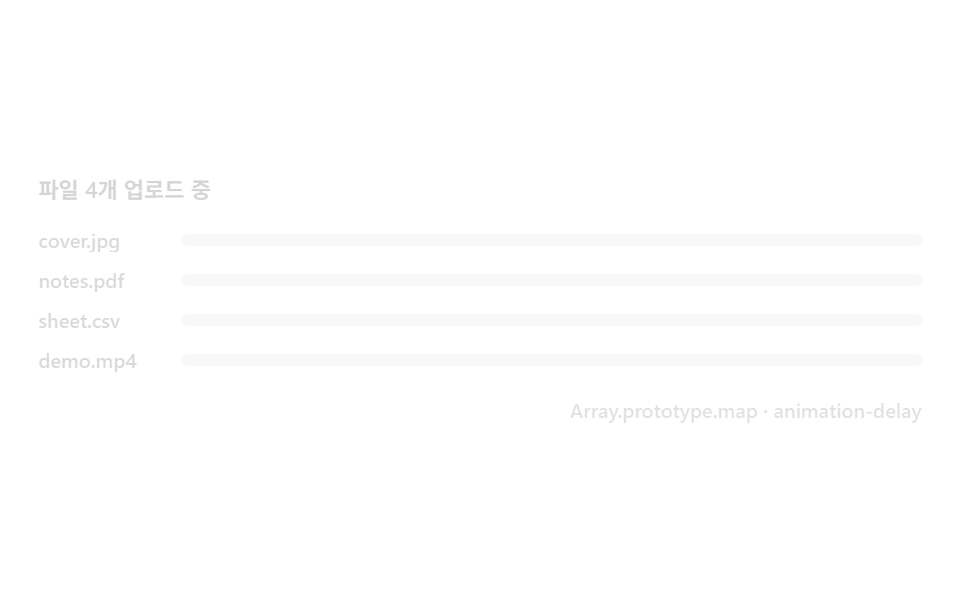
파일마다 개별 XHR 을 병렬로 열되 리스트 항목은 등록 순서의 인덱스만큼 지연을 곱해 나타나, 다섯 개를 한꺼번에 끌어다 놔도 목록이 한 줄씩 정돈되어 쌓입니다.
쓰임다중 첨부 폼, 이미지 갤러리 업로더
Array.prototype.mapanimation-delayrequestAnimationFrame
<main class="stage">
<div class="ms is-demo" id="msRoot" role="list" aria-label="파일별 업로드 진행률 목록" tabindex="0">
  <p class="ms__title">파일 4개 업로드 중</p>
  <ul class="ms__list" id="msList">
    <li class="ms__row" role="listitem"><span class="ms__name">cover.jpg</span><span class="ms__track"><span class="ms__fill" data-target="100"></span></span></li>
    <li class="ms__row" role="listitem"><span class="ms__name">notes.pdf</span><span class="ms__track"><span class="ms__fill" data-target="72"></span></span></li>
    <li class="ms__row" role="listitem"><span class="ms__name">sheet.csv</span><span class="ms__track"><span class="ms__fill" data-target="45"></span></span></li>
    <li class="ms__row" role="listitem"><span class="ms__name">demo.mp4</span><span class="ms__track"><span class="ms__fill" data-target="18"></span></span></li>
  </ul>
  <div class="ms__bar">
    <span class="ms__meta">Array.prototype.map · animation-delay</span>
  </div>
</div>
</main>
@use "../../../../site/static/demo-tokens" as *;
// 다중 파일 스태거(04) — 행마다 서로 다른 시작 지점을 가진 keyframes 로 인덱스×지연을 표현한다
// (실사용 경로는 style.animationDelay = i * 80ms 로 같은 효과를 낸다 — index.html 참고).
@include stage($stage-paper);
$ms-text: $subject-ink;
$ms-fill: $subject-blue-deep;
$duration: $dur-loop;
$easing: $ease-out;
$color: $ms-fill;
.ms {
display: flex; flex-direction: column; gap: $sp-3;
width: 100%; height: 100%; min-height: 164px;
justify-content: center;
}
.ms:focus-visible { outline: 2px solid $ms-fill; outline-offset: 2px; border-radius: $r-control; }
.ms__title {
margin: 0;
font-weight: 600; font-size: 11px; line-height: 1.3;
color: rgba($ms-text, .78);
}
.ms__list { list-style: none; margin: 0; padding: 0; display: flex; flex-direction: column; gap: $sp-2; }
.ms__row {
display: grid; grid-template-columns: 64px 1fr; align-items: center; gap: $sp-2;
opacity: 0;
transform: translateY(8px);
}
.ms__name {
font-weight: 500; font-size: 10px; line-height: 1.2;
color: rgba($ms-text, .7);
overflow: hidden; text-overflow: ellipsis; white-space: nowrap;
}
.ms__track {
position: relative;
height: $sp-1 + 2px;
border-radius: $r-pill;
background: rgba($ms-text, .12);
overflow: hidden;
}
.ms__fill {
position: absolute; inset: 0;
transform-origin: left center;
transform: scaleX(0);
border-radius: $r-pill;
background: $ms-fill;
}
.ms__bar { display: flex; justify-content: flex-end; }
.ms__meta { font-weight: 500; font-size: 10px; color: rgba($ms-text, .55); }
// ── 데모 루프 — 행마다 다른 시작 지점의 keyframes 로 인덱스×지연을 표현한다 ──
@keyframes msRow1 { 0%, 0% { opacity: 0; transform: translateY(8px); } 15% { opacity: 1; transform: translateY(0); } 100% { opacity: 1; transform: translateY(0); } }
@keyframes msRow2 { 0%, 4% { opacity: 0; transform: translateY(8px); } 19% { opacity: 1; transform: translateY(0); } 100% { opacity: 1; transform: translateY(0); } }
@keyframes msRow3 { 0%, 8% { opacity: 0; transform: translateY(8px); } 23% { opacity: 1; transform: translateY(0); } 100% { opacity: 1; transform: translateY(0); } }
@keyframes msRow4 { 0%, 12% { opacity: 0; transform: translateY(8px); } 27% { opacity: 1; transform: translateY(0); } 100% { opacity: 1; transform: translateY(0); } }
@keyframes msFill1 { 0%, 15% { transform: scaleX(0); } 45% { transform: scaleX(1); } 84% { transform: scaleX(1); } 92%, 100% { transform: scaleX(0); } }
@keyframes msFill2 { 0%, 19% { transform: scaleX(0); } 49% { transform: scaleX(.72); } 84% { transform: scaleX(.72); } 92%, 100% { transform: scaleX(0); } }
@keyframes msFill3 { 0%, 23% { transform: scaleX(0); } 53% { transform: scaleX(.45); } 84% { transform: scaleX(.45); } 92%, 100% { transform: scaleX(0); } }
@keyframes msFill4 { 0%, 27% { transform: scaleX(0); } 57% { transform: scaleX(.18); } 84% { transform: scaleX(.18); } 92%, 100% { transform: scaleX(0); } }
@keyframes msFade {
0% { opacity: 1; }
84% { opacity: 1; }
90% { opacity: 0; }
94% { opacity: 0; }
100% { opacity: 1; }
}
.is-demo .ms__row:nth-child(1) { animation: msRow1 $duration $easing infinite; }
.is-demo .ms__row:nth-child(2) { animation: msRow2 $duration $easing infinite; }
.is-demo .ms__row:nth-child(3) { animation: msRow3 $duration $easing infinite; }
.is-demo .ms__row:nth-child(4) { animation: msRow4 $duration $easing infinite; }
.is-demo .ms__row:nth-child(1) .ms__fill { animation: msFill1 $duration $ease-lerp-settle infinite; }
.is-demo .ms__row:nth-child(2) .ms__fill { animation: msFill2 $duration $ease-lerp-settle infinite; }
.is-demo .ms__row:nth-child(3) .ms__fill { animation: msFill3 $duration $ease-lerp-settle infinite; }
.is-demo .ms__row:nth-child(4) .ms__fill { animation: msFill4 $duration $ease-lerp-settle infinite; }
.is-demo.ms { animation: msFade $duration $ease-out infinite; }
@media (max-width: 340px) {
.ms__row { grid-template-columns: 48px 1fr; }
}
@media (prefers-reduced-motion: reduce) {
.is-demo .ms__row, .is-demo .ms__fill, .is-demo.ms { animation: none !important; }
.is-demo .ms__row { opacity: 1 !important; transform: none !important; }
.is-demo .ms__row:nth-child(1) .ms__fill { transform: scaleX(1) !important; }
.is-demo .ms__row:nth-child(2) .ms__fill { transform: scaleX(.72) !important; }
.is-demo .ms__row:nth-child(3) .ms__fill { transform: scaleX(.45) !important; }
.is-demo .ms__row:nth-child(4) .ms__fill { transform: scaleX(.18) !important; }
}html, body {
margin: 0;
overflow: hidden;
}
.stage {
box-sizing: border-box;
min-height: 100vh;
display: grid;
place-items: center;
margin: 0;
background: #ffffff;
font-family: -apple-system, "Segoe UI", "Noto Sans KR", sans-serif;
padding: clamp(8px, 4vw, 24px);
}
.ms {
display: flex;
flex-direction: column;
gap: 12px;
width: 100%;
height: 100%;
min-height: 164px;
justify-content: center;
}
.ms:focus-visible {
outline: 2px solid #0a4fe8;
outline-offset: 2px;
border-radius: 12px;
}
.ms__title {
margin: 0;
font-weight: 600;
font-size: 11px;
line-height: 1.3;
color: rgba(23, 20, 26, 0.78);
}
.ms__list {
list-style: none;
margin: 0;
padding: 0;
display: flex;
flex-direction: column;
gap: 8px;
}
.ms__row {
display: grid;
grid-template-columns: 64px 1fr;
align-items: center;
gap: 8px;
opacity: 0;
transform: translateY(8px);
}
.ms__name {
font-weight: 500;
font-size: 10px;
line-height: 1.2;
color: rgba(23, 20, 26, 0.7);
overflow: hidden;
text-overflow: ellipsis;
white-space: nowrap;
}
.ms__track {
position: relative;
height: 6px;
border-radius: 999px;
background: rgba(23, 20, 26, 0.12);
overflow: hidden;
}
.ms__fill {
position: absolute;
inset: 0;
transform-origin: left center;
transform: scaleX(0);
border-radius: 999px;
background: #0a4fe8;
}
.ms__bar {
display: flex;
justify-content: flex-end;
}
.ms__meta {
font-weight: 500;
font-size: 10px;
color: rgba(23, 20, 26, 0.55);
}
@keyframes msRow1 {
0%, 0% {
opacity: 0;
transform: translateY(8px);
}
15% {
opacity: 1;
transform: translateY(0);
}
100% {
opacity: 1;
transform: translateY(0);
}
}
@keyframes msRow2 {
0%, 4% {
opacity: 0;
transform: translateY(8px);
}
19% {
opacity: 1;
transform: translateY(0);
}
100% {
opacity: 1;
transform: translateY(0);
}
}
@keyframes msRow3 {
0%, 8% {
opacity: 0;
transform: translateY(8px);
}
23% {
opacity: 1;
transform: translateY(0);
}
100% {
opacity: 1;
transform: translateY(0);
}
}
@keyframes msRow4 {
0%, 12% {
opacity: 0;
transform: translateY(8px);
}
27% {
opacity: 1;
transform: translateY(0);
}
100% {
opacity: 1;
transform: translateY(0);
}
}
@keyframes msFill1 {
0%, 15% {
transform: scaleX(0);
}
45% {
transform: scaleX(1);
}
84% {
transform: scaleX(1);
}
92%, 100% {
transform: scaleX(0);
}
}
@keyframes msFill2 {
0%, 19% {
transform: scaleX(0);
}
49% {
transform: scaleX(0.72);
}
84% {
transform: scaleX(0.72);
}
92%, 100% {
transform: scaleX(0);
}
}
@keyframes msFill3 {
0%, 23% {
transform: scaleX(0);
}
53% {
transform: scaleX(0.45);
}
84% {
transform: scaleX(0.45);
}
92%, 100% {
transform: scaleX(0);
}
}
@keyframes msFill4 {
0%, 27% {
transform: scaleX(0);
}
57% {
transform: scaleX(0.18);
}
84% {
transform: scaleX(0.18);
}
92%, 100% {
transform: scaleX(0);
}
}
@keyframes msFade {
0% {
opacity: 1;
}
84% {
opacity: 1;
}
90% {
opacity: 0;
}
94% {
opacity: 0;
}
100% {
opacity: 1;
}
}
.is-demo .ms__row:nth-child(1) {
animation: msRow1 2s ease-out infinite;
}
.is-demo .ms__row:nth-child(2) {
animation: msRow2 2s ease-out infinite;
}
.is-demo .ms__row:nth-child(3) {
animation: msRow3 2s ease-out infinite;
}
.is-demo .ms__row:nth-child(4) {
animation: msRow4 2s ease-out infinite;
}
.is-demo .ms__row:nth-child(1) .ms__fill {
animation: msFill1 2s linear(0, 0.051, 0.176, 0.341, 0.518, 0.685, 0.831, 0.947, 1.032, 1.087, 1.117, 1.126, 1.121, 1.105, 1.085, 1.062, 1.041, 1.022, 1.008, 0.997, 1) infinite;
}
.is-demo .ms__row:nth-child(2) .ms__fill {
animation: msFill2 2s linear(0, 0.051, 0.176, 0.341, 0.518, 0.685, 0.831, 0.947, 1.032, 1.087, 1.117, 1.126, 1.121, 1.105, 1.085, 1.062, 1.041, 1.022, 1.008, 0.997, 1) infinite;
}
.is-demo .ms__row:nth-child(3) .ms__fill {
animation: msFill3 2s linear(0, 0.051, 0.176, 0.341, 0.518, 0.685, 0.831, 0.947, 1.032, 1.087, 1.117, 1.126, 1.121, 1.105, 1.085, 1.062, 1.041, 1.022, 1.008, 0.997, 1) infinite;
}
.is-demo .ms__row:nth-child(4) .ms__fill {
animation: msFill4 2s linear(0, 0.051, 0.176, 0.341, 0.518, 0.685, 0.831, 0.947, 1.032, 1.087, 1.117, 1.126, 1.121, 1.105, 1.085, 1.062, 1.041, 1.022, 1.008, 0.997, 1) infinite;
}
.is-demo.ms {
animation: msFade 2s ease-out infinite;
}
@media (max-width: 340px) {
.ms__row {
grid-template-columns: 48px 1fr;
}
}
@media (prefers-reduced-motion: reduce) {
.is-demo .ms__row, .is-demo .ms__fill, .is-demo.ms {
animation: none !important;
}
.is-demo .ms__row {
opacity: 1 !important;
transform: none !important;
}
.is-demo .ms__row:nth-child(1) .ms__fill {
transform: scaleX(1) !important;
}
.is-demo .ms__row:nth-child(2) .ms__fill {
transform: scaleX(0.72) !important;
}
.is-demo .ms__row:nth-child(3) .ms__fill {
transform: scaleX(0.45) !important;
}
.is-demo .ms__row:nth-child(4) .ms__fill {
transform: scaleX(0.18) !important;
}
}// 다중 파일 스태거 — 파일마다 개별 XHR 을 병렬로 열되(여기선 시드 난수로 흉내낸다),
// 목록 행은 Array.prototype.map 으로 한 번에 만들고 등록 순서의 인덱스(--i)만큼
// animation-delay 를 곱해 나타나므로, 다섯 개를 한꺼번에 끌어다 놔도 한 줄씩 정돈되어 쌓인다.
(function () {
var STAGGER_MS = 80;
var SEED = 0x7c31af;
function mulberry32(a) {
return function () {
a |= 0; a = (a + 0x6D2B79F5) | 0;
var t = Math.imul(a ^ (a >>> 15), 1 | a);
t = (t + Math.imul(t ^ (t >>> 7), 61 | t)) ^ t;
return ((t ^ (t >>> 14)) >>> 0) / 4294967296;
};
}
var rand = mulberry32(SEED);
var root = document.getElementById('msRoot');
var list = document.getElementById('msList');
if (!root || !list) return;
var rows = Array.prototype.map.call(list.querySelectorAll('.ms__row'), function (row, i) {
row.style.animationDelay = (i * STAGGER_MS) + 'ms';
return { row: row, fill: row.querySelector('.ms__fill'), value: 0 };
});
function step() {
if (root.classList.contains('is-demo')) return;
var done = true;
rows.forEach(function (r) {
var target = Number(r.fill.getAttribute('data-target'));
if (r.value < target) {
r.value = Math.min(target, r.value + 2 + rand() * 6);
r.fill.style.transform = 'scaleX(' + (r.value / 100) + ')';
done = false;
}
});
if (!done) requestAnimationFrame(step);
}
function live() {
if (!root.classList.contains('is-demo')) return;
root.classList.remove('is-demo');
rows.forEach(function (r) { r.fill.style.transform = 'scaleX(0)'; r.value = 0; });
requestAnimationFrame(step);
}
['pointerdown', 'focusin'].forEach(function (ev) { root.addEventListener(ev, live); });
})();// UploadProgressMultiStagger — vanilla 판(run/329/demo/04-upload-progress-multi-stagger/index.html) 의 React 포트.
// 파일마다 개별 XHR 을 병렬로 열되(여기선 시드 난수로 흉내낸다), 목록 행은 Array.prototype.map 으로 한 번에 만들고
// 등록 순서의 인덱스만큼 animation-delay 를 곱해 나타나므로, 다섯 개를 한꺼번에 끌어다 놔도 한 줄씩 정돈되어 쌓인다.
import { useRef, useState } from "react";
import type { CSSProperties } from "react";
import styles from "./UploadProgressMultiStagger.module.scss";
export type UploadProgressMultiStaggerProps = {
duration?: string;
easing?: string;
color?: string;
staggerMs?: number; // 행마다 밀리는 등장 지연
seed?: number; // mulberry32 시드
stepBase?: number; // 매 프레임 기본 증가분
stepJitter?: number; // 매 프레임 랜덤 증가분 상한
};
type Vars = CSSProperties & { "--duration"?: string; "--easing"?: string; "--color"?: string };
type Box<T> = { current: T };
const TITLE = "파일 4개 업로드 중";
const META = "Array.prototype.map · animation-delay";
const FILES = [
{ name: "cover.jpg", target: 100 },
{ name: "notes.pdf", target: 72 },
{ name: "sheet.csv", target: 45 },
{ name: "demo.mp4", target: 18 }
];
const STAGGER_MS = 80;
const SEED = 0x7c31af;
function mulberry32(a: number): () => number {
return function () {
a |= 0; a = (a + 0x6D2B79F5) | 0;
const t = Math.imul(a ^ (a >>> 15), 1 | a);
const u = (t + Math.imul(t ^ (t >>> 7), 61 | t)) ^ t;
return ((u ^ (u >>> 14)) >>> 0) / 4294967296;
};
}
export default function UploadProgressMultiStagger({
duration = "2s",
easing = "ease-out",
color = "#0a4fe8",
staggerMs = STAGGER_MS,
seed = SEED,
stepBase = 2,
stepJitter = 6
}: UploadProgressMultiStaggerProps) {
const [demo, setDemo] = useState(true);
const fillRefs = useRef<(HTMLSpanElement | null)[]>([]) as Box<(HTMLSpanElement | null)[]>;
const rafRef = useRef(0) as Box<number>;
const randRef = useRef<(() => number) | null>(null);
const vars: Vars = { "--duration": duration, "--easing": easing, "--color": color };
function live(): void {
if (!demo) return;
setDemo(false);
randRef.current = mulberry32(seed);
const rows = FILES.map((f) => ({ fill: null as HTMLSpanElement | null, value: 0, target: f.target }));
fillRefs.current.forEach((el, i) => {
rows[i].fill = el;
if (el) el.style.transform = "scaleX(0)";
});
function step(): void {
const rand = randRef.current!;
let done = true;
rows.forEach((r) => {
if (r.value < r.target) {
r.value = Math.min(r.target, r.value + stepBase + rand() * stepJitter);
if (r.fill) r.fill.style.transform = "scaleX(" + (r.value / 100) + ")";
done = false;
}
});
if (!done) rafRef.current = requestAnimationFrame(step);
}
rafRef.current = requestAnimationFrame(step);
}
const rootCls = demo ? `${styles.ms} ${styles.isDemo}` : styles.ms;
return (
<main className={styles.stage}>
<div
className={rootCls}
style={vars}
role="list"
aria-label="파일별 업로드 진행률 목록"
tabIndex={0}
onPointerDown={live}
onFocus={live}
>
<p className={styles.title}>{TITLE}</p>
<ul className={styles.list}>
{FILES.map((f, i) => (
<li
key={f.name}
className={styles.row}
role="listitem"
style={{ animationDelay: (i * staggerMs) + "ms" }}
>
<span className={styles.name}>{f.name}</span>
<span className={styles.track}>
<span
className={styles.fill}
data-target={f.target}
ref={(el: HTMLSpanElement | null) => { fillRefs.current[i] = el; }}
></span>
</span>
</li>
))}
</ul>
<div className={styles.bar}>
<span className={styles.meta}>{META}</span>
</div>
</div>
</main>
);
}04 다중 파일 스태거 — 목록에 순서대로 쌓이는 진행률 — 측정 누적면적 11.172% · 움직인 프레임 17/23GODRICH 원작 · zip 에 SCSS·React 포함 · 파일 업로드 진행률 로더 9종 — 드래그부터 체크까지 계산
이 데모가 속한 글
 파일 업로드 진행률 로더 9종 — 드래그부터 체크까지 계산파일 업로드 진행률 UI는 계산으로 그리는 로더입니다. 파일을 끌어다 놓으면 바이트와 시간을 계산해 링이 돌고 속도가 표시되고 끝나면 체크로 바뀝니다. 9가지 상태를 라이브러리 없이 계산으로 만드는 로더 — 코드는 이 글의 데모 전부 보기