03빈 테두리 자리가 카드로 하나씩 채워지는 목록
회색 막대가 반짝이는 스켈레톤 대신 점선 테두리 칸이 먼저 자리를 잡고, animation-delay 로 한 칸씩 늦게 실제 카드가 들어차며 aria-busy 가 false 로 떨어집니다.
쓰임필터를 바꿀 때마다 목록 전체를 다시 불러오는 상품·검색 결과 화면
aria-busyanimation-delayanimation-fill-mode: backwards
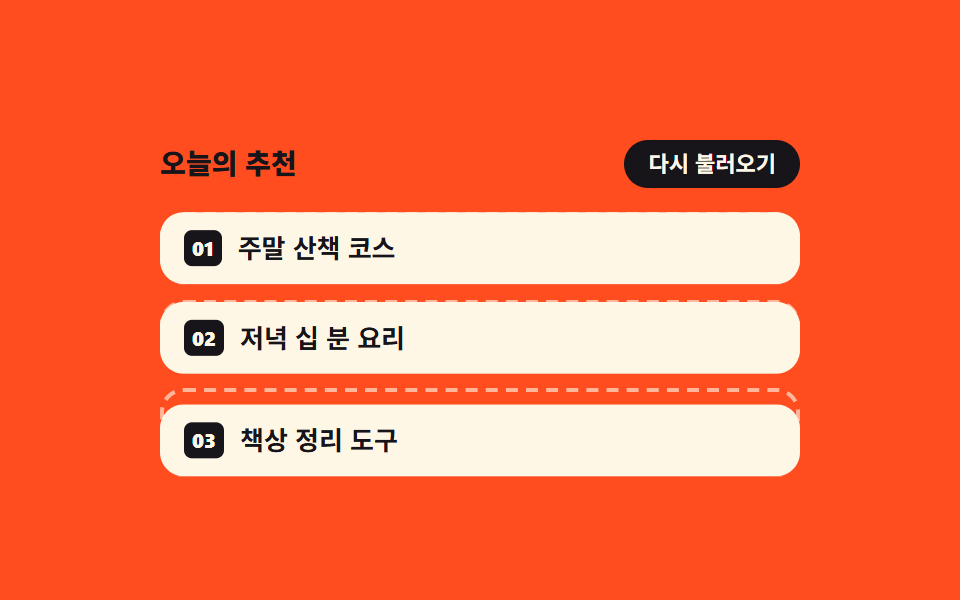
<main class="stage">
  <section class="of is-demo" id="of" aria-label="목록 채우기 미리보기">
    <header class="of__bar">
      <p class="of__title">오늘의 추천</p>
      <button class="of__again" type="button" id="of-again">다시 불러오기</button>
    </header>
    <ul class="of__list" id="of-list" aria-busy="false">
      <li class="of__slot">
        <span class="of__ghost" aria-hidden="true"></span>
        <article class="of__card"><span class="of__no">01</span><span class="of__name">주말 산책 코스</span></article>
      </li>
      <li class="of__slot">
        <span class="of__ghost" aria-hidden="true"></span>
        <article class="of__card"><span class="of__no">02</span><span class="of__name">저녁 십 분 요리</span></article>
      </li>
      <li class="of__slot">
        <span class="of__ghost" aria-hidden="true"></span>
        <article class="of__card"><span class="of__no">03</span><span class="of__name">책상 정리 도구</span></article>
      </li>
    </ul>
  </section>
</main>
@use "../../../../site/static/demo-tokens" as *;
// 점선 테두리 빈 칸이 먼저 자리를 잡고, 그 자리에 카드가 한 칸씩 늦게 들어찬다
$duration: $dur-base;
$easing: $ease-spring;
$color: $subject-cream;
@include stage($stage-orange);
.of {
box-sizing: border-box;
display: grid;
gap: $sp-3;
width: min(320px, 88vw);
}
.of * { box-sizing: border-box; }
.of__bar {
display: flex;
align-items: center;
justify-content: space-between;
gap: $sp-2;
}
.of__title {
margin: 0;
color: $subject-ink; // 오렌지 무대 위 크림 글자는 3.1:1 로 모자라 먹색으로 쓴다 (5.5:1)
font-size: 14px;
font-weight: 800;
line-height: 1.2;
}
.of__again {
margin: 0;
padding: $sp-1 $sp-3;
border: 0;
border-radius: $r-pill;
background: $subject-ink;
color: $color;
font-family: inherit;
font-size: 11px;
font-weight: 700;
line-height: 1.4;
cursor: pointer;
}
.of__again:focus-visible { outline: 2px solid $color; outline-offset: 2px; }
.of__list {
display: grid;
gap: $sp-2;
margin: 0;
padding: 0;
list-style: none;
}
// 빈 칸과 카드를 같은 칸에 겹쳐 둔다 — 칸 높이가 먼저 정해지므로 카드가 들어와도 아래가 밀리지 않는다
.of__slot {
display: grid;
min-height: 36px;
}
// 반짝이는 회색 막대(스켈레톤)가 아니라 점선 테두리만. 그라디언트를 쓰지 않는다
.of__ghost {
grid-area: 1 / 1;
border: 2px dashed rgba(255, 247, 230, .62);
border-radius: $r-control;
}
.of__card {
grid-area: 1 / 1;
display: flex;
align-items: center;
gap: $sp-2;
padding: 0 $sp-3;
border-radius: $r-control;
background: $color;
color: $subject-ink;
transform: translateY(0);
transition: transform $duration $easing;
}
.of__no {
padding: $sp-1;
border-radius: $r-xs;
background: $subject-ink;
color: $color;
font-size: 10px;
font-weight: 800;
line-height: 1;
}
.of__name {
font-size: 13px;
font-weight: 700;
line-height: 1.2;
}
// 정적(손으로 조작) 경로 — 기본은 다 채워진 상태. 다시 불러오면 빈 칸으로 돌아갔다 한 칸씩 들어찬다
.of__list.is-loading .of__card {
transform: translateY(10px);
opacity: 0;
}
.of__list.is-loading .of__slot.is-in .of__card {
transform: translateY(0);
opacity: 1;
}
// ── 격자 미리보기 전용 2초 루프 ──
// 보임은 steps(1, end) 컷(반투명 유령 금지), 자리 잡기는 translateY 가 프레임을 채운다.
// 두 애니메이션을 쉼표로 나눠 걸어야 한 요소에서 컷과 이징을 같이 쓸 수 있다
@keyframes of-show {
0% { opacity: 0; }
8% { opacity: 1; }
68% { opacity: 0; }
100% { opacity: 0; }
}
@keyframes of-rise {
0%, 8% { transform: translateY(10px); }
30%, 68% { transform: translateY(0); }
69%, 100% { transform: translateY(10px); }
}
// animation 단축은 delay 를 0s 로 리셋하므로 낱개 속성으로 쓴다.
// backwards 가 없으면 지연 구간에 작성 상태(다 채워진 모습)가 0프레임에 번쩍인다
.of.is-demo {
.of__card {
animation-name: of-show, of-rise;
animation-duration: $dur-loop, $dur-loop;
animation-timing-function: steps(1, end), $easing;
animation-iteration-count: infinite, infinite;
animation-fill-mode: backwards, backwards;
animation-delay: 0ms, 0ms;
}
.of__slot:nth-child(2) .of__card { animation-delay: 160ms, 160ms; }
.of__slot:nth-child(3) .of__card { animation-delay: 320ms, 320ms; }
}
@media (max-width: 340px) {
.of { gap: $sp-2; }
.of__title { font-size: 12px; }
.of__again { font-size: 10px; }
.of__list { gap: $sp-1; }
.of__slot { min-height: 32px; }
.of__card { padding: 0 $sp-2; }
.of__name { font-size: 12px; }
}
@media (prefers-reduced-motion: reduce) {
// 움직임만 끄고 "다 채워진" 결과 상태는 남긴다
.of.is-demo .of__card {
animation: none !important;
transition: none !important;
transform: none !important;
opacity: 1 !important;
}
}html, body {
margin: 0;
overflow: hidden;
}
.stage {
box-sizing: border-box;
min-height: 100vh;
display: grid;
place-items: center;
margin: 0;
background: #ff4d1f;
font-family: -apple-system, "Segoe UI", "Noto Sans KR", sans-serif;
padding: clamp(8px, 4vw, 24px);
}
.of {
box-sizing: border-box;
display: grid;
gap: 12px;
width: min(320px, 88vw);
}
.of * {
box-sizing: border-box;
}
.of__bar {
display: flex;
align-items: center;
justify-content: space-between;
gap: 8px;
}
.of__title {
margin: 0;
color: #17141a;
font-size: 14px;
font-weight: 800;
line-height: 1.2;
}
.of__again {
margin: 0;
padding: 4px 12px;
border: 0;
border-radius: 999px;
background: #17141a;
color: #fff7e6;
font-family: inherit;
font-size: 11px;
font-weight: 700;
line-height: 1.4;
cursor: pointer;
}
.of__again:focus-visible {
outline: 2px solid #fff7e6;
outline-offset: 2px;
}
.of__list {
display: grid;
gap: 8px;
margin: 0;
padding: 0;
list-style: none;
}
.of__slot {
display: grid;
min-height: 36px;
}
.of__ghost {
grid-area: 1/1;
border: 2px dashed rgba(255, 247, 230, 0.62);
border-radius: 12px;
}
.of__card {
grid-area: 1/1;
display: flex;
align-items: center;
gap: 8px;
padding: 0 12px;
border-radius: 12px;
background: #fff7e6;
color: #17141a;
transform: translateY(0);
transition: transform 300ms cubic-bezier(0.2, 0.8, 0.2, 1);
}
.of__no {
padding: 4px;
border-radius: 4px;
background: #17141a;
color: #fff7e6;
font-size: 10px;
font-weight: 800;
line-height: 1;
}
.of__name {
font-size: 13px;
font-weight: 700;
line-height: 1.2;
}
.of__list.is-loading .of__card {
transform: translateY(10px);
opacity: 0;
}
.of__list.is-loading .of__slot.is-in .of__card {
transform: translateY(0);
opacity: 1;
}
@keyframes of-show {
0% {
opacity: 0;
}
8% {
opacity: 1;
}
68% {
opacity: 0;
}
100% {
opacity: 0;
}
}
@keyframes of-rise {
0%, 8% {
transform: translateY(10px);
}
30%, 68% {
transform: translateY(0);
}
69%, 100% {
transform: translateY(10px);
}
}
.of.is-demo .of__card {
animation-name: of-show, of-rise;
animation-duration: 2s, 2s;
animation-timing-function: steps(1, end), cubic-bezier(0.2, 0.8, 0.2, 1);
animation-iteration-count: infinite, infinite;
animation-fill-mode: backwards, backwards;
animation-delay: 0ms, 0ms;
}
.of.is-demo .of__slot:nth-child(2) .of__card {
animation-delay: 160ms, 160ms;
}
.of.is-demo .of__slot:nth-child(3) .of__card {
animation-delay: 320ms, 320ms;
}
@media (max-width: 340px) {
.of {
gap: 8px;
}
.of__title {
font-size: 12px;
}
.of__again {
font-size: 10px;
}
.of__list {
gap: 4px;
}
.of__slot {
min-height: 32px;
}
.of__card {
padding: 0 8px;
}
.of__name {
font-size: 12px;
}
}
@media (prefers-reduced-motion: reduce) {
.of.is-demo .of__card {
animation: none !important;
transition: none !important;
transform: none !important;
opacity: 1 !important;
}
}// 빈 칸은 늘 자리에 있고, 카드만 한 칸씩 늦게 들어찬다. 다 차면 aria-busy 를 false 로 내린다.
var of = document.getElementById('of');
var ofList = document.getElementById('of-list');
var ofAgain = document.getElementById('of-again');
var ofSlots = ofList.querySelectorAll('.of__slot');
var ofTimers = [];
function ofReload() {
of.classList.remove('is-demo');
for (var i = 0; i < ofTimers.length; i++) clearTimeout(ofTimers[i]);
ofTimers = [];
ofList.classList.add('is-loading');
ofList.setAttribute('aria-busy', 'true');
for (var s = 0; s < ofSlots.length; s++) ofSlots[s].classList.remove('is-in');
ofSlots.forEach(function (slot, k) {
ofTimers.push(setTimeout(function () {
slot.classList.add('is-in');
if (k !== ofSlots.length - 1) return;
ofList.setAttribute('aria-busy', 'false');
ofList.classList.remove('is-loading');
}, 240 * (k + 1)));
});
}
ofAgain.addEventListener('click', ofReload);import { useEffect, useRef, useState } from "react";
import type { CSSProperties } from "react";
import styles from "./OutlineFillCards.module.scss";
export type OutlineFillCardsProps = {
/** 목록 항목 — 점선 빈 칸이 먼저 자리를 잡고 한 칸씩 늦게 채워진다 */
items?: string[];
title?: string;
reloadLabel?: string;
groupLabel?: string;
/** 격자 미리보기용 2초 자동 루프. 사람이 손대면 꺼진다 */
demo?: boolean;
duration?: number;
easing?: string;
color?: string;
};
type Vars = CSSProperties & { "--duration"?: string; "--easing"?: string; "--color"?: string };
// ambient 가 얇아 useRef 가 T | null 을 돌려준다 — 필요한 꼴만 로컬 타입으로 단언
type Box<T> = { current: T };
const DEFAULT_ITEMS = ["A weekend walking route", "Ten minute dinners", "Desk tidying tools"];
const GAP = 240;
export default function OutlineFillCards({
items = DEFAULT_ITEMS,
title = "Today's picks",
reloadLabel = "Reload",
groupLabel = "List fill-in preview",
demo = true,
duration = 300,
easing = "cubic-bezier(.2,.8,.2,1)",
color = "#fff7e6",
}: OutlineFillCardsProps) {
const [live, setLive] = useState(demo);
const [loading, setLoading] = useState(false);
const [filled, setFilled] = useState(items.length);
const timers = useRef<number[]>([]) as Box<number[]>;
useEffect(() => () => {
for (const t of timers.current) clearTimeout(t);
}, []);
function reload() {
setLive(false);
for (const t of timers.current) clearTimeout(t);
setLoading(true);
setFilled(0);
const next: number[] = [];
items.forEach((_, k) => {
next.push(window.setTimeout(() => {
setFilled(k + 1);
if (k !== items.length - 1) return;
// 다 차면 기다림이 끝난다
setLoading(false);
}, GAP * (k + 1)));
});
timers.current = next;
}
const vars: Vars = { "--duration": `${duration}ms`, "--easing": easing, "--color": color };
const cls = [styles.of, live ? styles.isDemo : ""].filter(Boolean).join(" ");
return (
<section className={cls} style={vars} aria-label={groupLabel}>
<header className={styles.bar}>
<p className={styles.title}>{title}</p>
<button className={styles.again} type="button" onClick={reload}>{reloadLabel}</button>
</header>
<ul className={styles.list} aria-busy={loading}>
{items.map((name, i) => (
<li className={styles.slot} key={name}>
<span className={styles.ghost} aria-hidden="true" />
<article className={[styles.card, loading && i >= filled ? styles.isOut : ""].filter(Boolean).join(" ")}>
<span className={styles.no}>{String(i + 1).padStart(2, "0")}</span>
<span className={styles.name}>{name}</span>
</article>
</li>
))}
</ul>
</section>
);
}03 빈 테두리 자리가 카드로 하나씩 채워지는 목록 — 측정 누적면적 29.383% · 움직인 프레임 12/23GODRICH 원작 · zip 에 SCSS·React 포함 · 페이지 로딩 애니메이션 9종 — 화면이 바뀌는 동안
이 데모가 속한 글
 페이지 로딩 애니메이션 9종 — 화면이 바뀌는 동안페이지 로딩 애니메이션은 화면이 다음 화면으로 바뀌는 짧은 동안 기다림을 눈에 보이게 만드는 장치입니다. 여기 아홉 개는 한가운데서 빙글 도는 스피너가 아니라 진행 바·색 띠·자리표시·낙관적 이동처럼 화면을 통째로 이 글의 데모 전부 보기