08스크롤 속도에 기우는 목록
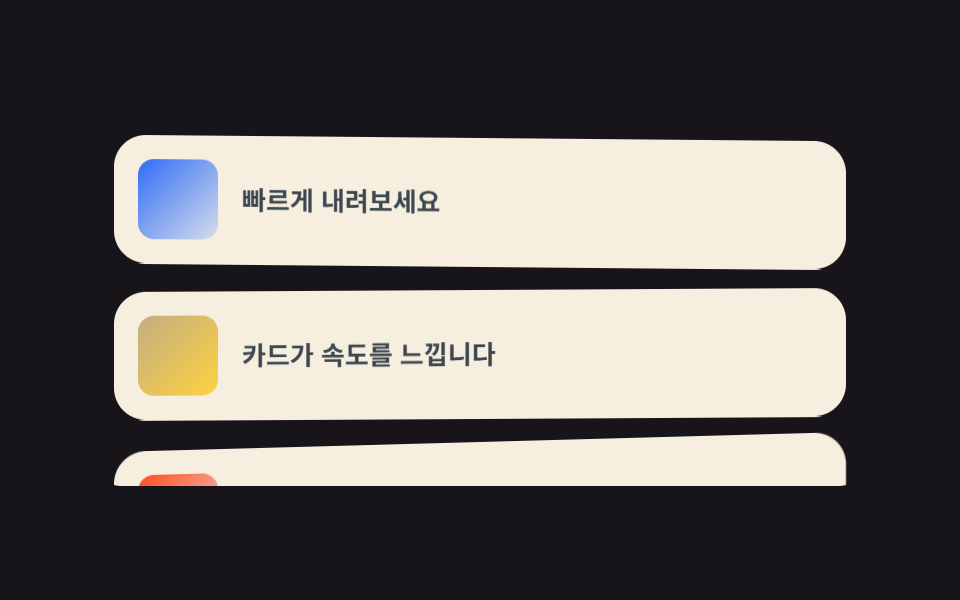
스크롤을 빨리 하면 목록 카드가 그 속도만큼 옆으로 기울었다가, 멈추면 제자리로 돌아옵니다.
쓰임갤러리 피드, 뉴스·매거진 목록
JS 10줄--vel 변수skewY
<main class="stage">
  <div class="vs is-demo">
    <div class="vs__scroll">
      <div class="vs__row"><span class="vs__thumb vs__thumb--1"></span><span class="vs__t">빠르게 내려보세요</span></div>
      <div class="vs__row"><span class="vs__thumb vs__thumb--2"></span><span class="vs__t">카드가 속도를 느낍니다</span></div>
      <div class="vs__row"><span class="vs__thumb vs__thumb--3"></span><span class="vs__t">멈추면 제자리</span></div>
      <div class="vs__row"><span class="vs__thumb vs__thumb--4"></span><span class="vs__t">다시 올려도 돼요</span></div>
    </div>
  </div>
</main>
@use "../../../../site/static/demo-tokens" as *;
// ── 변수 3개 ──────────────────────────────────────────
$duration: $dur-loop;
$easing: $ease-spring;
$color: $subject-blue;
@include stage($stage-ink);
.vs {
width: min(390px, 88vw);
height: clamp(150px, 62vh, 216px);
border-radius: $r-card;
overflow: hidden;
box-shadow: $shadow-raised;
}
.vs__scroll {
height: 100%;
overflow-y: auto;
padding: $sp-3;
box-sizing: border-box;
scrollbar-width: none;
&::-webkit-scrollbar { display: none; }
}
.vs__row {
display: flex;
align-items: center;
gap: $sp-3;
margin-bottom: $sp-3;
padding: $sp-3;
border-radius: $r-card;
background: rgba(255, 247, 230, .96);
box-sizing: border-box;
// ── 실제 동작: JS 가 --vel(스크롤 속도)을 넣으면 skewY 가 그 값을 받아 기울고,
// 속도가 0 으로 줄면 같은 계산식이 저절로 제자리로 돌려놓는다 ──
transform: skewY(calc(var(--vel, 0) * -0.18deg));
&:last-child { margin-bottom: 0; }
}
.vs__thumb {
flex: 0 0 auto;
width: 40px;
height: 40px;
border-radius: $r-sm;
}
.vs__thumb--1 { background: linear-gradient(135deg, $color, #d6ddeb); }
.vs__thumb--2 { background: linear-gradient(135deg, #c2ae82, $stage-yellow); }
.vs__thumb--3 { background: linear-gradient(135deg, $stage-orange, #ebdbd6); }
.vs__thumb--4 { background: linear-gradient(135deg, #37b786, #d6ebe2); }
.vs__t {
color: #3c4750;
font: 700 13px/1.4 -apple-system, "Segoe UI", "Noto Sans KR", sans-serif;
}
// 데모 루프: 실제 스크롤 대신 카드가 왕복으로 기울었다 펴지는 걸 흉내(캡처용)
.vs.is-demo .vs__row { animation: vs-skew $duration $easing infinite; }
.vs.is-demo .vs__row:nth-child(2) { animation-delay: 40ms; }
.vs.is-demo .vs__row:nth-child(3) { animation-delay: 80ms; }
.vs.is-demo .vs__row:nth-child(4) { animation-delay: 120ms; }
@keyframes vs-skew {
0%, 100% { transform: skewY(0deg); }
30% { transform: skewY(-4.4deg); }
62% { transform: skewY(2.2deg); }
}
@media (prefers-reduced-motion: reduce) {
.vs.is-demo .vs__row { animation: none !important; }
.vs__row { transform: none !important; } // 움직임 잠금: 속도 반응도 함께 끈다
.vs__scroll { scroll-behavior: auto; }
}html, body {
margin: 0;
overflow: hidden;
}
.stage {
box-sizing: border-box;
min-height: 100vh;
display: grid;
place-items: center;
margin: 0;
background: #17141a;
font-family: -apple-system, "Segoe UI", "Noto Sans KR", sans-serif;
padding: clamp(8px, 4vw, 24px);
}
.vs {
width: min(390px, 88vw);
height: clamp(150px, 62vh, 216px);
border-radius: 16px;
overflow: hidden;
box-shadow: 0 14px 24px rgba(23, 20, 26, 0.32);
}
.vs__scroll {
height: 100%;
overflow-y: auto;
padding: 12px;
box-sizing: border-box;
scrollbar-width: none;
}
.vs__scroll::-webkit-scrollbar {
display: none;
}
.vs__row {
display: flex;
align-items: center;
gap: 12px;
margin-bottom: 12px;
padding: 12px;
border-radius: 16px;
background: rgba(255, 247, 230, 0.96);
box-sizing: border-box;
transform: skewY(calc(var(--vel, 0) * -0.18deg));
}
.vs__row:last-child {
margin-bottom: 0;
}
.vs__thumb {
flex: 0 0 auto;
width: 40px;
height: 40px;
border-radius: 8px;
}
.vs__thumb--1 {
background: linear-gradient(135deg, #2f6df6, #d6ddeb);
}
.vs__thumb--2 {
background: linear-gradient(135deg, #c2ae82, #ffd23f);
}
.vs__thumb--3 {
background: linear-gradient(135deg, #ff4d1f, #ebdbd6);
}
.vs__thumb--4 {
background: linear-gradient(135deg, #37b786, #d6ebe2);
}
.vs__t {
color: #3c4750;
font: 700 13px/1.4 -apple-system, "Segoe UI", "Noto Sans KR", sans-serif;
}
.vs.is-demo .vs__row {
animation: vs-skew 2s cubic-bezier(0.2, 0.8, 0.2, 1) infinite;
}
.vs.is-demo .vs__row:nth-child(2) {
animation-delay: 40ms;
}
.vs.is-demo .vs__row:nth-child(3) {
animation-delay: 80ms;
}
.vs.is-demo .vs__row:nth-child(4) {
animation-delay: 120ms;
}
@keyframes vs-skew {
0%, 100% {
transform: skewY(0deg);
}
30% {
transform: skewY(-4.4deg);
}
62% {
transform: skewY(2.2deg);
}
}
@media (prefers-reduced-motion: reduce) {
.vs.is-demo .vs__row {
animation: none !important;
}
.vs__row {
transform: none !important;
}
.vs__scroll {
scroll-behavior: auto;
}
}// 스크롤 속도를 재서 --vel 변수에 넣는다. 나머지는 CSS 계산(calc)이 한다.
// 미리보기(.is-demo) 중에는 CSS 키프레임이 움직임을 맡는다.
(function () {
var box = document.querySelector('.vs__scroll');
var last = box.scrollTop, vel = 0;
box.addEventListener('scroll', function () {
document.querySelector('.vs').classList.remove('is-demo');
vel = Math.max(-24, Math.min(24, box.scrollTop - last));
last = box.scrollTop;
});
(function decay() {
vel *= 0.86;
box.style.setProperty('--vel', vel.toFixed(2));
requestAnimationFrame(decay);
})();
})();import { useEffect, useRef } from "react";
import type { CSSProperties } from "react";
import styles from "./VelocitySkew.module.scss";
export type VelocitySkewProps = {
duration?: number;
easing?: string;
color?: string;
rows?: string[];
};
type Vars = CSSProperties & { "--duration"?: string; "--easing"?: string; "--color"?: string };
export default function VelocitySkew({
duration = 300,
easing = "cubic-bezier(.2,.8,.2,1)",
color = "#2f6df6",
rows = ["빠르게 내려보세요", "카드가 속도를 느낍니다", "멈추면 제자리", "다시 올려도 돼요"],
}: VelocitySkewProps) {
const boxRef = useRef<HTMLDivElement>(null);
const vars: Vars = { "--duration": `${duration}ms`, "--easing": easing, "--color": color };
// 스크롤 속도를 재서 --vel 에 넣는다. 나머지는 CSS calc(skewY) 가 한다
useEffect(() => {
const box = boxRef.current;
if (!box) return;
let last = box.scrollTop;
let vel = 0;
let raf = 0;
const onScroll = () => {
vel = Math.max(-24, Math.min(24, box.scrollTop - last));
last = box.scrollTop;
};
const decay = () => {
vel *= 0.86;
box.style.setProperty("--vel", vel.toFixed(2));
raf = requestAnimationFrame(decay);
};
box.addEventListener("scroll", onScroll, { passive: true });
raf = requestAnimationFrame(decay);
return () => {
box.removeEventListener("scroll", onScroll);
cancelAnimationFrame(raf);
};
}, []);
return (
<div className={styles.vs} style={vars}>
<div ref={boxRef} className={styles.scroll}>
{rows.map((t, i) => (
<div key={i} className={styles.row}>
<span className={`${styles.thumb} ${styles["thumb" + ((i % 4) + 1)]}`} />
<span className={styles.t}>{t}</span>
</div>
))}
</div>
</div>
);
}08 스크롤 속도에 기우는 목록 — 측정 누적면적 18.627% · 움직인 프레임 23/23GODRICH 원작 · zip 에 SCSS·React 포함 · 홈페이지 스크롤 효과 9가지 — 애플 페이지처럼 되는 CSS
이 데모가 속한 글
 홈페이지 스크롤 효과 9가지 — 애플 페이지처럼 되는 CSS홈페이지 스크롤 효과는 페이지를 내리는 손가락 하나에 화면이 반응하게 만드는 장치로, 애플 제품 페이지가 이 분야의 기준입니다. 자바스크립트 라이브러리 하나도 없이 CSS만으로 가로 패널·고정 장면 교체·단어 채움· 이 글의 데모 전부 보기