02언어 고르는 첫 화면
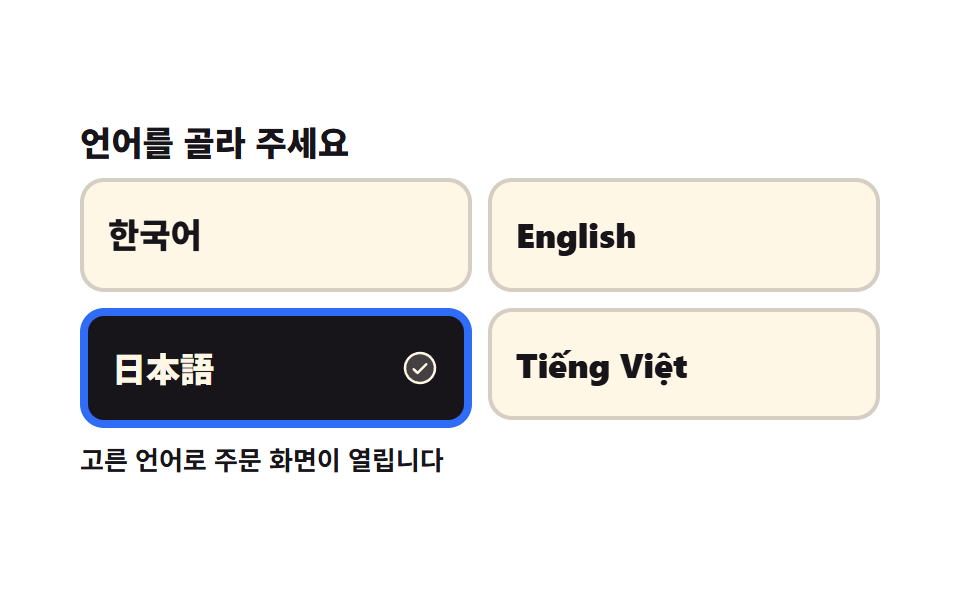
네 언어 버튼이 차례로 떠오르고, 고른 칸에만 굵은 테두리와 체크가 한 프레임에 붙습니다. 고른 언어는 아래 안내 문장에 바로 반영됩니다.
쓰임관광지 무인 주문기의 첫 화면, 공항 셀프 체크인 단말
aria-pressedanimation-fill-modetranslateY
<main class="stage">
<div class="kl is-demo" id="kl">
  <p class="kl__head">언어를 골라 주세요</p>
  <div class="kl__grid" role="group" aria-label="화면 언어">
    <!-- _의도적한국어: 언어 이름은 그 언어 표기가 정석이라 번역하지 않는다. 문구 사전이 걷어 가지 않도록 data-name 에 두고 CSS content 로 그린다 -->
    <div class="kl__cell kl__cell--1">
      <button type="button" class="kl__opt" data-lang="ko" aria-pressed="true">
        <span class="kl__name" data-name="한국어"></span>
        <svg xmlns="http://www.w3.org/2000/svg" viewBox="0 0 256 256" fill="currentColor" class="kl__check" aria-hidden="true"><path d="M224,128a96,96,0,1,1-96-96A96,96,0,0,1,224,128Z" opacity="0.2"/><path d="M173.66,98.34a8,8,0,0,1,0,11.32l-56,56a8,8,0,0,1-11.32,0l-24-24a8,8,0,0,1,11.32-11.32L112,148.69l50.34-50.35A8,8,0,0,1,173.66,98.34ZM232,128A104,104,0,1,1,128,24,104.11,104.11,0,0,1,232,128Zm-16,0a88,88,0,1,0-88,88A88.1,88.1,0,0,0,216,128Z"/></svg>
      </button>
    </div>
    <div class="kl__cell kl__cell--2">
      <button type="button" class="kl__opt" data-lang="en" aria-pressed="false">
        <span class="kl__name" data-name="English"></span>
        <svg xmlns="http://www.w3.org/2000/svg" viewBox="0 0 256 256" fill="currentColor" class="kl__check" aria-hidden="true"><path d="M224,128a96,96,0,1,1-96-96A96,96,0,0,1,224,128Z" opacity="0.2"/><path d="M173.66,98.34a8,8,0,0,1,0,11.32l-56,56a8,8,0,0,1-11.32,0l-24-24a8,8,0,0,1,11.32-11.32L112,148.69l50.34-50.35A8,8,0,0,1,173.66,98.34ZM232,128A104,104,0,1,1,128,24,104.11,104.11,0,0,1,232,128Zm-16,0a88,88,0,1,0-88,88A88.1,88.1,0,0,0,216,128Z"/></svg>
      </button>
    </div>
    <div class="kl__cell kl__cell--3">
      <button type="button" class="kl__opt" data-lang="ja" aria-pressed="false">
        <span class="kl__name" data-name="日本語"></span>
        <svg xmlns="http://www.w3.org/2000/svg" viewBox="0 0 256 256" fill="currentColor" class="kl__check" aria-hidden="true"><path d="M224,128a96,96,0,1,1-96-96A96,96,0,0,1,224,128Z" opacity="0.2"/><path d="M173.66,98.34a8,8,0,0,1,0,11.32l-56,56a8,8,0,0,1-11.32,0l-24-24a8,8,0,0,1,11.32-11.32L112,148.69l50.34-50.35A8,8,0,0,1,173.66,98.34ZM232,128A104,104,0,1,1,128,24,104.11,104.11,0,0,1,232,128Zm-16,0a88,88,0,1,0-88,88A88.1,88.1,0,0,0,216,128Z"/></svg>
      </button>
    </div>
    <div class="kl__cell kl__cell--4">
      <button type="button" class="kl__opt" data-lang="vi" aria-pressed="false">
        <span class="kl__name" data-name="Tiếng Việt"></span>
        <svg xmlns="http://www.w3.org/2000/svg" viewBox="0 0 256 256" fill="currentColor" class="kl__check" aria-hidden="true"><path d="M224,128a96,96,0,1,1-96-96A96,96,0,0,1,224,128Z" opacity="0.2"/><path d="M173.66,98.34a8,8,0,0,1,0,11.32l-56,56a8,8,0,0,1-11.32,0l-24-24a8,8,0,0,1,11.32-11.32L112,148.69l50.34-50.35A8,8,0,0,1,173.66,98.34ZM232,128A104,104,0,1,1,128,24,104.11,104.11,0,0,1,232,128Zm-16,0a88,88,0,1,0-88,88A88.1,88.1,0,0,0,216,128Z"/></svg>
      </button>
    </div>
  </div>
  <p class="kl__hint" id="klHint">고른 언어로 주문 화면이 열립니다</p>
</div>
</main>@use "../../../../site/static/demo-tokens" as *;
// 언어 고르는 첫 화면 — 큰 칸 네 개로 언어를 고르고, 고른 칸에만 체크가 붙는다.
// 선택 표시(굵은 테두리 · 먹 배경 · 체크 아이콘)는 전부 같은 steps(1, end) 시각표 위에 있다.
// opacity 로 서서히 교차하면 24장 표본의 중간 프레임이 두 칸이 반쯤 켜진 유령이 되고 그 장이 poster 로 뽑힌다.
// 컷만 있으면 움직인 프레임이 두세 장으로 떨어지므로, 네 칸이 차례로 떠오르는 translateY 를
// 같은 2초 시계에 계속 돌려 칸을 채운다.
$duration: $dur-loop;
$easing: $ease-spring;
$color: $subject-blue;
@include stage($stage-paper);
.kl { width: 100%; max-width: 400px; }
.kl__head {
margin: 0 0 $sp-2; font-weight: 800; font-size: clamp(13px, 3.6vw, 17px);
line-height: 1.2; color: $subject-ink;
}
.kl__grid { display: grid; grid-template-columns: repeat(2, 1fr); gap: $sp-2; }
// 칸(떠오름)과 버튼(선택 컷)을 나눠 둔다 — 둘의 animation-delay 가 다르기 때문이다
.kl__cell { display: block; }
// 버튼 격자는 width:100% 를 못 박는다 — 버튼은 fit-content 라 1fr 칸이 내용 폭으로 접힌다
.kl__opt {
box-sizing: border-box; width: 100%;
display: flex; align-items: center; justify-content: space-between; gap: $sp-2;
padding: $sp-4 $sp-3; cursor: pointer;
border: 2px solid rgba(23, 20, 26, .18); border-radius: $r-control;
background: $subject-cream; color: $subject-ink;
font-family: inherit; font-weight: 800; font-size: clamp(12px, 3.6vw, 17px);
line-height: 1.2; text-align: left;
}
.kl__opt:focus-visible { outline: 3px solid $color; outline-offset: 2px; }
// 언어 이름은 번역하지 않는 값이라 data-name 에 두고 여기서 그린다 (index.html 의 _의도적한국어 주석 참고)
.kl__name::after { content: attr(data-name); }
// 체크는 안 고른 칸에서도 자리를 차지한다 — 고를 때 글자가 밀리지 않는다
.kl__check {
width: clamp(14px, 4.4vw, 20px); height: clamp(14px, 4.4vw, 20px);
flex: 0 0 auto; opacity: 0;
}
// 고른 칸 — 정적 경로. 손이 닿으면 JS 가 aria-pressed 를 옮기고 이 규칙이 그대로 그린다
.kl__opt[aria-pressed="true"] {
border-width: 4px; border-color: $color;
background: $subject-ink; color: $subject-cream;
}
.kl__opt[aria-pressed="true"] .kl__check { opacity: 1; }
.kl__hint {
margin: $sp-2 0 0; font-weight: 700; font-size: clamp(11px, 3vw, 13px);
line-height: 1.3; color: $subject-ink;
}
// ── 미리보기 루프 ────────────────────────────────────────────────
// 네 칸이 2초를 4등분해 차례로 켜진다. 테두리·배경·글자색·체크가 같은 시각표라 한 프레임에 갈린다.
.kl.is-demo .kl__opt {
animation-name: klSel; animation-duration: $duration;
animation-timing-function: steps(1, end); animation-iteration-count: infinite;
}
.kl.is-demo .kl__check {
animation-name: klCheck; animation-duration: $duration;
animation-timing-function: steps(1, end); animation-iteration-count: infinite;
}
.kl.is-demo .kl__cell--2 .kl__opt,
.kl.is-demo .kl__cell--2 .kl__check { animation-delay: calc(#{$duration} / -4 * 3); }
.kl.is-demo .kl__cell--3 .kl__opt,
.kl.is-demo .kl__cell--3 .kl__check { animation-delay: calc(#{$duration} / -2); }
.kl.is-demo .kl__cell--4 .kl__opt,
.kl.is-demo .kl__cell--4 .kl__check { animation-delay: calc(#{$duration} / -4); }
@keyframes klSel {
0% { border-width: 4px; border-color: $color; background: $subject-ink; color: $subject-cream; }
25%, 100% { border-width: 2px; border-color: rgba(23, 20, 26, .18); background: $subject-cream; color: $subject-ink; }
}
@keyframes klCheck {
0% { opacity: 1; }
25%, 100% { opacity: 0; }
}
// 떠오름 — 컷 옆에 붙이는 작은 움직임. 반투명이 안 생기는 transform 이라 유령 프레임을 만들지 않는다.
// 지연이 걸린 루프라 fill-mode: backwards 가 없으면 0프레임에 완성 상태가 한 번 번쩍인다.
.kl.is-demo .kl__cell {
animation-name: klRise; animation-duration: $duration;
animation-timing-function: $easing; animation-iteration-count: infinite;
animation-fill-mode: backwards;
}
.kl.is-demo .kl__cell--2 { animation-delay: 80ms; }
.kl.is-demo .kl__cell--3 { animation-delay: 160ms; }
.kl.is-demo .kl__cell--4 { animation-delay: 240ms; }
@keyframes klRise {
0% { transform: translateY(8px); }
22%, 74% { transform: translateY(0); }
88%, 100% { transform: translateY(8px); }
}
@media (max-width: 340px) {
.kl__opt { padding: $sp-2; }
.kl__hint { margin-top: $sp-1; }
}
@media (prefers-reduced-motion: reduce) {
.kl.is-demo .kl__opt,
.kl.is-demo .kl__check,
.kl.is-demo .kl__cell { animation: none !important; }
// 움직임 없이 첫 칸이 고른 상태로 서 있게 값을 못 박는다
.kl.is-demo .kl__cell { transform: translateY(0) !important; }
}html, body {
margin: 0;
overflow: hidden;
}
.stage {
box-sizing: border-box;
min-height: 100vh;
display: grid;
place-items: center;
margin: 0;
background: #ffffff;
font-family: -apple-system, "Segoe UI", "Noto Sans KR", sans-serif;
padding: clamp(8px, 4vw, 24px);
}
.kl {
width: 100%;
max-width: 400px;
}
.kl__head {
margin: 0 0 8px;
font-weight: 800;
font-size: clamp(13px, 3.6vw, 17px);
line-height: 1.2;
color: #17141a;
}
.kl__grid {
display: grid;
grid-template-columns: repeat(2, 1fr);
gap: 8px;
}
.kl__cell {
display: block;
}
.kl__opt {
box-sizing: border-box;
width: 100%;
display: flex;
align-items: center;
justify-content: space-between;
gap: 8px;
padding: 16px 12px;
cursor: pointer;
border: 2px solid rgba(23, 20, 26, 0.18);
border-radius: 12px;
background: #fff7e6;
color: #17141a;
font-family: inherit;
font-weight: 800;
font-size: clamp(12px, 3.6vw, 17px);
line-height: 1.2;
text-align: left;
}
.kl__opt:focus-visible {
outline: 3px solid #2f6df6;
outline-offset: 2px;
}
.kl__name::after {
content: attr(data-name);
}
.kl__check {
width: clamp(14px, 4.4vw, 20px);
height: clamp(14px, 4.4vw, 20px);
flex: 0 0 auto;
opacity: 0;
}
.kl__opt[aria-pressed=true] {
border-width: 4px;
border-color: #2f6df6;
background: #17141a;
color: #fff7e6;
}
.kl__opt[aria-pressed=true] .kl__check {
opacity: 1;
}
.kl__hint {
margin: 8px 0 0;
font-weight: 700;
font-size: clamp(11px, 3vw, 13px);
line-height: 1.3;
color: #17141a;
}
.kl.is-demo .kl__opt {
animation-name: klSel;
animation-duration: 2s;
animation-timing-function: steps(1, end);
animation-iteration-count: infinite;
}
.kl.is-demo .kl__check {
animation-name: klCheck;
animation-duration: 2s;
animation-timing-function: steps(1, end);
animation-iteration-count: infinite;
}
.kl.is-demo .kl__cell--2 .kl__opt,
.kl.is-demo .kl__cell--2 .kl__check {
animation-delay: calc(2s / -4 * 3);
}
.kl.is-demo .kl__cell--3 .kl__opt,
.kl.is-demo .kl__cell--3 .kl__check {
animation-delay: calc(2s / -2);
}
.kl.is-demo .kl__cell--4 .kl__opt,
.kl.is-demo .kl__cell--4 .kl__check {
animation-delay: calc(2s / -4);
}
@keyframes klSel {
0% {
border-width: 4px;
border-color: #2f6df6;
background: #17141a;
color: #fff7e6;
}
25%, 100% {
border-width: 2px;
border-color: rgba(23, 20, 26, 0.18);
background: #fff7e6;
color: #17141a;
}
}
@keyframes klCheck {
0% {
opacity: 1;
}
25%, 100% {
opacity: 0;
}
}
.kl.is-demo .kl__cell {
animation-name: klRise;
animation-duration: 2s;
animation-timing-function: cubic-bezier(0.2, 0.8, 0.2, 1);
animation-iteration-count: infinite;
animation-fill-mode: backwards;
}
.kl.is-demo .kl__cell--2 {
animation-delay: 80ms;
}
.kl.is-demo .kl__cell--3 {
animation-delay: 160ms;
}
.kl.is-demo .kl__cell--4 {
animation-delay: 240ms;
}
@keyframes klRise {
0% {
transform: translateY(8px);
}
22%, 74% {
transform: translateY(0);
}
88%, 100% {
transform: translateY(8px);
}
}
@media (max-width: 340px) {
.kl__opt {
padding: 8px;
}
.kl__hint {
margin-top: 4px;
}
}
@media (prefers-reduced-motion: reduce) {
.kl.is-demo .kl__opt,
.kl.is-demo .kl__check,
.kl.is-demo .kl__cell {
animation: none !important;
}
.kl.is-demo .kl__cell {
transform: translateY(0) !important;
}
}var kl = document.getElementById('kl');
var klHint = document.getElementById('klHint');
var klOpts = [].slice.call(document.querySelectorAll('.kl__opt'));
// 언어 고르기 첫 화면. 고른 칸만 aria-pressed="true" 가 되고, 아래 안내 한 줄이 **고른 언어로** 바뀐다.
// 안내문 한 벌을 상수로 둔다 — 화면 언어가 바뀌는 것을 보여 주는 게 이 데모의 주제라서,
// ko 말고 en·ja·vi 문장은 번역 대상이 아니라 그 자체가 데모 데이터다.
var LANG_HINT = {
ko: '한국어로 주문 화면이 열립니다',
en: 'The order screen opens in English',
ja: '日本語で注文画面が開きます',
vi: 'Màn hình đặt món sẽ mở bằng tiếng Việt'
};
// 미리보기 루프(.is-demo)는 CSS 키프레임이 돌린다. 손이 닿는 순간 루프를 떼고 진짜 선택으로 넘긴다.
function klPick(btn) {
kl.classList.remove('is-demo');
for (var i = 0; i < klOpts.length; i++) {
klOpts[i].setAttribute('aria-pressed', klOpts[i] === btn ? 'true' : 'false');
}
var text = LANG_HINT[btn.getAttribute('data-lang')];
if (text) { klHint.textContent = text; }
}
// <button> 은 Enter·Space 를 브라우저가 click 으로 바꿔 준다 — 키 핸들러를 따로 두지 않는다.
for (var i = 0; i < klOpts.length; i++) {
klOpts[i].addEventListener('click', function (e) { klPick(e.currentTarget); });
}// LanguageFirstChoice — vanilla 판(run/298/demo/02-kiosk-language-first-choice/index.html) 의 React 포트.
// 언어 고르기 첫 화면. 고른 칸만 aria-pressed="true" 가 되고, 아래 안내 한 줄이 **고른 언어로** 바뀐다.
// 미리보기 루프(.isDemo)는 CSS 키프레임이 돌린다. 손이 닿는 순간 루프를 떼고 진짜 선택으로 넘긴다.
// <button> 은 Enter·Space 를 브라우저가 click 으로 바꿔 준다 — 키 핸들러를 따로 두지 않는다.
// 값·수치는 vanilla 와 같다.
import { useState } from "react";
import type { CSSProperties } from "react";
import styles from "./LanguageFirstChoice.module.scss";
export type LanguageFirstChoiceProps = {
duration?: number;
easing?: string;
color?: string;
};
type Vars = CSSProperties & {
"--duration"?: string;
"--easing"?: string;
"--color"?: string;
};
type Lang = { code: string; name: string; cell: string };
// _의도적한국어: 언어 이름은 그 언어 표기가 정석이라 번역하지 않는다.
// 문구 사전이 걷어 가지 않도록 data-name 에 두고 CSS content 로 그린다.
const LANGS: Lang[] = [
{ code: "ko", name: "한국어", cell: "cell1" },
{ code: "en", name: "English", cell: "cell2" },
{ code: "ja", name: "日本語", cell: "cell3" },
{ code: "vi", name: "Tiếng Việt", cell: "cell4" },
];
// 안내문 한 벌을 상수로 둔다 — 화면 언어가 바뀌는 것을 보여 주는 게 이 데모의 주제라서,
// ko 말고 en·ja·vi 문장은 번역 대상이 아니라 그 자체가 데모 데이터다.
const LANG_HINT: { [k: string]: string } = {
ko: "한국어로 주문 화면이 열립니다",
en: "The order screen opens in English",
ja: "日本語で注文画面が開きます",
vi: "Màn hình đặt món sẽ mở bằng tiếng Việt",
};
// CSS 모듈은 규칙이 없는 이름을 undefined 로 돌려준다 — vanilla 에서 스타일이 안 붙은 이름
// (첫 칸 .kl__cell--1 은 지연이 없어 규칙이 없다)까지 구조 그대로 옮기려고 빈 값을 걸러 낸다
function cx(...names: (string | undefined)[]): string {
return names.filter(Boolean).join(" ");
}
const HEAD = "언어를 골라 주세요";
const GROUP_LABEL = "화면 언어";
const FIRST_HINT = "고른 언어로 주문 화면이 열립니다";
// 체크 아이콘 넷이 같은 그림이라 한 군데서만 그린다
function CheckMark({ cls }: { cls: string }) {
return (
<svg xmlns="http://www.w3.org/2000/svg" viewBox="0 0 256 256" fill="currentColor" className={cls} aria-hidden="true"><path d="M224,128a96,96,0,1,1-96-96A96,96,0,0,1,224,128Z" opacity="0.2"/><path d="M173.66,98.34a8,8,0,0,1,0,11.32l-56,56a8,8,0,0,1-11.32,0l-24-24a8,8,0,0,1,11.32-11.32L112,148.69l50.34-50.35A8,8,0,0,1,173.66,98.34ZM232,128A104,104,0,1,1,128,24,104.11,104.11,0,0,1,232,128Zm-16,0a88,88,0,1,0-88,88A88.1,88.1,0,0,0,216,128Z"/></svg>
);
}
export default function LanguageFirstChoice({
duration = 2000,
easing = "cubic-bezier(.2, .8, .2, 1)",
color = "#2f6df6",
}: LanguageFirstChoiceProps) {
const [picked, setPicked] = useState("ko");
const [hint, setHint] = useState(FIRST_HINT);
const [demo, setDemo] = useState(true);
const vars: Vars = { "--duration": `${duration}ms`, "--easing": easing, "--color": color };
function pick(code: string): void {
setDemo(false);
setPicked(code);
const text = LANG_HINT[code];
if (text) { setHint(text); }
}
const cls = cx(styles.root, demo ? styles.isDemo : "");
return (
<main className={styles.stage}>
<div className={cls} style={vars}>
<p className={styles.head}>{HEAD}</p>
<div className={styles.grid} role="group" aria-label={GROUP_LABEL}>
{LANGS.map((lang) => (
<div key={lang.code} className={cx(styles.cell, styles[lang.cell])}>
<button
type="button"
className={styles.opt}
data-lang={lang.code}
aria-pressed={picked === lang.code ? "true" : "false"}
onClick={() => pick(lang.code)}
>
<span className={styles.name} data-name={lang.name}></span>
<CheckMark cls={styles.check} />
</button>
</div>
))}
</div>
<p className={styles.hint}>{hint}</p>
</div>
</main>
);
}02 언어 고르는 첫 화면 — 측정 누적면적 35.997% · 움직인 프레임 15/23GODRICH 원작 · zip 에 SCSS·React 포함 · 키오스크 UI 디자인 9종 — 손가락 기준으로 키운 주문 화면
이 데모가 속한 글
 키오스크 UI 디자인 9종 — 손가락 기준으로 키운 주문 화면키오스크 UI 디자인은 서서 쓰는 큰 화면을 손가락 기준으로 키운 주문 흐름으로 짜는 일입니다. 여기 아홉 화면은 유휴 광고부터 언어 고르기·메뉴 타일·품절 칸·호출판·되돌아가기까지, 붙여 넣으면 바로 도는 형태로 이 글의 데모 전부 보기