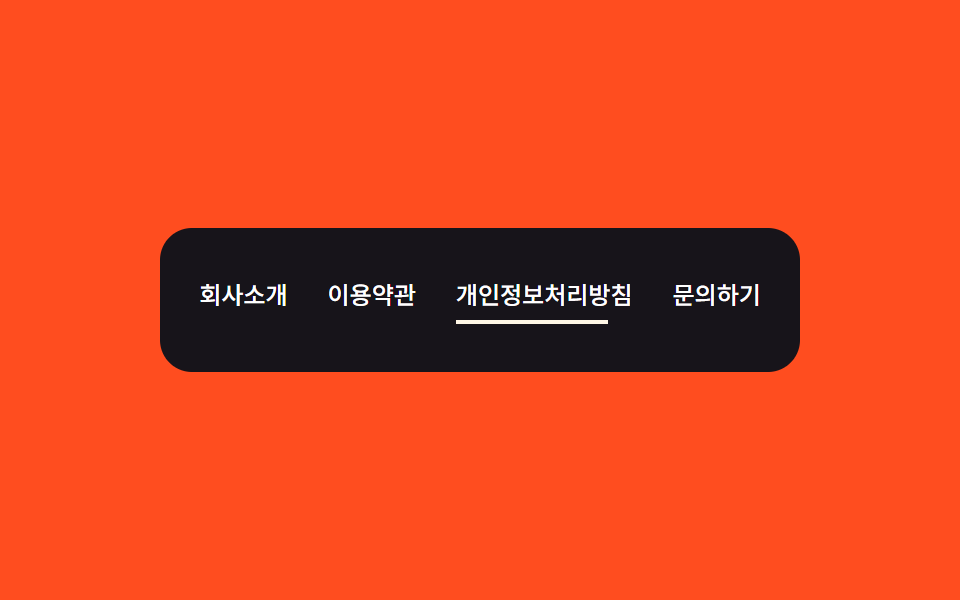
07푸터 — 밑줄 너비 값을 0에서 글자 폭까지 다시 구하는 링크 목록
링크 위에 포인터가 올라간 상태가 되면 그 항목의 밑줄 너비 값이 0에서 글자 폭 값까지 다시 계산되어 왼쪽부터 그려집니다.
쓰임사이트 하단 링크 모음, 회사 정보·약관 안내
getBoundingClientRectquerySelectorAlladdEventListener
<main class="stage" id="stage">
  <footer class="panel is-demo" id="stage-panel">
    <nav class="links">
      <a class="link" href="#">회사소개</a>
      <a class="link" href="#">이용약관</a>
      <a class="link" href="#">개인정보처리방침</a>
      <a class="link" href="#">문의하기</a>
    </nav>
  </footer>
</main>
@use "../../../../site/static/demo-tokens" as *;
$duration: $dur-base;
$easing: $ease-out;
$color: $subject-cream;
@include stage($stage-orange);
.panel {
padding: $sp-6 $sp-5;
border-radius: $r-card;
background: $subject-ink;
}
.links {
display: flex;
flex-wrap: wrap;
gap: $sp-5;
justify-content: center;
}
.link {
position: relative;
padding-bottom: $sp-1;
color: $stage-paper;
font-weight: 500;
font-size: 12px;
line-height: 1.6;
text-decoration: none;
white-space: nowrap;
}
.link::after {
content: "";
position: absolute;
left: 0;
bottom: 0;
height: 2px;
width: var(--tw, 0px);
background: $color;
transition: width $duration $easing;
}
.is-demo .link:nth-child(1)::after { animation: underline-1 $dur-loop steps(1, end) infinite; }
.is-demo .link:nth-child(2)::after { animation: underline-2 $dur-loop steps(1, end) infinite; }
.is-demo .link:nth-child(3)::after { animation: underline-3 $dur-loop steps(1, end) infinite; }
.is-demo .link:nth-child(4)::after { animation: underline-4 $dur-loop steps(1, end) infinite; }
@keyframes underline-1 { 0%, 4% { width: 0; } 12%, 22% { width: 34px; } 30%, 100% { width: 0; } }
@keyframes underline-2 { 0%, 26% { width: 0; } 34%, 44% { width: 52px; } 52%, 100% { width: 0; } }
@keyframes underline-3 { 0%, 48% { width: 0; } 56%, 66% { width: 76px; } 74%, 100% { width: 0; } }
@keyframes underline-4 { 0%, 70% { width: 0; } 78%, 88% { width: 40px; } 96%, 100% { width: 0; } }
@media (max-width: 340px) {
.links { gap: $sp-3; }
.link { font-size: 11px; }
}
@media (prefers-reduced-motion: reduce) {
.is-demo .link:nth-child(1)::after,
.is-demo .link:nth-child(2)::after,
.is-demo .link:nth-child(3)::after,
.is-demo .link:nth-child(4)::after {
animation: none;
width: 0;
}
}html, body {
margin: 0;
overflow: hidden;
}
.stage {
box-sizing: border-box;
min-height: 100vh;
display: grid;
place-items: center;
margin: 0;
background: #ff4d1f;
font-family: -apple-system, "Segoe UI", "Noto Sans KR", sans-serif;
padding: clamp(8px, 4vw, 24px);
}
.panel {
padding: 24px 20px;
border-radius: 16px;
background: #17141a;
}
.links {
display: flex;
flex-wrap: wrap;
gap: 20px;
justify-content: center;
}
.link {
position: relative;
padding-bottom: 4px;
color: #ffffff;
font-weight: 500;
font-size: 12px;
line-height: 1.6;
text-decoration: none;
white-space: nowrap;
}
.link::after {
content: "";
position: absolute;
left: 0;
bottom: 0;
height: 2px;
width: var(--tw, 0px);
background: #fff7e6;
transition: width 300ms ease-out;
}
.is-demo .link:nth-child(1)::after {
animation: underline-1 2s steps(1, end) infinite;
}
.is-demo .link:nth-child(2)::after {
animation: underline-2 2s steps(1, end) infinite;
}
.is-demo .link:nth-child(3)::after {
animation: underline-3 2s steps(1, end) infinite;
}
.is-demo .link:nth-child(4)::after {
animation: underline-4 2s steps(1, end) infinite;
}
@keyframes underline-1 {
0%, 4% {
width: 0;
}
12%, 22% {
width: 34px;
}
30%, 100% {
width: 0;
}
}
@keyframes underline-2 {
0%, 26% {
width: 0;
}
34%, 44% {
width: 52px;
}
52%, 100% {
width: 0;
}
}
@keyframes underline-3 {
0%, 48% {
width: 0;
}
56%, 66% {
width: 76px;
}
74%, 100% {
width: 0;
}
}
@keyframes underline-4 {
0%, 70% {
width: 0;
}
78%, 88% {
width: 40px;
}
96%, 100% {
width: 0;
}
}
@media (max-width: 340px) {
.links {
gap: 12px;
}
.link {
font-size: 11px;
}
}
@media (prefers-reduced-motion: reduce) {
.is-demo .link:nth-child(1)::after,
.is-demo .link:nth-child(2)::after,
.is-demo .link:nth-child(3)::after,
.is-demo .link:nth-child(4)::after {
animation: none;
width: 0;
}
}// 포인터가 링크 위로 올라오면 그 글자의 실제 폭 값을 다시 구해 밑줄 너비 값을 0에서 그 값까지 늘린다.
// 계산 겹: 포인터 진입 -> 글자 폭 값(getBoundingClientRect) -> 밑줄 너비 보간. 실사용 포인터 리스너 있음(데모 재생 자체는 고정 시퀀스).
(function () {
var panel = document.getElementById('stage-panel');
if (!panel) return;
var links = panel.querySelectorAll('.link');
links.forEach(function (link) {
link.addEventListener('pointerenter', function () {
panel.classList.remove('is-demo');
var w = link.getBoundingClientRect().width;
link.style.setProperty('--tw', w + 'px');
});
link.addEventListener('pointerleave', function () {
link.style.setProperty('--tw', '0px');
});
});
})();import { useEffect, useRef } from "react";
import styles from "./FooterLinks.module.scss";
// 포인터가 링크 위로 올라오면 그 글자의 실제 폭 값을 다시 구해 밑줄 너비 값을 0에서 그 값까지 늘린다.
// 계산 겹: 포인터 진입 -> 글자 폭 값(getBoundingClientRect) -> 밑줄 너비 보간. 실사용 포인터 리스너 있음(데모 재생 자체는 고정 시퀀스).
const LINKS = ["회사소개", "이용약관", "개인정보처리방침", "문의하기"];
export default function FooterLinks() {
const panelRef = useRef<HTMLElement>(null);
useEffect(() => {
const panel = panelRef.current;
if (!panel) return;
const links = panel.querySelectorAll<HTMLAnchorElement>(`.${styles.link}`);
const handlers: Array<() => void> = [];
links.forEach((link) => {
const onEnter = () => {
panel!.classList.remove(styles["is-demo"]);
const w = link.getBoundingClientRect().width;
link.style.setProperty("--tw", w + "px");
};
const onLeave = () => {
link.style.setProperty("--tw", "0px");
};
link.addEventListener("pointerenter", onEnter);
link.addEventListener("pointerleave", onLeave);
handlers.push(() => {
link.removeEventListener("pointerenter", onEnter);
link.removeEventListener("pointerleave", onLeave);
});
});
return () => handlers.forEach((off) => off());
}, []);
return (
<main className={styles.stage}>
<footer ref={panelRef} className={`${styles.panel} ${styles["is-demo"]}`}>
<nav className={styles.links}>
{LINKS.map((label) => (
<a key={label} className={styles.link} href="#">
{label}
</a>
))}
</nav>
</footer>
</main>
);
}07 푸터 — 밑줄 너비 값을 0에서 글자 폭까지 다시 구하는 링크 목록 — 측정 누적면적 0.281% · 움직인 프레임 7/23GODRICH 원작 · zip 에 SCSS·React 포함 · 랜딩페이지 히어로섹션 디자인 9종 — 통계 카운터까지
이 데모가 속한 글
 랜딩페이지 히어로섹션 디자인 9종 — 통계 카운터까지랜딩페이지 히어로섹션 아홉 개 중 하나는 카드가 보이는 비율 값이 기준을 넘을 때마다 순서 값에 간격을 곱해 나타나는 시점을 다시 구하고, 하나는 열린 질문의 답변 높이 값을 내용 길이로 다시 구해 펼치며, 또 하나 이 글의 데모 전부 보기