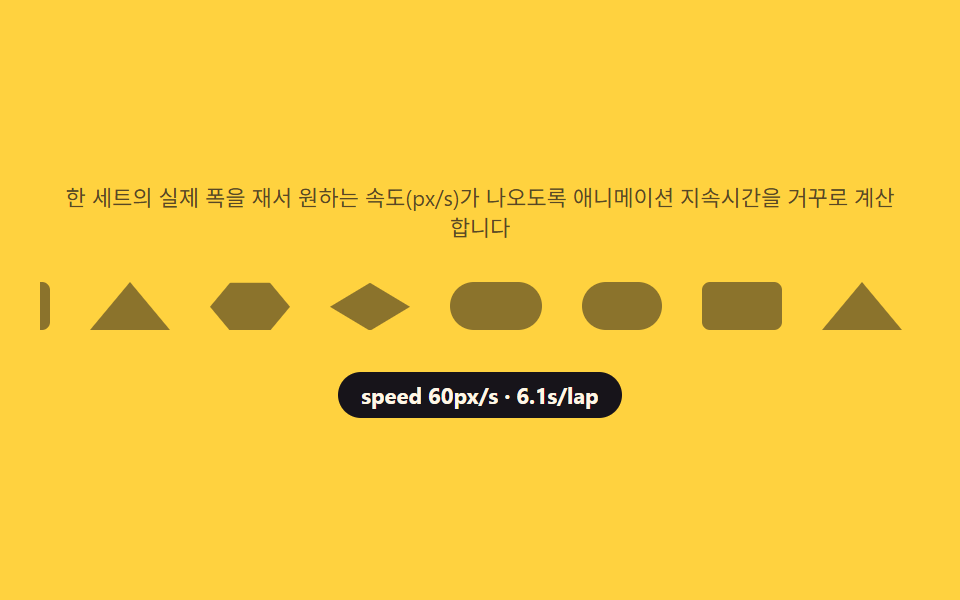
06파트너 로고 바 — 트랙 실측 폭으로 속도를 역산해 흐르는 줄
로고를 두 번 이어붙인 트랙 폭을 getBoundingClientRect 로 재서 목표 속도(초당 px)로 나누면 그 트랙에 맞는 animation-duration 이 나오고, 이 값을 CSS 변수에 넣어 keyframe 은 그대로 두고 재생시간만 매번 다시 계산합니다. 로고가 3개든 12개든 체감 속도가 똑같이 유지됩니다.
쓰임협력사 로고 슬라이드, 투자사 소개 줄
getBoundingClientRectanimation-durationCSS custom properties
<main class="stage">
<section class="bar" id="bar">
  <p class="bar__hint" id="barHint">한 세트의 실제 폭을 재서 원하는 속도(px/s)가 나오도록 애니메이션 지속시간을 거꾸로 계산합니다</p>
  <div class="bar__viewport">
    <div class="bar__track" id="barTrack">
      <div class="bar__set" id="barSetA"></div>
      <div class="bar__set" id="barSetB" aria-hidden="true"></div>
    </div>
  </div>
  <p class="bar__meta"><span class="bar__chip" id="barChip">speed 60px/s</span></p>
</section>
</main>
@use "../../../../site/static/demo-tokens" as *;
$duration: $dur-loop; // 실제 지속시간은 JS 가 --dur 로 거꾸로 계산해 덮어쓴다
$easing: linear;
$color: $subject-ink;
@include stage($stage-yellow);
.bar {
width: 100%;
max-width: 440px;
display: flex;
flex-direction: column;
gap: $sp-3;
align-items: center;
text-align: center;
}
.bar__hint {
margin: 0;
padding: 0 $sp-2;
font-weight: 400;
font-size: 11px;
line-height: 1.4;
color: rgba($subject-ink, .72);
}
.bar__viewport {
width: 100%;
overflow: hidden;
padding: $sp-2 0;
}
.bar__track {
display: flex;
width: max-content;
animation-name: bar-scroll;
animation-duration: var(--dur, 8s);
animation-timing-function: $easing;
animation-iteration-count: infinite;
}
.bar__set {
display: flex;
flex: 0 0 auto;
}
.bar__logo {
flex: 0 0 auto;
display: inline-block;
width: 40px;
height: 24px;
margin-right: $sp-5;
background: rgba($subject-ink, .5);
}
.bar__logo--circle { border-radius: $r-pill; }
.bar__logo--square { border-radius: $r-xs; }
.bar__logo--triangle {
width: 0;
height: 0;
border-left: 20px solid transparent;
border-right: 20px solid transparent;
border-bottom: 24px solid rgba($subject-ink, .5);
background: none;
}
.bar__logo--hexagon {
clip-path: polygon(25% 0%, 75% 0%, 100% 50%, 75% 100%, 25% 100%, 0% 50%);
}
.bar__logo--diamond {
clip-path: polygon(50% 0%, 100% 50%, 50% 100%, 0% 50%);
}
.bar__logo--pill {
border-radius: $r-pill;
width: 46px;
}
@keyframes bar-scroll {
from { transform: translateX(0); }
to { transform: translateX(-50%); }
}
.bar__meta { margin: 0; }
.bar__chip {
display: inline-flex;
padding: $sp-1 $sp-3;
border-radius: $r-pill;
background: $color;
color: $subject-cream;
font-weight: 700;
font-size: 11px;
}
@media (max-width: 340px) {
.bar { max-width: 300px; gap: $sp-2; }
.bar__hint { font-size: 9px; }
.bar__logo { width: 32px; height: 20px; margin-right: $sp-4; }
.bar__logo--triangle { border-left-width: 16px; border-right-width: 16px; border-bottom-width: 20px; }
.bar__chip { font-size: 10px; padding: $sp-1 $sp-2; }
}
@media (prefers-reduced-motion: reduce) {
.bar__track {
animation-play-state: paused;
}
}html, body {
margin: 0;
overflow: hidden;
}
.stage {
box-sizing: border-box;
min-height: 100vh;
display: grid;
place-items: center;
margin: 0;
background: #ffd23f;
font-family: -apple-system, "Segoe UI", "Noto Sans KR", sans-serif;
padding: clamp(8px, 4vw, 24px);
}
.bar {
width: 100%;
max-width: 440px;
display: flex;
flex-direction: column;
gap: 12px;
align-items: center;
text-align: center;
}
.bar__hint {
margin: 0;
padding: 0 8px;
font-weight: 400;
font-size: 11px;
line-height: 1.4;
color: rgba(23, 20, 26, 0.72);
}
.bar__viewport {
width: 100%;
overflow: hidden;
padding: 8px 0;
}
.bar__track {
display: flex;
width: max-content;
animation-name: bar-scroll;
animation-duration: var(--dur, 8s);
animation-timing-function: linear;
animation-iteration-count: infinite;
}
.bar__set {
display: flex;
flex: 0 0 auto;
}
.bar__logo {
flex: 0 0 auto;
display: inline-block;
width: 40px;
height: 24px;
margin-right: 20px;
background: rgba(23, 20, 26, 0.5);
}
.bar__logo--circle {
border-radius: 999px;
}
.bar__logo--square {
border-radius: 4px;
}
.bar__logo--triangle {
width: 0;
height: 0;
border-left: 20px solid transparent;
border-right: 20px solid transparent;
border-bottom: 24px solid rgba(23, 20, 26, 0.5);
background: none;
}
.bar__logo--hexagon {
clip-path: polygon(25% 0%, 75% 0%, 100% 50%, 75% 100%, 25% 100%, 0% 50%);
}
.bar__logo--diamond {
clip-path: polygon(50% 0%, 100% 50%, 50% 100%, 0% 50%);
}
.bar__logo--pill {
border-radius: 999px;
width: 46px;
}
@keyframes bar-scroll {
from {
transform: translateX(0);
}
to {
transform: translateX(-50%);
}
}
.bar__meta {
margin: 0;
}
.bar__chip {
display: inline-flex;
padding: 4px 12px;
border-radius: 999px;
background: #17141a;
color: #fff7e6;
font-weight: 700;
font-size: 11px;
}
@media (max-width: 340px) {
.bar {
max-width: 300px;
gap: 8px;
}
.bar__hint {
font-size: 9px;
}
.bar__logo {
width: 32px;
height: 20px;
margin-right: 16px;
}
.bar__logo--triangle {
border-left-width: 16px;
border-right-width: 16px;
border-bottom-width: 20px;
}
.bar__chip {
font-size: 10px;
padding: 4px 8px;
}
}
@media (prefers-reduced-motion: reduce) {
.bar__track {
animation-play-state: paused;
}
}// 파트너 로고 바(06) — 로고 세트 하나의 실측 폭(scrollWidth)을 원하는 속도(px/s)로 나눠
// 애니메이션 지속시간을 거꾸로 계산한다(계산 한 겹). 세트를 그대로 복제해 이어붙이므로
// translateX(-50%) 가 정확히 세트 하나 폭만큼만 움직인다 — 트랙에는 flex gap 을 쓰지 않고
// 로고마다 margin-right 로 간격을 준다(BD15).
(function () {
var track = document.getElementById('barTrack');
var setA = document.getElementById('barSetA');
var setB = document.getElementById('barSetB');
var chip = document.getElementById('barChip');
if (!track || !setA || !setB || !chip) return;
var reduce = window.matchMedia('(prefers-reduced-motion: reduce)').matches;
function mulberry32(a) {
return function () {
a |= 0; a = a + 0x6D2B79F5 | 0;
var t = Math.imul(a ^ a >>> 15, 1 | a);
t = t + Math.imul(t ^ t >>> 7, 61 | t) ^ t;
return ((t ^ t >>> 14) >>> 0) / 4294967296;
};
}
var rnd = mulberry32(77);
var SHAPES = ['circle', 'square', 'triangle', 'hexagon', 'diamond', 'pill'];
function shapeEl(i) {
var wrap = document.createElement('span');
wrap.className = 'bar__logo bar__logo--' + SHAPES[i % SHAPES.length];
wrap.setAttribute('role', 'img');
wrap.setAttribute('aria-label', '파트너 P' + (i + 1));
return wrap;
}
var COUNT = 6;
for (var i = 0; i < COUNT; i++) { setA.appendChild(shapeEl(i)); }
for (var j = 0; j < COUNT; j++) { setB.appendChild(shapeEl(j)); }
void rnd(); // 시드 고정 사용 표시 — 순서를 흔들 필요가 없어 소비만 한다
var SPEEDS = [60, 30]; // 변형 06: px/s
var speedIdx = 0;
function apply(speed) {
var setWidth = setA.getBoundingClientRect().width;
if (setWidth <= 0) return;
var durationS = setWidth / speed;
track.style.setProperty('--dur', durationS.toFixed(2) + 's');
chip.textContent = 'speed ' + speed + 'px/s · ' + durationS.toFixed(1) + 's/lap';
}
apply(SPEEDS[0]);
window.addEventListener('resize', function () { apply(SPEEDS[speedIdx]); });
if (!reduce) {
setInterval(function () {
speedIdx = (speedIdx + 1) % SPEEDS.length;
apply(SPEEDS[speedIdx]);
}, 2400);
}
})();// TeamPartnerBar — vanilla 판(run/338/demo/06-team-partner-bar/index.html) 의 React 포트.
// 한 세트의 실제 폭을 재서 원하는 속도(px/s)가 나오도록 애니메이션 지속시간을 거꾸로
// 계산한다(계산 한 겹).
import { useEffect, useRef } from "react";
import styles from "./TeamPartnerBar.module.scss";
export type TeamPartnerBarProps = {
duration?: string;
easing?: string;
color?: string;
};
const HINT = "한 세트의 실제 폭을 재서 원하는 속도(px/s)가 나오도록 애니메이션 지속시간을 거꾸로 계산합니다";
function mulberry32(a: number): () => number {
return function (): number {
a |= 0; a = a + 0x6d2b79f5 | 0;
let t = Math.imul(a ^ (a >>> 15), 1 | a);
t = (t + Math.imul(t ^ (t >>> 7), 61 | t)) ^ t;
return ((t ^ (t >>> 14)) >>> 0) / 4294967296;
};
}
const SHAPES = ["circle", "square", "triangle", "hexagon", "diamond", "pill"];
const COUNT = 6;
const SPEEDS = [60, 30];
const SHAPE_CLASS: { [k: string]: string } = {
circle: styles.logoCircle,
square: styles.logoSquare,
triangle: styles.logoTriangle,
hexagon: styles.logoHexagon,
diamond: styles.logoDiamond,
pill: styles.logoPill
};
function ShapeSet({ idPrefix }: { idPrefix: string }) {
const items = Array.from({ length: COUNT }, (_, i) => i);
return (
<>
{items.map((i) => {
const shape = SHAPES[i % SHAPES.length];
return (
<span
key={idPrefix + i}
className={styles.logo + " " + SHAPE_CLASS[shape]}
role="img"
aria-label={"파트너 P" + (i + 1)}
/>
);
})}
</>
);
}
export default function TeamPartnerBar({
duration = "2s",
easing = "linear",
color = "#17141a"
}: TeamPartnerBarProps) {
const trackRef = useRef<HTMLDivElement | null>(null);
const setARef = useRef<HTMLDivElement | null>(null);
const chipRef = useRef<HTMLSpanElement | null>(null);
useEffect(() => {
const track = trackRef.current;
const setA = setARef.current;
const chip = chipRef.current;
if (!track || !setA || !chip) return;
const reduce = window.matchMedia("(prefers-reduced-motion: reduce)").matches;
const rnd = mulberry32(77);
void rnd();
function apply(speed: number): void {
const setWidth = setA!.getBoundingClientRect().width;
if (setWidth <= 0) return;
const durationS = setWidth / speed;
track!.style.setProperty("--dur", durationS + "s");
chip!.textContent = "speed " + speed + "px/s · " + durationS.toFixed(1) + "s/lap";
}
let idx = 0;
apply(SPEEDS[0]);
const onResize = (): void => apply(SPEEDS[idx]);
window.addEventListener("resize", onResize);
let timer = 0;
if (!reduce) {
timer = window.setInterval(() => {
idx = (idx + 1) % SPEEDS.length;
apply(SPEEDS[idx]);
}, 2400);
}
return () => {
window.removeEventListener("resize", onResize);
if (timer) window.clearInterval(timer);
};
// eslint-disable-next-line react-hooks/exhaustive-deps
}, []);
return (
<main className={styles.stage}>
<section className={styles.bar}>
<p className={styles.hint}>{HINT}</p>
<div className={styles.viewport}>
<div className={styles.track} ref={trackRef}>
<div className={styles.set} ref={setARef}>
<ShapeSet idPrefix="a" />
</div>
<div className={styles.set} aria-hidden="true">
<ShapeSet idPrefix="b" />
</div>
</div>
</div>
<p className={styles.meta}>
<span className={styles.chip} ref={chipRef} style={{ color }}>speed 60px/s</span>
</p>
</section>
</main>
);
}06 파트너 로고 바 — 트랙 실측 폭으로 속도를 역산해 흐르는 줄 — 측정 누적면적 7.333% · 움직인 프레임 23/23GODRICH 원작 · zip 에 SCSS·React 포함 · 팀 소개 페이지 UI 9종 — 인원수·소개글 길이·시차까지 계산해서 보여주는
이 데모가 속한 글
 팀 소개 페이지 UI 9종 — 인원수·소개글 길이·시차까지 계산해서 보여주는팀원이 몇 명이든 카드 줄이 어긋나지 않게 열 수를 계산하고, 소개글이 길면 재서 더보기를 붙이고, 파트너 로고는 개수와 무관하게 같은 속도로 흐르게 만드는 팀 소개 페이지 9종입니다. 이 글의 데모 전부 보기