08활동 내역 타임라인
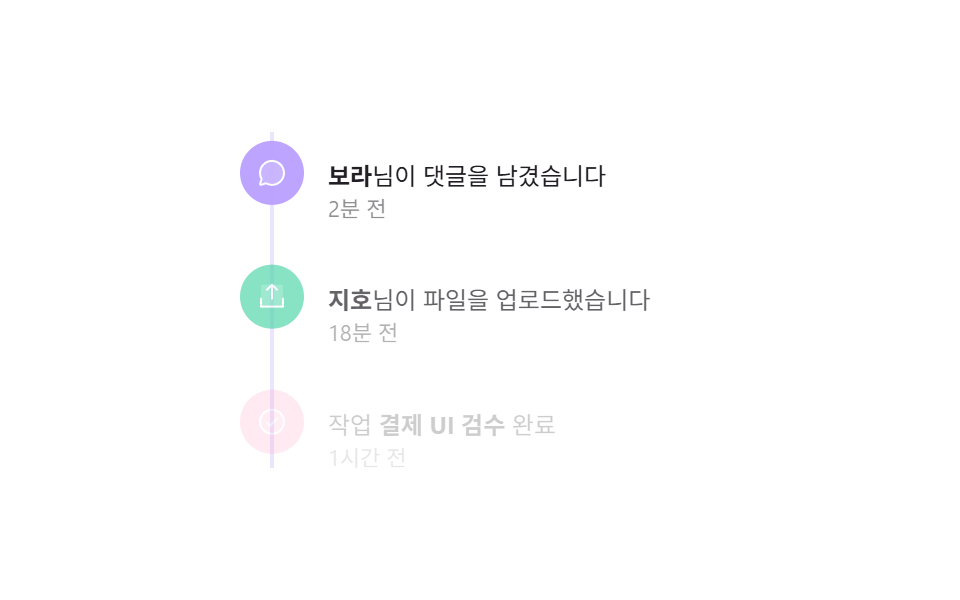
세로선을 따라 아이콘 점이 찍힌 활동 기록이 위에서부터 하나씩 순서대로 옅게 떠오르며 나타난다.
쓰임알림함 활동 기록, 협업 툴의 프로젝트 히스토리
stagger fade+translateY타임라인 세로선 + 아이콘 점파스텔 톤
<main class="stage">
  <ul class="tl-list is-demo" aria-label="활동 내역">
    <li class="tl-item" style="--n:0">
      <span class="tl-item__dot">
        <svg viewBox="0 0 256 256" aria-hidden="true"><g fill="currentColor"><path d="M224 128a96 96 0 0 1-144.07 83.11l-37.39 12.47a8 8 0 0 1-10.12-10.12l12.47-37.39A96 96 0 1 1 224 128" opacity=".2"/><path d="M128 24a104 104 0 0 0-91.82 152.88l-11.35 34.05a16 16 0 0 0 20.24 20.24l34.05-11.35A104 104 0 1 0 128 24m0 192a87.87 87.87 0 0 1-44.06-11.81a8 8 0 0 0-6.54-.67L40 216l12.47-37.4a8 8 0 0 0-.66-6.54A88 88 0 1 1 128 216"/></g></svg>
      </span>
      <div class="tl-item__body"><b>보라</b>님이 댓글을 남겼습니다<time>2분 전</time></div>
    </li>
    <li class="tl-item" style="--n:1">
      <span class="tl-item__dot">
        <svg viewBox="0 0 256 256" aria-hidden="true"><g fill="currentColor"><path d="M216 48v160H40V48a16 16 0 0 1 16-16h144a16 16 0 0 1 16 16" opacity=".2"/><path d="M224 144v64a8 8 0 0 1-8 8H40a8 8 0 0 1-8-8v-64a8 8 0 0 1 16 0v56h160v-56a8 8 0 0 1 16 0M93.66 77.66L120 51.31V144a8 8 0 0 0 16 0V51.31l26.34 26.35a8 8 0 0 0 11.32-11.32l-40-40a8 8 0 0 0-11.32 0l-40 40a8 8 0 0 0 11.32 11.32"/></g></svg>
      </span>
      <div class="tl-item__body"><b>지호</b>님이 파일을 업로드했습니다<time>18분 전</time></div>
    </li>
    <li class="tl-item" style="--n:2">
      <span class="tl-item__dot">
        <svg viewBox="0 0 256 256" aria-hidden="true"><g fill="currentColor"><path d="M224 128a96 96 0 1 1-96-96a96 96 0 0 1 96 96" opacity=".2"/><path d="M173.66 98.34a8 8 0 0 1 0 11.32l-56 56a8 8 0 0 1-11.32 0l-24-24a8 8 0 0 1 11.32-11.32L112 148.69l50.34-50.35a8 8 0 0 1 11.32 0M232 128A104 104 0 1 1 128 24a104.11 104.11 0 0 1 104 104m-16 0a88 88 0 1 0-88 88a88.1 88.1 0 0 0 88-88"/></g></svg>
      </span>
      <div class="tl-item__body">작업 <b>결제 UI 검수</b> 완료<time>1시간 전</time></div>
    </li>
  </ul>
</main>
@use "../../../../site/static/demo-tokens" as *;
$duration: $dur-enter; // 항목이 떠오르는 시간
$easing: $ease-out;
$color: $subject-lilac; // 세로선·점 배경(파스텔)
@include stage($stage-paper);
.tl-list {
list-style: none;
margin: 0;
padding: 0;
width: min(240px, 78vw);
position: relative;
}
.tl-list::before {
content: "";
position: absolute;
left: 15px;
top: 4px;
bottom: 4px;
width: 2px;
background: #ece3ff; // $subject-lilac 를 흰 배경에 옅게 섞은 불투명 톤
}
.tl-item {
position: relative;
display: flex;
gap: $sp-3;
padding: $sp-2 0;
opacity: 0;
transform: translateY(10px);
}
.tl-item__dot {
position: relative;
z-index: 1;
width: 32px;
height: 32px;
flex: 0 0 auto;
display: grid;
place-items: center;
border-radius: $r-pill;
background: $color;
color: $stage-paper;
}
.tl-item:nth-child(2) .tl-item__dot { background: $subject-mint; }
.tl-item:nth-child(3) .tl-item__dot { background: $subject-pink; }
.tl-item__dot svg { width: 16px; height: 16px; }
.tl-item__body { font-size: 12px; color: $stage-ink; line-height: 1.5; padding-top: $sp-2; }
.tl-item__body b { font-weight: 700; }
.tl-item__body time { display: block; font-size: 11px; color: rgba(23, 20, 26, .5); }
// 데모 강제 루프 — 위에서부터 순서대로 옅게 떠오름을 stagger keyframes 로
.tl-list.is-demo .tl-item {
animation: tl-loop $dur-loop $easing infinite;
animation-delay: calc(var(--n) * 140ms);
}
@keyframes tl-loop {
0% { opacity: 0; transform: translateY(10px); }
20%, 90% { opacity: 1; transform: translateY(0); }
100% { opacity: 0; transform: translateY(10px); }
}
@media (prefers-reduced-motion: reduce) {
.tl-item { animation: none !important; opacity: 1; transform: none; }
}html, body {
margin: 0;
overflow: hidden;
}
.stage {
box-sizing: border-box;
min-height: 100vh;
display: grid;
place-items: center;
margin: 0;
background: #ffffff;
font-family: -apple-system, "Segoe UI", "Noto Sans KR", sans-serif;
padding: clamp(8px, 4vw, 24px);
}
.tl-list {
list-style: none;
margin: 0;
padding: 0;
width: min(240px, 78vw);
position: relative;
}
.tl-list::before {
content: "";
position: absolute;
left: 15px;
top: 4px;
bottom: 4px;
width: 2px;
background: #ece3ff;
}
.tl-item {
position: relative;
display: flex;
gap: 12px;
padding: 8px 0;
opacity: 0;
transform: translateY(10px);
}
.tl-item__dot {
position: relative;
z-index: 1;
width: 32px;
height: 32px;
flex: 0 0 auto;
display: grid;
place-items: center;
border-radius: 999px;
background: #b9a0ff;
color: #ffffff;
}
.tl-item:nth-child(2) .tl-item__dot {
background: #4cd4a6;
}
.tl-item:nth-child(3) .tl-item__dot {
background: #ff9ebb;
}
.tl-item__dot svg {
width: 16px;
height: 16px;
}
.tl-item__body {
font-size: 12px;
color: #17141a;
line-height: 1.5;
padding-top: 8px;
}
.tl-item__body b {
font-weight: 700;
}
.tl-item__body time {
display: block;
font-size: 11px;
color: rgba(23, 20, 26, 0.5);
}
.tl-list.is-demo .tl-item {
animation: tl-loop 2s ease-out infinite;
animation-delay: calc(var(--n) * 140ms);
}
@keyframes tl-loop {
0% {
opacity: 0;
transform: translateY(10px);
}
20%, 90% {
opacity: 1;
transform: translateY(0);
}
100% {
opacity: 0;
transform: translateY(10px);
}
}
@media (prefers-reduced-motion: reduce) {
.tl-item {
animation: none !important;
opacity: 1;
transform: none;
}
}import { useEffect, useState, type CSSProperties, type ReactNode } from "react";
import styles from "./ActivityTimelineLog.module.scss";
export type ActivityEvent = { text: ReactNode; time: string; icon: "chat" | "upload" | "check" };
export type ActivityTimelineLogProps = {
events: ActivityEvent[];
/** 항목이 떠오르는 시간 (기본 600ms) */
duration?: number;
easing?: string;
/** 세로선·점 배경(파스텔) */
color?: string;
};
type Vars = CSSProperties & { "--duration"?: string; "--easing"?: string; "--color"?: string };
const ICONS: Record<ActivityEvent["icon"], ReactNode> = {
chat: (
<svg viewBox="0 0 256 256" aria-hidden="true"><g fill="currentColor"><path d="M224 128a96 96 0 0 1-144.07 83.11l-37.39 12.47a8 8 0 0 1-10.12-10.12l12.47-37.39A96 96 0 1 1 224 128" opacity=".2" /><path d="M128 24a104 104 0 0 0-91.82 152.88l-11.35 34.05a16 16 0 0 0 20.24 20.24l34.05-11.35A104 104 0 1 0 128 24m0 192a87.87 87.87 0 0 1-44.06-11.81a8 8 0 0 0-6.54-.67L40 216l12.47-37.4a8 8 0 0 0-.66-6.54A88 88 0 1 1 128 216" /></g></svg>
),
upload: (
<svg viewBox="0 0 256 256" aria-hidden="true"><g fill="currentColor"><path d="M216 48v160H40V48a16 16 0 0 1 16-16h144a16 16 0 0 1 16 16" opacity=".2" /><path d="M224 144v64a8 8 0 0 1-8 8H40a8 8 0 0 1-8-8v-64a8 8 0 0 1 16 0v56h160v-56a8 8 0 0 1 16 0M93.66 77.66L120 51.31V144a8 8 0 0 0 16 0V51.31l26.34 26.35a8 8 0 0 0 11.32-11.32l-40-40a8 8 0 0 0-11.32 0l-40 40a8 8 0 0 0 11.32 11.32" /></g></svg>
),
check: (
<svg viewBox="0 0 256 256" aria-hidden="true"><g fill="currentColor"><path d="M224 128a96 96 0 1 1-96-96a96 96 0 0 1 96 96" opacity=".2" /><path d="M173.66 98.34a8 8 0 0 1 0 11.32l-56 56a8 8 0 0 1-11.32 0l-24-24a8 8 0 0 1 11.32-11.32L112 148.69l50.34-50.35a8 8 0 0 1 11.32 0M232 128A104 104 0 1 1 128 24a104.11 104.11 0 0 1 104 104m-16 0a88 88 0 1 0-88 88a88.1 88.1 0 0 0 88-88" /></g></svg>
),
};
/** 위에서부터 순서대로 옅게 떠오르는 stagger — CSS 변수 --n 을 각 li 에 주고 transition-delay 로 순서를 만든다 */
export default function ActivityTimelineLog({
events,
duration = 600,
easing = "ease-out",
color = "#b9a0ff",
}: ActivityTimelineLogProps) {
const vars: Vars = { "--duration": `${duration}ms`, "--easing": easing, "--color": color };
const [shown, setShown] = useState(false);
useEffect(() => { const id = requestAnimationFrame(() => setShown(true)); return () => cancelAnimationFrame(id); }, []);
return (
<ul className={styles.list} style={vars} aria-label="활동 내역">
{events.map((ev, i) => (
<li key={i} className={`${styles.item} ${shown ? styles.shown : ""}`} data-i={i % 3} style={{ transitionDelay: `${i * 140}ms` }}>
<span className={styles.dot}>{ICONS[ev.icon]}</span>
<div className={styles.body}>{ev.text}<time>{ev.time}</time></div>
</li>
))}
</ul>
);
}08 활동 내역 타임라인 — 측정 누적면적 6.644% · 움직인 프레임 10/23GODRICH 원작 · zip 에 SCSS·React 포함 · 아코디언 리스트 UI 9가지 — 체크리스트까지
이 데모가 속한 글
 아코디언 리스트 UI 9가지 — 체크리스트까지아코디언 리스트는 목록 행을 클릭했을 때 그 자리에서 높이가 부드럽게 늘어나며 상세 내용이 펼쳐지는 UI로, 별도 페이지 이동 없이 리스트 화면 안에서 정보를 더 보여주고 싶을 때 씁니다. 리스트 한 줄을 눌렀을 때 이 글의 데모 전부 보기