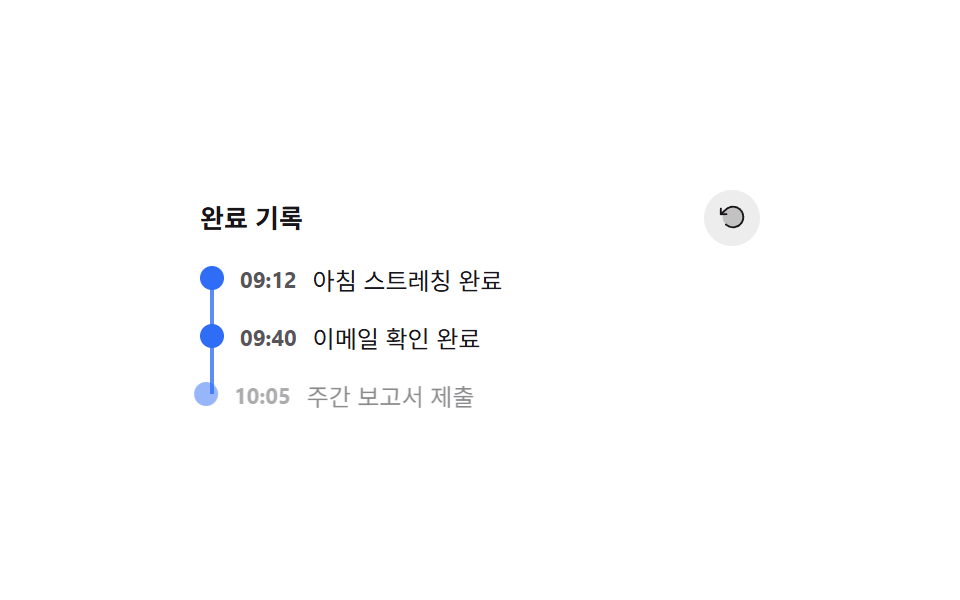
08완료 타임라인 되감기
완료한 할일이 쌓일수록 세로 타임라인이 아래로 자라나고, 되감기 버튼을 누르면 점들이 방금 순서의 역순으로 하나씩 사라진다 (231 의 위에서부터 순차 등장과 다른 시연 — 여긴 역순 되감기 애니메이션이 핵심).
쓰임완료 기록 되돌아보기, 활동 로그 되감기
STAGGER_MS 순차 transitionDelayrewind() 역순 제거 — reverseIndex 지연aria-live 기록/되감기 알림
<main class="stage">
<div class="wrap is-demo" id="wrap">
  <div class="head">
    <span class="headTitle">완료 기록</span>
    <button class="rewindBtn" id="rewindBtn" type="button" aria-label="되감기 — 최근 항목부터 되돌리기">
      <svg viewBox="0 0 256 256" aria-hidden="true"><g fill="currentColor"><path d="M216 128a88 88 0 1 1-88-88a88 88 0 0 1 88 88" opacity=".2"/><path d="M224 128a96 96 0 0 1-94.71 96H128a95.38 95.38 0 0 1-65.9-26.2a8 8 0 0 1 11-11.63a80 80 0 1 0-1.67-114.78a3 3 0 0 1-.26.25L44.59 96H72a8 8 0 0 1 0 16H24a8 8 0 0 1-8-8V56a8 8 0 0 1 16 0v29.8L60.25 60A96 96 0 0 1 224 128"/></g></svg>
    </button>
  </div>
  <ol class="timeline" id="timeline"></ol>
  <p class="liveNote" id="liveNote" aria-live="polite"></p>
</div>
</main>
@use "../../../../site/static/demo-tokens" as *;
// 계산 겹은 index.html 의 paintLine() 에 있다 — 첫 점·마지막 점의 실제 화면 좌표 차이를 재서
// 세로선 길이를 정한다. rewind() 는 역순 인덱스로 지연을 계산해 최근 항목부터 지운다.
@include stage($stage-paper);
.wrap {
width: 280px;
display: grid;
gap: $sp-2;
}
.head {
display: flex;
align-items: center;
justify-content: space-between;
}
.headTitle {
color: $subject-ink;
font-size: 13px;
font-weight: 700;
}
.rewindBtn {
appearance: none;
border: none;
background: rgba($subject-ink, .08);
width: 28px;
height: 28px;
border-radius: $r-pill;
display: grid;
place-items: center;
color: $subject-ink;
cursor: pointer;
svg { width: 15px; height: 15px; }
&:focus-visible { outline: 2px solid $subject-blue-light; outline-offset: 2px; }
}
.timeline {
position: relative;
list-style: none;
margin: 0;
padding: 0;
display: grid;
gap: $sp-3;
min-height: 40px;
}
.timelineLine {
position: absolute;
left: 5px;
width: 2px;
background: $subject-blue-light;
transform: scaleY(0);
transform-origin: top;
transition: transform $dur-quick $ease-out, height $dur-quick $ease-out;
}
.entry {
position: relative;
display: grid;
grid-template-columns: 12px auto 1fr;
align-items: center;
gap: $sp-2;
padding-left: 0;
opacity: 0;
transform: translateX(-6px);
transition: opacity $dur-base $ease-out, transform $dur-base $ease-out;
&.in { opacity: 1; transform: translateX(0); }
&.out { opacity: 0; transform: translateX(6px); transition-duration: 220ms; }
}
.dot {
width: 12px;
height: 12px;
border-radius: 50%;
background: $subject-blue;
}
.entryTime {
color: rgba($subject-ink, .72);
font-size: 11px;
font-weight: 700;
}
.entryText {
color: $subject-ink;
font-size: 12px;
}
.liveNote {
position: absolute;
width: 1px;
height: 1px;
overflow: hidden;
clip: rect(0 0 0 0);
margin: -1px;
}
@media (max-width: 340px) {
.wrap { width: 220px; }
}
@media (prefers-reduced-motion: reduce) {
// 실사용 경로에도 적용 — 추가·제거가 전환 없이 즉시 일어난다
.timelineLine { transition: none !important; }
.entry { transition: none !important; }
}html, body {
margin: 0;
overflow: hidden;
}
.stage {
box-sizing: border-box;
min-height: 100vh;
display: grid;
place-items: center;
margin: 0;
background: #ffffff;
font-family: -apple-system, "Segoe UI", "Noto Sans KR", sans-serif;
padding: clamp(8px, 4vw, 24px);
}
.wrap {
width: 280px;
display: grid;
gap: 8px;
}
.head {
display: flex;
align-items: center;
justify-content: space-between;
}
.headTitle {
color: #17141a;
font-size: 13px;
font-weight: 700;
}
.rewindBtn {
appearance: none;
border: none;
background: rgba(23, 20, 26, 0.08);
width: 28px;
height: 28px;
border-radius: 999px;
display: grid;
place-items: center;
color: #17141a;
cursor: pointer;
}
.rewindBtn svg {
width: 15px;
height: 15px;
}
.rewindBtn:focus-visible {
outline: 2px solid #5b8cf8;
outline-offset: 2px;
}
.timeline {
position: relative;
list-style: none;
margin: 0;
padding: 0;
display: grid;
gap: 12px;
min-height: 40px;
}
.timelineLine {
position: absolute;
left: 5px;
width: 2px;
background: #5b8cf8;
transform: scaleY(0);
transform-origin: top;
transition: transform 220ms ease-out, height 220ms ease-out;
}
.entry {
position: relative;
display: grid;
grid-template-columns: 12px auto 1fr;
align-items: center;
gap: 8px;
padding-left: 0;
opacity: 0;
transform: translateX(-6px);
transition: opacity 300ms ease-out, transform 300ms ease-out;
}
.entry.in {
opacity: 1;
transform: translateX(0);
}
.entry.out {
opacity: 0;
transform: translateX(6px);
transition-duration: 220ms;
}
.dot {
width: 12px;
height: 12px;
border-radius: 50%;
background: #2f6df6;
}
.entryTime {
color: rgba(23, 20, 26, 0.72);
font-size: 11px;
font-weight: 700;
}
.entryText {
color: #17141a;
font-size: 12px;
}
.liveNote {
position: absolute;
width: 1px;
height: 1px;
overflow: hidden;
clip: rect(0 0 0 0);
margin: -1px;
}
@media (max-width: 340px) {
.wrap {
width: 220px;
}
}
@media (prefers-reduced-motion: reduce) {
.timelineLine {
transition: none !important;
}
.entry {
transition: none !important;
}
}(function () {
var STAGGER_MS = 90;
var reduce = window.matchMedia('(prefers-reduced-motion: reduce)').matches;
var wrap = document.getElementById('wrap');
var timeline = document.getElementById('timeline');
var rewindBtn = document.getElementById('rewindBtn');
var liveNote = document.getElementById('liveNote');
var line = document.createElement('div');
line.className = 'timelineLine';
line.setAttribute('aria-hidden', 'true');
timeline.appendChild(line);
var LOG = [
{ time: '09:12', text: '아침 스트레칭 완료' },
{ time: '09:40', text: '이메일 확인 완료' },
{ time: '10:05', text: '주간 보고서 제출' },
{ time: '11:20', text: '팀 스탠드업 참여' },
{ time: '13:00', text: '점심 식단 기록' }
];
var shown = [];
function human() { wrap.classList.remove('is-demo'); window.clearInterval(autoTimer); }
// 계산 겹: 첫 점과 마지막 점의 실제 화면 좌표 차이를 재서 세로선의 길이(scaleY)를 정한다 —
// 고정 px 나열이 아니다.
function paintLine() {
var dots = timeline.querySelectorAll('.dot');
if (dots.length < 2) { line.style.transform = 'scaleY(0)'; return; }
var first = dots[0].getBoundingClientRect();
var last = dots[dots.length - 1].getBoundingClientRect();
var timelineRect = timeline.getBoundingClientRect();
var top = first.top + first.height / 2 - timelineRect.top;
var span = (last.top + last.height / 2) - (first.top + first.height / 2);
line.style.top = top + 'px';
line.style.height = span + 'px';
line.style.transform = 'scaleY(1)';
}
function renderEntry(entry, index) {
var li = document.createElement('li');
li.className = 'entry';
li.style.transitionDelay = reduce ? '0ms' : (index * STAGGER_MS) + 'ms';
li.innerHTML =
'<span class="dot" aria-hidden="true"></span>' +
'<span class="entryTime">' + entry.time + '</span>' +
'<span class="entryText">' + entry.text + '</span>';
timeline.appendChild(li);
return li;
}
function addNext() {
if (shown.length >= LOG.length) return;
var entry = LOG[shown.length];
var li = renderEntry(entry, shown.length);
shown.push(li);
timeline.getBoundingClientRect();
li.classList.add('in');
paintLine();
liveNote.textContent = entry.text + ' 기록이 추가됐습니다.';
}
// 계산 겹: 되감기는 최근 항목부터 지우되, 각 항목의 지연 시간을 "끝에서부터의 역순 인덱스"로
// 계산한다 — 안쪽(오래된 항목)일수록 나중에 사라진다.
function rewind() {
var total = shown.length;
if (total === 0) return;
var toRemove = shown.slice().reverse();
toRemove.forEach(function (li, i) {
var reverseIndex = total - 1 - i; // 뒤에서부터 셀수록 커지는 값
var delay = reduce ? 0 : reverseIndex * STAGGER_MS * 0.4;
window.setTimeout(function () {
li.classList.remove('in');
li.classList.add('out');
window.setTimeout(function () {
if (li.parentNode) li.parentNode.removeChild(li);
paintLine();
}, reduce ? 0 : 220);
}, delay);
});
shown = [];
liveNote.textContent = total + '개 기록을 되감았습니다.';
}
rewindBtn.addEventListener('click', function () { human(); rewind(); });
var cursor = 0;
function autoStep() {
if (shown.length >= LOG.length) {
rewind();
return;
}
addNext();
}
var autoTimer;
if (!reduce) { autoTimer = window.setInterval(autoStep, 420); }
})();// ActivityTimeline — vanilla 판(run/377/demo/08-activity-timeline/index.html) 의 React 포트.
// 계산 겹: 첫 점·마지막 점의 실제 화면 좌표 차이로 세로선 길이를 정하고, 되감기는 역순 인덱스로
// 지연을 계산한다(오래된 항목일수록 나중에 사라진다).
import { useEffect, useRef, useState } from "react";
import styles from "./ActivityTimeline.module.scss";
type Box<T> = { current: T };
const STAGGER_MS = 90;
const LOG = [
{ time: "09:12", text: "아침 스트레칭 완료" },
{ time: "09:40", text: "이메일 확인 완료" },
{ time: "10:05", text: "주간 보고서 제출" },
{ time: "11:20", text: "팀 스탠드업 참여" },
{ time: "13:00", text: "점심 식단 기록" },
];
type Entry = { time: string; text: string; state: "in" | "out" };
export default function ActivityTimeline() {
const [isDemo, setIsDemo] = useState(true);
const [entries, setEntries] = useState<Entry[]>([]);
const [line, setLine] = useState({ top: 0, height: 0, scale: 0 });
const [liveNote, setLiveNote] = useState("");
const dotRefs = useRef([]) as unknown as Box<(HTMLSpanElement | null)[]>;
const timelineRef = useRef(null) as unknown as Box<HTMLOListElement>;
const timerRef = useRef(0) as unknown as Box<number>;
const reduce = typeof window !== "undefined" && window.matchMedia("(prefers-reduced-motion: reduce)").matches;
function human() {
if (isDemo) { setIsDemo(false); window.clearInterval(timerRef.current); }
}
function paintLine() {
const dots = dotRefs.current.filter(Boolean) as HTMLSpanElement[];
const timeline = timelineRef.current;
if (!timeline || dots.length < 2) { setLine({ top: 0, height: 0, scale: 0 }); return; }
const first = dots[0].getBoundingClientRect();
const last = dots[dots.length - 1].getBoundingClientRect();
const timelineRect = timeline.getBoundingClientRect();
const top = first.top + first.height / 2 - timelineRect.top;
const span = (last.top + last.height / 2) - (first.top + first.height / 2);
setLine({ top: top, height: span, scale: 1 });
}
function addNext() {
setEntries(function (prev) {
if (prev.length >= LOG.length) return prev;
const next = LOG[prev.length];
setLiveNote(next.text + " 기록이 추가됐습니다.");
return prev.concat([{ time: next.time, text: next.text, state: "in" }]);
});
}
function rewind() {
setEntries(function (prev) {
const total = prev.length;
if (total === 0) return prev;
prev.forEach(function (_e, i) {
const reverseIndex = total - 1 - i;
const delay = reduce ? 0 : reverseIndex * STAGGER_MS * 0.4;
window.setTimeout(function () {
setEntries(function (cur) {
const n = cur.slice();
if (n[i]) n[i] = { ...n[i], state: "out" };
return n;
});
}, delay);
});
window.setTimeout(function () { setEntries([]); }, reduce ? 0 : total * STAGGER_MS * 0.4 + 220);
setLiveNote(total + "개 기록을 되감았습니다.");
return prev;
});
}
useEffect(paintLine);
useEffect(function () {
addNext();
if (reduce) return;
timerRef.current = window.setInterval(function () {
setEntries(function (prev) {
if (prev.length >= LOG.length) { rewind(); return prev; }
addNext();
return prev;
});
}, 420);
return function () { window.clearInterval(timerRef.current); };
// eslint-disable-next-line
}, []);
return (
<main className={styles.stage}>
<div className={styles.wrap + (isDemo ? " " + styles.isDemo : "")}>
<div className={styles.head}>
<span className={styles.headTitle}>완료 기록</span>
<button
className={styles.rewindBtn}
type="button"
aria-label="되감기 — 최근 항목부터 되돌리기"
onClick={function () { human(); rewind(); }}
>
<svg viewBox="0 0 256 256" aria-hidden="true">
<g fill="currentColor">
<path d="M216 128a88 88 0 1 1-88-88a88 88 0 0 1 88 88" opacity=".2" />
<path d="M224 128a96 96 0 0 1-94.71 96H128a95.38 95.38 0 0 1-65.9-26.2a8 8 0 0 1 11-11.63a80 80 0 1 0-1.67-114.78a3 3 0 0 1-.26.25L44.59 96H72a8 8 0 0 1 0 16H24a8 8 0 0 1-8-8V56a8 8 0 0 1 16 0v29.8L60.25 60A96 96 0 0 1 224 128" />
</g>
</svg>
</button>
</div>
<ol className={styles.timeline} ref={timelineRef}>
<div className={styles.timelineLine} aria-hidden="true" style={{ top: line.top + "px", height: line.height + "px", transform: "scaleY(" + line.scale + ")" }} />
{entries.map(function (entry, i) {
return (
<li
key={entry.time + entry.text}
className={styles.entry + " " + styles[entry.state]}
style={{ transitionDelay: reduce ? "0ms" : i * STAGGER_MS + "ms" }}
>
<span className={styles.dot} aria-hidden="true" ref={function (el: HTMLSpanElement | null) { dotRefs.current[i] = el; }} />
<span className={styles.entryTime}>{entry.time}</span>
<span className={styles.entryText}>{entry.text}</span>
</li>
);
})}
</ol>
<p className={styles.liveNote} aria-live="polite">{liveNote}</p>
</div>
</main>
);
}08 완료 타임라인 되감기 — 측정 누적면적 9.168% · 움직인 프레임 22/23GODRICH 원작 · zip 에 SCSS·React 포함 · 투두 리스트 ui 패턴 9종 — 진행률 게이지부터 되감기까지 한 번에 정리
이 데모가 속한 글
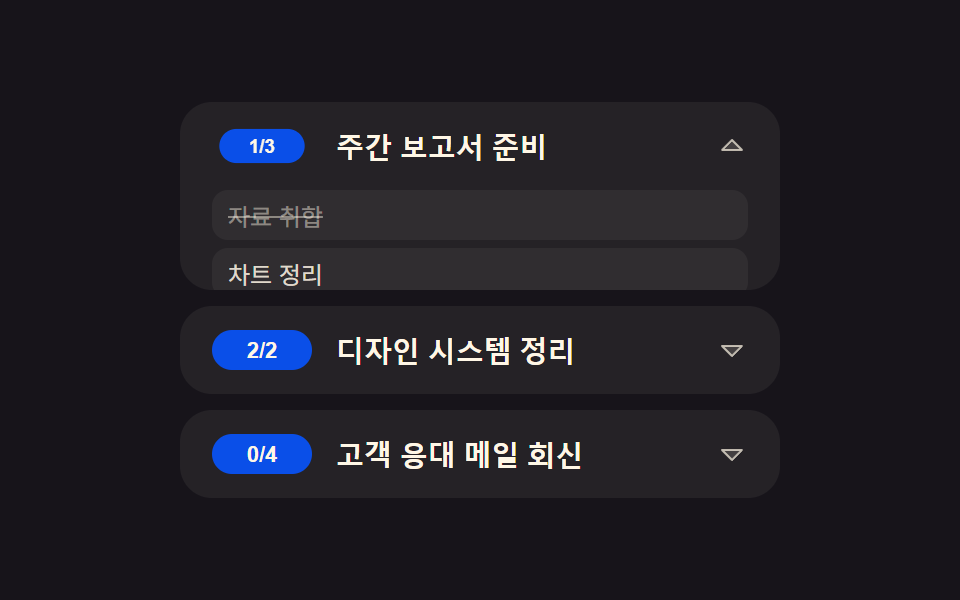 투두 리스트 ui 패턴 9종 — 진행률 게이지부터 되감기까지 한 번에 정리투두 리스트 ui 아홉 패턴 중 하나는 더보기를 누를 때마다 불러오는 개수가 두 배로 늘고, 하나는 되감기를 누르면 완료 타임라인이 방금 순서의 역순으로 사라지며, 하나는 체크박스를 누를 때마다 원형 게이지가 그 비 이 글의 데모 전부 보기