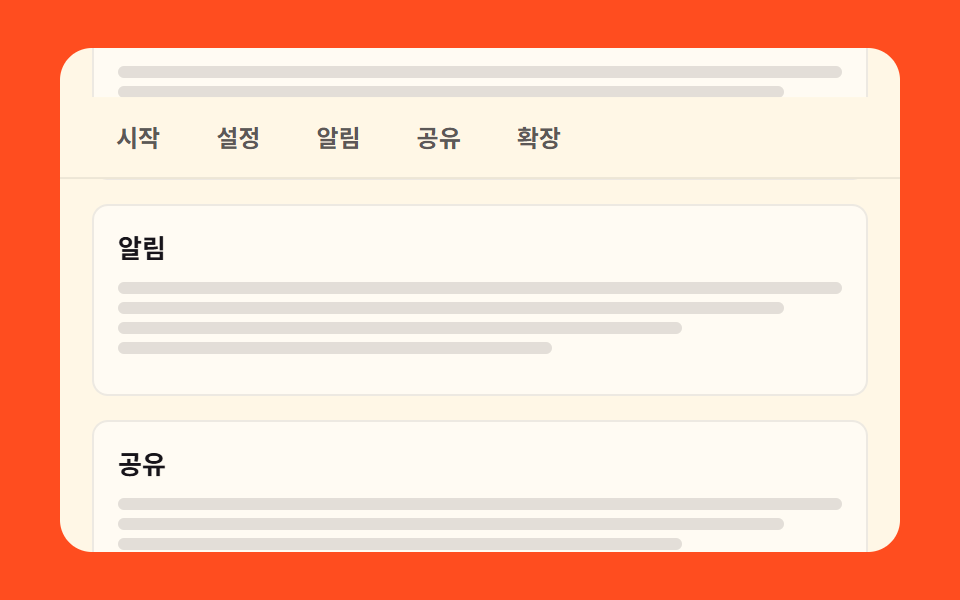
05현재 칸을 알려 주는 스티키 서브 내비
섹션이 지나가는 동안 카테고리 바는 자리에 붙어 있고, 화면에 걸린 섹션이 바뀌면 강조가 그 칸으로 옮겨 갑니다.
쓰임설명서·랜딩처럼 한 페이지가 여러 섹션인 곳
position: stickyIntersectionObserveraria-current
<main class="stage">
  <div class="ss is-demo">
    <div class="ss__win">
      <div class="ss__doc">
        <div class="ss__docHead">
          <h2 class="ss__title">설명서</h2>
        </div>
        <nav class="ss__bar">
          <a class="ss__chip" href="#sec-1">시작</a>
          <a class="ss__chip" href="#sec-2">설정</a>
          <a class="ss__chip" href="#sec-3">알림</a>
          <a class="ss__chip" href="#sec-4">공유</a>
          <a class="ss__chip" href="#sec-5">확장</a>
        </nav>
        <div class="ss__track">
          <section class="ss__sec" id="sec-1">
            <h3 class="ss__h">시작</h3>
            <i class="ss__line"></i><i class="ss__line ss__line--a"></i><i class="ss__line ss__line--b"></i><i class="ss__line ss__line--c"></i>
          </section>
          <section class="ss__sec" id="sec-2">
            <h3 class="ss__h">설정</h3>
            <i class="ss__line"></i><i class="ss__line ss__line--a"></i><i class="ss__line ss__line--b"></i><i class="ss__line ss__line--c"></i>
          </section>
          <section class="ss__sec" id="sec-3">
            <h3 class="ss__h">알림</h3>
            <i class="ss__line"></i><i class="ss__line ss__line--a"></i><i class="ss__line ss__line--b"></i><i class="ss__line ss__line--c"></i>
          </section>
          <section class="ss__sec" id="sec-4">
            <h3 class="ss__h">공유</h3>
            <i class="ss__line"></i><i class="ss__line ss__line--a"></i><i class="ss__line ss__line--b"></i><i class="ss__line ss__line--c"></i>
          </section>
          <section class="ss__sec" id="sec-5">
            <h3 class="ss__h">확장</h3>
            <i class="ss__line"></i><i class="ss__line ss__line--a"></i><i class="ss__line ss__line--b"></i><i class="ss__line ss__line--c"></i>
          </section>
        </div>
      </div>
    </div>
  </div>
</main>@use "../../../../site/static/demo-tokens" as *;
// ── 변수 3개 ──────────────────────────────────────────
$duration: $dur-loop; // 격자 미리보기 루프 한 바퀴 2초
$easing: linear; // 칩 컷과 섹션이 같은 속도로 지나가야 하이라이트 타이밍이 맞는다
$color: $subject-ink; // 크림 카드 위 글자 · 현재 칩 배경
@include stage($stage-orange);
.ss, .ss * { box-sizing: border-box; }
.ss { width: min(420px, 94vw); }
// 스크롤 상자 = 크림 카드 자체. 안에서만 스크롤이 일어난다.
.ss__win {
height: clamp(160px, 84vh, 272px);
overflow-y: auto;
scrollbar-width: none;
&::-webkit-scrollbar { display: none; }
border-radius: $r-card;
background: $subject-cream;
color: $color;
scroll-behavior: smooth;
}
// sticky 바는 부모(.ss__doc) 높이만큼만 붙어 있을 수 있다 — 부모가 콘텐츠 전체를 감싼다(260 실측).
.ss__doc { position: relative; }
// 제목 영역 높이 46px(16 + 22 + 8) — 아래 루프 ss-bar 의 시작 오프셋과 같은 값
.ss__docHead { padding: $sp-4 $sp-4 $sp-2; }
.ss__title { margin: 0; font-size: 16px; line-height: 22px; font-weight: 800; }
.ss__bar {
position: sticky;
top: 0;
z-index: 1;
display: flex;
gap: $sp-1;
padding: $sp-2 $sp-4;
background: $subject-cream;
border-bottom: 1px solid rgba(23, 20, 26, .08);
}
.ss__chip {
padding: $sp-1 $sp-3;
border-radius: $r-pill;
color: rgba(23, 20, 26, .7);
font-size: 12px;
line-height: 16px;
font-weight: 700;
text-decoration: none;
transition: background-color 140ms $ease-out, color 140ms $ease-out;
}
.ss__chip[aria-current="true"] { background: $color; color: $subject-cream; }
.ss__track { display: grid; gap: $sp-3; padding: $sp-3 $sp-4 $sp-12; }
.ss__sec { min-height: 96px; padding: $sp-3; border: 1px solid rgba(23, 20, 26, .08); border-radius: $r-sm; background: rgba(255, 255, 255, .5); }
.ss__h { margin: 0 0 $sp-2; font-size: 13px; line-height: 18px; font-weight: 700; }
.ss__line { display: block; height: 6px; margin-top: $sp-1; border-radius: $r-xs; background: rgba(23, 20, 26, .12); }
.ss__line--a { width: 92%; }
.ss__line--b { width: 78%; }
.ss__line--c { width: 60%; }
// ── 격자 미리보기 루프 ──
// .is-demo 동안은 스크롤이 0 이라 sticky 가 안 걸린다 — 바를 absolute 로 무대 위에 고정하고
// 트랙(제목+섹션 묶음)을 translateY 로 흘려 스크롤을 흉내낸다(051: 상자가 아니라 트랙).
// 제목도 트랙과 함께 흘러가고 바만 남는다.
.ss.is-demo .ss__bar {
position: absolute;
top: 0; left: 0; right: 0;
animation-name: ss-bar;
animation-duration: $duration;
animation-timing-function: $easing;
animation-iteration-count: infinite;
}
.ss.is-demo .ss__docHead,
.ss.is-demo .ss__track {
animation-name: ss-flow;
animation-duration: $duration;
animation-timing-function: $easing;
animation-iteration-count: infinite;
}
// 칩 하이라이트는 steps(1, end) 컷으로 옮겨간다(이동 아님) — 섹션이 중앙을 지나는 타이밍과 맞춤
.ss.is-demo .ss__chip {
animation-duration: $duration;
animation-timing-function: steps(1, end);
animation-iteration-count: infinite;
}
.ss.is-demo .ss__chip:nth-child(1) { animation-name: ss-cur-1; }
.ss.is-demo .ss__chip:nth-child(2) { animation-name: ss-cur-2; }
.ss.is-demo .ss__chip:nth-child(3) { animation-name: ss-cur-3; }
.ss.is-demo .ss__chip:nth-child(4) { animation-name: ss-cur-4; }
.ss.is-demo .ss__chip:nth-child(5) { animation-name: ss-cur-5; }
@keyframes ss-flow {
0%, 6% { transform: translateY(0); }
74%, 78% { transform: translateY(-420px); }
88%, 100% { transform: translateY(0); }
}
@keyframes ss-bar {
0%, 6% { transform: translateY(46px); } // 제목 아래 본래 위치
16% { transform: translateY(0); } // 제목이 흘러가면 무대 위에 붙는다
78% { transform: translateY(0); }
88%, 100% { transform: translateY(46px); }
}
// 시작→설정→알림→공유→확장 순서대로 하이라이트가 컷 이동, 88% 안에 복귀
@keyframes ss-cur-1 { 0% { background: $color; color: $subject-cream; } 18%, 100% { background: transparent; color: rgba(23, 20, 26, .7); } }
@keyframes ss-cur-2 { 0% { background: transparent; color: rgba(23, 20, 26, .7); } 18% { background: $color; color: $subject-cream; } 34%, 100% { background: transparent; color: rgba(23, 20, 26, .7); } }
@keyframes ss-cur-3 { 0% { background: transparent; color: rgba(23, 20, 26, .7); } 34% { background: $color; color: $subject-cream; } 50%, 100% { background: transparent; color: rgba(23, 20, 26, .7); } }
@keyframes ss-cur-4 { 0% { background: transparent; color: rgba(23, 20, 26, .7); } 50% { background: $color; color: $subject-cream; } 66%, 100% { background: transparent; color: rgba(23, 20, 26, .7); } }
@keyframes ss-cur-5 { 0% { background: transparent; color: rgba(23, 20, 26, .7); } 66% { background: $color; color: $subject-cream; } 80%, 100% { background: transparent; color: rgba(23, 20, 26, .7); } }
@media (max-width: 340px) {
.ss__bar { gap: 0; padding: $sp-2 $sp-3; }
.ss__chip { padding: $sp-1 $sp-2; font-size: 11px; }
.ss__sec { min-height: 84px; padding: $sp-2; }
.ss__track { gap: $sp-2; padding: $sp-2 $sp-3 $sp-10; }
}
@media (prefers-reduced-motion: reduce) {
.ss.is-demo .ss__bar,
.ss.is-demo .ss__docHead,
.ss.is-demo .ss__track,
.ss.is-demo .ss__chip { animation: none !important; }
// 정적 상태에서도 바가 제목 아래 붙어 있는 모습이 그대로 보인다(진짜 sticky 로 복귀)
.ss.is-demo .ss__bar { position: sticky; top: 0; transform: none !important; }
.ss.is-demo .ss__docHead, .ss.is-demo .ss__track { transform: none !important; }
.ss__win { scroll-behavior: auto; }
}html, body {
margin: 0;
overflow: hidden;
}
.stage {
box-sizing: border-box;
min-height: 100vh;
display: grid;
place-items: center;
margin: 0;
background: #ff4d1f;
font-family: -apple-system, "Segoe UI", "Noto Sans KR", sans-serif;
padding: clamp(8px, 4vw, 24px);
}
.ss, .ss * {
box-sizing: border-box;
}
.ss {
width: min(420px, 94vw);
}
.ss__win {
height: clamp(160px, 84vh, 272px);
overflow-y: auto;
scrollbar-width: none;
}
.ss__win::-webkit-scrollbar {
display: none;
}
.ss__win {
border-radius: 16px;
background: #fff7e6;
color: #17141a;
scroll-behavior: smooth;
}
.ss__doc {
position: relative;
}
.ss__docHead {
padding: 16px 16px 8px;
}
.ss__title {
margin: 0;
font-size: 16px;
line-height: 22px;
font-weight: 800;
}
.ss__bar {
position: sticky;
top: 0;
z-index: 1;
display: flex;
gap: 4px;
padding: 8px 16px;
background: #fff7e6;
border-bottom: 1px solid rgba(23, 20, 26, 0.08);
}
.ss__chip {
padding: 4px 12px;
border-radius: 999px;
color: rgba(23, 20, 26, 0.7);
font-size: 12px;
line-height: 16px;
font-weight: 700;
text-decoration: none;
transition: background-color 140ms ease-out, color 140ms ease-out;
}
.ss__chip[aria-current=true] {
background: #17141a;
color: #fff7e6;
}
.ss__track {
display: grid;
gap: 12px;
padding: 12px 16px 48px;
}
.ss__sec {
min-height: 96px;
padding: 12px;
border: 1px solid rgba(23, 20, 26, 0.08);
border-radius: 8px;
background: rgba(255, 255, 255, 0.5);
}
.ss__h {
margin: 0 0 8px;
font-size: 13px;
line-height: 18px;
font-weight: 700;
}
.ss__line {
display: block;
height: 6px;
margin-top: 4px;
border-radius: 4px;
background: rgba(23, 20, 26, 0.12);
}
.ss__line--a {
width: 92%;
}
.ss__line--b {
width: 78%;
}
.ss__line--c {
width: 60%;
}
.ss.is-demo .ss__bar {
position: absolute;
top: 0;
left: 0;
right: 0;
animation-name: ss-bar;
animation-duration: 2s;
animation-timing-function: linear;
animation-iteration-count: infinite;
}
.ss.is-demo .ss__docHead,
.ss.is-demo .ss__track {
animation-name: ss-flow;
animation-duration: 2s;
animation-timing-function: linear;
animation-iteration-count: infinite;
}
.ss.is-demo .ss__chip {
animation-duration: 2s;
animation-timing-function: steps(1, end);
animation-iteration-count: infinite;
}
.ss.is-demo .ss__chip:nth-child(1) {
animation-name: ss-cur-1;
}
.ss.is-demo .ss__chip:nth-child(2) {
animation-name: ss-cur-2;
}
.ss.is-demo .ss__chip:nth-child(3) {
animation-name: ss-cur-3;
}
.ss.is-demo .ss__chip:nth-child(4) {
animation-name: ss-cur-4;
}
.ss.is-demo .ss__chip:nth-child(5) {
animation-name: ss-cur-5;
}
@keyframes ss-flow {
0%, 6% {
transform: translateY(0);
}
74%, 78% {
transform: translateY(-420px);
}
88%, 100% {
transform: translateY(0);
}
}
@keyframes ss-bar {
0%, 6% {
transform: translateY(46px);
}
16% {
transform: translateY(0);
}
78% {
transform: translateY(0);
}
88%, 100% {
transform: translateY(46px);
}
}
@keyframes ss-cur-1 {
0% {
background: #17141a;
color: #fff7e6;
}
18%, 100% {
background: transparent;
color: rgba(23, 20, 26, 0.7);
}
}
@keyframes ss-cur-2 {
0% {
background: transparent;
color: rgba(23, 20, 26, 0.7);
}
18% {
background: #17141a;
color: #fff7e6;
}
34%, 100% {
background: transparent;
color: rgba(23, 20, 26, 0.7);
}
}
@keyframes ss-cur-3 {
0% {
background: transparent;
color: rgba(23, 20, 26, 0.7);
}
34% {
background: #17141a;
color: #fff7e6;
}
50%, 100% {
background: transparent;
color: rgba(23, 20, 26, 0.7);
}
}
@keyframes ss-cur-4 {
0% {
background: transparent;
color: rgba(23, 20, 26, 0.7);
}
50% {
background: #17141a;
color: #fff7e6;
}
66%, 100% {
background: transparent;
color: rgba(23, 20, 26, 0.7);
}
}
@keyframes ss-cur-5 {
0% {
background: transparent;
color: rgba(23, 20, 26, 0.7);
}
66% {
background: #17141a;
color: #fff7e6;
}
80%, 100% {
background: transparent;
color: rgba(23, 20, 26, 0.7);
}
}
@media (max-width: 340px) {
.ss__bar {
gap: 0;
padding: 8px 12px;
}
.ss__chip {
padding: 4px 8px;
font-size: 11px;
}
.ss__sec {
min-height: 84px;
padding: 8px;
}
.ss__track {
gap: 8px;
padding: 8px 12px 40px;
}
}
@media (prefers-reduced-motion: reduce) {
.ss.is-demo .ss__bar,
.ss.is-demo .ss__docHead,
.ss.is-demo .ss__track,
.ss.is-demo .ss__chip {
animation: none !important;
}
.ss.is-demo .ss__bar {
position: sticky;
top: 0;
transform: none !important;
}
.ss.is-demo .ss__docHead, .ss.is-demo .ss__track {
transform: none !important;
}
.ss__win {
scroll-behavior: auto;
}
}// 실제 동작: 화면(스크롤 상자) 중앙에 가장 가까운 섹션이 현재 칩이 된다.
var ss = document.querySelector('.ss');
var win = ss.querySelector('.ss__win');
var chips = Array.prototype.slice.call(ss.querySelectorAll('.ss__chip'));
var secs = Array.prototype.slice.call(ss.querySelectorAll('.ss__sec'));
function stopDemo() { ss.classList.remove('is-demo'); } // 사람이 만졌으니 자동 루프를 끈다
ss.addEventListener('pointerdown', stopDemo);
win.addEventListener('scroll', stopDemo, { passive: true });
function mark(el) {
chips.forEach(function (c) {
c.setAttribute('aria-current', c.getAttribute('href') === '#' + el.id ? 'true' : 'false');
});
}
var io = new IntersectionObserver(function (entries) {
var w = win.getBoundingClientRect();
var mid = w.top + w.height / 2;
var best = null, gap = Infinity;
entries.forEach(function (e) {
if (!e.isIntersecting) return;
var r = e.boundingClientRect;
var d = Math.abs((r.top + r.bottom) / 2 - mid);
if (d < gap) { gap = d; best = e.target; }
});
if (best) mark(best);
}, { root: win, threshold: 0.5 });
secs.forEach(function (s) { io.observe(s); });
mark(secs[0]);import { useState, useEffect, useRef } from "react";
import type { CSSProperties } from "react";
import styles from "./StickySubnav.module.scss";
export type StickySubnavProps = {
labels?: { title?: string; chips?: string[] };
/** 격자 미리보기용 2초 자동 루프. 사람이 손대면 꺼진다 */
demo?: boolean;
duration?: number;
easing?: string;
color?: string;
};
type Vars = CSSProperties & { "--duration"?: string; "--easing"?: string; "--color"?: string };
type Box<T> = { current: T | null };
const CHIPS = ["Start", "Settings", "Alerts", "Sharing", "Extend"];
export default function StickySubnav({
labels,
demo = true,
duration = 2000,
easing = "linear",
color = "#17141a",
}: StickySubnavProps) {
const title = labels?.title ?? "Manual";
const chips = labels?.chips ?? CHIPS;
const [live, setLive] = useState(demo);
const [cur, setCur] = useState(0);
const winRef: Box<HTMLDivElement> = useRef(null);
const trackRef: Box<HTMLDivElement> = useRef(null);
// 화면(스크롤 상자) 중앙에 가장 가까운 섹션이 현재 칩이 된다
useEffect(() => {
const win = winRef.current;
const track = trackRef.current;
if (win === null || track === null) return;
const secs = Array.from(track.children) as HTMLElement[];
const io = new IntersectionObserver(
(entries) => {
const r = win.getBoundingClientRect();
const mid = r.top + r.height / 2;
let best: HTMLElement | null = null;
let gap = Infinity;
entries.forEach((e) => {
if (!e.isIntersecting) return;
const b = e.boundingClientRect;
const d = Math.abs((b.top + b.bottom) / 2 - mid);
if (d < gap) {
gap = d;
best = e.target as HTMLElement;
}
});
if (best !== null) setCur(secs.indexOf(best));
},
{ root: win, threshold: 0.5 }
);
secs.forEach((s) => io.observe(s));
return () => io.disconnect();
}, []);
function touch() {
setLive(false); // 사람이 만졌으니 자동 루프를 끈다
}
const vars: Vars = { "--duration": `${duration}ms`, "--easing": easing, "--color": color };
const cls = [styles.ss, live ? styles.isDemo : ""].filter(Boolean).join(" ");
return (
<section className={cls} style={vars} onPointerDown={touch}>
<div className={styles.win} ref={winRef} onScroll={touch}>
<div className={styles.doc}>
<div className={styles.docHead}>
<h2 className={styles.title}>{title}</h2>
</div>
<nav className={styles.bar}>
{chips.map((c, i) => (
<a
className={styles.chip}
key={c}
href={`#sec-${i + 1}`}
aria-current={i === cur ? "true" : "false"}
>
{c}
</a>
))}
</nav>
<div className={styles.track} ref={trackRef}>
{chips.map((c, i) => (
<section className={styles.sec} key={c} id={`sec-${i + 1}`}>
<h3 className={styles.h}>{c}</h3>
<i className={styles.line} />
<i className={`${styles.line} ${styles.lineA}`} />
<i className={`${styles.line} ${styles.lineB}`} />
<i className={`${styles.line} ${styles.lineC}`} />
</section>
))}
</div>
</div>
</div>
</section>
);
}05 현재 칸을 알려 주는 스티키 서브 내비 — 측정 누적면적 66.211% · 움직인 프레임 21/23GODRICH 원작 · zip 에 SCSS·React 포함 · 메가 메뉴 ui 9종 — 링크 나열이 아니라 사이트 지도
이 데모가 속한 글
 메가 메뉴 ui 9종 — 링크 나열이 아니라 사이트 지도메가 메뉴 ui 는 상단 내비의 항목 하나에서 화면 폭만큼 넓은 패널이 열려 사이트 전체 구조를 한눈에 보여 주는 메뉴입니다. 여기 모은 아홉 개는 그 패널뿐 아니라 다단 전개·스크롤 축소·모바일 전환·검색·알림까지 이 글의 데모 전부 보기