08오버 시 이미지 프리뷰 — 리본 꼬리
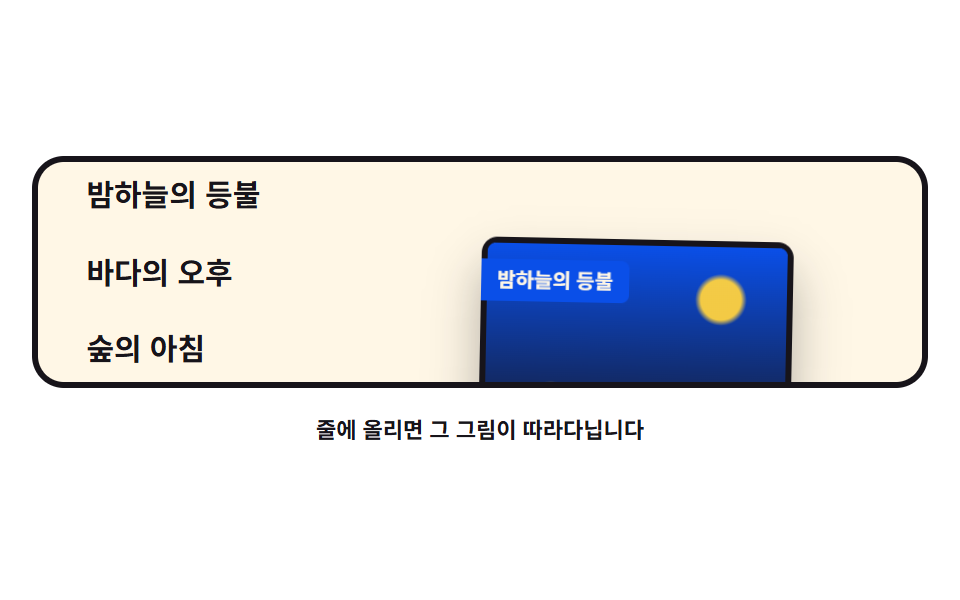
목록 줄에 올리면 그 항목의 그림이 translate3d 로 커서를 늦게 쫓아 떠오르고, 그림에는 리본 이름표가 붙어 같이 돌아다닙니다.
쓰임포트폴리오 목록, 작품 링크
pointerovertranslate3drotate
<main class="stage">
<div class="iv is-demo" id="iv">
  <div class="iv__scene" role="img" aria-label="목록 세 줄 중 커서가 있는 줄의 그림이 커서를 쫓아 떠오르는 그림">
    <ul class="iv__list">
      <li><button class="iv__row" type="button" data-scene="night">밤하늘의 등불</button></li>
      <li><button class="iv__row" type="button" data-scene="sea">바다의 오후</button></li>
      <li><button class="iv__row" type="button" data-scene="forest">숲의 아침</button></li>
    </ul>
    <div class="iv__preview" id="ivPreview" aria-hidden="true">
      <span class="iv__art iv__art--night"></span>
      <span class="iv__art iv__art--sea"></span>
      <span class="iv__art iv__art--forest"></span>
      <span class="iv__ribbon" id="ivRibbon">밤하늘의 등불</span>
    </div>
  </div>
  <p class="iv__hint">줄에 올리면 그 그림이 따라다닙니다</p>
</div>
</main>
@use "../../../../site/static/demo-tokens" as *;
// 오버 시 이미지 프리뷰 — 줄에 올리면 그 항목의 그림(그라디언트 장면)이 커서를 lerp(0.13)로 쫓아
// 떠오르고, 이동 방향에 따라 rotate 로 살짝 기울며 리본 이름표가 붙어 따라온다.
// 격자 미리보기(.is-demo)는 그림이 세 줄을 차례로 찾아다니는 루프를 @keyframes 로 돌린다.
$duration: $dur-loop;
$easing: $ease-spring;
$color: $subject-ink;
@include stage($stage-paper);
.iv { display: grid; justify-items: center; gap: $sp-3; width: 100%; }
.iv__scene {
position: relative; overflow: hidden;
display: flex; align-items: center;
width: 100%; height: clamp(110px, 32vh, 160px);
border: 3px solid $color; border-radius: $r-card;
background: $subject-cream;
}
.iv__list { list-style: none; margin: 0; padding: 0 $sp-4; display: grid; gap: $sp-2; }
.iv__row {
appearance: none;
padding: $sp-1 $sp-2;
background: transparent; border: 0;
color: $color;
font-family: inherit; font-weight: 700; font-size: clamp(12px, 3.2vw, 15px); line-height: 1.5;
text-align: left; white-space: nowrap;
border-radius: $r-sm;
cursor: pointer;
}
.iv__row:hover { text-decoration: underline; text-decoration-thickness: 3px; text-underline-offset: 4px; }
.iv__row:focus-visible { outline: 3px solid $subject-blue; outline-offset: 2px; }
// 프리뷰 그림 — 커서를 쫓는 150x110 카드. 장면 세 개를 겹쳐 두고 opacity 로 갈아 낀다
.iv__preview {
position: absolute; left: 0; top: 0;
width: 150px; height: 110px;
border: 3px solid $color; border-radius: $r-sm;
background: $stage-paper;
box-shadow: $shadow-raised;
will-change: transform;
}
.iv__art {
position: absolute; inset: 0;
border-radius: $r-xs;
transition: opacity $dur-quick $ease-out;
}
// 세 장면 — 사진 대신 색면으로 밤하늘·바다·숲을 나타낸다 (외부 파일 0)
.iv__art--night {
background:
radial-gradient(circle at 78% 24%, rgba($stage-yellow, .95) 0 7%, rgba($stage-yellow, 0) 9%),
radial-gradient(circle at 22% 70%, rgba($stage-yellow, .8) 0 4%, rgba($stage-yellow, 0) 6%),
linear-gradient(180deg, $subject-blue-deep 0%, $subject-ink 100%);
}
.iv__art--sea {
background:
radial-gradient(circle at 72% 20%, rgba($stage-paper, .9) 0 9%, rgba($stage-paper, 0) 14%),
linear-gradient(180deg, $subject-sky 0%, $subject-sky 52%, $subject-mint 52%, $subject-mint 100%);
}
.iv__art--forest {
background:
radial-gradient(circle at 26% 26%, rgba($stage-yellow, .95) 0 10%, rgba($stage-yellow, 0) 16%),
linear-gradient(180deg, $subject-mint 0%, $chart-3 130%);
}
// 달·해는 그라디언트 원으로, 숲 능선은 반투명 삼각형 겹침으로
.iv__art--forest::before {
content: ""; position: absolute; left: 0; right: 0; bottom: 0;
height: 46%;
background: linear-gradient(135deg, transparent 0 18%, rgba($subject-ink, .8) 18% 32%, transparent 32% 48%, rgba($subject-ink, .8) 48% 66%, transparent 66%);
}
// 리본 이름표 — 그림 왼쪽 위에 붙는다 (붙는 지점이 있는 요소).
// 파란 면은 크림 글자가 5.98:1 이 되는 한 단계 진한 쪽을 쓴다
.iv__ribbon {
position: absolute; left: -3px; top: $sp-2;
padding: $sp-1 $sp-2;
background: $subject-blue-deep;
color: $subject-cream;
font-weight: 700; font-size: clamp(9px, 2.4vw, 10px); line-height: 1.3;
border-radius: 0 $r-xs $r-xs 0;
}
.iv__hint { margin: 0; color: $color; font-weight: 700; font-size: clamp(9px, 2.4vw, 11px); }
// ── 미리보기 루프: 그림이 세 줄을 차례로 찾아가며 살짝 기울었다 편다
.iv.is-demo .iv__preview { animation: ivTour $duration $easing infinite; }
@keyframes ivTour {
0%, 8% { transform: translate3d(196px, 18px, 0) rotate(-3deg); }
30%, 38% { transform: translate3d(232px, 48px, 0) rotate(3deg); }
58%, 66% { transform: translate3d(210px, 78px, 0) rotate(-2deg); }
88%, 100% { transform: translate3d(196px, 18px, 0) rotate(-3deg); }
}
@media (max-width: 340px) {
.iv { gap: $sp-2; }
.iv__scene { height: clamp(96px, 28vh, 130px); }
.iv__preview { width: 120px; height: 88px; }
.iv__list { padding: 0 $sp-2; }
.iv.is-demo .iv__preview { animation-name: ivTourNarrow; }
}
@keyframes ivTourNarrow {
0%, 8% { transform: translate3d(148px, 14px, 0) rotate(-3deg); }
30%, 38% { transform: translate3d(168px, 38px, 0) rotate(3deg); }
58%, 66% { transform: translate3d(152px, 62px, 0) rotate(-2deg); }
88%, 100% { transform: translate3d(148px, 14px, 0) rotate(-3deg); }
}
@media (prefers-reduced-motion: reduce) {
.iv.is-demo .iv__preview { animation: none !important; }
// reduce 에서는 그림이 오른쪽 고정 자리에 바로 서 있다
.iv.is-demo .iv__preview { transform: translate3d(196px, 40px, 0) rotate(0deg) !important; }
.iv__art { transition: none; }
}html, body {
margin: 0;
overflow: hidden;
}
.stage {
box-sizing: border-box;
min-height: 100vh;
display: grid;
place-items: center;
margin: 0;
background: #ffffff;
font-family: -apple-system, "Segoe UI", "Noto Sans KR", sans-serif;
padding: clamp(8px, 4vw, 24px);
}
.iv {
display: grid;
justify-items: center;
gap: 12px;
width: 100%;
}
.iv__scene {
position: relative;
overflow: hidden;
display: flex;
align-items: center;
width: 100%;
height: clamp(110px, 32vh, 160px);
border: 3px solid #17141a;
border-radius: 16px;
background: #fff7e6;
}
.iv__list {
list-style: none;
margin: 0;
padding: 0 16px;
display: grid;
gap: 8px;
}
.iv__row {
appearance: none;
padding: 4px 8px;
background: transparent;
border: 0;
color: #17141a;
font-family: inherit;
font-weight: 700;
font-size: clamp(12px, 3.2vw, 15px);
line-height: 1.5;
text-align: left;
white-space: nowrap;
border-radius: 8px;
cursor: pointer;
}
.iv__row:hover {
text-decoration: underline;
text-decoration-thickness: 3px;
text-underline-offset: 4px;
}
.iv__row:focus-visible {
outline: 3px solid #2f6df6;
outline-offset: 2px;
}
.iv__preview {
position: absolute;
left: 0;
top: 0;
width: 150px;
height: 110px;
border: 3px solid #17141a;
border-radius: 8px;
background: #ffffff;
box-shadow: 0 14px 24px rgba(23, 20, 26, 0.32);
will-change: transform;
}
.iv__art {
position: absolute;
inset: 0;
border-radius: 4px;
transition: opacity 220ms ease-out;
}
.iv__art--night {
background: radial-gradient(circle at 78% 24%, rgba(255, 210, 63, 0.95) 0 7%, rgba(255, 210, 63, 0) 9%), radial-gradient(circle at 22% 70%, rgba(255, 210, 63, 0.8) 0 4%, rgba(255, 210, 63, 0) 6%), linear-gradient(180deg, #0a4fe8 0%, #17141a 100%);
}
.iv__art--sea {
background: radial-gradient(circle at 72% 20%, rgba(255, 255, 255, 0.9) 0 9%, rgba(255, 255, 255, 0) 14%), linear-gradient(180deg, #6ec8ff 0%, #6ec8ff 52%, #4cd4a6 52%, #4cd4a6 100%);
}
.iv__art--forest {
background: radial-gradient(circle at 26% 26%, rgba(255, 210, 63, 0.95) 0 10%, rgba(255, 210, 63, 0) 16%), linear-gradient(180deg, #4cd4a6 0%, #2b9d74 130%);
}
.iv__art--forest::before {
content: "";
position: absolute;
left: 0;
right: 0;
bottom: 0;
height: 46%;
background: linear-gradient(135deg, transparent 0 18%, rgba(23, 20, 26, 0.8) 18% 32%, transparent 32% 48%, rgba(23, 20, 26, 0.8) 48% 66%, transparent 66%);
}
.iv__ribbon {
position: absolute;
left: -3px;
top: 8px;
padding: 4px 8px;
background: #0a4fe8;
color: #fff7e6;
font-weight: 700;
font-size: clamp(9px, 2.4vw, 10px);
line-height: 1.3;
border-radius: 0 4px 4px 0;
}
.iv__hint {
margin: 0;
color: #17141a;
font-weight: 700;
font-size: clamp(9px, 2.4vw, 11px);
}
.iv.is-demo .iv__preview {
animation: ivTour 2s cubic-bezier(0.2, 0.8, 0.2, 1) infinite;
}
@keyframes ivTour {
0%, 8% {
transform: translate3d(196px, 18px, 0) rotate(-3deg);
}
30%, 38% {
transform: translate3d(232px, 48px, 0) rotate(3deg);
}
58%, 66% {
transform: translate3d(210px, 78px, 0) rotate(-2deg);
}
88%, 100% {
transform: translate3d(196px, 18px, 0) rotate(-3deg);
}
}
@media (max-width: 340px) {
.iv {
gap: 8px;
}
.iv__scene {
height: clamp(96px, 28vh, 130px);
}
.iv__preview {
width: 120px;
height: 88px;
}
.iv__list {
padding: 0 8px;
}
.iv.is-demo .iv__preview {
animation-name: ivTourNarrow;
}
}
@keyframes ivTourNarrow {
0%, 8% {
transform: translate3d(148px, 14px, 0) rotate(-3deg);
}
30%, 38% {
transform: translate3d(168px, 38px, 0) rotate(3deg);
}
58%, 66% {
transform: translate3d(152px, 62px, 0) rotate(-2deg);
}
88%, 100% {
transform: translate3d(148px, 14px, 0) rotate(-3deg);
}
}
@media (prefers-reduced-motion: reduce) {
.iv.is-demo .iv__preview {
animation: none !important;
}
.iv.is-demo .iv__preview {
transform: translate3d(196px, 40px, 0) rotate(0deg) !important;
}
.iv__art {
transition: none;
}
}var root = document.getElementById('iv');
var preview = document.getElementById('ivPreview');
var ribbon = document.getElementById('ivRibbon');
var rows = Array.prototype.slice.call(document.querySelectorAll('.iv__row'));
var arts = { night: 0, sea: 1, forest: 2 };
var reduce = window.matchMedia('(prefers-reduced-motion: reduce)').matches;
function lerp(a, b, k) { return a + (b - a) * k; }
var t = { x: 0, y: 0 };
var p = { x: 0, y: 0 };
var rot = 0;
var rotNow = 0;
var lastX = null;
function sceneRect() { return root.querySelector('.iv__scene').getBoundingClientRect(); }
function show(idx, label) {
var cards = preview.querySelectorAll('.iv__art');
for (var i = 0; i < cards.length; i++) {
// 보여줄 장면만 opacity 1 — 나머지는 공간을 유지한 채 감춘다
cards[i].style.opacity = i === idx ? '1' : '0';
}
ribbon.textContent = label;
}
function place(cx, cy) {
var r = sceneRect();
t.x = Math.min(r.width - 90, Math.max(90, cx - r.left));
t.y = Math.min(r.height - 60, Math.max(60, cy - r.top));
if (lastX !== null) {
rot = Math.max(-7, Math.min(7, (cx - lastX) * 0.35));
}
lastX = cx;
}
function draw() {
preview.style.transform = 'translate3d(' + (p.x - 75).toFixed(1) + 'px,' + (p.y - 55).toFixed(1) + 'px,0) rotate(' + rotNow.toFixed(1) + 'deg)';
}
function tick() {
p.x = lerp(p.x, t.x, 0.13);
p.y = lerp(p.y, t.y, 0.13);
rotNow = lerp(rotNow, rot, 0.1);
rot = lerp(rot, 0, 0.06);
draw();
requestAnimationFrame(tick);
}
function home() {
var r = sceneRect();
t = { x: r.width - 100, y: r.height * 0.62 };
p = { x: t.x, y: t.y };
rot = 0; rotNow = 0;
}
rows.forEach(function (row) {
row.addEventListener('pointerenter', function (e) {
root.classList.remove('is-demo');
show(arts[row.dataset.scene], row.textContent);
place(e.clientX, e.clientY);
});
row.addEventListener('focus', function () {
root.classList.remove('is-demo');
show(arts[row.dataset.scene], row.textContent);
});
});
root.addEventListener('pointermove', function (e) {
root.classList.remove('is-demo');
place(e.clientX, e.clientY);
});
home();
show(0, rows[0].textContent);
draw();
if (reduce) {
// reduce 에서는 그림이 줄 옆 고정 자리에 붙어 돌아다니지 않는다
window.addEventListener('pointermove', function (e) {
place(e.clientX, e.clientY);
var r = sceneRect();
p = { x: r.width - 100, y: r.height * 0.62 };
rotNow = 0;
draw();
});
} else {
requestAnimationFrame(tick);
}// ImagePreview — vanilla 판(run/079/demo/08-follow-image-preview/index.html) 의 React 포트.
// 줄에 올리면 그 항목의 그림(그라디언트 장면)이 커서를 lerp(0.13)로 쫓아 떠오르고,
// 이동 방향에 따라 rotate 로 살짝 기울며 리본 이름표가 붙어 따라온다.
// 장면 전환은 vanilla 처럼 opacity 로 갈아 끼운다. 값·수치는 vanilla 와 같다.
import { useEffect, useRef, useState } from "react";
import type { CSSProperties } from "react";
import styles from "./ImagePreview.module.scss";
export type ImagePreviewProps = {
duration?: number;
easing?: string;
color?: string;
};
type Vars = CSSProperties & { "--duration"?: string; "--easing"?: string; "--color"?: string };
// useRef 는 T | null 을 돌려준다. 처음부터 값이 있고 절대 비지 않는 상자는 이렇게 좁혀 쓴다
type Box<T> = { current: T };
// 전역 DOM 타입에 기대지 않는다 — 포인터 이벤트에서 실제로 읽는 것만 적는다
type PtrEvt = { clientX: number; clientY: number };
const SCENE_LABEL = "목록 세 줄 중 커서가 있는 줄의 그림이 커서를 쫓아 떠오르는 그림";
const HINT = "줄에 올리면 그 그림이 따라다닙니다";
// 줄 세 개 — 장면 키와 화면 문구. vanilla index.html 의 순서와 같다
const ROWS = [
{ key: "night", label: "밤하늘의 등불" },
{ key: "sea", label: "바다의 오후" },
{ key: "forest", label: "숲의 아침" },
];
// lerp: 매 프레임 남은 거리의 일부만 더 가는 선형 보간
function lerp(a: number, b: number, k: number): number {
return a + (b - a) * k;
}
export default function ImagePreview({
duration = 2000,
easing = "cubic-bezier(.2, .8, .2, 1)",
color = "#17141a",
}: ImagePreviewProps) {
const rootRef = useRef<HTMLDivElement | null>(null);
const sceneRef = useRef<HTMLDivElement | null>(null) as Box<HTMLDivElement>;
const previewRef = useRef<HTMLDivElement | null>(null);
const rowRef = useRef<(HTMLButtonElement | null)[]>(new Array(ROWS.length).fill(null)) as Box<(HTMLButtonElement | null)[]>;
const [demo, setDemo] = useState(true);
const [scene, setScene] = useState(0);
const vars: Vars = { "--duration": `${duration}ms`, "--easing": easing, "--color": color };
function setRow(index: number) {
return (el: HTMLButtonElement | null): void => {
rowRef.current[index] = el;
};
}
useEffect(() => {
const root = rootRef.current;
const sceneBox = sceneRef.current;
if (!root || !sceneBox) return;
const reduce = window.matchMedia("(prefers-reduced-motion: reduce)").matches;
const t = { x: 0, y: 0 };
const p = { x: 0, y: 0 };
let rot = 0;
let rotNow = 0;
let lastX: number | null = null;
function place(cx: number, cy: number): void {
const r = sceneBox.getBoundingClientRect();
t.x = Math.min(r.width - 90, Math.max(90, cx - r.left));
t.y = Math.min(r.height - 60, Math.max(60, cy - r.top));
if (lastX !== null) {
rot = Math.max(-7, Math.min(7, (cx - lastX) * 0.35));
}
lastX = cx;
}
function draw(): void {
const preview = previewRef.current;
if (preview) {
preview.style.transform =
"translate3d(" + (p.x - 75).toFixed(1) + "px," + (p.y - 55).toFixed(1) + "px,0) rotate(" + rotNow.toFixed(1) + "deg)";
}
}
function tick(): void {
p.x = lerp(p.x, t.x, 0.13);
p.y = lerp(p.y, t.y, 0.13);
rotNow = lerp(rotNow, rot, 0.1);
rot = lerp(rot, 0, 0.06);
draw();
raf = requestAnimationFrame(tick);
}
function home(): void {
const r = sceneBox.getBoundingClientRect();
t.x = r.width - 100;
t.y = r.height * 0.62;
p.x = t.x;
p.y = t.y;
rot = 0;
rotNow = 0;
}
function onRowEnter(index: number, event: PtrEvt): void {
setDemo(false);
setScene(index);
place(event.clientX, event.clientY);
}
function onRowFocus(index: number): void {
setDemo(false);
setScene(index);
}
function onMove(event: PtrEvt): void {
setDemo(false);
place(event.clientX, event.clientY);
}
// reduce 에서는 그림이 줄 옆 고정 자리에 붙어 돌아다니지 않는다
function onReduceMove(event: PtrEvt): void {
place(event.clientX, event.clientY);
const r = sceneBox.getBoundingClientRect();
p.x = r.width - 100;
p.y = r.height * 0.62;
rotNow = 0;
draw();
}
const offs: (() => void)[] = [];
rowRef.current.forEach((row, i) => {
if (!row) return;
const enter = (event: PtrEvt): void => onRowEnter(i, event);
const focus = (): void => onRowFocus(i);
row.addEventListener("pointerenter", enter);
row.addEventListener("focus", focus);
offs.push(() => {
row.removeEventListener("pointerenter", enter);
row.removeEventListener("focus", focus);
});
});
root.addEventListener("pointermove", onMove);
if (reduce) window.addEventListener("pointermove", onReduceMove);
let raf = 0;
home();
setScene(0);
draw();
if (!reduce) raf = requestAnimationFrame(tick);
return () => {
offs.forEach((off) => off());
root.removeEventListener("pointermove", onMove);
if (reduce) window.removeEventListener("pointermove", onReduceMove);
cancelAnimationFrame(raf);
};
}, []);
return (
<main className={styles.stage}>
<div className={styles.root + (demo ? " " + styles.isDemo : "")} style={vars} ref={rootRef}>
<div className={styles.scene} ref={sceneRef} role="img" aria-label={SCENE_LABEL}>
<ul className={styles.list}>
{ROWS.map((row, i) => (
<li key={row.key}>
<button className={styles.row} type="button" ref={setRow(i)}>{row.label}</button>
</li>
))}
</ul>
<div className={styles.preview} ref={previewRef} aria-hidden="true">
<span className={styles.art + " " + styles.artNight} style={{ opacity: scene === 0 ? "1" : "0" }}></span>
<span className={styles.art + " " + styles.artSea} style={{ opacity: scene === 1 ? "1" : "0" }}></span>
<span className={styles.art + " " + styles.artForest} style={{ opacity: scene === 2 ? "1" : "0" }}></span>
<span className={styles.ribbon}>{ROWS[scene].label}</span>
</div>
</div>
<p className={styles.hint}>{HINT}</p>
</div>
</main>
);
}08 오버 시 이미지 프리뷰 — 리본 꼬리 — 측정 누적면적 12.68% · 움직인 프레임 18/23GODRICH 원작 · zip 에 SCSS·React 포함 · 마우스 따라다니는 효과 9종 — 커서를 쫓는 글씨·빛·파티클
이 데모가 속한 글
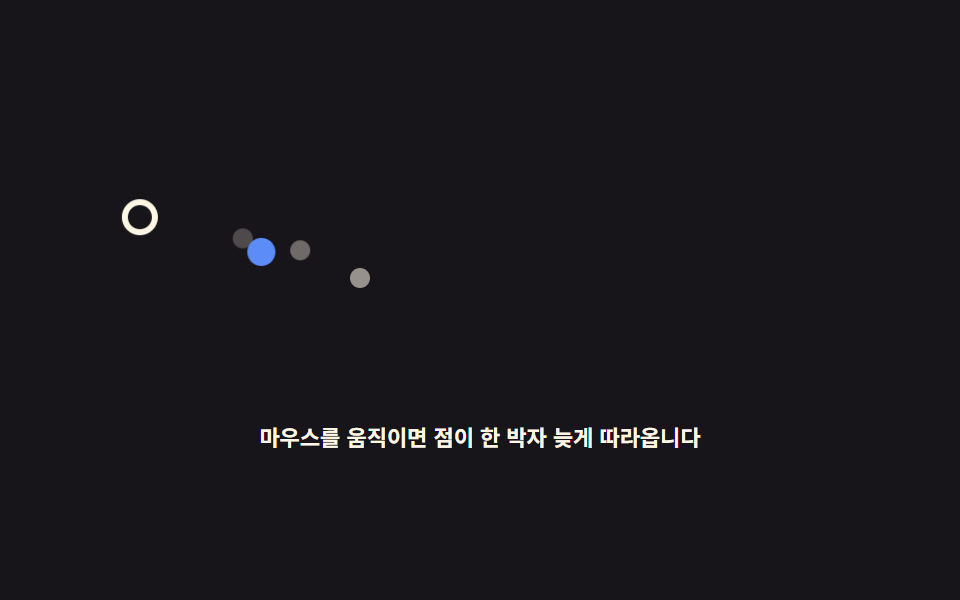 마우스 따라다니는 효과 9종 — 커서를 쫓는 글씨·빛·파티클마우스 따라다니는 효과는 커서 좌표를 매 프레임 읽어서 요소가 한 박자 늦게 쫓아오게 만드는 인터랙션입니다. 핵심은 lerp(선형 보간) 한 줄이고, 캔버스 없이 transform 한 줄로 만들어 무겁지 않습니다. 이 글의 데모 전부 보기