03점에서 끌어 연결하기
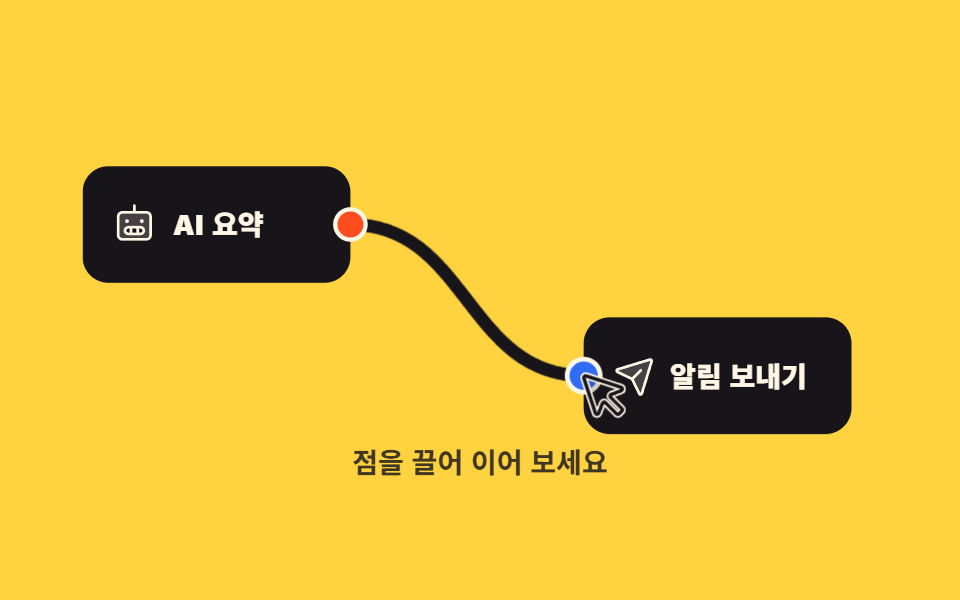
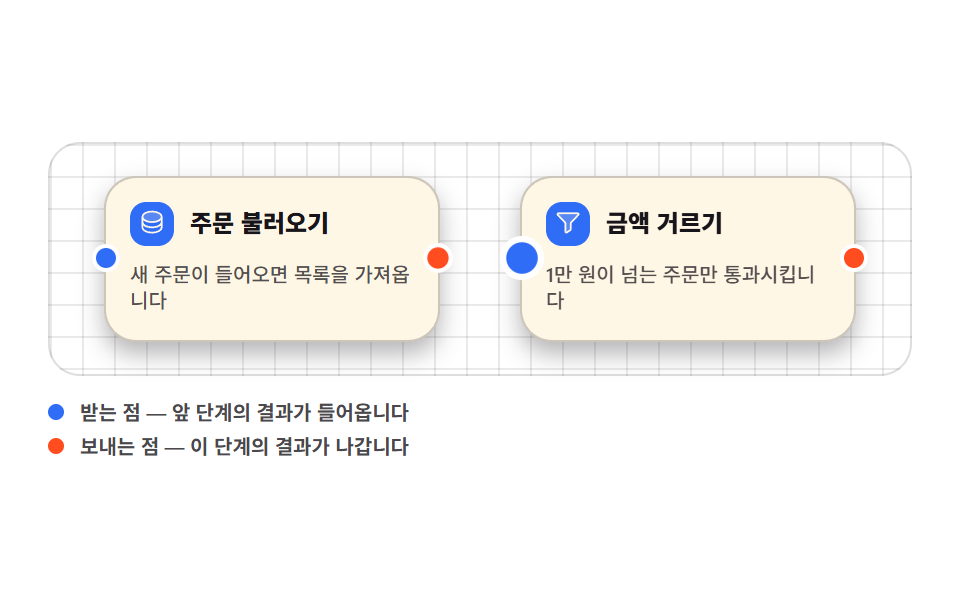
보내는 점을 눌러 끌면 선 끝이 손가락을 따라오고, 받는 점 가까이 가면 선 끝이 그 점에 달라붙으며 점이 한 번 부풉니다.
쓰임노드 편집기의 연결 조작, 매핑 화면
pointerdownsetPointerCapturegetBoundingClientRect
<main class="stage">
<div class="ng is-demo" id="ng">

  <svg class="ng__svg" id="ngSvg" viewBox="0 0 400 176" role="group" aria-label="두 노드를 끌어서 잇는 화면">

    <!-- 확정된 연결선 -->
    <path class="ng__wire" id="ngWire" fill="none" d="M140,53 C194,53 194,123 248,123"/>
    <!-- 끌고 있는 동안의 임시 선 -->
    <path class="ng__temp" id="ngTemp" fill="none" d="M140,53 C194,53 194,123 248,123"/>

    <g class="ng__node">
      <rect x="16" y="26" width="124" height="54" rx="12"/>
      <svg x="30" y="43" width="20" height="20" viewBox="0 0 256 256" fill="currentColor" class="ng__ico" aria-hidden="true"><path d="M200,56H56A24,24,0,0,0,32,80V192a24,24,0,0,0,24,24H200a24,24,0,0,0,24-24V80A24,24,0,0,0,200,56ZM164,184H92a20,20,0,0,1,0-40h72a20,20,0,0,1,0,40Z" opacity="0.2"/><path d="M200,48H136V16a8,8,0,0,0-16,0V48H56A32,32,0,0,0,24,80V192a32,32,0,0,0,32,32H200a32,32,0,0,0,32-32V80A32,32,0,0,0,200,48Zm16,144a16,16,0,0,1-16,16H56a16,16,0,0,1-16-16V80A16,16,0,0,1,56,64H200a16,16,0,0,1,16,16ZM72,108a12,12,0,1,1,12,12A12,12,0,0,1,72,108Zm88,0a12,12,0,1,1,12,12A12,12,0,0,1,160,108Zm4,28H92a28,28,0,0,0,0,56h72a28,28,0,0,0,0-56Zm-24,16v24H116V152ZM80,164a12,12,0,0,1,12-12h8v24H92A12,12,0,0,1,80,164Zm84,12h-8V152h8a12,12,0,0,1,0,24Z"/></svg>
      <text class="ng__nm" x="58" y="53">AI 요약</text>
    </g>

    <g class="ng__node">
      <rect x="248" y="96" width="124" height="54" rx="12"/>
      <svg x="262" y="113" width="20" height="20" viewBox="0 0 256 256" fill="currentColor" class="ng__ico" aria-hidden="true"><path d="M223.69,42.18l-58.22,192a8,8,0,0,1-14.92,1.25L108,148,20.58,105.45a8,8,0,0,1,1.25-14.92l192-58.22A8,8,0,0,1,223.69,42.18Z" opacity="0.2"/><path d="M227.32,28.68a16,16,0,0,0-15.66-4.08l-.15,0L19.57,82.84a16,16,0,0,0-2.49,29.8L102,154l41.3,84.87A15.86,15.86,0,0,0,157.74,248q.69,0,1.38-.06a15.88,15.88,0,0,0,14-11.51l58.2-191.94c0-.05,0-.1,0-.15A16,16,0,0,0,227.32,28.68ZM157.83,231.85l-.05.14,0-.07-40.06-82.3,48-48a8,8,0,0,0-11.31-11.31l-48,48L24.08,98.25l-.07,0,.14,0L216,40Z"/></svg>
      <text class="ng__nm" x="288" y="123">알림 보내기</text>
    </g>

    <circle class="ng__port ng__port--out" id="ngOut" cx="140" cy="53" r="7" role="button" tabindex="0" aria-label="보내는 점"/>
    <circle class="ng__port ng__port--in"  id="ngIn"  cx="248" cy="123" r="7" role="button" tabindex="0" aria-label="받는 점"/>

    <!-- 미리보기 루프의 가짜 포인터 -->
    <g class="ng__cursor" aria-hidden="true">
      <svg x="0" y="0" width="26" height="26" viewBox="0 0 256 256" fill="currentColor"><path d="M213.66,201,201,213.66a8,8,0,0,1-11.31,0l-51.31-51.31a8,8,0,0,0-13,2.46l-17.82,46.41a8,8,0,0,1-14.85-.71L40.41,50.44a8,8,0,0,1,10-10L210.51,92.68a8,8,0,0,1,.71,14.85l-46.41,17.82a8,8,0,0,0-2.46,13l51.31,51.31A8,8,0,0,1,213.66,201Z" opacity="0.2"/><path d="M168,132.69,214.08,115l.33-.13A16,16,0,0,0,213,85.07L52.92,32.8A15.95,15.95,0,0,0,32.8,52.92L85.07,213a15.82,15.82,0,0,0,14.41,11l.78,0a15.84,15.84,0,0,0,14.61-9.59l.13-.33L132.69,168,184,219.31a16,16,0,0,0,22.63,0l12.68-12.68a16,16,0,0,0,0-22.63ZM195.31,208,144,156.69a16,16,0,0,0-26,4.93c0,.11-.09.22-.13.32l-17.65,46L48,48l159.85,52.2-45.95,17.64-.32.13a16,16,0,0,0-4.93,26h0L208,195.31Z"/></svg>
    </g>

    <text class="ng__hint" id="ngHint" x="200" y="168" text-anchor="middle" aria-live="polite">점을 끌어 이어 보세요</text>
  </svg>

</div>
</main>@use "../../../../site/static/demo-tokens" as *;
$duration: $dur-loop;
$easing: $ease-out;
$color: $subject-ink;
@include stage($stage-yellow);
.ng { box-sizing: border-box; width: min(100%, 432px); }
.ng__svg { display: block; width: 100%; height: auto; touch-action: none; }
.ng__node rect { fill: $subject-ink; }
.ng__node .ng__ico { color: $subject-cream; }
.ng__nm { font-weight: 800; font-size: 13px; fill: $subject-cream; dominant-baseline: central; }
// 포트 — SVG 도형은 transform-origin 기준이 뷰박스 원점이라 fill-box 로 바꿔야 제자리에서 커진다
.ng__port {
stroke: $subject-cream; stroke-width: 2; cursor: crosshair;
transform-box: fill-box; transform-origin: 50% 50%;
transition: transform $dur-quick $easing;
}
.ng__port--out { fill: $stage-orange; }
.ng__port--in { fill: $subject-blue; }
.ng__port:focus-visible { outline: 2px solid $subject-ink; outline-offset: 2px; }
.ng__port--in.is-near,
.ng__port--out.is-armed { transform: scale(1.7); }
.ng__wire { stroke: $color; stroke-width: 6; stroke-linecap: round; opacity: 0; pointer-events: none; }
.ng__temp { stroke: rgba(23, 20, 26, .55); stroke-width: 4; stroke-linecap: round; opacity: 0; pointer-events: none; }
.ng__cursor { opacity: 0; color: $subject-ink; pointer-events: none; }
// 포인터가 어두운 노드 위로 올라가면 먹색끼리 겹쳐 사라진다 — 크림 테두리를 먼저 칠해 띄운다
.ng__cursor path { stroke: $subject-cream; stroke-width: 16; stroke-linejoin: round; paint-order: stroke; }
.ng__hint { font-weight: 700; font-size: 13px; fill: rgba(23, 20, 26, .82); }
// ── 미리보기 루프: 가짜 포인터가 보내는 점 → 받는 점으로 이어 달리고,
// 58% 에 받는 점이 부풀며 스냅, 61% 에 굵은 선으로 컷, 87% 안에 처음으로 돌아온다.
// 포인터는 안 보이는 동안(78~79%) 출발점으로 되돌아간다 — 화면에 텔레포트가 안 보인다
.ng.is-demo .ng__cursor {
animation-name: ngCursorMove; animation-duration: $duration;
animation-timing-function: linear; animation-iteration-count: infinite;
animation-fill-mode: backwards;
}
.ng.is-demo .ng__temp {
stroke-dasharray: var(--len);
animation-name: ngTempDraw; animation-duration: $duration;
animation-timing-function: linear; animation-iteration-count: infinite;
animation-fill-mode: backwards;
}
.ng.is-demo .ng__wire {
animation-name: ngCommit; animation-duration: $duration;
animation-timing-function: steps(1, end); animation-iteration-count: infinite;
animation-fill-mode: backwards;
}
.ng.is-demo .ng__port--in {
animation-name: ngSnap; animation-duration: $duration;
animation-timing-function: $ease-pop; animation-iteration-count: infinite;
animation-fill-mode: backwards;
}
// 포인터 좌표는 3차 베지어 위의 t = 0 / .25 / .5 / .75 / 1 지점에서 아이콘 끝(4,4)만큼 뺀 값
@keyframes ngCursorMove {
0% { opacity: 0; transform: translate(136px, 49px); }
6% { opacity: 1; transform: translate(136px, 49px); }
8% { opacity: 1; transform: translate(136px, 49px); }
20.5% { opacity: 1; transform: translate(168px, 60px); }
33% { opacity: 1; transform: translate(190px, 84px); }
45.5% { opacity: 1; transform: translate(212px, 108px); }
58% { opacity: 1; transform: translate(244px, 119px); }
70% { opacity: 1; transform: translate(244px, 119px); }
78% { opacity: 0; transform: translate(244px, 119px); }
79% { opacity: 0; transform: translate(136px, 49px); }
100% { opacity: 0; transform: translate(136px, 49px); }
}
@keyframes ngTempDraw {
0%, 7% { opacity: 0; stroke-dashoffset: var(--len); }
8% { opacity: 1; stroke-dashoffset: var(--len); }
58% { opacity: 1; stroke-dashoffset: 0; }
61% { opacity: 1; stroke-dashoffset: 0; }
62% { opacity: 0; stroke-dashoffset: 0; }
100% { opacity: 0; stroke-dashoffset: 0; }
}
@keyframes ngCommit {
0%, 60% { opacity: 0; }
61% { opacity: 1; }
86% { opacity: 1; }
87% { opacity: 0; }
100% { opacity: 0; }
}
@keyframes ngSnap {
0%, 52% { transform: scale(1); }
60% { transform: scale(1.7); }
72% { transform: scale(1); }
100% { transform: scale(1); }
}
@media (prefers-reduced-motion: reduce) {
.ng.is-demo .ng__cursor,
.ng.is-demo .ng__temp,
.ng.is-demo .ng__wire,
.ng.is-demo .ng__port--in { animation-name: none !important; }
.ng.is-demo .ng__wire { opacity: 1 !important; }
.ng.is-demo .ng__temp { opacity: 0 !important; }
.ng__port { transition: none !important; }
}html, body {
margin: 0;
overflow: hidden;
}
.stage {
box-sizing: border-box;
min-height: 100vh;
display: grid;
place-items: center;
margin: 0;
background: #ffd23f;
font-family: -apple-system, "Segoe UI", "Noto Sans KR", sans-serif;
padding: clamp(8px, 4vw, 24px);
}
.ng {
box-sizing: border-box;
width: min(100%, 432px);
}
.ng__svg {
display: block;
width: 100%;
height: auto;
touch-action: none;
}
.ng__node rect {
fill: #17141a;
}
.ng__node .ng__ico {
color: #fff7e6;
}
.ng__nm {
font-weight: 800;
font-size: 13px;
fill: #fff7e6;
dominant-baseline: central;
}
.ng__port {
stroke: #fff7e6;
stroke-width: 2;
cursor: crosshair;
transform-box: fill-box;
transform-origin: 50% 50%;
transition: transform 220ms ease-out;
}
.ng__port--out {
fill: #ff4d1f;
}
.ng__port--in {
fill: #2f6df6;
}
.ng__port:focus-visible {
outline: 2px solid #17141a;
outline-offset: 2px;
}
.ng__port--in.is-near,
.ng__port--out.is-armed {
transform: scale(1.7);
}
.ng__wire {
stroke: #17141a;
stroke-width: 6;
stroke-linecap: round;
opacity: 0;
pointer-events: none;
}
.ng__temp {
stroke: rgba(23, 20, 26, 0.55);
stroke-width: 4;
stroke-linecap: round;
opacity: 0;
pointer-events: none;
}
.ng__cursor {
opacity: 0;
color: #17141a;
pointer-events: none;
}
.ng__cursor path {
stroke: #fff7e6;
stroke-width: 16;
stroke-linejoin: round;
paint-order: stroke;
}
.ng__hint {
font-weight: 700;
font-size: 13px;
fill: rgba(23, 20, 26, 0.82);
}
.ng.is-demo .ng__cursor {
animation-name: ngCursorMove;
animation-duration: 2s;
animation-timing-function: linear;
animation-iteration-count: infinite;
animation-fill-mode: backwards;
}
.ng.is-demo .ng__temp {
stroke-dasharray: var(--len);
animation-name: ngTempDraw;
animation-duration: 2s;
animation-timing-function: linear;
animation-iteration-count: infinite;
animation-fill-mode: backwards;
}
.ng.is-demo .ng__wire {
animation-name: ngCommit;
animation-duration: 2s;
animation-timing-function: steps(1, end);
animation-iteration-count: infinite;
animation-fill-mode: backwards;
}
.ng.is-demo .ng__port--in {
animation-name: ngSnap;
animation-duration: 2s;
animation-timing-function: cubic-bezier(0.2, 1.4, 0.4, 1);
animation-iteration-count: infinite;
animation-fill-mode: backwards;
}
@keyframes ngCursorMove {
0% {
opacity: 0;
transform: translate(136px, 49px);
}
6% {
opacity: 1;
transform: translate(136px, 49px);
}
8% {
opacity: 1;
transform: translate(136px, 49px);
}
20.5% {
opacity: 1;
transform: translate(168px, 60px);
}
33% {
opacity: 1;
transform: translate(190px, 84px);
}
45.5% {
opacity: 1;
transform: translate(212px, 108px);
}
58% {
opacity: 1;
transform: translate(244px, 119px);
}
70% {
opacity: 1;
transform: translate(244px, 119px);
}
78% {
opacity: 0;
transform: translate(244px, 119px);
}
79% {
opacity: 0;
transform: translate(136px, 49px);
}
100% {
opacity: 0;
transform: translate(136px, 49px);
}
}
@keyframes ngTempDraw {
0%, 7% {
opacity: 0;
stroke-dashoffset: var(--len);
}
8% {
opacity: 1;
stroke-dashoffset: var(--len);
}
58% {
opacity: 1;
stroke-dashoffset: 0;
}
61% {
opacity: 1;
stroke-dashoffset: 0;
}
62% {
opacity: 0;
stroke-dashoffset: 0;
}
100% {
opacity: 0;
stroke-dashoffset: 0;
}
}
@keyframes ngCommit {
0%, 60% {
opacity: 0;
}
61% {
opacity: 1;
}
86% {
opacity: 1;
}
87% {
opacity: 0;
}
100% {
opacity: 0;
}
}
@keyframes ngSnap {
0%, 52% {
transform: scale(1);
}
60% {
transform: scale(1.7);
}
72% {
transform: scale(1);
}
100% {
transform: scale(1);
}
}
@media (prefers-reduced-motion: reduce) {
.ng.is-demo .ng__cursor,
.ng.is-demo .ng__temp,
.ng.is-demo .ng__wire,
.ng.is-demo .ng__port--in {
animation-name: none !important;
}
.ng.is-demo .ng__wire {
opacity: 1 !important;
}
.ng.is-demo .ng__temp {
opacity: 0 !important;
}
.ng__port {
transition: none !important;
}
}var VIEW_W = 400; // viewBox 가로 — 화면 px 를 이 좌표계로 되돌릴 때 쓴다
var SNAP = 28; // 받는 점 중심에서 이 거리 안이면 달라붙는다
var ng = document.getElementById('ng');
var svg = document.getElementById('ngSvg');
var temp = document.getElementById('ngTemp');
var wire = document.getElementById('ngWire');
var outPort = document.getElementById('ngOut');
var inPort = document.getElementById('ngIn');
var hint = document.getElementById('ngHint');
var OUT = { x: 140, y: 53 };
var IN = { x: 248, y: 123 };
var dragging = false, snapped = false, armed = false;
// 화면 좌표 → viewBox 좌표. 무대가 줄어도 배율 하나로 되돌린다
function toLocal(e) {
var box = svg.getBoundingClientRect();
var k = VIEW_W / box.width;
return { x: (e.clientX - box.left) * k, y: (e.clientY - box.top) * k };
}
// 손잡이는 두 점의 가로 거리의 절반, 최소 40
function wirePath(x1, y1, x2, y2) {
var h = Math.max(40, Math.abs(x2 - x1) * 0.5);
return 'M' + x1 + ',' + y1 + ' C' + (x1 + h) + ',' + y1 + ' ' + (x2 - h) + ',' + y2 + ' ' + x2 + ',' + y2;
}
function wake() { ng.classList.remove('is-demo'); }
function drawTo(p) {
var far = Math.sqrt((p.x - IN.x) * (p.x - IN.x) + (p.y - IN.y) * (p.y - IN.y));
snapped = far < SNAP;
var end = snapped ? IN : p;
temp.setAttribute('d', wirePath(OUT.x, OUT.y, end.x, end.y));
inPort.classList.toggle('is-near', snapped);
}
function commit() {
wire.setAttribute('d', wirePath(OUT.x, OUT.y, IN.x, IN.y));
wire.style.opacity = '1';
hint.textContent = '이어졌습니다';
}
function stop() {
dragging = false; armed = false;
temp.style.opacity = '0';
inPort.classList.remove('is-near');
outPort.classList.remove('is-armed');
}
outPort.addEventListener('pointerdown', function (e) {
e.preventDefault(); wake();
outPort.setPointerCapture(e.pointerId); // 손가락이 포트를 벗어나도 이 점이 계속 받는다
dragging = true; snapped = false;
temp.style.opacity = '1';
drawTo(toLocal(e));
});
outPort.addEventListener('pointermove', function (e) { if (dragging) drawTo(toLocal(e)); });
outPort.addEventListener('pointerup', function () {
if (!dragging) return;
if (snapped) commit();
stop();
});
outPort.addEventListener('pointercancel', stop);
// 키보드: 보내는 점에서 Enter → 받는 점에서 Enter
outPort.addEventListener('keydown', function (e) {
if (e.key !== 'Enter' && e.key !== ' ') return;
e.preventDefault(); wake();
armed = true;
outPort.classList.add('is-armed');
inPort.classList.add('is-near');
inPort.focus({ preventScroll: true });
});
inPort.addEventListener('keydown', function (e) {
if (e.key !== 'Enter' && e.key !== ' ') return;
e.preventDefault();
if (armed) { commit(); stop(); }
});
outPort.addEventListener('focus', wake);
inPort.addEventListener('focus', wake);
// 미리보기 루프가 쓸 선 길이 — 점선 한 칸이 선 전체가 되게 한다
temp.style.setProperty('--len', temp.getTotalLength());import { useEffect, useRef, useState } from "react";
import styles from "./DragConnect.module.scss";
export type DragConnectProps = { duration?: number; easing?: string; color?: string };
// ambient 에 React 이벤트 제네릭이 없다 — 쓰는 필드만 적은 로컬 타입
type PointerEvt = {
clientX: number; clientY: number; pointerId: number;
currentTarget: { setPointerCapture(id: number): void };
preventDefault(): void;
};
type KeyEvt = { key: string; preventDefault(): void };
type Point = { x: number; y: number };
const VIEW_W = 400; // viewBox 가로 — 화면 px 를 이 좌표계로 되돌릴 때 쓴다
const SNAP = 28; // 받는 점 중심에서 이 거리 안이면 달라붙는다
const OUT: Point = { x: 140, y: 53 };
const IN: Point = { x: 248, y: 123 };
// 손잡이는 두 점의 가로 거리의 절반, 최소 40
function wirePath(x1: number, y1: number, x2: number, y2: number): string {
const h = Math.max(40, Math.abs(x2 - x1) * 0.5);
return `M${x1},${y1} C${x1 + h},${y1} ${x2 - h},${y2} ${x2},${y2}`;
}
const FULL = wirePath(OUT.x, OUT.y, IN.x, IN.y);
export default function DragConnect({
duration = 2000,
easing = "linear",
color = "#17141a",
}: DragConnectProps) {
const [demo, setDemo] = useState(true);
const [temp, setTemp] = useState("");
const [near, setNear] = useState(false);
const [armed, setArmed] = useState(false);
const [connected, setConnected] = useState(false);
const [len, setLen] = useState(0);
const svgRef = useRef<SVGSVGElement>(null);
const tempRef = useRef<SVGPathElement>(null);
const inRef = useRef<SVGCircleElement>(null);
const dragRef = useRef<boolean>(false);
const snapRef = useRef<boolean>(false);
useEffect(() => {
const el = tempRef.current;
if (el) setLen(el.getTotalLength()); // 미리보기 루프가 쓸 선 길이
}, []);
// 화면 좌표 → viewBox 좌표. 무대가 줄어도 배율 하나로 되돌린다
const local = (e: PointerEvt): Point => {
const el = svgRef.current;
if (!el) return { x: 0, y: 0 };
const box = el.getBoundingClientRect();
const k = VIEW_W / box.width;
return { x: (e.clientX - box.left) * k, y: (e.clientY - box.top) * k };
};
const drawTo = (p: Point) => {
const gap = Math.sqrt((p.x - IN.x) * (p.x - IN.x) + (p.y - IN.y) * (p.y - IN.y));
const hit = gap < SNAP;
snapRef.current = hit;
setNear(hit);
const end = hit ? IN : p;
setTemp(wirePath(OUT.x, OUT.y, end.x, end.y));
};
const stop = () => {
dragRef.current = false;
setTemp(""); setNear(false); setArmed(false);
};
const onDown = (e: PointerEvt) => {
e.preventDefault();
setDemo(false);
e.currentTarget.setPointerCapture(e.pointerId); // 손가락이 포트를 벗어나도 이 점이 계속 받는다
dragRef.current = true; snapRef.current = false;
drawTo(local(e));
};
const onMove = (e: PointerEvt) => { if (dragRef.current) drawTo(local(e)); };
const onUp = () => {
if (!dragRef.current) return;
if (snapRef.current) setConnected(true);
stop();
};
const onOutKey = (e: KeyEvt) => {
if (e.key !== "Enter" && e.key !== " ") return;
e.preventDefault();
setDemo(false); setArmed(true); setNear(true);
const el = inRef.current;
if (el) el.focus({ preventScroll: true });
};
const onInKey = (e: KeyEvt) => {
if (e.key !== "Enter" && e.key !== " ") return;
e.preventDefault();
if (armed) { setConnected(true); stop(); }
};
const loop = (name: string, timing: string) => (demo
? {
animationName: name,
animationDuration: `${duration}ms`,
animationTimingFunction: timing,
animationIterationCount: "infinite",
animationFillMode: "backwards",
}
: {});
return (
<main className={styles.stage}>
<div className={styles.ng}>
<svg ref={svgRef} className={styles.svg} viewBox="0 0 400 176" role="group" aria-label="두 노드를 끌어서 잇는 화면">
<path
className={styles.wire}
fill="none"
d={FULL}
style={{ stroke: color, opacity: demo ? undefined : (connected ? 1 : 0), ...loop("ngCommit", "steps(1, end)") }}
/>
<path
ref={tempRef}
className={styles.temp}
fill="none"
d={demo ? FULL : (temp || FULL)}
style={{
opacity: demo ? undefined : (temp ? 1 : 0),
...(demo ? { strokeDasharray: len || undefined, "--len": len } : {}),
...loop("ngTempDraw", "linear"),
}}
/>
<g className={styles.node}>
<rect x="16" y="26" width="124" height="54" rx="12"/>
<svg x="30" y="43" width="20" height="20" viewBox="0 0 256 256" fill="currentColor" className={styles.ico} aria-hidden="true"><path d="M200,56H56A24,24,0,0,0,32,80V192a24,24,0,0,0,24,24H200a24,24,0,0,0,24-24V80A24,24,0,0,0,200,56ZM164,184H92a20,20,0,0,1,0-40h72a20,20,0,0,1,0,40Z" opacity="0.2"/><path d="M200,48H136V16a8,8,0,0,0-16,0V48H56A32,32,0,0,0,24,80V192a32,32,0,0,0,32,32H200a32,32,0,0,0,32-32V80A32,32,0,0,0,200,48Zm16,144a16,16,0,0,1-16,16H56a16,16,0,0,1-16-16V80A16,16,0,0,1,56,64H200a16,16,0,0,1,16,16ZM72,108a12,12,0,1,1,12,12A12,12,0,0,1,72,108Zm88,0a12,12,0,1,1,12,12A12,12,0,0,1,160,108Zm4,28H92a28,28,0,0,0,0,56h72a28,28,0,0,0,0-56Zm-24,16v24H116V152ZM80,164a12,12,0,0,1,12-12h8v24H92A12,12,0,0,1,80,164Zm84,12h-8V152h8a12,12,0,0,1,0,24Z"/></svg>
<text className={styles.nm} x="58" y="53">AI 요약</text>
</g>
<g className={styles.node}>
<rect x="248" y="96" width="124" height="54" rx="12"/>
<svg x="262" y="113" width="20" height="20" viewBox="0 0 256 256" fill="currentColor" className={styles.ico} aria-hidden="true"><path d="M223.69,42.18l-58.22,192a8,8,0,0,1-14.92,1.25L108,148,20.58,105.45a8,8,0,0,1,1.25-14.92l192-58.22A8,8,0,0,1,223.69,42.18Z" opacity="0.2"/><path d="M227.32,28.68a16,16,0,0,0-15.66-4.08l-.15,0L19.57,82.84a16,16,0,0,0-2.49,29.8L102,154l41.3,84.87A15.86,15.86,0,0,0,157.74,248q.69,0,1.38-.06a15.88,15.88,0,0,0,14-11.51l58.2-191.94c0-.05,0-.1,0-.15A16,16,0,0,0,227.32,28.68ZM157.83,231.85l-.05.14,0-.07-40.06-82.3,48-48a8,8,0,0,0-11.31-11.31l-48,48L24.08,98.25l-.07,0,.14,0L216,40Z"/></svg>
<text className={styles.nm} x="288" y="123">알림 보내기</text>
</g>
<circle
className={`${styles.port} ${styles.portOut} ${armed ? styles.isArmed : ""}`}
cx="140" cy="53" r="7" role="button" tabIndex={0} aria-label="보내는 점"
onPointerDown={onDown}
onPointerMove={onMove}
onPointerUp={onUp}
onPointerCancel={stop}
onKeyDown={onOutKey}
onFocus={() => setDemo(false)}
/>
<circle
ref={inRef}
className={`${styles.port} ${styles.portIn} ${near ? styles.isNear : ""}`}
cx="248" cy="123" r="7" role="button" tabIndex={0} aria-label="받는 점"
style={loop("ngSnap", "cubic-bezier(.2, 1.4, .4, 1)")}
onKeyDown={onInKey}
onFocus={() => setDemo(false)}
/>
<g className={styles.cursor} aria-hidden="true" style={loop("ngCursorMove", easing)}>
<svg x="0" y="0" width="26" height="26" viewBox="0 0 256 256" fill="currentColor"><path d="M213.66,201,201,213.66a8,8,0,0,1-11.31,0l-51.31-51.31a8,8,0,0,0-13,2.46l-17.82,46.41a8,8,0,0,1-14.85-.71L40.41,50.44a8,8,0,0,1,10-10L210.51,92.68a8,8,0,0,1,.71,14.85l-46.41,17.82a8,8,0,0,0-2.46,13l51.31,51.31A8,8,0,0,1,213.66,201Z" opacity="0.2"/><path d="M168,132.69,214.08,115l.33-.13A16,16,0,0,0,213,85.07L52.92,32.8A15.95,15.95,0,0,0,32.8,52.92L85.07,213a15.82,15.82,0,0,0,14.41,11l.78,0a15.84,15.84,0,0,0,14.61-9.59l.13-.33L132.69,168,184,219.31a16,16,0,0,0,22.63,0l12.68-12.68a16,16,0,0,0,0-22.63ZM195.31,208,144,156.69a16,16,0,0,0-26,4.93c0,.11-.09.22-.13.32l-17.65,46L48,48l159.85,52.2-45.95,17.64-.32.13a16,16,0,0,0-4.93,26h0L208,195.31Z"/></svg>
</g>
<text className={styles.hint} x="200" y="168" textAnchor="middle" aria-live="polite">
{connected ? "이어졌습니다" : "점을 끌어 이어 보세요"}
</text>
</svg>
</div>
</main>
);
}03 점에서 끌어 연결하기 — 측정 누적면적 2.532% · 움직인 프레임 20/23GODRICH 원작 · zip 에 SCSS·React 포함 · 플로우차트 UI 9종 — 노드를 선으로 잇는 화면
이 데모가 속한 글
 플로우차트 UI 9종 — 노드를 선으로 잇는 화면플로우차트 UI 는 상자를 늘어놓고 선으로 이어 「무엇 다음에 무엇이 오는지」를 눈으로 보여 주는 화면입니다. 여기 모은 아홉 벌은 n8n·피그마 같은 편집기의 그 화면을 라이브러리 없이 바닐라 JS 와 SCSS 로 이 글의 데모 전부 보기