01굵기가 변하는 서명 패드
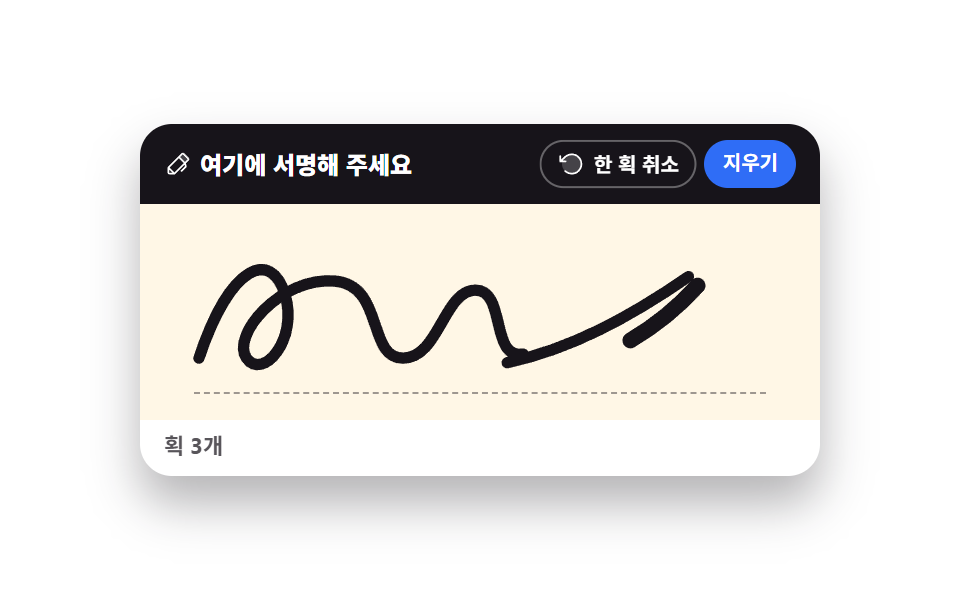
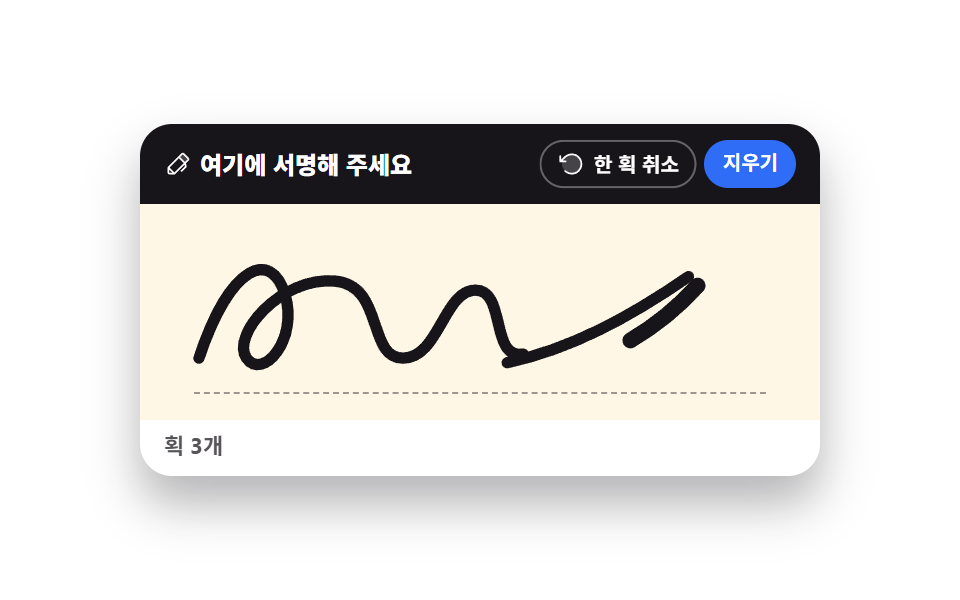
손으로 그은 자리에 잉크가 남는 기본 서명 패드입니다.
쓰임배송 수령 확인 서명, 모바일 동의서의 서명 칸
pointerdownlineWidthquadraticCurveTo
<main class="stage">
<div class="sp is-demo" id="sp">
  <div class="sp__card">
    <div class="sp__bar">
      <p class="sp__label"><svg xmlns="http://www.w3.org/2000/svg" viewBox="0 0 256 256" fill="currentColor" class="sp__ico" aria-hidden="true"><path d="M221.66,90.34,192,120,136,64l29.66-29.66a8,8,0,0,1,11.31,0L221.66,79A8,8,0,0,1,221.66,90.34Z" opacity="0.2"/><path d="M227.32,73.37,182.63,28.69a16,16,0,0,0-22.63,0L36.69,152A15.86,15.86,0,0,0,32,163.31V208a16,16,0,0,0,16,16H92.69A15.86,15.86,0,0,0,104,219.31l83.67-83.66,3.48,13.9-36.8,36.79a8,8,0,0,0,11.31,11.32l40-40a8,8,0,0,0,2.11-7.6l-6.9-27.61L227.32,96A16,16,0,0,0,227.32,73.37ZM48,208V179.31L76.69,208Zm48-3.31L51.31,160,136,75.31,180.69,120Zm96-96L147.32,64l24-24L216,84.69Z"/></svg><span>여기에 서명해 주세요</span></p>
      <div class="sp__acts">
        <button type="button" class="sp__btn" id="undoBtn"><svg xmlns="http://www.w3.org/2000/svg" viewBox="0 0 256 256" fill="currentColor" class="sp__ico" aria-hidden="true"><path d="M216,128a88,88,0,1,1-88-88A88,88,0,0,1,216,128Z" opacity="0.2"/><path d="M224,128a96,96,0,0,1-94.71,96H128A95.38,95.38,0,0,1,62.1,197.8a8,8,0,0,1,11-11.63A80,80,0,1,0,71.43,71.39a3.07,3.07,0,0,1-.26.25L44.59,96H72a8,8,0,0,1,0,16H24a8,8,0,0,1-8-8V56a8,8,0,0,1,16,0V85.8L60.25,60A96,96,0,0,1,224,128Z"/></svg><span>한 획 취소</span></button>
        <button type="button" class="sp__btn sp__btn--wipe" id="clearBtn">지우기</button>
      </div>
    </div>
    <div class="sp__pad" id="pad">
      <canvas class="sp__ink" id="ink" role="img" aria-label="서명 칸, 획 0개"></canvas>
      <svg class="sp__ghost" viewBox="0 0 300 96" preserveAspectRatio="none" aria-hidden="true">
        <path class="sp__stroke sp__stroke--a" pathLength="100" d="M26,68 C40,26 58,20 64,40 C70,60 54,78 47,68 C40,58 62,32 86,34 C108,36 100,68 116,68 C132,68 134,38 148,38 C162,38 154,70 170,66"/>
        <path class="sp__stroke sp__stroke--b" pathLength="100" d="M162,70 C190,64 216,50 242,32"/>
        <path class="sp__stroke sp__stroke--c" pathLength="100" d="M246,36 C210,76 152,88 92,80"/>
      </svg>
      <span class="sp__rule" aria-hidden="true"></span>
    </div>
    <p class="sp__live">
      <span class="sp__liveReal" id="live" aria-live="polite">획 0개</span>
      <span class="sp__liveDemo sp__liveDemo--zero" aria-hidden="true">획 0개</span>
      <span class="sp__liveDemo sp__liveDemo--one" aria-hidden="true">획 1개</span>
      <span class="sp__liveDemo sp__liveDemo--two" aria-hidden="true">획 2개</span>
      <span class="sp__liveDemo sp__liveDemo--three" aria-hidden="true">획 3개</span>
    </p>
  </div>
</div>
</main>@use "../../../../site/static/demo-tokens" as *;
// 굵기가 변하는 서명 패드 — 실제 서명은 canvas 2D 가 그린다(pointermove 마다 quadraticCurveTo).
// 격자 미리보기(.is-demo)는 canvas 를 감추고 같은 모양의 SVG 경로 3개를 stroke-dashoffset 으로
// 순서대로 긋는다. demo.py 는 CSS 애니메이션 시계로 프레임을 뽑으므로 canvas 로 그린 획은 24장이 전부 같다.
$duration: $dur-loop;
$easing: $ease-out;
$color: $subject-ink;
@include stage($stage-paper);
.sp { display: flex; justify-content: center; width: 100%; }
.sp__card {
width: min(100%, 340px); background: $stage-paper; border-radius: $r-card;
box-shadow: $shadow-raised; overflow: hidden;
}
.sp__bar {
display: flex; align-items: center; justify-content: space-between; gap: $sp-2;
background: $subject-ink; padding: $sp-2 $sp-3;
}
.sp__label {
display: flex; align-items: center; gap: $sp-1; margin: 0;
font-weight: 800; font-size: clamp(10px, 2.8vw, 12px); color: $stage-paper;
}
.sp__ico { width: 14px; height: 14px; flex: 0 0 auto; }
.sp__acts { display: flex; gap: $sp-1; }
.sp__btn {
display: flex; align-items: center; gap: $sp-1; cursor: pointer;
border: 1px solid rgba(255, 255, 255, .34); background: transparent; color: $stage-paper;
border-radius: $r-pill; font-family: inherit; font-weight: 700;
font-size: clamp(9px, 2.4vw, 10px); padding: $sp-1 $sp-2; line-height: 1.3;
}
.sp__btn--wipe { background: $subject-blue; border-color: $subject-blue; }
.sp__btn:focus-visible { outline: 3px solid $subject-blue; outline-offset: 2px; }
.sp__pad { position: relative; background: $subject-cream; aspect-ratio: 300 / 96; touch-action: none; }
.sp__ink, .sp__ghost { position: absolute; inset: 0; width: 100%; height: 100%; }
.sp__rule {
position: absolute; left: 8%; right: 8%; bottom: 12%; height: 0;
border-bottom: 1px dashed rgba(23, 20, 26, .42);
}
.sp__ghost { display: none; fill: none; }
.sp__stroke {
stroke: $color; stroke-width: 5; stroke-linecap: round; stroke-linejoin: round;
stroke-dasharray: 100; stroke-dashoffset: 100;
}
.sp__stroke--c { stroke-width: 7; }
.sp__live {
position: relative; margin: 0; padding: $sp-1 $sp-3 $sp-2; font-weight: 700;
font-size: clamp(9px, 2.4vw, 11px); color: rgba(23, 20, 26, .72);
}
.sp__liveDemo { display: none; position: absolute; left: $sp-3; top: $sp-1; }
// ── 미리보기 루프: 획 셋이 4~54% 에 차례로 그어지고, 62% 부터 「한 획 취소」를 세 번 누른 것처럼
// 마지막 획부터 거꾸로 되감긴다(stroke-dashoffset 0 → 100 은 펜이 왔던 길을 되짚는 모양이다).
// 98% 에 빈 칸으로 돌아오므로 루프가 이어붙는 지점이 빈 칸 대 빈 칸 — 되감기가 튀지 않는다.
.sp.is-demo .sp__ink { visibility: hidden; }
.sp.is-demo .sp__ghost { display: block; }
.sp.is-demo .sp__stroke {
animation-duration: $duration;
animation-timing-function: $easing;
animation-iteration-count: infinite;
}
.sp.is-demo .sp__stroke--a { animation-name: spDrawA; }
.sp.is-demo .sp__stroke--b { animation-name: spDrawB; }
.sp.is-demo .sp__stroke--c { animation-name: spDrawC; }
@keyframes spDrawA {
0%, 4% { stroke-dashoffset: 100; }
28%, 80% { stroke-dashoffset: 0; }
98%, 100% { stroke-dashoffset: 100; }
}
@keyframes spDrawB {
0%, 30% { stroke-dashoffset: 100; }
42%, 70% { stroke-dashoffset: 0; }
82%, 100% { stroke-dashoffset: 100; }
}
@keyframes spDrawC {
0%, 44% { stroke-dashoffset: 100; }
54%, 62% { stroke-dashoffset: 0; }
70%, 100% { stroke-dashoffset: 100; }
}
// 미리보기의 획 수는 실제 값이 아니므로 칸 네 개를 steps(1, end) 로 갈아 끼운다 — 반투명 겹침이 없다
.sp.is-demo .sp__liveReal { color: transparent; }
.sp.is-demo .sp__liveDemo {
display: block;
animation-duration: $duration;
animation-timing-function: steps(1, end);
animation-iteration-count: infinite;
}
.sp.is-demo .sp__liveDemo--zero { animation-name: spCountZero; }
.sp.is-demo .sp__liveDemo--one { animation-name: spCountOne; }
.sp.is-demo .sp__liveDemo--two { animation-name: spCountTwo; }
.sp.is-demo .sp__liveDemo--three { animation-name: spCountThree; }
@keyframes spCountZero {
0%, 27% { opacity: 1; }
28%, 97% { opacity: 0; }
98%, 100% { opacity: 1; }
}
@keyframes spCountOne {
0%, 27% { opacity: 0; }
28%, 41% { opacity: 1; }
42%, 81% { opacity: 0; }
82%, 97% { opacity: 1; }
98%, 100% { opacity: 0; }
}
@keyframes spCountTwo {
0%, 41% { opacity: 0; }
42%, 53% { opacity: 1; }
54%, 69% { opacity: 0; }
70%, 81% { opacity: 1; }
82%, 100% { opacity: 0; }
}
@keyframes spCountThree {
0%, 53% { opacity: 0; }
54%, 69% { opacity: 1; }
70%, 100% { opacity: 0; }
}
// 되감기가 시작되는 62% 에 「한 획 취소」 버튼이 자기 중심에서 눌린다 (transform-origin 기본값 50% 50%)
.sp.is-demo .sp__btn:first-child {
animation-name: spPress;
animation-duration: $duration;
animation-timing-function: $ease-pop;
animation-iteration-count: infinite;
}
@keyframes spPress {
0%, 60% { transform: scale(1); }
64% { transform: scale(.88); }
70%, 100% { transform: scale(1); }
}
@media (max-width: 340px) {
.sp__bar { padding: $sp-1 $sp-2; }
.sp__live { padding: $sp-1 $sp-2; }
.sp__liveDemo { left: $sp-2; }
}
@media (prefers-reduced-motion: reduce) {
.sp.is-demo .sp__stroke,
.sp.is-demo .sp__liveDemo,
.sp.is-demo .sp__btn:first-child { animation: none !important; }
// 움직임 없이 서명이 다 그어진 최종 상태로 세운다
.sp.is-demo .sp__stroke { stroke-dashoffset: 0 !important; }
.sp.is-demo .sp__liveDemo--zero,
.sp.is-demo .sp__liveDemo--one,
.sp.is-demo .sp__liveDemo--two { opacity: 0 !important; }
.sp.is-demo .sp__liveDemo--three { opacity: 1 !important; }
}html, body {
margin: 0;
overflow: hidden;
}
.stage {
box-sizing: border-box;
min-height: 100vh;
display: grid;
place-items: center;
margin: 0;
background: #ffffff;
font-family: -apple-system, "Segoe UI", "Noto Sans KR", sans-serif;
padding: clamp(8px, 4vw, 24px);
}
.sp {
display: flex;
justify-content: center;
width: 100%;
}
.sp__card {
width: min(100%, 340px);
background: #ffffff;
border-radius: 16px;
box-shadow: 0 14px 24px rgba(23, 20, 26, 0.32);
overflow: hidden;
}
.sp__bar {
display: flex;
align-items: center;
justify-content: space-between;
gap: 8px;
background: #17141a;
padding: 8px 12px;
}
.sp__label {
display: flex;
align-items: center;
gap: 4px;
margin: 0;
font-weight: 800;
font-size: clamp(10px, 2.8vw, 12px);
color: #ffffff;
}
.sp__ico {
width: 14px;
height: 14px;
flex: 0 0 auto;
}
.sp__acts {
display: flex;
gap: 4px;
}
.sp__btn {
display: flex;
align-items: center;
gap: 4px;
cursor: pointer;
border: 1px solid rgba(255, 255, 255, 0.34);
background: transparent;
color: #ffffff;
border-radius: 999px;
font-family: inherit;
font-weight: 700;
font-size: clamp(9px, 2.4vw, 10px);
padding: 4px 8px;
line-height: 1.3;
}
.sp__btn--wipe {
background: #2f6df6;
border-color: #2f6df6;
}
.sp__btn:focus-visible {
outline: 3px solid #2f6df6;
outline-offset: 2px;
}
.sp__pad {
position: relative;
background: #fff7e6;
aspect-ratio: 300/96;
touch-action: none;
}
.sp__ink, .sp__ghost {
position: absolute;
inset: 0;
width: 100%;
height: 100%;
}
.sp__rule {
position: absolute;
left: 8%;
right: 8%;
bottom: 12%;
height: 0;
border-bottom: 1px dashed rgba(23, 20, 26, 0.42);
}
.sp__ghost {
display: none;
fill: none;
}
.sp__stroke {
stroke: #17141a;
stroke-width: 5;
stroke-linecap: round;
stroke-linejoin: round;
stroke-dasharray: 100;
stroke-dashoffset: 100;
}
.sp__stroke--c {
stroke-width: 7;
}
.sp__live {
position: relative;
margin: 0;
padding: 4px 12px 8px;
font-weight: 700;
font-size: clamp(9px, 2.4vw, 11px);
color: rgba(23, 20, 26, 0.72);
}
.sp__liveDemo {
display: none;
position: absolute;
left: 12px;
top: 4px;
}
.sp.is-demo .sp__ink {
visibility: hidden;
}
.sp.is-demo .sp__ghost {
display: block;
}
.sp.is-demo .sp__stroke {
animation-duration: 2s;
animation-timing-function: ease-out;
animation-iteration-count: infinite;
}
.sp.is-demo .sp__stroke--a {
animation-name: spDrawA;
}
.sp.is-demo .sp__stroke--b {
animation-name: spDrawB;
}
.sp.is-demo .sp__stroke--c {
animation-name: spDrawC;
}
@keyframes spDrawA {
0%, 4% {
stroke-dashoffset: 100;
}
28%, 80% {
stroke-dashoffset: 0;
}
98%, 100% {
stroke-dashoffset: 100;
}
}
@keyframes spDrawB {
0%, 30% {
stroke-dashoffset: 100;
}
42%, 70% {
stroke-dashoffset: 0;
}
82%, 100% {
stroke-dashoffset: 100;
}
}
@keyframes spDrawC {
0%, 44% {
stroke-dashoffset: 100;
}
54%, 62% {
stroke-dashoffset: 0;
}
70%, 100% {
stroke-dashoffset: 100;
}
}
.sp.is-demo .sp__liveReal {
color: transparent;
}
.sp.is-demo .sp__liveDemo {
display: block;
animation-duration: 2s;
animation-timing-function: steps(1, end);
animation-iteration-count: infinite;
}
.sp.is-demo .sp__liveDemo--zero {
animation-name: spCountZero;
}
.sp.is-demo .sp__liveDemo--one {
animation-name: spCountOne;
}
.sp.is-demo .sp__liveDemo--two {
animation-name: spCountTwo;
}
.sp.is-demo .sp__liveDemo--three {
animation-name: spCountThree;
}
@keyframes spCountZero {
0%, 27% {
opacity: 1;
}
28%, 97% {
opacity: 0;
}
98%, 100% {
opacity: 1;
}
}
@keyframes spCountOne {
0%, 27% {
opacity: 0;
}
28%, 41% {
opacity: 1;
}
42%, 81% {
opacity: 0;
}
82%, 97% {
opacity: 1;
}
98%, 100% {
opacity: 0;
}
}
@keyframes spCountTwo {
0%, 41% {
opacity: 0;
}
42%, 53% {
opacity: 1;
}
54%, 69% {
opacity: 0;
}
70%, 81% {
opacity: 1;
}
82%, 100% {
opacity: 0;
}
}
@keyframes spCountThree {
0%, 53% {
opacity: 0;
}
54%, 69% {
opacity: 1;
}
70%, 100% {
opacity: 0;
}
}
.sp.is-demo .sp__btn:first-child {
animation-name: spPress;
animation-duration: 2s;
animation-timing-function: cubic-bezier(0.2, 1.4, 0.4, 1);
animation-iteration-count: infinite;
}
@keyframes spPress {
0%, 60% {
transform: scale(1);
}
64% {
transform: scale(0.88);
}
70%, 100% {
transform: scale(1);
}
}
@media (max-width: 340px) {
.sp__bar {
padding: 4px 8px;
}
.sp__live {
padding: 4px 8px;
}
.sp__liveDemo {
left: 8px;
}
}
@media (prefers-reduced-motion: reduce) {
.sp.is-demo .sp__stroke,
.sp.is-demo .sp__liveDemo,
.sp.is-demo .sp__btn:first-child {
animation: none !important;
}
.sp.is-demo .sp__stroke {
stroke-dashoffset: 0 !important;
}
.sp.is-demo .sp__liveDemo--zero,
.sp.is-demo .sp__liveDemo--one,
.sp.is-demo .sp__liveDemo--two {
opacity: 0 !important;
}
.sp.is-demo .sp__liveDemo--three {
opacity: 1 !important;
}
}var sp = document.getElementById('sp');
var pad = document.getElementById('pad');
var ink = document.getElementById('ink');
var live = document.getElementById('live');
var ctx = ink.getContext('2d');
var strokes = [], current = null, lastPoint = null;
var PAD_LABEL = '서명 칸, 획 %d개';
var LIVE_LABEL = '획 %d개';
// 고DPI 대응 — 배킹 스토어를 devicePixelRatio 배로 키우고 좌표계는 CSS 픽셀 그대로 쓴다
function resize() {
var r = pad.getBoundingClientRect(), dpr = window.devicePixelRatio || 1;
ink.width = Math.round(r.width * dpr);
ink.height = Math.round(r.height * dpr);
ctx.setTransform(dpr, 0, 0, dpr, 0, 0);
repaint();
}
// 필압이 있으면 그 값, 없으면 직전 점과의 거리(속도)로 굵기를 정한다 — 빠를수록 가늘게
function widthFor(point) {
if (point.pressure > 0 && point.pressure !== 0.5) { return 1.2 + point.pressure * 5.2; }
var dx = point.x - lastPoint.x, dy = point.y - lastPoint.y;
return Math.max(1.4, 5.4 - Math.sqrt(dx * dx + dy * dy) * 0.34);
}
function midOf(a, b) { return { x: (a.x + b.x) / 2, y: (a.y + b.y) / 2 }; }
function repaint() {
ctx.clearRect(0, 0, ink.width, ink.height);
ctx.lineCap = 'round';
ctx.lineJoin = 'round';
ctx.strokeStyle = '#17141a';
for (var s = 0; s < strokes.length; s++) {
var pts = strokes[s];
if (pts.length < 2) { continue; }
// 구간은 중점에서 중점으로 잇고 꺾이는 점은 제어점으로 쓴다.
// 시작점을 중점이 아니라 점 자체에 두면 중점과 그 점 사이가 매번 비어 획이 절반씩 끊긴다
var start = pts[0];
for (var i = 1; i < pts.length - 1; i++) {
var end = midOf(pts[i], pts[i + 1]);
ctx.lineWidth = pts[i].w;
ctx.beginPath();
ctx.moveTo(start.x, start.y);
ctx.quadraticCurveTo(pts[i].x, pts[i].y, end.x, end.y);
ctx.stroke();
start = end;
}
var last = pts[pts.length - 1];
ctx.lineWidth = last.w;
ctx.beginPath();
ctx.moveTo(start.x, start.y);
ctx.lineTo(last.x, last.y);
ctx.stroke();
}
ink.setAttribute('aria-label', PAD_LABEL.replace('%d', strokes.length));
live.textContent = LIVE_LABEL.replace('%d', strokes.length);
}
function toLocal(e) {
var r = ink.getBoundingClientRect();
return { x: e.clientX - r.left, y: e.clientY - r.top, pressure: e.pressure, w: 3 };
}
pad.addEventListener('pointerdown', function (e) {
sp.classList.remove('is-demo');
lastPoint = toLocal(e);
current = [lastPoint];
strokes.push(current);
pad.setPointerCapture(e.pointerId);
});
pad.addEventListener('pointermove', function (e) {
if (!current) { return; }
var point = toLocal(e);
point.w = widthFor(point);
current.push(point);
lastPoint = point;
repaint();
});
window.addEventListener('pointerup', function () { current = null; });
document.getElementById('undoBtn').addEventListener('click', function () { strokes.pop(); repaint(); });
document.getElementById('clearBtn').addEventListener('click', function () { strokes = []; repaint(); });
window.addEventListener('resize', resize);
resize();// SignaturePad — vanilla 판(run/287/demo/01-signature-pad-pressure/index.html) 의 React 포트.
// canvas 2D 에 포인터 궤적을 quadraticCurveTo 로 잇고, 필압이 없으면 직전 점과의 거리로 굵기를 정한다.
// 획은 배열의 배열로 쌓아 두므로 한 획 취소는 pop 한 번이다. 값·수치는 vanilla 와 같다.
import { useCallback, useEffect, useRef, useState } from "react";
import type { CSSProperties, PointerEvent as ReactPointerEvent } from "react";
import styles from "./SignaturePad.module.scss";
export type SignaturePadProps = {
duration?: number;
easing?: string;
color?: string;
};
type Vars = CSSProperties & { "--duration"?: string; "--easing"?: string; "--color"?: string };
type Point = { x: number; y: number; pressure: number; w: number };
// useRef 는 T | null 을 돌려준다. 처음부터 값이 있고 절대 비지 않는 상자는 이렇게 좁혀 쓴다
type Box<T> = { current: T };
const PAD_LABEL = "서명 칸, 획 %d개";
const LIVE_LABEL = "획 %d개";
// 필압이 있으면 그 값, 없으면 직전 점과의 거리(속도)로 굵기를 정한다 — 빠를수록 가늘게
function widthFor(point: Point, lastPoint: Point): number {
if (point.pressure > 0 && point.pressure !== 0.5) {
return 1.2 + point.pressure * 5.2;
}
const dx = point.x - lastPoint.x;
const dy = point.y - lastPoint.y;
return Math.max(1.4, 5.4 - Math.sqrt(dx * dx + dy * dy) * 0.34);
}
function midOf(a: Point, b: Point): { x: number; y: number } {
return { x: (a.x + b.x) / 2, y: (a.y + b.y) / 2 };
}
function applyRepaint(ctx: CanvasRenderingContext2D, strokes: Point[][], width: number, height: number): void {
ctx.clearRect(0, 0, width, height);
ctx.lineCap = "round";
ctx.lineJoin = "round";
ctx.strokeStyle = "#17141a";
for (const pts of strokes) {
if (pts.length < 2) continue;
// 구간은 중점에서 중점으로 잇고 꺾이는 점은 제어점으로 쓴다.
// 시작점을 중점이 아니라 점 자체에 두면 중점과 그 점 사이가 매번 비어 획이 절반씩 끊긴다
let start = { x: pts[0].x, y: pts[0].y };
for (let i = 1; i < pts.length - 1; i++) {
const end = midOf(pts[i], pts[i + 1]);
ctx.lineWidth = pts[i].w;
ctx.beginPath();
ctx.moveTo(start.x, start.y);
ctx.quadraticCurveTo(pts[i].x, pts[i].y, end.x, end.y);
ctx.stroke();
start = end;
}
const last = pts[pts.length - 1];
ctx.lineWidth = last.w;
ctx.beginPath();
ctx.moveTo(start.x, start.y);
ctx.lineTo(last.x, last.y);
ctx.stroke();
}
}
export default function SignaturePad({
duration = 2000,
easing = "ease-out",
color = "#17141a",
}: SignaturePadProps) {
const padRef = useRef<HTMLDivElement | null>(null);
const inkRef = useRef<HTMLCanvasElement | null>(null);
const strokesRef = useRef<Point[][]>([]) as Box<Point[][]>;
const currentRef = useRef<Point[] | null>(null);
const lastRef = useRef<Point | null>(null);
const [demo, setDemo] = useState(true);
const [count, setCount] = useState(0);
const vars: Vars = { "--duration": `${duration}ms`, "--easing": easing, "--color": color };
const repaint = useCallback(() => {
const canvas = inkRef.current;
if (!canvas) return;
const ctx = canvas.getContext("2d");
if (!ctx) return;
applyRepaint(ctx, strokesRef.current, canvas.width, canvas.height);
setCount(strokesRef.current.length);
}, []);
// 고DPI 대응 — 배킹 스토어를 devicePixelRatio 배로 키우고 좌표계는 CSS 픽셀 그대로 쓴다
const resize = useCallback(() => {
const pad = padRef.current;
const canvas = inkRef.current;
if (!pad || !canvas) return;
const ctx = canvas.getContext("2d");
if (!ctx) return;
const r = pad.getBoundingClientRect();
const dpr = window.devicePixelRatio || 1;
canvas.width = Math.round(r.width * dpr);
canvas.height = Math.round(r.height * dpr);
ctx.setTransform(dpr, 0, 0, dpr, 0, 0);
repaint();
}, [repaint]);
useEffect(() => {
resize();
window.addEventListener("resize", resize);
return () => window.removeEventListener("resize", resize);
}, [resize]);
useEffect(() => {
function onUp(): void {
currentRef.current = null;
}
window.addEventListener("pointerup", onUp);
return () => window.removeEventListener("pointerup", onUp);
}, []);
function toLocal(event: ReactPointerEvent<HTMLDivElement>): Point | null {
const canvas = inkRef.current;
if (!canvas) return null;
const r = canvas.getBoundingClientRect();
return { x: event.clientX - r.left, y: event.clientY - r.top, pressure: event.pressure, w: 3 };
}
function onPointerDown(event: ReactPointerEvent<HTMLDivElement>): void {
setDemo(false);
const point = toLocal(event);
const pad = padRef.current;
if (!point || !pad) return;
lastRef.current = point;
currentRef.current = [point];
strokesRef.current.push(currentRef.current);
pad.setPointerCapture(event.pointerId);
}
function onPointerMove(event: ReactPointerEvent<HTMLDivElement>): void {
const current = currentRef.current;
const last = lastRef.current;
if (!current || !last) return;
const point = toLocal(event);
if (!point) return;
point.w = widthFor(point, last);
current.push(point);
lastRef.current = point;
repaint();
}
function onUndo(): void {
strokesRef.current.pop();
repaint();
}
function onClear(): void {
strokesRef.current = [];
repaint();
}
const cls = [styles.root, demo ? styles.isDemo : ""].filter(Boolean).join(" ");
return (
<main className={styles.stage}>
<div className={cls} style={vars}>
<div className={styles.card}>
<div className={styles.bar}>
<p className={styles.label}>
<svg xmlns="http://www.w3.org/2000/svg" viewBox="0 0 256 256" fill="currentColor" className={styles.ico} aria-hidden="true"><path d="M221.66,90.34,192,120,136,64l29.66-29.66a8,8,0,0,1,11.31,0L221.66,79A8,8,0,0,1,221.66,90.34Z" opacity="0.2"/><path d="M227.32,73.37,182.63,28.69a16,16,0,0,0-22.63,0L36.69,152A15.86,15.86,0,0,0,32,163.31V208a16,16,0,0,0,16,16H92.69A15.86,15.86,0,0,0,104,219.31l83.67-83.66,3.48,13.9-36.8,36.79a8,8,0,0,0,11.31,11.32l40-40a8,8,0,0,0,2.11-7.6l-6.9-27.61L227.32,96A16,16,0,0,0,227.32,73.37ZM48,208V179.31L76.69,208Zm48-3.31L51.31,160,136,75.31,180.69,120Zm96-96L147.32,64l24-24L216,84.69Z"/></svg>
<span>여기에 서명해 주세요</span>
</p>
<div className={styles.acts}>
<button type="button" className={styles.btn} onClick={onUndo}>
<svg xmlns="http://www.w3.org/2000/svg" viewBox="0 0 256 256" fill="currentColor" className={styles.ico} aria-hidden="true"><path d="M216,128a88,88,0,1,1-88-88A88,88,0,0,1,216,128Z" opacity="0.2"/><path d="M224,128a96,96,0,0,1-94.71,96H128A95.38,95.38,0,0,1,62.1,197.8a8,8,0,0,1,11-11.63A80,80,0,1,0,71.43,71.39a3.07,3.07,0,0,1-.26.25L44.59,96H72a8,8,0,0,1,0,16H24a8,8,0,0,1-8-8V56a8,8,0,0,1,16,0V85.8L60.25,60A96,96,0,0,1,224,128Z"/></svg>
<span>한 획 취소</span>
</button>
<button type="button" className={`${styles.btn} ${styles.btnWipe}`} onClick={onClear}>지우기</button>
</div>
</div>
<div className={styles.pad} ref={padRef} onPointerDown={onPointerDown} onPointerMove={onPointerMove}>
<canvas className={styles.ink} ref={inkRef} role="img" aria-label={PAD_LABEL.replace("%d", String(count))}></canvas>
<svg className={styles.ghost} viewBox="0 0 300 96" preserveAspectRatio="none" aria-hidden="true">
<path className={`${styles.stroke} ${styles.strokeA}`} pathLength="100" d="M26,68 C40,26 58,20 64,40 C70,60 54,78 47,68 C40,58 62,32 86,34 C108,36 100,68 116,68 C132,68 134,38 148,38 C162,38 154,70 170,66"/>
<path className={`${styles.stroke} ${styles.strokeB}`} pathLength="100" d="M162,70 C190,64 216,50 242,32"/>
<path className={`${styles.stroke} ${styles.strokeC}`} pathLength="100" d="M246,36 C210,76 152,88 92,80"/>
</svg>
<span className={styles.rule} aria-hidden="true"></span>
</div>
<p className={styles.live}>
<span className={styles.liveReal} aria-live="polite">{LIVE_LABEL.replace("%d", String(count))}</span>
<span className={`${styles.liveDemo} ${styles.liveZero}`} aria-hidden="true">획 0개</span>
<span className={`${styles.liveDemo} ${styles.liveOne}`} aria-hidden="true">획 1개</span>
<span className={`${styles.liveDemo} ${styles.liveTwo}`} aria-hidden="true">획 2개</span>
<span className={`${styles.liveDemo} ${styles.liveThree}`} aria-hidden="true">획 3개</span>
</p>
</div>
</div>
</main>
);
}01 굵기가 변하는 서명 패드 — 측정 누적면적 3.913% · 움직인 프레임 22/23GODRICH 원작 · zip 에 SCSS·React 포함 · 서명 패드와 캔버스 드로잉 UI 9종 — 라이브러리 없이
이 데모가 속한 글
 서명 패드와 캔버스 드로잉 UI 9종 — 라이브러리 없이서명 패드는 계약서·동의서에서 손으로 긋는 서명을 받아들이는 입력 칸입니다. 여기 아홉 가지는 그 칸을 라이브러리 없이 브라우저에 있는 canvas 와 Pointer Events 만으로 만든 것이라, 파일을 붙여 넣 이 글의 데모 전부 보기