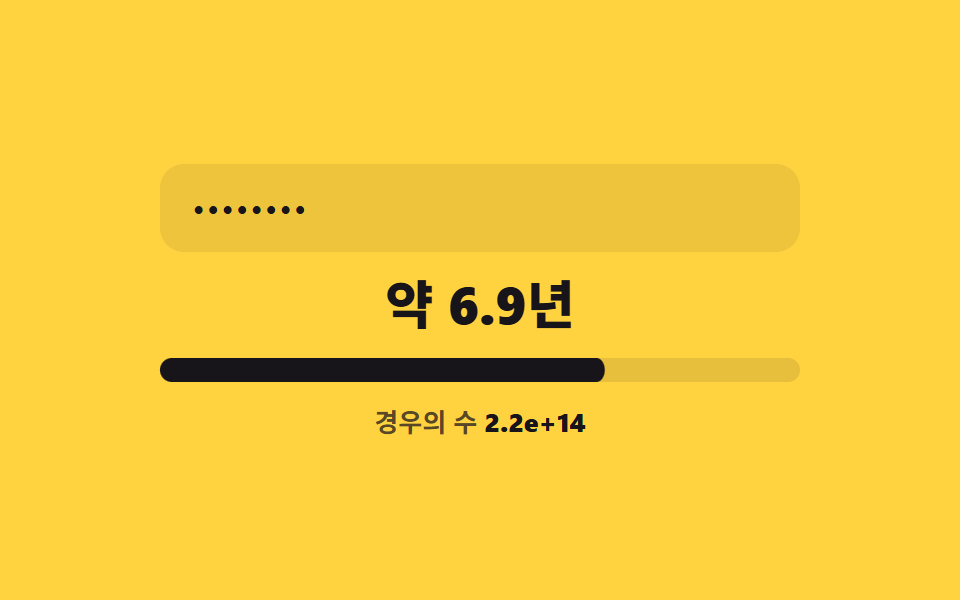
06추정 시간 값 단위 전환 — 계산된 비트 값이 경계 값을 지날 때마다 걸리는 시간을 나타내는 값의 단위가 바뀌는 방식
계산된 비트 값이 몇 개의 정해진 경계 값을 지날 때마다 걸리는 시간을 나타내는 값의 단위가 바뀌어 나타납니다.
쓰임보안 인식을 돕는 계정 설정 화면, 개발자 대상 비밀 값 발급 도구
GUESSES_PER_SEC = 1e6guessesOf(value)UNITS 단위 배열
<main class="stage">
<div class="ct is-demo" id="ct">
  <label class="ct__field">
    <input class="ct__input" id="ctInput" type="text" autocomplete="off" spellcheck="false" value="">
  </label>
  <div class="ct__readout">
    <span class="ct__time" id="ctTime">즉시</span>
  </div>
  <div class="ct__track"><div class="ct__fill" id="ctFill"></div></div>
  <div class="ct__meta">경우의 수 <b id="ctGuesses">0</b></div>
</div>
</main>
@use "../../../../site/static/demo-tokens" as *;
// 계산 겹: 경우의 수(문자 집합 크기^글자 수) ÷ 가정 초당 시도 수(GUESSES_PER_SEC,
// 데모 안 임의 상수)로 초 값을 만들고, log10 스케일로 막대를 채운다.
@include stage($stage-yellow);
.ct {
width: 100%;
max-width: 320px;
display: grid;
gap: $sp-3;
}
.ct__field { display: block; }
.ct__input {
width: 100%;
box-sizing: border-box;
padding: $sp-3 $sp-4;
border-radius: $r-control;
border: 0;
background: rgba($stage-ink, .08);
color: $stage-ink;
font: 500 16px/1.3 -apple-system, "Segoe UI", "Noto Sans KR", sans-serif;
letter-spacing: .04em;
-webkit-text-security: disc;
&:focus { outline: 2px solid $stage-ink; outline-offset: 2px; }
}
.ct__readout {
display: flex;
justify-content: center;
}
.ct__time {
font: 800 26px/1.1 -apple-system, "Segoe UI", "Noto Sans KR", sans-serif;
color: $stage-ink;
font-variant-numeric: tabular-nums;
}
.ct__track {
position: relative;
height: $sp-3;
border-radius: $r-sm;
background: rgba($stage-ink, .1);
overflow: hidden;
}
.ct__fill {
position: absolute;
inset: 0;
border-radius: $r-sm;
background: $stage-ink;
transform: scaleX(0);
transform-origin: left center;
transition: transform $dur-base $ease-out;
}
.ct__meta {
font: 600 13px/1.2 -apple-system, "Segoe UI", "Noto Sans KR", sans-serif;
color: rgba($stage-ink, .72);
text-align: center;
b { color: $stage-ink; font-variant-numeric: tabular-nums; }
}
@media (max-width: 340px) {
.ct { max-width: 260px; }
.ct__input { padding: $sp-2 $sp-3; font-size: 14px; }
.ct__time { font-size: 21px; }
.ct__meta { font-size: 11px; }
}
@media (prefers-reduced-motion: reduce) {
.ct__fill { transition: none; }
}html, body {
margin: 0;
overflow: hidden;
}
.stage {
box-sizing: border-box;
min-height: 100vh;
display: grid;
place-items: center;
margin: 0;
background: #ffd23f;
font-family: -apple-system, "Segoe UI", "Noto Sans KR", sans-serif;
padding: clamp(8px, 4vw, 24px);
}
.ct {
width: 100%;
max-width: 320px;
display: grid;
gap: 12px;
}
.ct__field {
display: block;
}
.ct__input {
width: 100%;
box-sizing: border-box;
padding: 12px 16px;
border-radius: 12px;
border: 0;
background: rgba(23, 20, 26, 0.08);
color: #17141a;
font: 500 16px/1.3 -apple-system, "Segoe UI", "Noto Sans KR", sans-serif;
letter-spacing: 0.04em;
-webkit-text-security: disc;
}
.ct__input:focus {
outline: 2px solid #17141a;
outline-offset: 2px;
}
.ct__readout {
display: flex;
justify-content: center;
}
.ct__time {
font: 800 26px/1.1 -apple-system, "Segoe UI", "Noto Sans KR", sans-serif;
color: #17141a;
font-variant-numeric: tabular-nums;
}
.ct__track {
position: relative;
height: 12px;
border-radius: 8px;
background: rgba(23, 20, 26, 0.1);
overflow: hidden;
}
.ct__fill {
position: absolute;
inset: 0;
border-radius: 8px;
background: #17141a;
transform: scaleX(0);
transform-origin: left center;
transition: transform 300ms ease-out;
}
.ct__meta {
font: 600 13px/1.2 -apple-system, "Segoe UI", "Noto Sans KR", sans-serif;
color: rgba(23, 20, 26, 0.72);
text-align: center;
}
.ct__meta b {
color: #17141a;
font-variant-numeric: tabular-nums;
}
@media (max-width: 340px) {
.ct {
max-width: 260px;
}
.ct__input {
padding: 8px 12px;
font-size: 14px;
}
.ct__time {
font-size: 21px;
}
.ct__meta {
font-size: 11px;
}
}
@media (prefers-reduced-motion: reduce) {
.ct__fill {
transition: none;
}
}(function () {
var root = document.getElementById('ct');
var input = document.getElementById('ctInput');
var timeEl = document.getElementById('ctTime');
var fill = document.getElementById('ctFill');
var guessesEl = document.getElementById('ctGuesses');
// 가정값: 데모 안 임의 상수 — 실제 하드웨어·연도·연구 인용이 아니다.
var GUESSES_PER_SEC = 1e6;
var LOG_MAX = 12; // 막대 눈금 상한(초 단위 log10) — 이 값 이상은 꽉 찬 막대
function charsetSize(value) {
var size = 0;
if (/[a-z]/.test(value)) size += 26;
if (/[A-Z]/.test(value)) size += 26;
if (/[0-9]/.test(value)) size += 10;
if (/[^A-Za-z0-9]/.test(value)) size += 32;
return size;
}
// 계산 겹: 문자 집합 크기의 글자 수 제곱으로 경우의 수를 구하고, 가정 초당
// 시도 수로 나눠 초 값을 만든 뒤, 자리 단위(초→분→시간→일→년→세기)로 변환한다.
function guessesOf(value) {
var size = charsetSize(value);
if (!value.length || size === 0) return 0;
return Math.pow(size, value.length);
}
var UNITS = [
{ at: 1, name: '초' },
{ at: 60, name: '분', div: 60 },
{ at: 3600, name: '시간', div: 3600 },
{ at: 86400, name: '일', div: 86400 },
{ at: 31536000, name: '년', div: 31536000 },
{ at: 31536000 * 100, name: '세기', div: 31536000 * 100 }
];
function formatTime(seconds) {
if (seconds < 1) return '즉시';
var pick = UNITS[0];
for (var i = 0; i < UNITS.length; i++) if (seconds >= UNITS[i].at) pick = UNITS[i];
var div = pick.div || 1;
var n = seconds / div;
var text = n >= 100 ? Math.round(n).toLocaleString() : (Math.round(n * 10) / 10).toString();
return '약 ' + text + pick.name;
}
function paint(value) {
var guesses = guessesOf(value);
var seconds = guesses / GUESSES_PER_SEC;
timeEl.textContent = formatTime(seconds);
var mag = seconds < 1 ? 0 : Math.log(seconds + 1) / Math.LN10;
fill.style.transform = 'scaleX(' + Math.max(0, Math.min(1, mag / LOG_MAX)) + ')';
guessesEl.textContent = guesses >= 1e6 ? guesses.toExponential(1) : Math.round(guesses).toLocaleString();
}
input.addEventListener('input', function () {
root.classList.remove('is-demo');
stopAutoplay();
paint(input.value);
});
paint(input.value);
// 자동 루프: 시드 고정 문자열 배열로 길이·문자 종류를 함께 늘렸다 줄인다.
var SEQ = ['', 'ab', 'abcd12', 'abcd12EF', 'abcd12EF!@', 'abcd12EF!@#$xy',
'abcd12EF!@', 'abcd12EF', 'abcd12', 'ab', ''];
var si = 0;
var autoTimer = null;
function autoTick() { input.value = SEQ[si]; paint(SEQ[si]); si = (si + 1) % SEQ.length; }
function stopAutoplay() { if (autoTimer) { clearInterval(autoTimer); autoTimer = null; } }
var reduce = window.matchMedia('(prefers-reduced-motion: reduce)').matches;
if (!reduce) { autoTimer = setInterval(autoTick, 380); autoTick(); }
})();import { useEffect, useRef } from "react";
import styles from "./CrackTimeEstimate.module.scss";
type Box<T> = { current: T };
// 가정값: 데모 안 임의 상수 — 실제 하드웨어·연도·연구 인용이 아니다.
const GUESSES_PER_SEC = 1e6;
const LOG_MAX = 12;
type Unit = { at: number; name: string; div?: number };
const UNITS: Unit[] = [
{ at: 1, name: "초" },
{ at: 60, name: "분", div: 60 },
{ at: 3600, name: "시간", div: 3600 },
{ at: 86400, name: "일", div: 86400 },
{ at: 31536000, name: "년", div: 31536000 },
{ at: 31536000 * 100, name: "세기", div: 31536000 * 100 },
];
export default function CrackTimeEstimate() {
const rootRef = useRef(null) as unknown as Box<HTMLDivElement | null>;
useEffect(() => {
const root = rootRef.current;
if (!root) return;
const input = root.querySelector(`.${styles.input}`) as HTMLInputElement | null;
const timeEl = root.querySelector(`.${styles.time}`) as HTMLElement | null;
const fill = root.querySelector(`.${styles.fill}`) as HTMLElement | null;
const guessesEl = root.querySelector(`.${styles.guesses}`) as HTMLElement | null;
if (!input || !timeEl || !fill || !guessesEl) return;
function charsetSize(value: string) {
let size = 0;
if (/[a-z]/.test(value)) size += 26;
if (/[A-Z]/.test(value)) size += 26;
if (/[0-9]/.test(value)) size += 10;
if (/[^A-Za-z0-9]/.test(value)) size += 32;
return size;
}
// 계산 겹: 문자 집합 크기의 글자 수 제곱으로 경우의 수를 구하고, 가정 초당
// 시도 수로 나눠 초 값을 만든 뒤, 자리 단위(초→분→시간→일→년→세기)로 변환한다.
function guessesOf(value: string) {
const size = charsetSize(value);
if (!value.length || size === 0) return 0;
return Math.pow(size, value.length);
}
function formatTime(seconds: number) {
if (seconds < 1) return "즉시";
let pick = UNITS[0];
for (let i = 0; i < UNITS.length; i++) if (seconds >= UNITS[i].at) pick = UNITS[i];
const div = pick.div || 1;
const n = seconds / div;
const text = n >= 100 ? Math.round(n).toLocaleString() : (Math.round(n * 10) / 10).toString();
return "약 " + text + pick.name;
}
function paint(value: string) {
const guesses = guessesOf(value);
const seconds = guesses / GUESSES_PER_SEC;
timeEl!.textContent = formatTime(seconds);
const mag = seconds < 1 ? 0 : Math.log(seconds + 1) / Math.LN10;
fill!.style.transform = "scaleX(" + Math.max(0, Math.min(1, mag / LOG_MAX)) + ")";
guessesEl!.textContent = guesses >= 1e6 ? guesses.toExponential(1) : Math.round(guesses).toLocaleString();
}
function onInput() {
root!.classList.remove(styles["is-demo"]);
stopAutoplay();
paint(input!.value);
}
input.addEventListener("input", onInput);
paint(input.value);
// 자동 루프: 시드 고정 문자열 배열로 길이·문자 종류를 함께 늘렸다 줄인다.
const SEQ = ["", "ab", "abcd12", "abcd12EF", "abcd12EF!@", "abcd12EF!@#$xy",
"abcd12EF!@", "abcd12EF", "abcd12", "ab", ""];
let si = 0;
let autoTimer: number | null = null;
function autoTick() { input!.value = SEQ[si]; paint(SEQ[si]); si = (si + 1) % SEQ.length; }
function stopAutoplay() { if (autoTimer !== null) { window.clearInterval(autoTimer); autoTimer = null; } }
const reduce = window.matchMedia("(prefers-reduced-motion: reduce)").matches;
if (!reduce) { autoTimer = window.setInterval(autoTick, 380); autoTick(); }
return () => {
stopAutoplay();
input.removeEventListener("input", onInput);
};
}, []);
return (
<div ref={rootRef} className={`${styles.stage} ${styles.ct} ${styles["is-demo"]}`}>
<label className={styles.field}>
<input className={styles.input} type="text" autoComplete="off" spellCheck={false} defaultValue="" />
</label>
<div className={styles.readout}>
<span className={styles.time}>즉시</span>
</div>
<div className={styles.track}><div className={styles.fill} /></div>
<div className={styles.meta}>경우의 수 <b className={styles.guesses}>0</b></div>
</div>
);
}06 추정 시간 값 단위 전환 — 계산된 비트 값이 경계 값을 지날 때마다 걸리는 시간을 나타내는 값의 단위가 바뀌는 방식 — 측정 누적면적 7.119% · 움직인 프레임 14/23GODRICH 원작 · zip 에 SCSS·React 포함 · 비밀번호 강도 UI 9종 — 강도 값이 계산되는 아홉 가지 방식
이 데모가 속한 글
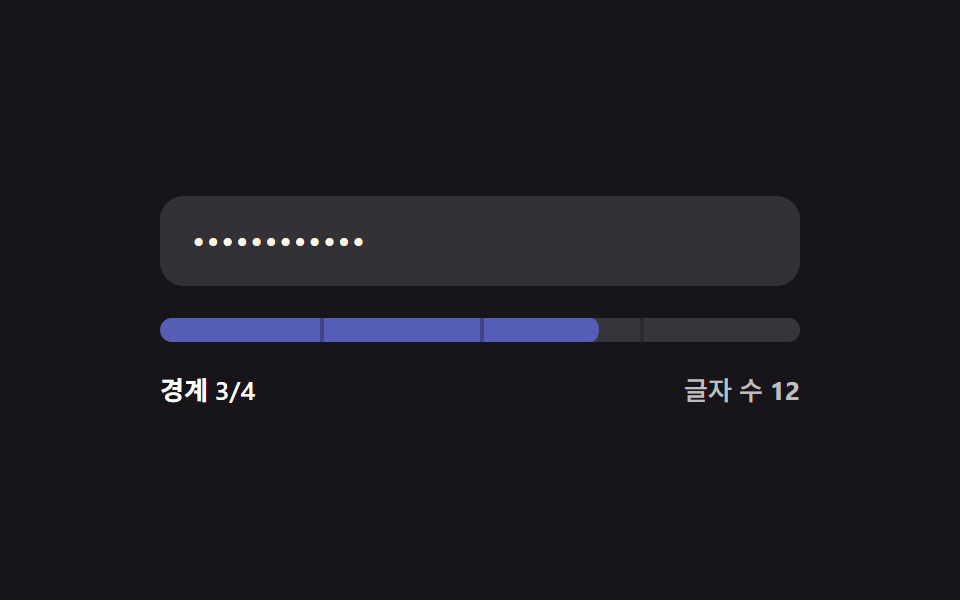 비밀번호 강도 UI 9종 — 강도 값이 계산되는 아홉 가지 방식비밀번호 강도는 입력한 값이 얼마나 뚫기 쉬운지를 점수나 막대로 보여주는 계산인데, 아홉 개 중 하나는 문자 종류 값이 몇 가지 섞였는지에 따라 강도 값이 정해지고, 하나는 흔한 값 목록과 같은 상태가 되면 강도 값 이 글의 데모 전부 보기
이 효과가 마음에 들면 — 비슷한 데모
 입력 UI08 단위 플립 전환 — 단위가 바뀐 상태가 되면 카드가 뒤집히며 90도 지점에서 표시 값이 바뀌는 스텝퍼숫자 스텝퍼 UI 패턴 9종 — 길게 누를수록 빨라지는 것부터 눈금에 붙는 것까지
 입력 UI05 유효성 값 실시간 전환 — 자릿수 값이 채워질 때마다 번호 전체의 유효성 값이 계산되어 표시 값이 바뀌는 방식카드 번호 입력 UI 9종 — 자릿수 값마다 반응이 달라지는 아홉 가지 방식
 입력 UI04 선택 개수 롤 전환 — 선택된 개수 값이 오르내릴 때마다 배지 숫자의 자리 값이 위아래로 굴러가듯 바뀌는 방식커스텀 체크박스 9종 — 체크 값으로 바뀌는 아홉 가지 방식