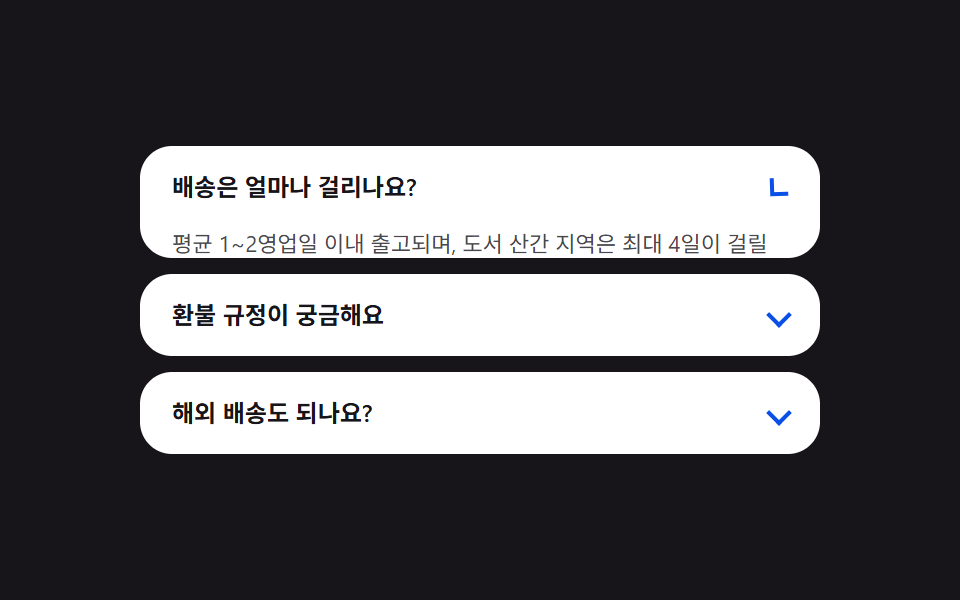
05요금 FAQ — 열린 항목 수에 맞춰 목록 높이를 다시 재는 아코디언
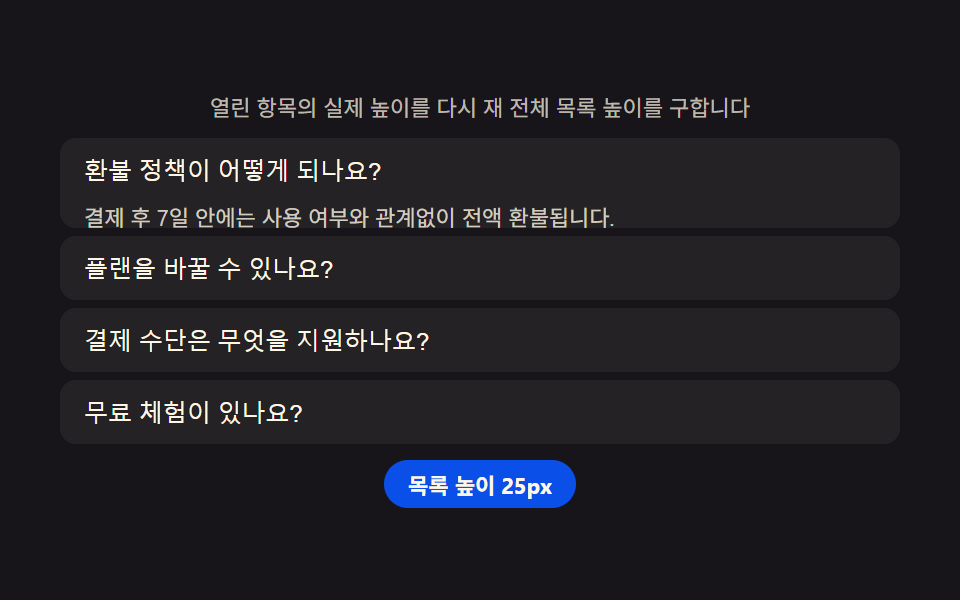
항목을 열고 닫을 때마다 열린 항목들의 실제 높이를 다시 재 전체 목록의 높이를 구하고, 그 값만큼 아래 항목들의 자리를 부드럽게 옮깁니다.
쓰임요금제 페이지 FAQ 섹션, 결제 안내 자주 묻는 질문
grid-template-rowsscrollHeightaria-expanded
<main class="stage">
<section class="panel">
  <p class="hint">열린 항목의 실제 높이를 다시 재 전체 목록 높이를 구합니다</p>
  <div class="acc" id="acc">
    <div class="item">
      <button class="q" id="q0" aria-expanded="false" aria-controls="a0">환불 정책이 어떻게 되나요?</button>
      <div class="a" id="a0" role="region" aria-labelledby="q0">
        <p class="aText">결제 후 7일 안에는 사용 여부와 관계없이 전액 환불됩니다.</p>
      </div>
    </div>
    <div class="item">
      <button class="q" id="q1" aria-expanded="false" aria-controls="a1">플랜을 바꿀 수 있나요?</button>
      <div class="a" id="a1" role="region" aria-labelledby="q1">
        <p class="aText">언제든 상위·하위 플랜으로 바꿀 수 있고 남은 기간 요금은 다음 결제에서 조정됩니다.</p>
      </div>
    </div>
    <div class="item">
      <button class="q" id="q2" aria-expanded="false" aria-controls="a2">결제 수단은 무엇을 지원하나요?</button>
      <div class="a" id="a2" role="region" aria-labelledby="q2">
        <p class="aText">신용카드와 계좌 자동이체를 지원하며, 팀 플랜은 세금계산서 발행도 가능합니다.</p>
      </div>
    </div>
    <div class="item">
      <button class="q" id="q3" aria-expanded="false" aria-controls="a3">무료 체험이 있나요?</button>
      <div class="a" id="a3" role="region" aria-labelledby="q3">
        <p class="aText">모든 플랜은 카드 등록 없이 14일 동안 전체 기능을 무료로 써볼 수 있습니다.</p>
      </div>
    </div>
  </div>
  <p class="chip" id="heightChip">목록 높이 0px</p>
</section>
</main>@use "../../../../site/static/demo-tokens" as *;
$duration: $dur-enter;
$easing: $ease-spring;
$color: $subject-blue-deep;
@include stage($stage-ink);
.panel {
width: 100%;
max-width: 420px;
display: flex;
flex-direction: column;
align-items: center;
gap: $sp-2;
}
.hint {
margin: 0;
padding: 0 $sp-2;
text-align: center;
font-weight: 400;
font-size: 11px;
line-height: 1.4;
color: rgba($subject-cream, .72);
}
.acc {
width: 100%;
display: flex;
flex-direction: column;
gap: $sp-1;
}
.item {
border-radius: $r-sm;
background: rgba($subject-cream, .06);
overflow: hidden;
}
.q {
width: 100%;
text-align: left;
border: 0;
background: transparent;
padding: $sp-2 $sp-3;
font-weight: 500;
font-size: 12px;
color: $subject-cream;
cursor: pointer;
}
.a {
display: grid;
grid-template-rows: 0px;
overflow: hidden;
transition: grid-template-rows $duration $easing;
}
.aText {
min-height: 0;
margin: 0;
padding: 0 $sp-3 $sp-2;
font-weight: 400;
font-size: 11px;
line-height: 1.5;
color: rgba($subject-cream, .80);
overflow: hidden;
}
.chip {
margin: 0;
padding: $sp-1 $sp-3;
border-radius: $r-pill;
background: $color;
color: $subject-cream;
font-weight: 700;
font-size: 11px;
}
@media (max-width: 340px) {
.panel { max-width: 300px; gap: $sp-1; }
.hint { font-size: 9px; }
.q { font-size: 11px; padding: $sp-1 $sp-2; }
.aText { font-size: 10px; padding: 0 $sp-2 $sp-1; }
}
@media (prefers-reduced-motion: reduce) {
.a {
transition: none;
}
}html, body {
margin: 0;
overflow: hidden;
}
.stage {
box-sizing: border-box;
min-height: 100vh;
display: grid;
place-items: center;
margin: 0;
background: #17141a;
font-family: -apple-system, "Segoe UI", "Noto Sans KR", sans-serif;
padding: clamp(8px, 4vw, 24px);
}
.panel {
width: 100%;
max-width: 420px;
display: flex;
flex-direction: column;
align-items: center;
gap: 8px;
}
.hint {
margin: 0;
padding: 0 8px;
text-align: center;
font-weight: 400;
font-size: 11px;
line-height: 1.4;
color: rgba(255, 247, 230, 0.72);
}
.acc {
width: 100%;
display: flex;
flex-direction: column;
gap: 4px;
}
.item {
border-radius: 8px;
background: rgba(255, 247, 230, 0.06);
overflow: hidden;
}
.q {
width: 100%;
text-align: left;
border: 0;
background: transparent;
padding: 8px 12px;
font-weight: 500;
font-size: 12px;
color: #fff7e6;
cursor: pointer;
}
.a {
display: grid;
grid-template-rows: 0px;
overflow: hidden;
transition: grid-template-rows 600ms cubic-bezier(0.2, 0.8, 0.2, 1);
}
.aText {
min-height: 0;
margin: 0;
padding: 0 12px 8px;
font-weight: 400;
font-size: 11px;
line-height: 1.5;
color: rgba(255, 247, 230, 0.8);
overflow: hidden;
}
.chip {
margin: 0;
padding: 4px 12px;
border-radius: 999px;
background: #0a4fe8;
color: #fff7e6;
font-weight: 700;
font-size: 11px;
}
@media (max-width: 340px) {
.panel {
max-width: 300px;
gap: 4px;
}
.hint {
font-size: 9px;
}
.q {
font-size: 11px;
padding: 4px 8px;
}
.aText {
font-size: 10px;
padding: 0 8px 4px;
}
}
@media (prefers-reduced-motion: reduce) {
.a {
transition: none;
}
}// 요금 FAQ(05) — 항목을 열 때마다 열린 패널들의 실제 scrollHeight 를 다시 재 합산하고,
// 그 총합을 칩에 표시한다(계산 한 겹). 패널 자체는 grid-template-rows 로 접혀 아래 항목이
// 그 값만큼 자연스럽게 자리를 옮긴다. 자동 시연은 항목을 순서대로 하나씩 연다.
(function () {
var acc = document.getElementById('acc');
var chip = document.getElementById('heightChip');
if (!acc || !chip) return;
var reduce = window.matchMedia('(prefers-reduced-motion: reduce)').matches;
var items = Array.prototype.slice.call(acc.querySelectorAll('.item'));
// 패널은 grid-template-rows 로 접혀 있어 열리는 도중에 scrollHeight 를 읽으면 전환 시작 전
// 값(0 근처)이 잡힌다 — 그래서 실제 콘텐츠 높이는 시작할 때 한 번, 열림 상태를 순간 강제해
// 재고 원래대로 되돌리는 방식으로 미리 재 캐시해 둔다(자연 높이 캐시).
var NATURAL_HEIGHTS = items.map(function (item) {
var panel = item.querySelector('.a');
if (!panel) return 0;
// grid-template-rows 를 잠깐 auto 로 풀어 전환·클래스와 무관하게 콘텐츠의 실제 높이를 잰다.
var prevTransition = panel.style.transition;
panel.style.transition = 'none';
panel.style.gridTemplateRows = 'auto';
var h = panel.scrollHeight;
panel.style.gridTemplateRows = '0px';
void panel.offsetHeight; // 0px 을 실제로 반영(플러시)해야 다음 전환이 이 값에서 시작한다
panel.style.transition = prevTransition;
return h;
});
function measureAndReport() {
var total = 0;
items.forEach(function (item, i) {
if (item.classList.contains('is-open')) total += NATURAL_HEIGHTS[i];
});
chip.textContent = '목록 높이 ' + total + 'px';
}
function setOpen(openIndex) {
items.forEach(function (item, i) {
var q = item.querySelector('.q');
var panel = item.querySelector('.a');
var open = i === openIndex;
item.classList.toggle('is-open', open);
if (panel) panel.style.gridTemplateRows = open ? NATURAL_HEIGHTS[i] + 'px' : '0px';
if (q) q.setAttribute('aria-expanded', open ? 'true' : 'false');
});
measureAndReport();
}
items.forEach(function (item, i) {
var q = item.querySelector('.q');
if (!q) return;
q.addEventListener('click', function () {
var willOpen = !item.classList.contains('is-open');
setOpen(willOpen ? i : -1);
});
});
setOpen(0);
if (!reduce) {
var idx = 0;
setInterval(function () {
idx = (idx + 1) % items.length;
setOpen(idx);
}, 550);
}
})();// PricingFaq — vanilla 판(run/339/demo/05-pricing-faq/index.html) 의 React 포트.
// 항목을 열 때마다 열린 패널들의 실제 콘텐츠 높이를 다시 재 합산하고, 그 총합을 칩에 표시한다(계산 한 겹).
// 패널은 고정 px 값을 인라인으로 대입해 grid-template-rows 를 전환한다 — fr 단위 재축소 오차를 피하려
// auto 로 잠깐 풀어 잰 뒤 0px 로 되돌릴 때 강제 리플로우(offsetHeight 읽기)를 끼워 그 값이 실제로
// 반영되게 한다(그렇지 않으면 다음 전환이 직전 auto 상태에서 시작해 첫 프레임이 어긋난다).
import { useEffect, useRef } from "react";
import styles from "./PricingFaq.module.scss";
export type PricingFaqProps = {
duration?: string;
easing?: string;
color?: string;
};
const HINT = "열린 항목의 실제 높이를 다시 재 전체 목록 높이를 구합니다";
type Item = { q: string; a: string };
const ITEMS: Item[] = [
{ q: "환불 정책이 어떻게 되나요?", a: "결제 후 7일 안에는 사용 여부와 관계없이 전액 환불됩니다." },
{ q: "플랜을 바꿀 수 있나요?", a: "언제든 상위·하위 플랜으로 바꿀 수 있고 남은 기간 요금은 다음 결제에서 조정됩니다." },
{ q: "결제 수단은 무엇을 지원하나요?", a: "신용카드와 계좌 자동이체를 지원하며, 팀 플랜은 세금계산서 발행도 가능합니다." },
{ q: "무료 체험이 있나요?", a: "모든 플랜은 카드 등록 없이 14일 동안 전체 기능을 무료로 써볼 수 있습니다." }
];
export default function PricingFaq({
duration = "600ms",
easing = "cubic-bezier(.2,.8,.2,1)",
color = "#0a4fe8"
}: PricingFaqProps) {
const qRefs = useRef<(HTMLButtonElement | null)[]>([]);
const panelRefs = useRef<(HTMLDivElement | null)[]>([]);
const itemRefs = useRef<(HTMLDivElement | null)[]>([]);
const chipRef = useRef<HTMLParagraphElement | null>(null);
useEffect(() => {
const chip = chipRef.current;
if (!chip) return;
const reduce = window.matchMedia("(prefers-reduced-motion: reduce)").matches;
// grid-template-rows 를 잠깐 auto 로 풀어 전환·상태와 무관하게 콘텐츠의 실제 높이를 잰다.
const naturalHeights = panelRefs.current!.map((panel) => {
if (!panel) return 0;
const prevTransition = panel.style.transition;
panel.style.transition = "none";
panel.style.gridTemplateRows = "auto";
const h = panel.scrollHeight;
panel.style.gridTemplateRows = "0px";
void panel.offsetHeight; // 0px 을 실제로 반영(플러시)해야 다음 전환이 이 값에서 시작한다
panel.style.transition = prevTransition;
return h;
});
function measureAndReport(openIndex: number): void {
let total = 0;
itemRefs.current!.forEach((item, i) => {
if (item && i === openIndex) total += naturalHeights[i];
});
chip!.textContent = "목록 높이 " + total + "px";
}
function setOpen(openIndex: number): void {
itemRefs.current!.forEach((item, i) => {
const q = qRefs.current![i];
const panel = panelRefs.current![i];
const open = i === openIndex;
if (item) item.classList.toggle(styles.isOpen, open);
if (panel) panel.style.gridTemplateRows = open ? naturalHeights[i] + "px" : "0px";
if (q) q.setAttribute("aria-expanded", open ? "true" : "false");
});
measureAndReport(openIndex);
}
const cleanups: (() => void)[] = [];
qRefs.current!.forEach((q, i) => {
if (!q) return;
const handler = (): void => {
const item = itemRefs.current![i];
const willOpen = !(item && item.classList.contains(styles.isOpen));
setOpen(willOpen ? i : -1);
};
q.addEventListener("click", handler);
cleanups.push(() => q.removeEventListener("click", handler));
});
setOpen(0);
let timer = 0;
if (!reduce) {
let idx = 0;
timer = window.setInterval(() => {
idx = (idx + 1) % ITEMS.length;
setOpen(idx);
}, 550);
}
return () => {
if (timer) window.clearInterval(timer);
cleanups.forEach((fn) => fn());
};
// eslint-disable-next-line react-hooks/exhaustive-deps
}, []);
return (
<main className={styles.stage}>
<section className={styles.panel}>
<p className={styles.hint}>{HINT}</p>
<div className={styles.acc}>
{ITEMS.map((item, i) => (
<div
key={item.q}
className={styles.item}
ref={(el: HTMLDivElement | null) => {
itemRefs.current![i] = el;
}}
>
<button
className={styles.q}
id={"q" + i}
aria-expanded="false"
aria-controls={"a" + i}
ref={(el: HTMLButtonElement | null) => {
qRefs.current![i] = el;
}}
>
{item.q}
</button>
<div
className={styles.a}
id={"a" + i}
role="region"
aria-labelledby={"q" + i}
ref={(el: HTMLDivElement | null) => {
panelRefs.current![i] = el;
}}
>
<p className={styles.aText}>{item.a}</p>
</div>
</div>
))}
</div>
<p className={styles.chip} ref={chipRef}>
목록 높이 0px
</p>
</section>
</main>
);
}05 요금 FAQ — 열린 항목 수에 맞춰 목록 높이를 다시 재는 아코디언 — 측정 누적면적 34.936% · 움직인 프레임 9/23GODRICH 원작 · zip 에 SCSS·React 포함 · 가격표 디자인 UI 9종 — 연/월 전환·할인율까지 계산해서 보여주는
이 데모가 속한 글
 가격표 디자인 UI 9종 — 연/월 전환·할인율까지 계산해서 보여주는연/월 전환이 바뀔 때마다 플랜마다 가격을 다시 계산해 보여주고, 할인 배지는 원가와 할인가 차이를 직접 구하고, 기업 문의 섹션은 사용량 값으로 예상 비용을 즉석에서 계산하는 가격표 페이지 9종입니다. 가격표 디자 이 글의 데모 전부 보기