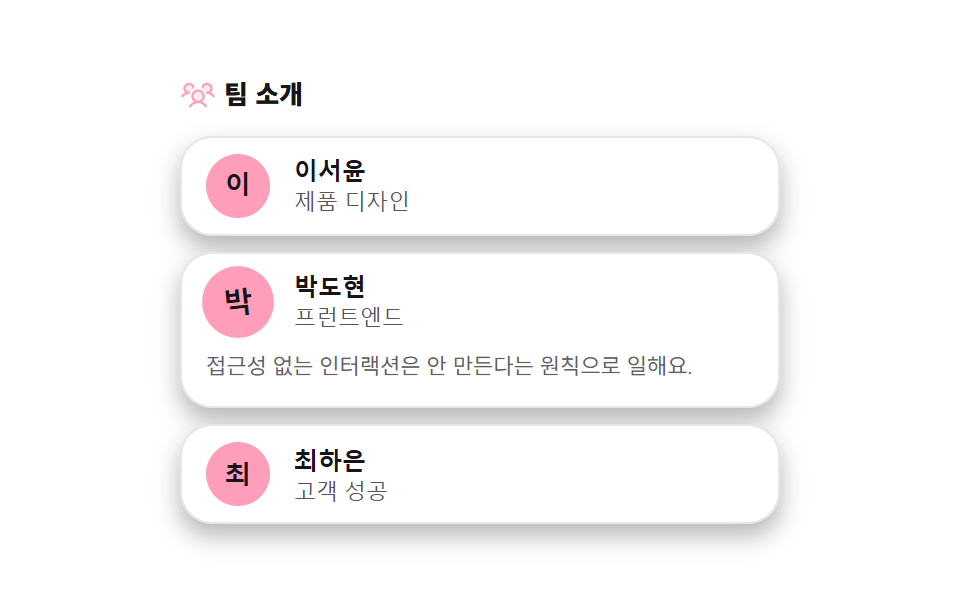
04프로필 상세 — 소개글 높이를 재서 더보기 버튼 유무를 정하는 카드
소개글 요소의 line-clamp 적용 전후의 scrollHeight 를 두 번 재 비교해 실제로 잘렸는지부터 계산하고, 차이가 없으면 더보기 버튼 자체를 렌더링하지 않습니다. 짧은 소개글에 쓸모없는 버튼이 남는 실수를 이 계산이 막습니다.
쓰임팀원 상세 모달, 프로필 카드 뒷면
scrollHeightclassList.togglearia-expanded

<main class="stage">
<section class="detail" id="detail">
  <p class="detail__hint" id="detailHint">소개글 실제 줄 수를 세로 높이로 재서, 정해 둔 줄 수보다 더 있을 때만 더보기 버튼을 보여줍니다</p>
  <div class="detail__card">
    <canvas class="detail__cv" width="40" height="40" aria-hidden="true"></canvas>
    <div class="detail__body">
      <p class="detail__bio" id="detailBio">한 줄 소개 텍스트가 여기에 들어갑니다. 두 번째 줄도 이어집니다. 세 번째 줄까지 길게 이어지는 소개 문구입니다. 네 번째 줄은 잘려서 숨겨집니다.</p>
      <button class="detail__more" id="detailMore" type="button" aria-expanded="false">더보기</button>
    </div>
  </div>
  <p class="detail__meta"><span class="detail__chip" id="detailChip">clamp 3줄 · 실측 대기</span></p>
</section>
</main>
@use "../../../../site/static/demo-tokens" as *;
$duration: $dur-base; // 300ms — 더보기 펼침
$easing: $ease-out;
$color: $subject-blue-deep;
@include stage($stage-paper);
.detail {
width: 100%;
max-width: 420px;
display: flex;
flex-direction: column;
gap: $sp-2;
align-items: center;
text-align: center;
}
.detail__hint {
margin: 0;
padding: 0 $sp-2;
font-weight: 400;
font-size: 11px;
line-height: 1.4;
color: rgba($subject-ink, .72);
}
.detail__card {
display: flex;
gap: $sp-2;
width: 100%;
padding: $sp-3;
border-radius: $r-card;
background: rgba($subject-ink, .04);
text-align: left;
transition: background $duration $easing;
}
.detail__card.is-alt {
background: rgba($subject-blue-deep, .12);
}
.detail__cv {
flex: 0 0 auto;
display: block;
width: 40px;
height: 40px;
border-radius: $r-pill;
}
.detail__body {
flex: 1 1 auto;
min-width: 0;
display: flex;
flex-direction: column;
gap: $sp-1;
}
.detail__bio {
margin: 0;
font-size: 12px;
line-height: 1.6;
color: $subject-ink;
}
.detail__bio.is-clamped {
display: -webkit-box;
-webkit-box-orient: vertical;
-webkit-line-clamp: var(--clamp, 3);
overflow: hidden;
}
.detail__bio.is-open.is-clamped {
-webkit-line-clamp: unset;
overflow: visible;
}
.detail__more {
align-self: flex-start;
appearance: none;
border: 0;
background: none;
padding: 0;
font-weight: 700;
font-size: 11px;
color: $color;
cursor: pointer;
opacity: 1;
transition: opacity $dur-quick $ease-out;
}
.detail__meta { margin: 0; }
.detail__chip {
display: inline-flex;
padding: $sp-1 $sp-3;
border-radius: $r-pill;
background: $color;
color: $subject-cream;
font-weight: 700;
font-size: 11px;
}
@media (max-width: 340px) {
.detail { max-width: 300px; gap: $sp-1; }
.detail__hint { font-size: 9px; }
.detail__card { padding: $sp-2; gap: $sp-1; }
.detail__cv { width: 32px; height: 32px; }
.detail__bio { font-size: 11px; }
.detail__chip { font-size: 10px; padding: $sp-1 $sp-2; }
}
@media (prefers-reduced-motion: reduce) {
.detail__card,
.detail__more {
transition: none;
}
}html, body {
margin: 0;
overflow: hidden;
}
.stage {
box-sizing: border-box;
min-height: 100vh;
display: grid;
place-items: center;
margin: 0;
background: #ffffff;
font-family: -apple-system, "Segoe UI", "Noto Sans KR", sans-serif;
padding: clamp(8px, 4vw, 24px);
}
.detail {
width: 100%;
max-width: 420px;
display: flex;
flex-direction: column;
gap: 8px;
align-items: center;
text-align: center;
}
.detail__hint {
margin: 0;
padding: 0 8px;
font-weight: 400;
font-size: 11px;
line-height: 1.4;
color: rgba(23, 20, 26, 0.72);
}
.detail__card {
display: flex;
gap: 8px;
width: 100%;
padding: 12px;
border-radius: 16px;
background: rgba(23, 20, 26, 0.04);
text-align: left;
transition: background 300ms ease-out;
}
.detail__card.is-alt {
background: rgba(10, 79, 232, 0.12);
}
.detail__cv {
flex: 0 0 auto;
display: block;
width: 40px;
height: 40px;
border-radius: 999px;
}
.detail__body {
flex: 1 1 auto;
min-width: 0;
display: flex;
flex-direction: column;
gap: 4px;
}
.detail__bio {
margin: 0;
font-size: 12px;
line-height: 1.6;
color: #17141a;
}
.detail__bio.is-clamped {
display: -webkit-box;
-webkit-box-orient: vertical;
-webkit-line-clamp: var(--clamp, 3);
overflow: hidden;
}
.detail__bio.is-open.is-clamped {
-webkit-line-clamp: unset;
overflow: visible;
}
.detail__more {
align-self: flex-start;
appearance: none;
border: 0;
background: none;
padding: 0;
font-weight: 700;
font-size: 11px;
color: #0a4fe8;
cursor: pointer;
opacity: 1;
transition: opacity 220ms ease-out;
}
.detail__meta {
margin: 0;
}
.detail__chip {
display: inline-flex;
padding: 4px 12px;
border-radius: 999px;
background: #0a4fe8;
color: #fff7e6;
font-weight: 700;
font-size: 11px;
}
@media (max-width: 340px) {
.detail {
max-width: 300px;
gap: 4px;
}
.detail__hint {
font-size: 9px;
}
.detail__card {
padding: 8px;
gap: 4px;
}
.detail__cv {
width: 32px;
height: 32px;
}
.detail__bio {
font-size: 11px;
}
.detail__chip {
font-size: 10px;
padding: 4px 8px;
}
}
@media (prefers-reduced-motion: reduce) {
.detail__card,
.detail__more {
transition: none;
}
}// 프로필 더보기(04) — bio 문단에 clamp(고정 줄 수)를 건 상태의 scrollHeight 와, clamp 을 풀었을 때의
// scrollHeight 를 한 프레임 안에서 비교해 실제로 넘치는 경우에만 더보기 버튼을 켠다(계산 한 겹).
// 넘치지 않으면 버튼을 아예 감춘다 — 항상 보이는 장식 버튼이 아니다.
(function () {
var wrap = document.getElementById('detail');
var bio = document.getElementById('detailBio');
var more = document.getElementById('detailMore');
var chip = document.getElementById('detailChip');
var cv = document.querySelector('.detail__cv');
if (!wrap || !bio || !more || !chip || !cv) return;
var reduce = window.matchMedia('(prefers-reduced-motion: reduce)').matches;
function mulberry32(a) {
return function () {
a |= 0; a = a + 0x6D2B79F5 | 0;
var t = Math.imul(a ^ a >>> 15, 1 | a);
t = t + Math.imul(t ^ t >>> 7, 61 | t) ^ t;
return ((t ^ t >>> 14) >>> 0) / 4294967296;
};
}
var HEXES = ['#9fc9ec', '#93d9c0', '#b9a0ff', '#f6c6d3'];
(function drawAvatar() {
var ctx = cv.getContext('2d');
if (!ctx) return;
var rnd = mulberry32(41);
var s = cv.width;
ctx.save();
ctx.beginPath(); ctx.arc(s / 2, s / 2, s / 2, 0, Math.PI * 2); ctx.clip();
var cell = 7;
for (var y = 0; y < s; y += cell) {
for (var x = 0; x < s; x += cell) {
var v = rnd();
ctx.fillStyle = v > .5 ? HEXES[Math.floor(rnd() * HEXES.length)] : 'rgba(23,20,26,.08)';
ctx.fillRect(x, y, cell, cell);
}
}
ctx.restore();
ctx.fillStyle = 'rgba(23,20,26,.55)';
ctx.beginPath(); ctx.arc(s / 2, s / 2, s / 2, 0, Math.PI * 2); ctx.fill();
ctx.fillStyle = '#fff7e6';
ctx.font = '700 ' + Math.round(s * .4) + 'px -apple-system, "Segoe UI", sans-serif';
ctx.textAlign = 'center'; ctx.textBaseline = 'middle';
ctx.fillText('M1', s / 2, s / 2 + 1);
})();
var card = wrap.querySelector('.detail__card');
var LINES = [3, 2]; // 변형 04: clamp 줄 수 3 → 2
var lineIdx = 0;
function measure(lineClamp) {
bio.style.setProperty('--clamp', String(lineClamp));
bio.classList.add('is-clamped');
var clampedHeight = bio.scrollHeight;
bio.classList.remove('is-clamped');
var fullHeight = bio.scrollHeight;
bio.classList.add('is-clamped');
return fullHeight > clampedHeight + 1;
}
function apply(lineClamp) {
var overflow = measure(lineClamp);
more.style.display = overflow ? '' : 'none';
more.setAttribute('aria-expanded', 'false');
bio.classList.remove('is-open');
chip.textContent = 'clamp ' + lineClamp + '줄 · ' + (overflow ? '넘침 O' : '넘침 X');
if (card) card.classList.toggle('is-alt');
}
more.addEventListener('click', function () {
var open = bio.classList.toggle('is-open');
more.setAttribute('aria-expanded', open ? 'true' : 'false');
more.textContent = open ? '접기' : '더보기';
});
apply(LINES[0]);
if (!reduce) {
setInterval(function () {
lineIdx = (lineIdx + 1) % LINES.length;
apply(LINES[lineIdx]);
}, 320);
}
})();// TeamProfileDetail — vanilla 판(run/338/demo/04-team-profile-detail/index.html) 의 React 포트.
// 소개글의 clamp 전·후 scrollHeight 를 재서 실제로 넘치는 줄만 더보기 버튼을 보이고,
// clamp 줄 수가 바뀌면 그 계산을 다시 돈다(계산 한 겹).
import { useEffect, useRef } from "react";
import styles from "./TeamProfileDetail.module.scss";
export type TeamProfileDetailProps = {
duration?: string;
easing?: string;
color?: string;
};
const HINT = "소개글 실제 줄 수를 세로 높이로 재서, 정해 둔 줄 수보다 더 있을 때만 더보기 버튼을 보여줍니다";
const BIO_TEXT =
"한 줄 소개 텍스트가 여기에 들어갑니다. 두 번째 줄도 이어집니다. 세 번째 줄까지 길게 이어지는 소개 문구입니다. 네 번째 줄은 잘려서 숨겨집니다.";
const MORE_TEXT = "더보기";
const LESS_TEXT = "접기";
const LINES = [3, 2];
function mulberry32(a: number): () => number {
return function (): number {
a |= 0; a = a + 0x6d2b79f5 | 0;
let t = Math.imul(a ^ (a >>> 15), 1 | a);
t = (t + Math.imul(t ^ (t >>> 7), 61 | t)) ^ t;
return ((t ^ (t >>> 14)) >>> 0) / 4294967296;
};
}
const HEXES = ["#9fc9ec", "#93d9c0", "#b9a0ff", "#f6c6d3"];
function drawAvatar(cv: HTMLCanvasElement, seed: number, label: string): void {
const ctx = cv.getContext("2d");
if (!ctx) return;
const rnd = mulberry32(seed);
const s = cv.width;
ctx.save();
ctx.beginPath();
ctx.arc(s / 2, s / 2, s / 2, 0, Math.PI * 2);
ctx.clip();
const cell = 7;
for (let y = 0; y < s; y += cell) {
for (let x = 0; x < s; x += cell) {
const v = rnd();
ctx.fillStyle = v > 0.5 ? HEXES[Math.floor(rnd() * HEXES.length)] : "rgba(23,20,26,.08)";
ctx.fillRect(x, y, cell, cell);
}
}
ctx.restore();
ctx.fillStyle = "rgba(23,20,26,.55)";
ctx.beginPath();
ctx.arc(s / 2, s / 2, s / 2, 0, Math.PI * 2);
ctx.fill();
ctx.fillStyle = "#fff7e6";
ctx.font = "700 " + Math.round(s * 0.4) + 'px -apple-system, "Segoe UI", sans-serif';
ctx.textAlign = "center";
ctx.textBaseline = "middle";
ctx.fillText(label, s / 2, s / 2 + 1);
}
export default function TeamProfileDetail({
duration = "300ms",
easing = "ease-out",
color = "#0a4fe8"
}: TeamProfileDetailProps) {
const cardRef = useRef<HTMLDivElement | null>(null);
const cvRef = useRef<HTMLCanvasElement | null>(null);
const bioRef = useRef<HTMLParagraphElement | null>(null);
const moreRef = useRef<HTMLButtonElement | null>(null);
const chipRef = useRef<HTMLSpanElement | null>(null);
useEffect(() => {
const card = cardRef.current;
const cv = cvRef.current;
const bio = bioRef.current;
const more = moreRef.current;
const chip = chipRef.current;
if (!card || !cv || !bio || !more || !chip) return;
const reduce = window.matchMedia("(prefers-reduced-motion: reduce)").matches;
drawAvatar(cv, 41, "M1");
function measure(lineClamp: number): boolean {
bio!.style.setProperty("--clamp", String(lineClamp));
bio!.classList.add(styles.isClamped);
const clampedHeight = bio!.scrollHeight;
bio!.classList.remove(styles.isClamped);
const fullHeight = bio!.scrollHeight;
bio!.classList.add(styles.isClamped);
return fullHeight > clampedHeight + 1;
}
let isOpen = false;
function apply(lineClamp: number): void {
const overflow = measure(lineClamp);
isOpen = false;
bio!.classList.remove(styles.isOpen);
more!.setAttribute("aria-expanded", "false");
more!.textContent = MORE_TEXT;
more!.style.display = overflow ? "" : "none";
chip!.textContent = "clamp " + lineClamp + "줄 · " + (overflow ? "넘침 O" : "넘침 X");
card!.classList.toggle(styles.isAlt);
}
function onMoreClick(): void {
isOpen = !isOpen;
bio!.classList.toggle(styles.isOpen, isOpen);
more!.setAttribute("aria-expanded", isOpen ? "true" : "false");
more!.textContent = isOpen ? LESS_TEXT : MORE_TEXT;
}
more.addEventListener("click", onMoreClick);
let idx = 0;
apply(LINES[0]);
let timer = 0;
if (!reduce) {
timer = window.setInterval(() => {
idx = (idx + 1) % LINES.length;
apply(LINES[idx]);
}, 320);
}
return () => {
more!.removeEventListener("click", onMoreClick);
if (timer) window.clearInterval(timer);
};
// eslint-disable-next-line react-hooks/exhaustive-deps
}, []);
return (
<main className={styles.stage}>
<section className={styles.detail}>
<p className={styles.hint}>{HINT}</p>
<div className={styles.card} ref={cardRef}>
<canvas className={styles.cv} ref={cvRef} width={40} height={40} aria-hidden="true" />
<div className={styles.body}>
<p className={styles.bio} ref={bioRef}>{BIO_TEXT}</p>
<button className={styles.more} ref={moreRef} type="button" aria-expanded="false">
{MORE_TEXT}
</button>
</div>
</div>
<p className={styles.meta}>
<span className={styles.chip} ref={chipRef} style={{ color }}>clamp 3줄 · 실측 대기</span>
</p>
</section>
</main>
);
}04 프로필 상세 — 소개글 높이를 재서 더보기 버튼 유무를 정하는 카드 — 측정 누적면적 17.345% · 움직인 프레임 6/23GODRICH 원작 · zip 에 SCSS·React 포함 · 팀 소개 페이지 UI 9종 — 인원수·소개글 길이·시차까지 계산해서 보여주는
이 데모가 속한 글
 팀 소개 페이지 UI 9종 — 인원수·소개글 길이·시차까지 계산해서 보여주는팀원이 몇 명이든 카드 줄이 어긋나지 않게 열 수를 계산하고, 소개글이 길면 재서 더보기를 붙이고, 파트너 로고는 개수와 무관하게 같은 속도로 흐르게 만드는 팀 소개 페이지 9종입니다. 이 글의 데모 전부 보기