09체크마크 정렬 드롭다운
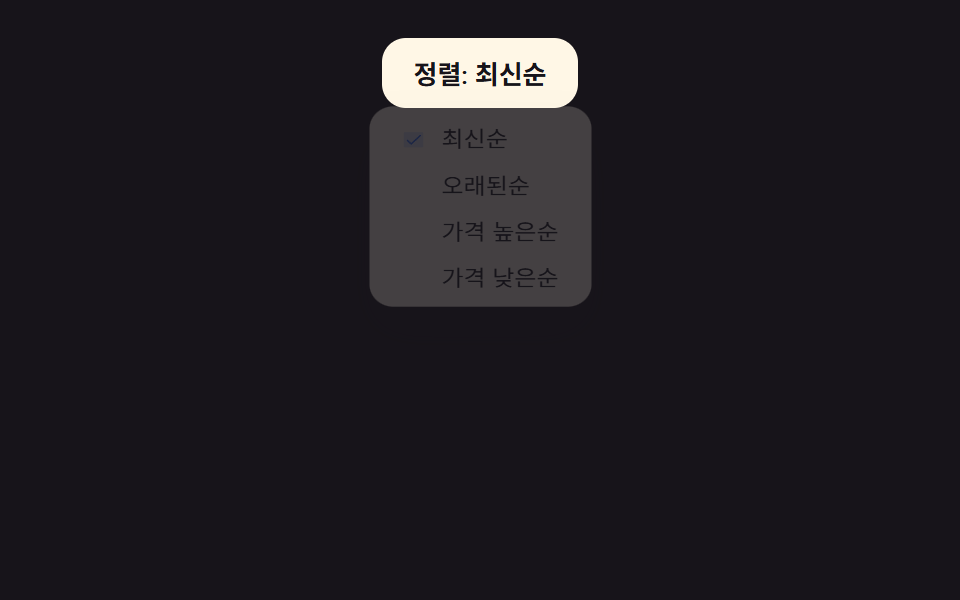
정렬 버튼을 누르면 옵션 목록이 opacity·translateY 로 펼쳐지고, 고른 항목 앞에만 체크마크가 나타나며 트리거 글자도 그 옵션 이름으로 바뀐다.
쓰임상품 목록 정렬(최신순/가격순), 게시판 글 정렬
role=menuopacity+translateY0.2초
<main class="stage">
  <div class="sd is-demo">
    <button type="button" class="sd__trigger" aria-haspopup="true" aria-expanded="false">정렬: <span class="sd__cur">최신순</span></button>
    <ul class="sd__menu" role="menu">
      <li role="menuitemradio" aria-checked="true" class="sd__item is-checked"><span class="sd__check" aria-hidden="true"><svg viewBox="0 0 256 256"><g fill="currentColor"><path d="M232 56v144a16 16 0 0 1-16 16H40a16 16 0 0 1-16-16V56a16 16 0 0 1 16-16h176a16 16 0 0 1 16 16" opacity=".2"/><path d="m205.66 85.66l-96 96a8 8 0 0 1-11.32 0l-40-40a8 8 0 0 1 11.32-11.32L104 164.69l90.34-90.35a8 8 0 0 1 11.32 11.32"/></g></svg></span>최신순</li>
      <li role="menuitemradio" aria-checked="false" class="sd__item"><span class="sd__check" aria-hidden="true"><svg viewBox="0 0 256 256"><g fill="currentColor"><path d="M232 56v144a16 16 0 0 1-16 16H40a16 16 0 0 1-16-16V56a16 16 0 0 1 16-16h176a16 16 0 0 1 16 16" opacity=".2"/><path d="m205.66 85.66l-96 96a8 8 0 0 1-11.32 0l-40-40a8 8 0 0 1 11.32-11.32L104 164.69l90.34-90.35a8 8 0 0 1 11.32 11.32"/></g></svg></span>오래된순</li>
      <li role="menuitemradio" aria-checked="false" class="sd__item"><span class="sd__check" aria-hidden="true"><svg viewBox="0 0 256 256"><g fill="currentColor"><path d="M232 56v144a16 16 0 0 1-16 16H40a16 16 0 0 1-16-16V56a16 16 0 0 1 16-16h176a16 16 0 0 1 16 16" opacity=".2"/><path d="m205.66 85.66l-96 96a8 8 0 0 1-11.32 0l-40-40a8 8 0 0 1 11.32-11.32L104 164.69l90.34-90.35a8 8 0 0 1 11.32 11.32"/></g></svg></span>가격 높은순</li>
      <li role="menuitemradio" aria-checked="false" class="sd__item"><span class="sd__check" aria-hidden="true"><svg viewBox="0 0 256 256"><g fill="currentColor"><path d="M232 56v144a16 16 0 0 1-16 16H40a16 16 0 0 1-16-16V56a16 16 0 0 1 16-16h176a16 16 0 0 1 16 16" opacity=".2"/><path d="m205.66 85.66l-96 96a8 8 0 0 1-11.32 0l-40-40a8 8 0 0 1 11.32-11.32L104 164.69l90.34-90.35a8 8 0 0 1 11.32 11.32"/></g></svg></span>가격 낮은순</li>
    </ul>
  </div>
</main>
@use "../../../../site/static/demo-tokens" as *;
// ── 변수 3개 ──────────────────────────────
$duration: $dur-quick;
$easing: $ease-spring;
$color: $subject-blue;
@include stage($stage-ink);
// 드롭다운은 아래로 펼쳐지므로 무대 중앙 정렬이면 바닥 밑으로 넘친다 — 위쪽에 붙여 펼칠 공간을 준다
.stage { align-items: flex-start; }
.sd { position: relative; display: inline-flex; max-width: 100%; }
.sd__trigger {
padding: $sp-2 $sp-4;
border: 0; border-radius: $r-control;
background: $subject-cream;
color: $subject-ink;
font-weight: 600; font-size: 13px; font-family: inherit;
cursor: pointer;
-webkit-tap-highlight-color: transparent;
}
.sd__menu {
position: absolute; top: calc(100% + #{$sp-1}); left: 50%;
list-style: none; margin: 0; padding: $sp-1;
width: max-content; min-width: 100%; max-width: min(190px, 58vw);
border-radius: $r-control;
background: $subject-cream;
box-shadow: $shadow-raised;
transform: translate(-50%, -6px);
opacity: 0;
pointer-events: none;
transition: transform $duration $easing, opacity $duration $easing;
}
.sd.is-open .sd__menu {
transform: translate(-50%, 0);
opacity: 1;
pointer-events: auto;
transform-origin: top center;
animation: sd-menu-jelly $duration $easing;
}
// 메뉴 열림 젤리: translate(-50%) 는 유지, scaleY 로 눌림-늘림 오버슛만 얹는다
@keyframes sd-menu-jelly {
0% { transform: translate(-50%, 0) scaleY(.9); }
60% { transform: translate(-50%, 0) scaleY(1.04); }
100% { transform: translate(-50%, 0) scaleY(1); }
}
.sd__item {
position: relative;
padding: $sp-1 $sp-3 $sp-1 $sp-8;
border-radius: $r-sm;
font-size: 12px; color: $subject-ink;
cursor: pointer;
}
.sd__check {
position: absolute; left: $sp-3; top: 50%;
width: 12px; height: 12px;
margin-top: -6px;
color: $color; // Phosphor duotone: g fill="currentColor" 가 이 값을 물려받는다
transform: scale(0);
transition: transform $dur-instant $easing;
}
.sd__item.is-checked .sd__check {
transform: scale(1);
animation: sd-check-spring $duration $easing;
}
// 체크 등장 스프링: scale 0→1.3→0.85→1 오버슛
@keyframes sd-check-spring {
0% { transform: scale(0); }
50% { transform: scale(1.3); }
75% { transform: scale(.85); }
100% { transform: scale(1); }
}
// 데모 루프 — 클릭 전까지 메뉴가 스스로 열렸다 닫힌다 (순수 CSS, JS 타이머에 기대지 않아
// 스크럽 렌더에서도 항상 보인다). is-demo 가 남아있는 한 .is-open 보다 뒤에 와 항상 이긴다
.sd.is-demo .sd__menu {
animation: sd-demo-loop $dur-loop $easing infinite;
}
@keyframes sd-demo-loop {
0%, 6% { transform: translate(-50%, -6px) scaleY(.9); opacity: 0; pointer-events: none; }
18% { transform: translate(-50%, 0) scaleY(1.04); opacity: 1; pointer-events: auto; }
28%, 68% { transform: translate(-50%, 0) scaleY(1); opacity: 1; pointer-events: auto; }
80% { transform: translate(-50%, 0) scaleY(1.04); opacity: 1; pointer-events: auto; }
92%, 100% { transform: translate(-50%, -6px) scaleY(.9); opacity: 0; pointer-events: none; }
}
@media (prefers-reduced-motion: reduce) {
.sd__menu, .sd__check { transition: none; }
.sd.is-open .sd__menu, .sd__item.is-checked .sd__check, .sd.is-demo .sd__menu { animation: none !important; }
}html, body {
margin: 0;
overflow: hidden;
}
.stage {
box-sizing: border-box;
min-height: 100vh;
display: grid;
place-items: center;
margin: 0;
background: #17141a;
font-family: -apple-system, "Segoe UI", "Noto Sans KR", sans-serif;
padding: clamp(8px, 4vw, 24px);
}
.stage {
align-items: flex-start;
}
.sd {
position: relative;
display: inline-flex;
max-width: 100%;
}
.sd__trigger {
padding: 8px 16px;
border: 0;
border-radius: 12px;
background: #fff7e6;
color: #17141a;
font-weight: 600;
font-size: 13px;
font-family: inherit;
cursor: pointer;
-webkit-tap-highlight-color: transparent;
}
.sd__menu {
position: absolute;
top: calc(100% + 4px);
left: 50%;
list-style: none;
margin: 0;
padding: 4px;
width: max-content;
min-width: 100%;
max-width: min(190px, 58vw);
border-radius: 12px;
background: #fff7e6;
box-shadow: 0 14px 24px rgba(23, 20, 26, 0.32);
transform: translate(-50%, -6px);
opacity: 0;
pointer-events: none;
transition: transform 220ms cubic-bezier(0.2, 0.8, 0.2, 1), opacity 220ms cubic-bezier(0.2, 0.8, 0.2, 1);
}
.sd.is-open .sd__menu {
transform: translate(-50%, 0);
opacity: 1;
pointer-events: auto;
transform-origin: top center;
animation: sd-menu-jelly 220ms cubic-bezier(0.2, 0.8, 0.2, 1);
}
@keyframes sd-menu-jelly {
0% {
transform: translate(-50%, 0) scaleY(0.9);
}
60% {
transform: translate(-50%, 0) scaleY(1.04);
}
100% {
transform: translate(-50%, 0) scaleY(1);
}
}
.sd__item {
position: relative;
padding: 4px 12px 4px 32px;
border-radius: 8px;
font-size: 12px;
color: #17141a;
cursor: pointer;
}
.sd__check {
position: absolute;
left: 12px;
top: 50%;
width: 12px;
height: 12px;
margin-top: -6px;
color: #2f6df6;
transform: scale(0);
transition: transform 140ms cubic-bezier(0.2, 0.8, 0.2, 1);
}
.sd__item.is-checked .sd__check {
transform: scale(1);
animation: sd-check-spring 220ms cubic-bezier(0.2, 0.8, 0.2, 1);
}
@keyframes sd-check-spring {
0% {
transform: scale(0);
}
50% {
transform: scale(1.3);
}
75% {
transform: scale(0.85);
}
100% {
transform: scale(1);
}
}
.sd.is-demo .sd__menu {
animation: sd-demo-loop 2s cubic-bezier(0.2, 0.8, 0.2, 1) infinite;
}
@keyframes sd-demo-loop {
0%, 6% {
transform: translate(-50%, -6px) scaleY(0.9);
opacity: 0;
pointer-events: none;
}
18% {
transform: translate(-50%, 0) scaleY(1.04);
opacity: 1;
pointer-events: auto;
}
28%, 68% {
transform: translate(-50%, 0) scaleY(1);
opacity: 1;
pointer-events: auto;
}
80% {
transform: translate(-50%, 0) scaleY(1.04);
opacity: 1;
pointer-events: auto;
}
92%, 100% {
transform: translate(-50%, -6px) scaleY(0.9);
opacity: 0;
pointer-events: none;
}
}
@media (prefers-reduced-motion: reduce) {
.sd__menu, .sd__check {
transition: none;
}
.sd.is-open .sd__menu, .sd__item.is-checked .sd__check, .sd.is-demo .sd__menu {
animation: none !important;
}
}// 실제 동작: 버튼을 누르면 메뉴가 열리고, 항목을 고르면 체크마크·트리거 글자가 바뀌며 메뉴가 닫힌다 (16줄)
var sd = document.querySelector('.sd'), trigger = sd.querySelector('.sd__trigger'), cur = sd.querySelector('.sd__cur');
var items = sd.querySelectorAll('.sd__item');
function setOpen(v) { sd.classList.toggle('is-open', v); trigger.setAttribute('aria-expanded', String(v)); }
function select(el) {
items.forEach(function (x) { x.classList.remove('is-checked'); x.setAttribute('aria-checked', 'false'); });
el.classList.add('is-checked'); el.setAttribute('aria-checked', 'true'); cur.textContent = el.textContent;
}
trigger.addEventListener('click', function () { sd.classList.remove('is-demo'); clearInterval(loop); setOpen(!sd.classList.contains('is-open')); });
items.forEach(function (el) { el.addEventListener('click', function () { select(el); setOpen(false); }); });
document.addEventListener('keydown', function (e) { if (e.key === 'Escape') setOpen(false); });
// .is-demo 자동 순환 — 열고 다음 항목을 고르고 닫는다 (실제 클릭이 오면 멈춘다)
// 첫 순환이 1300ms 뒤에야 시작되면 로드 직후 렌더 캡처 구간엔 메뉴가 한 번도 안 열린다 — 즉시 1회 실행
var i = 0;
function sdCycle() {
setOpen(true);
setTimeout(function () { select(items[i % items.length]); i++; setOpen(false); }, 260);
}
sdCycle();
var loop = setInterval(sdCycle, 1300);import { useState } from "react";
import type { CSSProperties } from "react";
import styles from "./SortDropdownCheckmarkMenu.module.scss";
export type SortDropdownCheckmarkMenuProps = {
options?: string[];
duration?: number;
easing?: string;
checkColor?: string;
};
type Vars = CSSProperties & { "--duration"?: string; "--easing"?: string; "--check"?: string };
export default function SortDropdownCheckmarkMenu({
options = ["Newest", "Oldest", "Price: high to low", "Price: low to high"],
duration = 200,
easing = "cubic-bezier(.2,.8,.2,1)",
checkColor = "#2f6df6",
}: SortDropdownCheckmarkMenuProps) {
const [open, setOpen] = useState(false);
const [current, setCurrent] = useState(options[0]);
const vars: Vars = { "--duration": `${duration}ms`, "--easing": easing, "--check": checkColor };
return (
<div className={styles.sd} style={vars} onKeyDown={(e: { key: string }) => e.key === "Escape" && setOpen(false)}>
<button type="button" className={styles.trigger} aria-haspopup="true" aria-expanded={open} onClick={() => setOpen((v) => !v)}>
Sort: {current}
</button>
<ul className={styles.menu} role="menu" data-open={open}>
{options.map((label) => (
<li
key={label}
role="menuitemradio"
aria-checked={current === label}
className={styles.item}
data-checked={current === label}
onClick={() => { setCurrent(label); setOpen(false); }}
>
<span className={styles.check} aria-hidden="true">
<svg viewBox="0 0 256 256">
<g fill="currentColor"><path d="M232 56v144a16 16 0 0 1-16 16H40a16 16 0 0 1-16-16V56a16 16 0 0 1 16-16h176a16 16 0 0 1 16 16" opacity=".2" /><path d="m205.66 85.66l-96 96a8 8 0 0 1-11.32 0l-40-40a8 8 0 0 1 11.32-11.32L104 164.69l90.34-90.35a8 8 0 0 1 11.32 11.32" /></g>
</svg>
</span>
{label}
</li>
))}
</ul>
</div>
);
}09 체크마크 정렬 드롭다운 — 측정 누적면적 8.764% · 움직인 프레임 11/23GODRICH 원작 · zip 에 SCSS·React 포함 · 세그먼트 컨트롤 선택 UI 9종 — 복붙하면 되는
이 데모가 속한 글
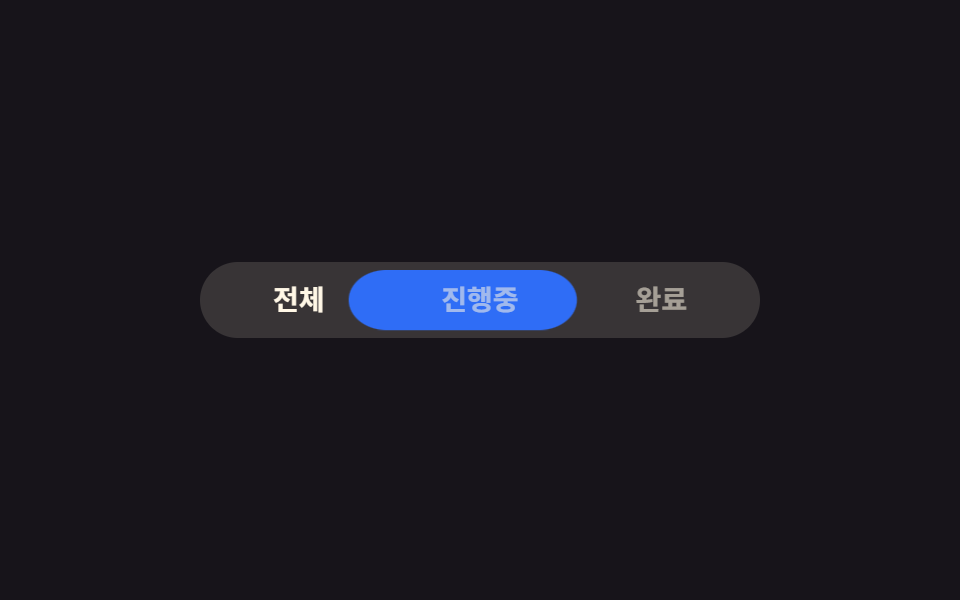 세그먼트 컨트롤 선택 UI 9종 — 복붙하면 되는세그먼트 컨트롤은 iOS 설정 화면에서 자주 보이는, 여러 선택지 중 하나를 고르면 배경 알약이 그 칸으로 미끄러져 가는 탭 전환 버튼입니다. 세그먼트 컨트롤부터 칩 필터·이모지 리액션·컬러 스와치까지, 이름은 몰라 이 글의 데모 전부 보기