08큰 것부터 자리 잡는 트리맵
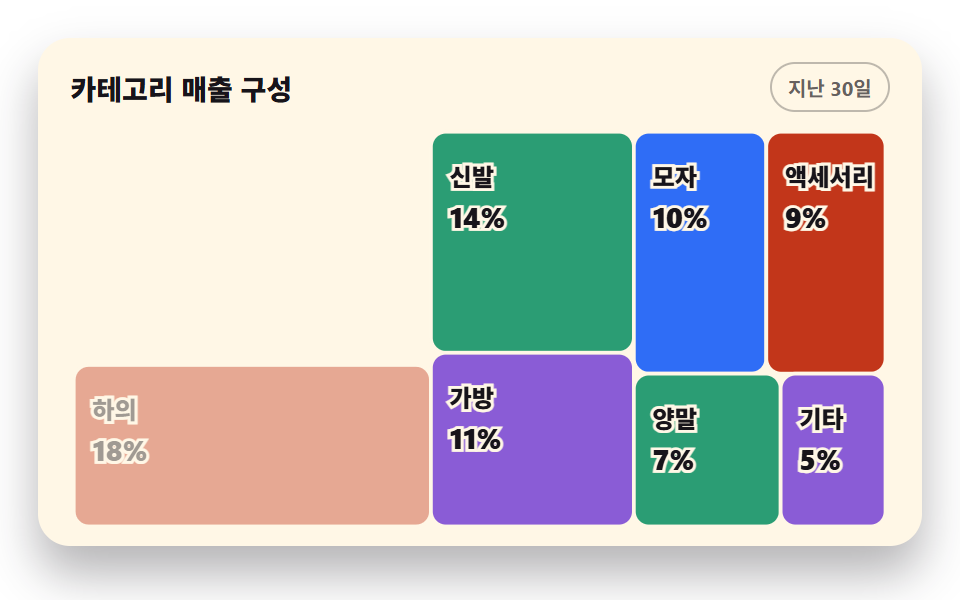
카테고리 매출을 squarified 분할로 정사각에 가깝게 배치하고 호버한 칸이 밝아지며 값이 뜬다
쓰임카테고리 매출 구성 패널, 포트폴리오 구성 뷰
fill-opacitypointermoveviewBox
<main class="stage">
<div class="ct is-demo" id="ct">
  <div class="ct__card">
    <div class="ct__head">
      <p class="ct__title">카테고리 매출 구성</p>
      <span class="ct__chip">지난 30일</span>
    </div>
    <div class="ct__plot">
      <svg class="ct__svg" id="chart" viewBox="0 0 440 216" role="img" aria-label="카테고리 매출 트리맵, 상의 26%가 가장 크고 다음은 하의 18%">
        <!-- 칸 rect 와 라벨은 JS 가 squarified 분할 계산으로 채운다 -->
        <g id="cells"></g>
      </svg>
      <div class="ct__tip" id="tip" aria-hidden="true"><strong id="tipName">상의</strong><span id="tipVal">26%</span></div>
      <table class="ct__sr">
        <caption>카테고리 매출 구성</caption>
        <thead><tr><th>카테고리</th><th>비중</th></tr></thead>
        <tbody id="srBody"></tbody>
      </table>
    </div>
  </div>
</div>
</main>
@use "../../../../site/static/demo-tokens" as *;
// 트리맵 — 실제 사용에선 JS 간이 squarified 분할로 칸이 한 번에 자리 잡고, hover 한 칸이 밝아지며
// 툴팁이 뜬다. 격자 미리보기(.is-demo)는 큰 칸부터 순차 등장(opacity + 살짝 scale)을 2초 루프로 보여 준다.
$duration: $dur-loop;
$easing: $ease-out;
$color: $chart-1;
@include stage($stage-paper);
.ct { display: flex; justify-content: center; width: 100%; padding-bottom: $sp-2; }
.ct__card {
width: min(100%, 420px); background: $subject-cream; border-radius: $r-card;
box-shadow: $shadow-raised; padding: $sp-3 $sp-4 $sp-2;
}
.ct__head { display: flex; align-items: center; justify-content: space-between; gap: $sp-2; margin-bottom: $sp-2; }
.ct__title { margin: 0; font-weight: 800; font-size: clamp(12px, 3vw, 14px); color: $subject-ink; }
.ct__chip {
font-weight: 700; font-size: clamp(9px, 2.4vw, 10px); color: rgba(23, 20, 26, .66);
border: 1px solid rgba(23, 20, 26, .28); border-radius: $r-pill; padding: $sp-1 $sp-2;
}
.ct__plot { position: relative; }
.ct__svg { display: block; width: 100%; height: auto; }
// 칸 배경색 — 계열 순서 고정. fill-opacity 로 밝게 두고 hover 에서 진해진다
.ct__cell { stroke: $subject-cream; stroke-width: 2; cursor: pointer; }
.ct__cell--c1 { fill: $chart-1; }
.ct__cell--c2 { fill: $chart-2; }
.ct__cell--c3 { fill: $chart-3; }
.ct__cell--c4 { fill: $chart-4; }
.ct__cell:hover { fill-opacity: .82; stroke: $subject-ink; stroke-width: 2.5; }
// 라벨 — 어떤 계열색 위에서도 읽히게 잉크 글자에 크림 외곽선(paint-order)을 준다
.ct__name, .ct__num {
fill: $subject-ink; stroke: $subject-cream; stroke-width: 3px; paint-order: stroke;
font-weight: 800; dominant-baseline: middle; pointer-events: none;
}
.ct__name { font-size: 13px; }
.ct__num { font-size: 15px; font-weight: 800; }
// 툴팁 — 칸 위쪽에 뜬다 (top % 로 칸 y 를 따라감)
.ct__tip {
position: absolute; transform: translate(-50%, -120%); display: flex; align-items: baseline; gap: $sp-1;
background: $subject-ink; color: $stage-paper; border-radius: $r-xs; padding: $sp-1 $sp-2;
font-weight: 700; font-size: 10px; white-space: nowrap; pointer-events: none; opacity: 0;
}
.ct__tip.is-on { opacity: 1; }
.ct__tip strong { font-size: 11px; }
.ct__sr { position: fixed; top: 0; left: -640px; width: 320px; margin: 0; }
// ── 미리보기 루프: 큰 칸부터 0.09s 간격으로 나타났다(살짝 커지며) 88% 까지 머물고 96% 부터 다시 사라진다.
// scale 은 칸 그룹 자기 중심에서 — SVG 요소의 CSS transform 기준 상자는 기본 view-box 이므로
// transform-box: fill-box 를 함께 쓴다 (이 줄이 없으면 무대 중심에서 커진다)
.ct.is-demo .ct__group {
transform-box: fill-box; transform-origin: center;
animation-name: ctPop;
animation-duration: $duration;
animation-timing-function: $easing;
animation-iteration-count: infinite;
animation-delay: var(--d, 0s); // 인라인 --d 로 칸마다 순차 — animation: 단축을 쓰면 delay 가 리셋된다
animation-fill-mode: backwards; // 지연 구간 첫 프레임 번쩍 방지
}
@keyframes ctPop {
0% { opacity: 0; transform: scale(.96); }
6%, 88% { opacity: 1; transform: scale(1); }
96%, 100% { opacity: 0; transform: scale(1); }
}
@media (max-width: 340px) {
// 320px 무대의 세로 여유는 174px 뿐 — 카드 아래 여백을 내려서 맞춘다 (좁은 화면에서는 올리지 않는다)
.ct { padding-bottom: 0; }
.ct__card { padding: $sp-2 $sp-3 0; }
.ct__name { font-size: 11px; }
.ct__num { font-size: 12px; }
}
@media (prefers-reduced-motion: reduce) {
.ct.is-demo .ct__group { animation: none !important; }
// 움직임 없이 모든 칸이 다 보이는 최종 상태로 점프한다
.ct.is-demo .ct__group { opacity: 1 !important; }
}html, body {
margin: 0;
overflow: hidden;
}
.stage {
box-sizing: border-box;
min-height: 100vh;
display: grid;
place-items: center;
margin: 0;
background: #ffffff;
font-family: -apple-system, "Segoe UI", "Noto Sans KR", sans-serif;
padding: clamp(8px, 4vw, 24px);
}
.ct {
display: flex;
justify-content: center;
width: 100%;
padding-bottom: 8px;
}
.ct__card {
width: min(100%, 420px);
background: #fff7e6;
border-radius: 16px;
box-shadow: 0 14px 24px rgba(23, 20, 26, 0.32);
padding: 12px 16px 8px;
}
.ct__head {
display: flex;
align-items: center;
justify-content: space-between;
gap: 8px;
margin-bottom: 8px;
}
.ct__title {
margin: 0;
font-weight: 800;
font-size: clamp(12px, 3vw, 14px);
color: #17141a;
}
.ct__chip {
font-weight: 700;
font-size: clamp(9px, 2.4vw, 10px);
color: rgba(23, 20, 26, 0.66);
border: 1px solid rgba(23, 20, 26, 0.28);
border-radius: 999px;
padding: 4px 8px;
}
.ct__plot {
position: relative;
}
.ct__svg {
display: block;
width: 100%;
height: auto;
}
.ct__cell {
stroke: #fff7e6;
stroke-width: 2;
cursor: pointer;
}
.ct__cell--c1 {
fill: #2f6df6;
}
.ct__cell--c2 {
fill: #c2361a;
}
.ct__cell--c3 {
fill: #2b9d74;
}
.ct__cell--c4 {
fill: #8a5cd6;
}
.ct__cell:hover {
fill-opacity: 0.82;
stroke: #17141a;
stroke-width: 2.5;
}
.ct__name, .ct__num {
fill: #17141a;
stroke: #fff7e6;
stroke-width: 3px;
paint-order: stroke;
font-weight: 800;
dominant-baseline: middle;
pointer-events: none;
}
.ct__name {
font-size: 13px;
}
.ct__num {
font-size: 15px;
font-weight: 800;
}
.ct__tip {
position: absolute;
transform: translate(-50%, -120%);
display: flex;
align-items: baseline;
gap: 4px;
background: #17141a;
color: #ffffff;
border-radius: 4px;
padding: 4px 8px;
font-weight: 700;
font-size: 10px;
white-space: nowrap;
pointer-events: none;
opacity: 0;
}
.ct__tip.is-on {
opacity: 1;
}
.ct__tip strong {
font-size: 11px;
}
.ct__sr {
position: fixed;
top: 0;
left: -640px;
width: 320px;
margin: 0;
}
.ct.is-demo .ct__group {
transform-box: fill-box;
transform-origin: center;
animation-name: ctPop;
animation-duration: 2s;
animation-timing-function: ease-out;
animation-iteration-count: infinite;
animation-delay: var(--d, 0s);
animation-fill-mode: backwards;
}
@keyframes ctPop {
0% {
opacity: 0;
transform: scale(0.96);
}
6%, 88% {
opacity: 1;
transform: scale(1);
}
96%, 100% {
opacity: 0;
transform: scale(1);
}
}
@media (max-width: 340px) {
.ct {
padding-bottom: 0;
}
.ct__card {
padding: 8px 12px 0;
}
.ct__name {
font-size: 11px;
}
.ct__num {
font-size: 12px;
}
}
@media (prefers-reduced-motion: reduce) {
.ct.is-demo .ct__group {
animation: none !important;
}
.ct.is-demo .ct__group {
opacity: 1 !important;
}
}var ITEMS = [
{ name: '상의', v: 26 }, { name: '하의', v: 18 }, { name: '신발', v: 14 }, { name: '가방', v: 11 },
{ name: '모자', v: 10 }, { name: '액세서리', v: 9 }, { name: '양말', v: 7 }, { name: '기타', v: 5 }
];
var SERIES = ['c1', 'c2', 'c3', 'c4']; // 계열 색 순서 고정 — 칸 순서대로 돌린다
var ct = document.getElementById('ct');
var cells = document.getElementById('cells');
var tip = document.getElementById('tip');
var tipName = document.getElementById('tipName');
var tipVal = document.getElementById('tipVal');
// 간이 squarified 이진 분할 — 값 내림차순 목록을 남은 영역에서 절반 무게에 가장 가까운 지점으로 나누고
// 종횡비가 1 에 가까워지는 방향(가로/세로)으로 재귀한다. 완전한 squarify 는 아니지만 정사각 비율이 잘 나온다
function split(items, x, y, w, h, out) {
if (!items.length) { return; }
if (items.length === 1) { out.push({ item: items[0], x: x, y: y, w: w, h: h }); return; }
var total = 0;
for (var k = 0; k < items.length; k++) { total += items[k].v; }
var half = total / 2, acc = 0, i = 0;
while (i < items.length - 1 && Math.abs(acc + items[i].v - half) < Math.abs(acc - half)) { acc += items[i].v; i++; }
var ratio = acc / total;
if (w >= h) {
split(items.slice(0, i), x, y, w * ratio, h, out);
split(items.slice(i), x + w * ratio, y, w * (1 - ratio), h, out);
} else {
split(items.slice(0, i), x, y, w, h * ratio, out);
split(items.slice(i), x, y + h * ratio, w, h * (1 - ratio), out);
}
}
var laid = [];
split(ITEMS, 2, 2, 436, 212, laid); // 2px 여백을 두고 채운다
var SVGNS = 'http://www.w3.org/2000/svg';
laid.forEach(function (cell, idx) {
var g = document.createElementNS(SVGNS, 'g');
g.setAttribute('class', 'ct__group');
var rect = document.createElementNS(SVGNS, 'rect');
rect.setAttribute('x', cell.x); rect.setAttribute('y', cell.y);
rect.setAttribute('width', cell.w); rect.setAttribute('height', cell.h);
rect.setAttribute('rx', 8);
rect.setAttribute('class', 'ct__cell ct__cell--' + SERIES[idx % 4]);
rect.setAttribute('data-i', idx);
g.appendChild(rect);
// 라벨은 면적이 충분한 칸에만 — 작은 칸은 툴팁과 표가 값을 갖고 있다
if (cell.w * cell.h > 1500) {
var name = document.createElementNS(SVGNS, 'text');
name.setAttribute('x', cell.x + 10); name.setAttribute('y', cell.y + 26);
name.setAttribute('class', 'ct__name');
name.textContent = cell.item.name;
var val = document.createElementNS(SVGNS, 'text');
val.setAttribute('x', cell.x + 10); val.setAttribute('y', cell.y + 48);
val.setAttribute('class', 'ct__num');
val.textContent = cell.item.v + '%';
g.appendChild(name); g.appendChild(val);
}
g.style.setProperty('--d', (idx * 0.09) + 's'); // 큰 칸부터 순차 등장
cells.appendChild(g);
});
var srBody = document.getElementById('srBody');
ITEMS.forEach(function (it) {
var tr = document.createElement('tr');
var th = document.createElement('th'); th.setAttribute('scope', 'row'); th.textContent = it.name;
var td = document.createElement('td'); td.textContent = it.v + '%';
tr.appendChild(th); tr.appendChild(td); srBody.appendChild(tr);
});
cells.addEventListener('pointermove', function (e) {
if (ct.classList.contains('is-demo')) { ct.classList.remove('is-demo'); }
var rect = e.target.closest('rect');
if (!rect) { return; }
var idx = Number(rect.getAttribute('data-i'));
var cell = laid[idx];
tipName.textContent = cell.item.name;
tipVal.textContent = cell.item.v + '%';
// 칸의 viewBox 중심을 plot 비율로 환산해 툴팁을 놓는다
tip.style.left = ((cell.x + cell.w / 2) / 440 * 100) + '%';
tip.style.top = ((cell.y / 216) * 100) + '%';
tip.classList.add('is-on');
});
cells.addEventListener('pointerleave', function () { tip.classList.remove('is-on'); });// ChartTreemapSquarify — vanilla 판(run/289/demo/08-chart-draw-treemap-squarify/index.html) 의 React 포트.
// 카테고리 매출을 간이 squarified 이진 분할로 정사각에 가깝게 배치하는 트리맵.
// 사람이 포인터를 올리면 미리보기 루프(.isDemo)가 떨어지고 칸이 밝아지며 툴팁이 뜬다.
import { useState } from "react";
import type { CSSProperties } from "react";
import styles from "./ChartTreemapSquarify.module.scss";
export type ChartTreemapSquarifyProps = {
/** 격자 미리보기용 2초 자동 루프. 사람이 포인터를 올리면 꺼진다 */
demo?: boolean;
};
type PtrEvt = { target: Element | null };
type Vars = CSSProperties & { "--d"?: string };
const ITEMS = [
{ name: "상의", v: 26 }, { name: "하의", v: 18 }, { name: "신발", v: 14 }, { name: "가방", v: 11 },
{ name: "모자", v: 10 }, { name: "액세서리", v: 9 }, { name: "양말", v: 7 }, { name: "기타", v: 5 }
];
const VW = 440, VH = 216;
type Cell = { item: { name: string; v: number }; x: number; y: number; w: number; h: number };
/** 간이 squarified 이진 분할 — 값 내림차순 목록을 남은 영역에서 절반 무게에 가장 가까운 지점으로 나누고
* 종횡비가 1 에 가까워지는 방향(가로/세로)으로 재귀한다. 완전한 squarify 는 아니지만 정사각 비율이 잘 나온다 */
function split(items: { name: string; v: number }[], x: number, y: number, w: number, h: number, out: Cell[]): void {
if (!items.length) return;
if (items.length === 1) { out.push({ item: items[0], x, y, w, h }); return; }
let total = 0;
for (const it of items) total += it.v;
const half = total / 2;
let acc = 0, i = 0;
while (i < items.length - 1 && Math.abs(acc + items[i].v - half) < Math.abs(acc - half)) { acc += items[i].v; i++; }
const ratio = acc / total;
if (w >= h) {
split(items.slice(0, i), x, y, w * ratio, h, out);
split(items.slice(i), x + w * ratio, y, w * (1 - ratio), h, out);
} else {
split(items.slice(0, i), x, y, w, h * ratio, out);
split(items.slice(i), x, y + h * ratio, w, h * (1 - ratio), out);
}
}
const LAID: Cell[] = [];
split(ITEMS, 2, 2, 436, 212, LAID); // 2px 여백을 두고 채운다
export default function ChartTreemapSquarify({ demo = true }: ChartTreemapSquarifyProps) {
const [live, setLive] = useState(!demo);
const [hot, setHot] = useState<number | null>(null);
/** pointermove — 칸 rect 위에서 그 칸의 이름과 비중을 보여 준다.
* CSS 모듈이라 칸의 클래스는 해시값 — data-i 로 칸을 찾는다 */
function onMove(e: PtrEvt) {
const t = e.target as Element | null;
const rect = t && t.tagName === "rect" ? t : (t ? t.closest("rect") : null);
if (!rect) { setHot(null); return; }
setLive(true); // live 를 켜야 .isDemo 루프가 떨어진다 (live=false 가 미리보기 상태다)
setHot(Number(rect.getAttribute("data-i")));
}
const shown = hot == null || hot < 0 ? 0 : hot;
const cell = LAID[shown];
const rootCls = [styles.root, live ? "" : styles.isDemo].filter(Boolean).join(" ");
return (
<div className={rootCls}>
<div className={styles.card}>
<div className={styles.head}>
<p className={styles.title}>카테고리 매출 구성</p>
<span className={styles.chip}>지난 30일</span>
</div>
<div className={styles.plot}>
<svg
className={styles.svg} viewBox={"0 0 " + VW + " " + VH} role="img"
aria-label="카테고리 매출 트리맵, 상의 26%가 가장 크고 다음은 하의 18%"
onPointerMove={onMove}
onPointerLeave={() => setHot(null)}
>
{LAID.map((c, idx) => (
<g key={c.item.name} className={styles.group} style={{ "--d": (idx * 0.09) + "s" } as Vars}>
<rect
className={[styles.cell, idx % 4 === 0 ? styles.cellC1 : idx % 4 === 1 ? styles.cellC2 : idx % 4 === 2 ? styles.cellC3 : styles.cellC4,
hot === idx ? styles.cellHot : ""].filter(Boolean).join(" ")}
x={c.x} y={c.y} width={c.w} height={c.h} rx={8} data-i={idx}
/>
{/* 라벨은 면적이 충분한 칸에만 — 작은 칸은 툴팁과 표가 값을 갖고 있다 */}
{c.w * c.h > 1500 ? (
<>
<text className={styles.name} x={c.x + 10} y={c.y + 26}>{c.item.name}</text>
<text className={styles.num} x={c.x + 10} y={c.y + 48}>{c.item.v}%</text>
</>
) : null}
</g>
))}
</svg>
{/* 툴팁 — 칸의 viewBox 중심 위에 뜬다 */}
<div
className={[styles.tip, hot == null ? "" : styles.tipIsOn].filter(Boolean).join(" ")}
aria-hidden="true"
style={{ left: ((cell.x + cell.w / 2) / VW * 100) + "%", top: ((cell.y / VH) * 100) + "%" }}
>
<strong>{cell.item.name}</strong><span>{cell.item.v}%</span>
</div>
{/* 스크린리더용 데이터 표 — 화면에 안 보인다 */}
<table className={styles.sr}>
<caption>카테고리 매출 구성</caption>
<thead><tr><th scope="col">카테고리</th><th scope="col">비중</th></tr></thead>
<tbody>
{ITEMS.map((it) => (
<tr key={it.name}><th scope="row">{it.name}</th><td>{it.v}%</td></tr>
))}
</tbody>
</table>
</div>
</div>
</div>
);
}08 큰 것부터 자리 잡는 트리맵 — 측정 누적면적 53.984% · 움직인 프레임 11/23GODRICH 원작 · zip 에 SCSS·React 포함 · css 그래프 만들기 SVG로 9종 — 라이브러리 없이
이 데모가 속한 글
 css 그래프 만들기 SVG로 9종 — 라이브러리 없이css 그래프는 숫자를 눈에 보이는 선·막대·면으로 바꾸는 가장 가벼운 방법입니다. 여기 아홉 가지는 선·막대·도넛·레이더·히트맵·스파크라인·누적 영역·트리맵·게이지를 라이브러리 없이 SVG 좌표 계산과 CSS 애니 이 글의 데모 전부 보기