08룰렛 뽑기
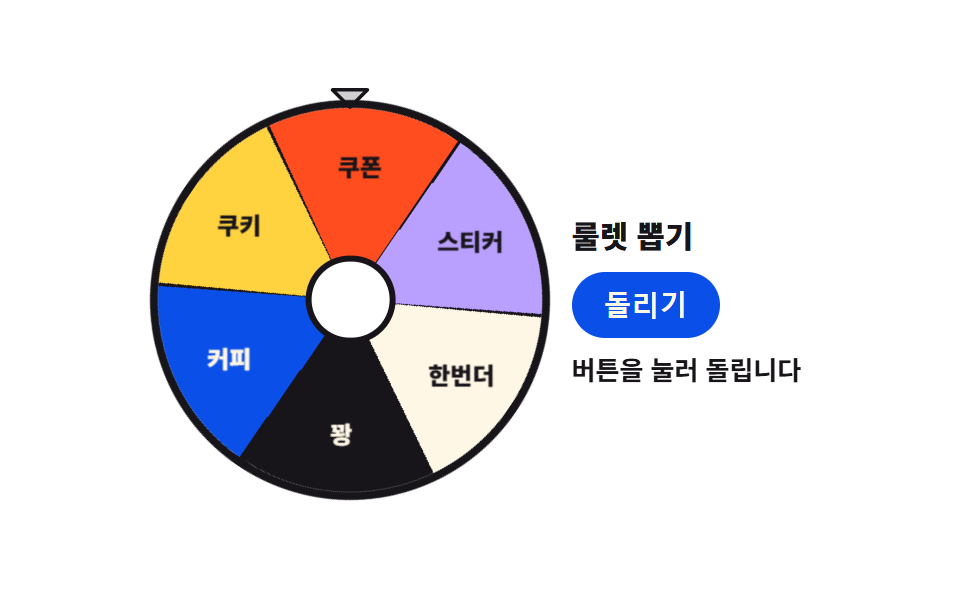
부채꼴이 여럿인 룰렛을 돌려 화살표가 멈춘 칸을 뽑습니다. 원판은 conic-gradient 하나로 그리고 회전감은 긴 여운의 easing 으로 담습니다.
쓰임이벤트 경품 추첨, 발표 순서 정하기
conic-gradienttransformtransition-timing-function
<main class="stage">
<div class="rl is-demo" id="rl">
  <div class="rl__wheel">
    <div class="rl__disc" id="rlDisc">
      <span class="rl__label rl__label--1"><span class="rl__labelText">커피</span></span>
      <span class="rl__label rl__label--2"><span class="rl__labelText">쿠키</span></span>
      <span class="rl__label rl__label--3"><span class="rl__labelText">쿠폰</span></span>
      <span class="rl__label rl__label--4"><span class="rl__labelText">스티커</span></span>
      <span class="rl__label rl__label--5"><span class="rl__labelText">한번더</span></span>
      <span class="rl__label rl__label--6"><span class="rl__labelText">꽝</span></span>
    </div>
    <span class="rl__hub" aria-hidden="true"></span>
    <span class="rl__pointer" aria-hidden="true">
      <svg viewBox="0 0 256 256" focusable="false"><g fill="currentColor"><path d="m208 96l-80 80l-80-80Z" opacity=".2"/><path d="M215.39 92.94A8 8 0 0 0 208 88H48a8 8 0 0 0-5.66 13.66l80 80a8 8 0 0 0 11.32 0l80-80a8 8 0 0 0 1.73-8.72M128 164.69L67.31 104h121.38Z"/></g></svg>
    </span>
  </div>

  <div class="rl__side">
    <p class="rl__title">룰렛 뽑기</p>
    <button class="rl__spin" id="rlSpin" type="button">돌리기</button>
    <div class="rl__out">
      <p class="rl__result" id="rlResult" aria-live="polite">버튼을 눌러 돌립니다</p>
      <p class="rl__ghost rl__ghost--b" aria-hidden="true">커피 나왔어요!</p>
    </div>
  </div>
</div>
</main>@use "../../../../site/static/demo-tokens" as *;
// 룰렛 뽑기 — 원판은 conic-gradient 한 줄, 경계선도 같은 그라디언트 안의 1deg 하드 스톱이다.
// 실제 회전은 transform + transition-timing-function(긴 꼬리) 이고, 격자 미리보기(.is-demo)만
// 2초에 정확히 한 바퀴 도는 keyframes 다 — demo.py 는 CSS 시계로 재므로 transition 은 못 잡는다.
// 글자 대비: 파란 칸은 크림(5.98:1), 옐로·주황·라일락·크림 칸은 잉크(5.50~17.11:1), 먹 칸은 크림(17.11:1).
$duration: $dur-loop;
$easing: $ease-out;
$color: $subject-blue-deep;
// 토큰 이징은 전부 짧은 여운이라 룰렛의 긴 감속 꼬리가 없다 — 이 항목 전용으로 하나 더 둔다
$spin-ease: cubic-bezier(.12, .72, .12, 1);
@include stage($stage-paper);
.rl {
--spin: 0deg; // JS 가 목표 각도를 여기에 쓴다 — 원판은 +, 라벨 글자는 - 로 같은 값을 쓴다
display: flex; align-items: center; justify-content: center; gap: clamp(8px, 3vw, 20px);
width: 100%; max-width: 380px; height: 100%; max-height: 100%;
}
.rl__wheel { position: relative; flex: 0 0 auto; width: clamp(112px, 40vw, 192px); aspect-ratio: 1; }
.rl__disc {
// 라벨 자리 상자는 원판 크기 그대로를 칸 각도로 돌린 것이라 회전 경계 상자가 원판보다 크다 —
// 그 넘침이 body.scrollHeight 로 전파돼 320px BD9 가 깨졌다(207px 실측). 원 안으로 잘라 막는다
position: absolute; inset: 0; border-radius: 50%; overflow: hidden;
box-shadow: 0 0 0 4px $subject-ink;
// 6칸 + 칸 경계 1deg 잉크 선. 하드 스톱이라 색이 섞이지 않는다
background-image: conic-gradient(
$subject-ink 0deg 1deg, $subject-blue-deep 1deg 60deg,
$subject-ink 60deg 61deg, $stage-yellow 61deg 120deg,
$subject-ink 120deg 121deg, $stage-orange 121deg 180deg,
$subject-ink 180deg 181deg, $subject-lilac 181deg 240deg,
$subject-ink 240deg 241deg, $subject-cream 241deg 300deg,
$subject-ink 300deg 301deg, $subject-ink 301deg 360deg
);
transform: rotate(var(--spin));
transition-property: transform;
transition-duration: 2400ms;
transition-timing-function: $spin-ease;
}
// 라벨 자리는 원판 크기의 상자를 칸 한가운데 각도(--a)로 돌려 위쪽에 붙인다 (px 오프셋이 없어 크기를 따라간다).
// 글자는 그 안에서 --a 와 --spin 을 모두 되돌려 **언제나 수평**이다 — 부채꼴을 따라 눕히면
// 아래쪽 칸 글자가 거꾸로 서서 목록 썸네일·OG 에서 읽히지 않는다 (poster 육안 검사 2026-09-14).
.rl__label {
position: absolute; inset: 0;
display: flex; justify-content: center; align-items: flex-start;
padding-top: 12%; // 글자가 회전해도 테두리·이웃 칸에 닿지 않는 반지름
transform: rotate(var(--a));
font-weight: 800; font-size: clamp(9px, 2.6vw, 12px); line-height: 1;
}
.rl__labelText {
display: block; white-space: nowrap;
transform: rotate(calc(var(--a) * -1 - var(--spin)));
transition-property: transform;
transition-duration: 2400ms;
transition-timing-function: $spin-ease;
}
.rl__label--1 { --a: 30deg; color: $subject-cream; }
.rl__label--2 { --a: 90deg; color: $subject-ink; }
.rl__label--3 { --a: 150deg; color: $subject-ink; }
.rl__label--4 { --a: 210deg; color: $subject-ink; }
.rl__label--5 { --a: 270deg; color: $subject-ink; }
.rl__label--6 { --a: 330deg; color: $subject-cream; }
// 글자가 앉은 면색을 글자 요소에 명시한다. 칸 색은 conic-gradient 라 요소의 background-color 가 아니고,
// 대비 스캐너는 조상의 background-color 를 거슬러 합성하므로 무대 흰색으로 잘못 읽는다(크림 글자 1.07:1 오판).
// 색이 칸과 같아 화면은 그대로고, 어느 면 위의 글자인지가 소스와 실측표에 남는다.
.rl__label--1 .rl__labelText { background-color: $subject-blue-deep; } // 크림 글자 5.98:1
.rl__label--2 .rl__labelText { background-color: $stage-yellow; } // 잉크 글자 12.63:1
.rl__label--3 .rl__labelText { background-color: $stage-orange; } // 잉크 글자 5.50:1
.rl__label--4 .rl__labelText { background-color: $subject-lilac; } // 잉크 글자 8.29:1
.rl__label--5 .rl__labelText { background-color: $subject-cream; } // 잉크 글자 17.11:1
.rl__label--6 .rl__labelText { background-color: $subject-ink; } // 크림 글자 17.11:1
.rl__hub {
position: absolute; left: 50%; top: 50%; z-index: 2;
width: 20%; aspect-ratio: 1; border-radius: 50%;
transform: translate(-50%, -50%);
background-color: $stage-paper;
box-shadow: 0 0 0 3px $subject-ink;
}
// 화살표는 원판 **밖**(무대 바탕 위)에 세워 끝만 테두리에 닿게 한다 —
// 원판 위에 얹으면 멈춘 칸이 먹·파랑일 때 잉크 화살표가 그 칸에 묻혀 안 보인다 (정적 스냅샷 실측)
.rl__pointer {
position: absolute; left: 50%; top: 0; z-index: 3;
width: clamp(20px, 6vw, 28px); aspect-ratio: 1;
transform: translate(-50%, -70%);
color: $subject-ink;
}
.rl__pointer svg { display: block; width: 100%; height: 100%; }
// 조작부는 내용 폭만 차지하고 무대 한가운데에 원판과 함께 묶여 선다 (오른쪽 빈 공간 방지)
.rl__side { flex: 0 1 auto; min-width: 0; display: flex; flex-direction: column; gap: $sp-2; }
.rl__title { margin: 0; font-weight: 800; font-size: clamp(12px, 3.2vw, 16px); color: $subject-ink; }
.rl__spin {
align-self: flex-start;
padding: clamp(8px, 2vw, 12px) $sp-4;
border: 0; border-radius: $r-pill;
background-color: $color; color: $subject-cream;
font-weight: 800; font-size: clamp(11px, 3vw, 14px); line-height: 1;
cursor: pointer;
transition: transform $dur-quick $easing;
}
.rl__spin:focus-visible { outline: 2px solid $subject-ink; outline-offset: 2px; }
.rl__spin:active { transform: scale(.96); }
.rl__spin[disabled] { cursor: default; opacity: .82; }
.rl__out { display: grid; }
.rl__result, .rl__ghost {
grid-area: 1 / 1; margin: 0;
font-weight: 700; font-size: clamp(10px, 2.8vw, 13px); line-height: 1.3;
color: $subject-ink;
}
.rl__ghost { opacity: 0; }
// ── 격자 미리보기 ───────────────────────────────────────────
// 원판은 2초에 한 바퀴 돌고 라벨 글자는 같은 이징으로 되돌아 돌아 수평을 지킨다.
// 상태 줄은 대기 문장 → 결과 컷 교체 — 멈춰 보이는 정지 프레임에 「돌리는 중」이 찍히지 않게 한다.
.rl.is-demo .rl__disc {
animation-name: rlTurn; animation-duration: $duration;
animation-timing-function: ease-in-out; animation-iteration-count: infinite;
}
.rl.is-demo .rl__labelText {
animation-name: rlLabelHold; animation-duration: $duration;
animation-timing-function: ease-in-out; animation-iteration-count: infinite;
}
.rl.is-demo .rl__result {
animation-name: rlOutOff; animation-duration: $duration;
animation-timing-function: steps(1, end); animation-iteration-count: infinite;
}
.rl.is-demo .rl__ghost--b {
animation-name: rlGhostB; animation-duration: $duration;
animation-timing-function: steps(1, end); animation-iteration-count: infinite;
}
// 0~60% 에 한 바퀴를 돌고 60% 뒤에는 **멈춰 선다** — 결과를 발표하는 구간에 원판이 계속 돌면
// 정지 프레임(poster·썸네일)에서 화살표가 가리키는 칸과 발표 문구가 어긋난다.
// 360deg 로 멈추므로 화살표는 다시 첫 칸(커피) 위다 — 미리보기 결과 문구가 그 칸과 같다.
@keyframes rlTurn {
0% { transform: rotate(0deg); }
60% { transform: rotate(360deg); }
100% { transform: rotate(360deg); }
}
@keyframes rlLabelHold {
0% { transform: rotate(calc(var(--a) * -1)); }
60% { transform: rotate(calc(var(--a) * -1 - 360deg)); }
100% { transform: rotate(calc(var(--a) * -1 - 360deg)); }
}
@keyframes rlOutOff {
0% { opacity: 1; }
60% { opacity: 0; }
88% { opacity: 1; }
100% { opacity: 1; }
}
@keyframes rlGhostB {
0% { opacity: 0; }
60% { opacity: 1; }
88% { opacity: 0; }
100% { opacity: 0; }
}
@media (max-width: 340px) {
.rl { gap: $sp-2; }
.rl__side { gap: $sp-1; }
.rl__spin { padding: $sp-2 $sp-3; }
}
@media (prefers-reduced-motion: reduce) {
.rl__disc { transition: none !important; }
.rl__labelText { transition: none !important; }
.rl__spin { transition: none !important; }
.rl.is-demo .rl__disc,
.rl.is-demo .rl__labelText,
.rl.is-demo .rl__result,
.rl.is-demo .rl__ghost { animation: none !important; }
.rl.is-demo .rl__ghost { opacity: 0 !important; }
.rl.is-demo .rl__result { opacity: 1 !important; }
}html, body {
margin: 0;
overflow: hidden;
}
.stage {
box-sizing: border-box;
min-height: 100vh;
display: grid;
place-items: center;
margin: 0;
background: #ffffff;
font-family: -apple-system, "Segoe UI", "Noto Sans KR", sans-serif;
padding: clamp(8px, 4vw, 24px);
}
.rl {
--spin: 0deg;
display: flex;
align-items: center;
justify-content: center;
gap: clamp(8px, 3vw, 20px);
width: 100%;
max-width: 380px;
height: 100%;
max-height: 100%;
}
.rl__wheel {
position: relative;
flex: 0 0 auto;
width: clamp(112px, 40vw, 192px);
aspect-ratio: 1;
}
.rl__disc {
position: absolute;
inset: 0;
border-radius: 50%;
overflow: hidden;
box-shadow: 0 0 0 4px #17141a;
background-image: conic-gradient(#17141a 0deg 1deg, #0a4fe8 1deg 60deg, #17141a 60deg 61deg, #ffd23f 61deg 120deg, #17141a 120deg 121deg, #ff4d1f 121deg 180deg, #17141a 180deg 181deg, #b9a0ff 181deg 240deg, #17141a 240deg 241deg, #fff7e6 241deg 300deg, #17141a 300deg 301deg, #17141a 301deg 360deg);
transform: rotate(var(--spin));
transition-property: transform;
transition-duration: 2400ms;
transition-timing-function: cubic-bezier(0.12, 0.72, 0.12, 1);
}
.rl__label {
position: absolute;
inset: 0;
display: flex;
justify-content: center;
align-items: flex-start;
padding-top: 12%;
transform: rotate(var(--a));
font-weight: 800;
font-size: clamp(9px, 2.6vw, 12px);
line-height: 1;
}
.rl__labelText {
display: block;
white-space: nowrap;
transform: rotate(calc(var(--a) * -1 - var(--spin)));
transition-property: transform;
transition-duration: 2400ms;
transition-timing-function: cubic-bezier(0.12, 0.72, 0.12, 1);
}
.rl__label--1 {
--a: 30deg;
color: #fff7e6;
}
.rl__label--2 {
--a: 90deg;
color: #17141a;
}
.rl__label--3 {
--a: 150deg;
color: #17141a;
}
.rl__label--4 {
--a: 210deg;
color: #17141a;
}
.rl__label--5 {
--a: 270deg;
color: #17141a;
}
.rl__label--6 {
--a: 330deg;
color: #fff7e6;
}
.rl__label--1 .rl__labelText {
background-color: #0a4fe8;
}
.rl__label--2 .rl__labelText {
background-color: #ffd23f;
}
.rl__label--3 .rl__labelText {
background-color: #ff4d1f;
}
.rl__label--4 .rl__labelText {
background-color: #b9a0ff;
}
.rl__label--5 .rl__labelText {
background-color: #fff7e6;
}
.rl__label--6 .rl__labelText {
background-color: #17141a;
}
.rl__hub {
position: absolute;
left: 50%;
top: 50%;
z-index: 2;
width: 20%;
aspect-ratio: 1;
border-radius: 50%;
transform: translate(-50%, -50%);
background-color: #ffffff;
box-shadow: 0 0 0 3px #17141a;
}
.rl__pointer {
position: absolute;
left: 50%;
top: 0;
z-index: 3;
width: clamp(20px, 6vw, 28px);
aspect-ratio: 1;
transform: translate(-50%, -70%);
color: #17141a;
}
.rl__pointer svg {
display: block;
width: 100%;
height: 100%;
}
.rl__side {
flex: 0 1 auto;
min-width: 0;
display: flex;
flex-direction: column;
gap: 8px;
}
.rl__title {
margin: 0;
font-weight: 800;
font-size: clamp(12px, 3.2vw, 16px);
color: #17141a;
}
.rl__spin {
align-self: flex-start;
padding: clamp(8px, 2vw, 12px) 16px;
border: 0;
border-radius: 999px;
background-color: #0a4fe8;
color: #fff7e6;
font-weight: 800;
font-size: clamp(11px, 3vw, 14px);
line-height: 1;
cursor: pointer;
transition: transform 220ms ease-out;
}
.rl__spin:focus-visible {
outline: 2px solid #17141a;
outline-offset: 2px;
}
.rl__spin:active {
transform: scale(0.96);
}
.rl__spin[disabled] {
cursor: default;
opacity: 0.82;
}
.rl__out {
display: grid;
}
.rl__result, .rl__ghost {
grid-area: 1/1;
margin: 0;
font-weight: 700;
font-size: clamp(10px, 2.8vw, 13px);
line-height: 1.3;
color: #17141a;
}
.rl__ghost {
opacity: 0;
}
.rl.is-demo .rl__disc {
animation-name: rlTurn;
animation-duration: 2s;
animation-timing-function: ease-in-out;
animation-iteration-count: infinite;
}
.rl.is-demo .rl__labelText {
animation-name: rlLabelHold;
animation-duration: 2s;
animation-timing-function: ease-in-out;
animation-iteration-count: infinite;
}
.rl.is-demo .rl__result {
animation-name: rlOutOff;
animation-duration: 2s;
animation-timing-function: steps(1, end);
animation-iteration-count: infinite;
}
.rl.is-demo .rl__ghost--b {
animation-name: rlGhostB;
animation-duration: 2s;
animation-timing-function: steps(1, end);
animation-iteration-count: infinite;
}
@keyframes rlTurn {
0% {
transform: rotate(0deg);
}
60% {
transform: rotate(360deg);
}
100% {
transform: rotate(360deg);
}
}
@keyframes rlLabelHold {
0% {
transform: rotate(calc(var(--a) * -1));
}
60% {
transform: rotate(calc(var(--a) * -1 - 360deg));
}
100% {
transform: rotate(calc(var(--a) * -1 - 360deg));
}
}
@keyframes rlOutOff {
0% {
opacity: 1;
}
60% {
opacity: 0;
}
88% {
opacity: 1;
}
100% {
opacity: 1;
}
}
@keyframes rlGhostB {
0% {
opacity: 0;
}
60% {
opacity: 1;
}
88% {
opacity: 0;
}
100% {
opacity: 0;
}
}
@media (max-width: 340px) {
.rl {
gap: 8px;
}
.rl__side {
gap: 4px;
}
.rl__spin {
padding: 8px 12px;
}
}
@media (prefers-reduced-motion: reduce) {
.rl__disc {
transition: none !important;
}
.rl__labelText {
transition: none !important;
}
.rl__spin {
transition: none !important;
}
.rl.is-demo .rl__disc,
.rl.is-demo .rl__labelText,
.rl.is-demo .rl__result,
.rl.is-demo .rl__ghost {
animation: none !important;
}
.rl.is-demo .rl__ghost {
opacity: 0 !important;
}
.rl.is-demo .rl__result {
opacity: 1 !important;
}
}// 룰렛 — 원판은 conic-gradient 하나로 그리고 회전은 transform: rotate 한 줄이다.
// 감속은 CSS transition-timing-function 이 맡고 JS 는 목표 각도(--spin)만 정한다.
// --spin 하나로 원판은 그만큼 돌고 라벨 글자는 그만큼 되돌아 돌아 언제나 수평으로 읽힌다.
// 각도 규약: conic-gradient 는 위(12시)가 0deg 이고 시계 방향으로 큰다. 화살표도 위에 있으므로
// 원판을 A 만큼 돌리면 화살표가 가리키는 칸의 원래 각도는 (-A) 를 360 으로 나눈 나머지다.
(function () {
var PRIZES = ['커피', '쿠키', '쿠폰', '스티커', '한번더', '꽝'];
var RESULT = '{n} 나왔어요!';
var SPINNING = '돌리는 중';
var SLICE = 360 / PRIZES.length;
var root = document.getElementById('rl');
var disc = document.getElementById('rlDisc');
var btn = document.getElementById('rlSpin');
var out = document.getElementById('rlResult');
var angle = 0, busy = false;
function spin() {
if (busy) { return; }
root.classList.remove('is-demo');
busy = true;
btn.disabled = true;
out.textContent = SPINNING;
var turns = 5 + Math.floor(Math.random() * 4); // 5~8 바퀴
var idx = Math.floor(Math.random() * PRIZES.length); // 멈출 칸
var target = (360 - (idx * SLICE + SLICE / 2) + 360) % 360; // 그 칸의 한가운데가 위로 오는 각도
angle += turns * 360 + ((target - (angle % 360)) + 360) % 360;
root.style.setProperty('--spin', angle + 'deg');
}
disc.addEventListener('transitionend', function (e) {
// 라벨 글자도 같은 transition 을 쓰므로 버블링으로 올라온 것은 거른다
if (e.target !== disc || e.propertyName !== 'transform') { return; }
var at = ((-angle % 360) + 360) % 360;
var i = Math.floor(at / SLICE) % PRIZES.length;
out.textContent = RESULT.replace('{n}', PRIZES[i]);
busy = false;
btn.disabled = false;
});
btn.addEventListener('click', spin);
})();// ConicRouletteSpin — vanilla 판(run/080/demo/08-conic-roulette-spin/index.html) 의 React 포트.
// 원판은 conic-gradient 하나, 회전은 transform: rotate 하나, 감속은 CSS transition-timing-function 이 맡는다.
// --spin 하나로 원판은 그만큼 돌고 라벨 글자는 그만큼 되돌아 돌아 언제나 수평으로 읽힌다.
// 각도 규약: conic-gradient 도 화살표도 위(12시)가 0deg 이고 시계 방향으로 큰다.
// 원판을 A 만큼 돌리면 화살표가 가리키는 칸의 원래 각도는 (-A) 를 360 으로 나눈 나머지다.
import { useRef, useState } from "react";
import type { CSSProperties } from "react";
import styles from "./ConicRouletteSpin.module.scss";
export type ConicRouletteSpinProps = {
duration?: number;
easing?: string;
accentColor?: string;
};
type Vars = CSSProperties & {
"--duration"?: string; "--easing"?: string; "--color"?: string; "--spin"?: string;
};
// React 제네릭 대신 로컬 타입 — 라벨 글자도 같은 transition 을 쓰므로 target 으로 걸러야 한다
type TransEvt = { propertyName: string; target: unknown; currentTarget: unknown };
const PRIZES = ["커피", "쿠키", "쿠폰", "스티커", "한번더", "꽝"];
const TITLE = "룰렛 뽑기";
const SPIN_LABEL = "돌리기";
const HELP = "버튼을 눌러 돌립니다";
const SPINNING = "돌리는 중";
const RESULT = "{n} 나왔어요!";
const GHOST_WIN = "커피 나왔어요!";
const SLICE = 360 / PRIZES.length;
const LABEL_CLASS = ["label1", "label2", "label3", "label4", "label5", "label6"];
export default function ConicRouletteSpin({
duration = 2000,
easing = "ease-out",
accentColor = "#0a4fe8",
}: ConicRouletteSpinProps) {
const [angle, setAngle] = useState(0);
const [busy, setBusy] = useState(false);
const [msg, setMsg] = useState(HELP);
const [demo, setDemo] = useState(true);
const busyRef = useRef(false);
const vars: Vars = {
"--duration": `${duration}ms`, "--easing": easing,
"--color": accentColor, "--spin": `${angle}deg`,
};
function spin() {
if (busyRef.current) { return; }
busyRef.current = true;
setDemo(false);
setBusy(true);
setMsg(SPINNING);
const turns = 5 + Math.floor(Math.random() * 4); // 5~8 바퀴
const idx = Math.floor(Math.random() * PRIZES.length); // 멈출 칸
const target = (360 - (idx * SLICE + SLICE / 2) + 360) % 360; // 그 칸의 한가운데가 위로 오는 각도
setAngle(angle + turns * 360 + (((target - (angle % 360)) + 360) % 360));
}
function onEnd(e: TransEvt) {
if (e.target !== e.currentTarget || e.propertyName !== "transform") { return; }
const at = ((-angle % 360) + 360) % 360;
const i = Math.floor(at / SLICE) % PRIZES.length;
setMsg(RESULT.replace("{n}", PRIZES[i]));
busyRef.current = false;
setBusy(false);
}
return (
<main className={styles.stage}>
<div className={[styles.root, demo ? styles.isDemo : ""].filter(Boolean).join(" ")} style={vars}>
<div className={styles.wheel}>
<div className={styles.disc} onTransitionEnd={onEnd}>
{PRIZES.map((name, i) => (
<span key={name} className={`${styles.label} ${styles[LABEL_CLASS[i]]}`}>
<span className={styles.labelText}>{name}</span>
</span>
))}
</div>
<span className={styles.hub} aria-hidden="true" />
<span className={styles.pointer} aria-hidden="true">
<svg viewBox="0 0 256 256" focusable="false">
<g fill="currentColor">
<path d="m208 96l-80 80l-80-80Z" opacity=".2" />
<path d="M215.39 92.94A8 8 0 0 0 208 88H48a8 8 0 0 0-5.66 13.66l80 80a8 8 0 0 0 11.32 0l80-80a8 8 0 0 0 1.73-8.72M128 164.69L67.31 104h121.38Z" />
</g>
</svg>
</span>
</div>
<div className={styles.side}>
<p className={styles.title}>{TITLE}</p>
<button className={styles.spin} type="button" disabled={busy} onClick={spin}>{SPIN_LABEL}</button>
<div className={styles.out}>
<p className={styles.result} aria-live="polite">{msg}</p>
<p className={`${styles.ghost} ${styles.ghostB}`} aria-hidden="true">{GHOST_WIN}</p>
</div>
</div>
</div>
</main>
);
}08 룰렛 뽑기 — 측정 누적면적 21.038% · 움직인 프레임 16/23GODRICH 원작 · zip 에 SCSS·React 포함 · 웹 미니게임 만들기 9종 — 계산기·타이머·퍼즐 복붙 코드
이 데모가 속한 글
 웹 미니게임 만들기 9종 — 계산기·타이머·퍼즐 복붙 코드웹 미니게임 만들기는 브라우저에서 바로 손이 가는 작은 놀잇감과 업무 도구를 HTML·CSS·JS 로 짜는 일입니다. 라이브러리 없이 파일 하나로 도는 아홉 개를 아래 격자에 늘어놓았고, 지금 그대로 움직입니다. 이 글의 데모 전부 보기