02Carousel 3D
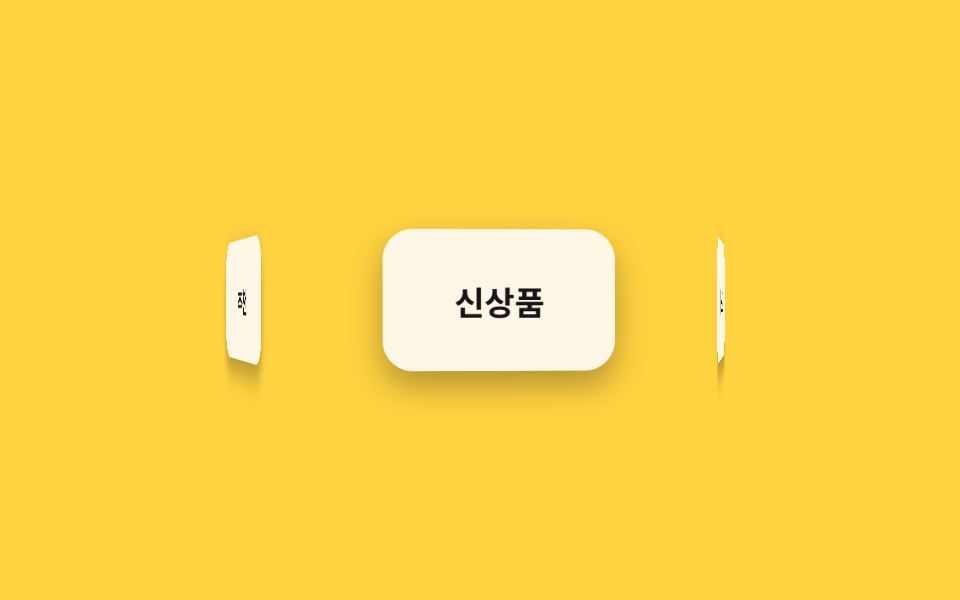
5 thẻ được đặt cố định quanh vòng tròn bằng rotateY, chỉ riêng ring cha xoay liên tục. Khác với marquee ở bài 028 đẩy track bằng translateX, ở đây không hề dùng translateX.
Dùng choShowcase logo, badge sản phẩm xoay vòng
rotateY 배치transform-style: preserve-3d부모만 회전
<main class="stage">
  <div class="scene">
    <ul class="ring is-demo">
      <li class="ring__card">Hàng mới</li>
      <li class="ring__card">Bán chạy</li>
      <li class="ring__card">Giảm giá</li>
      <li class="ring__card">Đánh giá</li>
      <li class="ring__card">Đề xuất</li>
    </ul>
  </div>
</main>
@use "../../../../site/static/demo-tokens" as *;
// ── 변수 3개 ──────────────────────────────
$duration: 8s; // 링이 한 바퀴 도는 시간 (개수가 늘면 느리게)
$easing: linear;
$color: $subject-cream; // 카드 배경
@include stage($stage-yellow);
$count: 5;
$step: 72deg; // 360deg ÷ 5장
$radius: 118px; // 카드 폭(92px)이 안 겹치도록 계산한 반지름
.scene { perspective: 560px; }
.ring {
position: relative;
width: 92px;
height: 56px;
list-style: none;
margin: 0;
padding: 0;
transform-style: preserve-3d;
animation: orbit $duration $easing infinite;
}
.ring__card {
position: absolute;
inset: 0;
display: grid;
place-items: center;
border-radius: $r-control;
background: $color;
color: $subject-ink;
font-weight: 700;
font-size: 13px;
line-height: 1;
font-family: inherit;
box-shadow: $shadow-press;
backface-visibility: hidden; // 뒤로 넘어간 카드 글자가 반전돼 비치지 않게
}
// 카드 5장을 원 둘레에 72deg 간격으로 세운다 — rotateY 로 배치만 하고, 도는 건 부모 .ring 하나
@for $i from 1 through 5 {
.ring__card:nth-child(#{$i}) {
transform: rotateY(#{($i - 1) * $step}) translateZ($radius);
}
}
@keyframes orbit {
from { transform: rotateY(0deg); }
to { transform: rotateY(360deg); }
}
// ── 접근성: 움직임 줄이기 설정이면 정면 카드 하나만 보이게 고정 ──────
@media (prefers-reduced-motion: reduce) {
.ring { animation: none; transform: rotateY(0deg); }
}html, body {
margin: 0;
overflow: hidden;
}
.stage {
box-sizing: border-box;
min-height: 100vh;
display: grid;
place-items: center;
margin: 0;
background: #ffd23f;
font-family: -apple-system, "Segoe UI", "Noto Sans KR", sans-serif;
padding: clamp(8px, 4vw, 24px);
}
.scene {
perspective: 560px;
}
.ring {
position: relative;
width: 92px;
height: 56px;
list-style: none;
margin: 0;
padding: 0;
transform-style: preserve-3d;
animation: orbit 8s linear infinite;
}
.ring__card {
position: absolute;
inset: 0;
display: grid;
place-items: center;
border-radius: 12px;
background: #fff7e6;
color: #17141a;
font-weight: 700;
font-size: 13px;
line-height: 1;
font-family: inherit;
box-shadow: 0 6px 12px rgba(23, 20, 26, 0.32);
backface-visibility: hidden;
}
.ring__card:nth-child(1) {
transform: rotateY(0deg) translateZ(118px);
}
.ring__card:nth-child(2) {
transform: rotateY(72deg) translateZ(118px);
}
.ring__card:nth-child(3) {
transform: rotateY(144deg) translateZ(118px);
}
.ring__card:nth-child(4) {
transform: rotateY(216deg) translateZ(118px);
}
.ring__card:nth-child(5) {
transform: rotateY(288deg) translateZ(118px);
}
@keyframes orbit {
from {
transform: rotateY(0deg);
}
to {
transform: rotateY(360deg);
}
}
@media (prefers-reduced-motion: reduce) {
.ring {
animation: none;
transform: rotateY(0deg);
}
}import type { CSSProperties } from "react";
import styles from "./Carousel3D.module.scss";
export type Carousel3DProps = {
/** 링이 한 바퀴 도는 시간 (기본 8000ms). 카드가 늘면 느리게 */
duration?: number;
easing?: string;
/** 카드 배경 */
color?: string;
cards?: string[];
};
type Vars = CSSProperties & { "--duration"?: string; "--easing"?: string; "--color"?: string; "--i"?: number };
export default function Carousel3D({
duration = 8000,
easing = "linear",
color = "#fff7e6",
cards = ["신상품", "베스트", "할인", "리뷰", "추천"],
}: Carousel3DProps) {
const step = 360 / cards.length;
const vars: Vars = { "--duration": `${duration}ms`, "--easing": easing, "--color": color };
return (
<div className={styles.scene}>
<ul className={styles.ring} style={vars}>
{cards.map((c, i) => (
<li key={c} className={styles.card} style={{ transform: `rotateY(${i * step}deg) translateZ(118px)` }}>
{c}
</li>
))}
</ul>
</div>
);
}02 Carousel 3D — Diện tích đo được 15.028% · khung hình chuyển động 23/23Nguyên tác GODRICH · SCSS và React nằm trong tệp zip · 9 CSS 3D Cube Effects — dán 1 dòng là chạy
Bài viết chứa demo này
 9 CSS 3D Cube Effects — dán 1 dòng là chạyCSS 3D cube là nhóm hiệu ứng khối lập phương xoay, carousel hình trụ và card nghiêng khi hover, dựng bằng perspective và Xem tất cả demo trong bài này