03Vòng tiến trình tròn
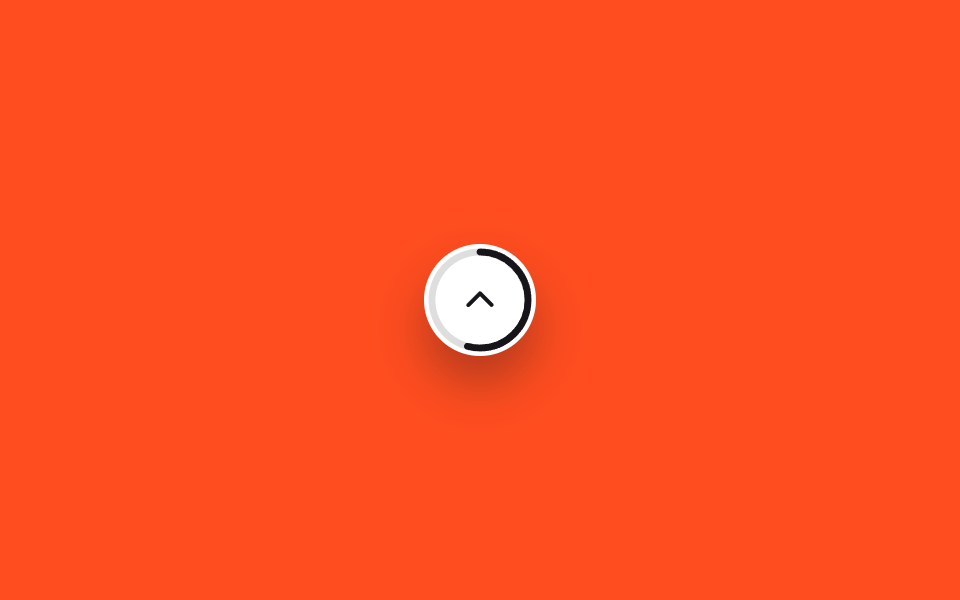
Một vòng SVG ôm lấy nút và đổ màu theo đúng tỷ lệ đã cuộn, cho thấy ngay bạn đã đọc bao nhiêu phần trăm trang.
Dùng choChỉ báo tiến trình đọc bài dài, trang landing dạng tài liệu
stroke-dashoffset@propertyJS 7줄
<main class="stage">
  <button type="button" class="totop is-demo" role="progressbar" aria-label="Tỷ lệ đã đọc" aria-valuemin="0" aria-valuemax="100" aria-valuenow="0">
    <svg class="totop__ring" viewBox="0 0 56 56" aria-hidden="true">
      <circle class="totop__track" cx="28" cy="28" r="24"/>
      <circle class="totop__fill" cx="28" cy="28" r="24"/>
    </svg>
    <svg class="totop__arrow" viewBox="0 0 24 24" aria-hidden="true"><polyline points="5,15 12,8 19,15"/></svg>
  </button>
</main>
@use "../../../../site/static/demo-tokens" as *;
// ── 변수 3개 ──────────────────────────────────────────
$duration: $dur-loop;
$easing: linear;
$color: $subject-ink; // 링 색
@include stage($stage-orange);
// 정수라야 링이 매끄럽게 보간된다 (047 스크롤 진행 배지와 같은 기법)
// inherits:true — .totop 에서 애니메이션하고 자식 SVG 원(.totop__fill)이 그 값을 물려받아 쓴다
@property --p {
syntax: '<number>';
initial-value: 0;
inherits: true;
}
.totop {
--p: 0;
position: relative;
width: 56px; height: 56px;
border: 0;
border-radius: $r-pill;
background: $stage-paper;
display: grid;
place-items: center;
box-shadow: $shadow-raised;
cursor: pointer;
}
// 데모 루프 — 실제로는 JS 가 스크롤 비율을 --p 에 직접 대입하지만, 여기선 0→100 을 자동으로 돈다
.totop.is-demo { animation: totop-fill $duration $easing infinite; }
@keyframes totop-fill { from { --p: 0; } to { --p: 100; } }
.totop__ring {
position: absolute;
inset: 0;
width: 56px; height: 56px;
transform: rotate(-90deg);
}
.totop__track, .totop__fill {
fill: none;
stroke-width: 3.4;
}
.totop__track { stroke: rgba($stage-ink, .14); }
.totop__fill {
stroke: $color;
stroke-linecap: round;
stroke-dasharray: 150.8px;
stroke-dashoffset: calc(150.8px * (1 - var(--p) / 100));
}
.totop__arrow {
width: 20px; height: 20px;
fill: none;
stroke: $color;
stroke-width: 2.4;
stroke-linecap: round;
stroke-linejoin: round;
}
@media (prefers-reduced-motion: reduce) {
.totop.is-demo { animation: none; --p: 100; }
}html, body {
margin: 0;
overflow: hidden;
}
.stage {
box-sizing: border-box;
min-height: 100vh;
display: grid;
place-items: center;
margin: 0;
background: #ff4d1f;
font-family: -apple-system, "Segoe UI", "Noto Sans KR", sans-serif;
padding: clamp(8px, 4vw, 24px);
}
@property --p {
syntax: "<number>";
initial-value: 0;
inherits: true;
}
.totop {
--p: 0;
position: relative;
width: 56px;
height: 56px;
border: 0;
border-radius: 999px;
background: #ffffff;
display: grid;
place-items: center;
box-shadow: 0 14px 24px rgba(23, 20, 26, 0.32);
cursor: pointer;
}
.totop.is-demo {
animation: totop-fill 2s linear infinite;
}
@keyframes totop-fill {
from {
--p: 0;
}
to {
--p: 100;
}
}
.totop__ring {
position: absolute;
inset: 0;
width: 56px;
height: 56px;
transform: rotate(-90deg);
}
.totop__track, .totop__fill {
fill: none;
stroke-width: 3.4;
}
.totop__track {
stroke: rgba(23, 20, 26, 0.14);
}
.totop__fill {
stroke: #17141a;
stroke-linecap: round;
stroke-dasharray: 150.8px;
stroke-dashoffset: calc(150.8px * (1 - var(--p) / 100));
}
.totop__arrow {
width: 20px;
height: 20px;
fill: none;
stroke: #17141a;
stroke-width: 2.4;
stroke-linecap: round;
stroke-linejoin: round;
}
@media (prefers-reduced-motion: reduce) {
.totop.is-demo {
animation: none;
--p: 100;
}
}// 실제 사용: 스크롤 비율을 계산해 --p 에 직접 대입한다 (7줄). 데모 루프는 별도 keyframes 가 담당한다
var el = document.querySelector('.totop');
function sync() {
var max = document.documentElement.scrollHeight - window.innerHeight;
var ratio = max > 0 ? Math.min(100, (window.scrollY / max) * 100) : 0;
el.style.setProperty('--p', ratio);
}
window.addEventListener('scroll', sync, { passive: true });import { useEffect, useState, type CSSProperties } from "react";
import styles from "./CircleProgressButton.module.scss";
export type CircleProgressButtonProps = {
color?: string;
};
type Vars = CSSProperties & { "--p"?: number };
// 실제 사용: 스크롤 비율을 계산해 --p 에 직접 대입한다. 애니메이션이 아니라 값 그대로 반영한다
export default function CircleProgressButton({ color = "#17141a" }: CircleProgressButtonProps) {
const [p, setP] = useState(0);
useEffect(() => {
const sync = () => {
const max = document.documentElement.scrollHeight - window.innerHeight;
setP(max > 0 ? Math.min(100, (window.scrollY / max) * 100) : 0);
};
sync();
window.addEventListener("scroll", sync, { passive: true });
return () => window.removeEventListener("scroll", sync);
}, []);
const vars: Vars = { "--p": p };
const circumference = 150.8;
return (
<button
type="button"
className={styles.totop}
style={{ ...vars, color }}
role="progressbar"
aria-label="읽은 비율"
aria-valuemin={0}
aria-valuemax={100}
aria-valuenow={Math.round(p)}
onClick={() => window.scrollTo({ top: 0, behavior: "smooth" })}
>
<svg className={styles.ring} viewBox="0 0 56 56" aria-hidden="true">
<circle className={styles.track} cx="28" cy="28" r="24" />
<circle
className={styles.fill}
cx="28"
cy="28"
r="24"
style={{ strokeDasharray: circumference, strokeDashoffset: circumference * (1 - p / 100) }}
/>
</svg>
<svg className={styles.arrow} viewBox="0 0 24 24" aria-hidden="true">
<polyline points="5,15 12,8 19,15" />
</svg>
</button>
);
}03 Vòng tiến trình tròn — Diện tích đo được 0.454% · khung hình chuyển động 23/23Nguyên tác GODRICH · SCSS và React nằm trong tệp zip · 9 nút back to top button css — hiện khi cuộn
Bài viết chứa demo này
 9 nút back to top button css — hiện khi cuộnNút back to top button css là nút nhỏ đưa bạn về đầu trang khi đã cuộn xuống sâu. Chín kiểu dưới đây chạy từ bản không A Xem tất cả demo trong bài này