04Nút viền tự vẽ
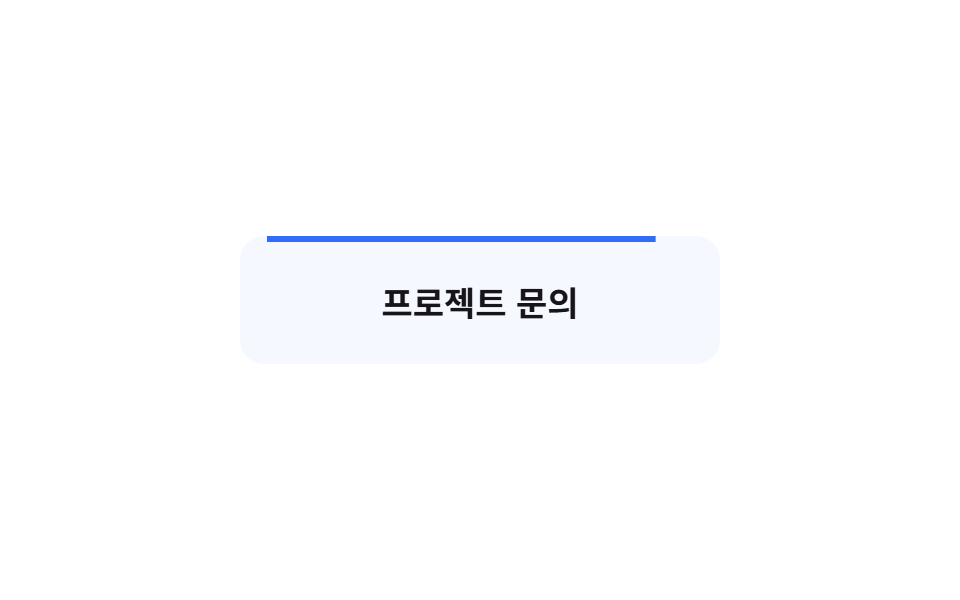
Viền SVG bo góc tự vẽ một vòng như tay viết khi stroke-dashoffset giảm về 0, lúc đó nút mới trông sẵn sàng để bấm.
Dùng choNút liên hệ trên site portfolio và agency, CTA trên thanh điều hướng
stroke-dashoffsetpathLength=100vector-effect: non-scaling-stroke
<main class="stage is-demo">
  <button class="btn" type="button">
    <span class="btn__fill" aria-hidden="true"></span>
    <span class="btn__label">Liên hệ dự án</span>
    <svg class="btn__frame" viewBox="0 0 240 64" aria-hidden="true" focusable="false">
      <rect class="btn__rect" x="1.5" y="1.5" width="237" height="61" rx="12"
            pathLength="100" vector-effect="non-scaling-stroke" />
    </svg>
  </button>
</main>
@use "../../../../site/static/demo-tokens" as *;
// ── 변수 3개 ──────────────────────────────────────────
$duration: $dur-loop; // 2s — 그리기 한 주기
$easing: $ease-out;
$color: $subject-blue; // 테두리 색
@include stage($stage-paper);
.btn {
box-sizing: border-box;
position: relative;
width: 240px;
height: 64px;
border: none;
background: none;
color: $subject-ink;
font-family: -apple-system, "Segoe UI", "Noto Sans KR", sans-serif;
font-weight: 700;
font-size: 17px;
cursor: pointer;
}
// 그려진 뒤 채워지는 옅은 물감
.btn__fill {
position: absolute;
inset: 0;
border-radius: $r-control;
background: rgba($color, .14);
opacity: 0;
}
.btn__label { position: relative; z-index: 1; }
.btn__frame { position: absolute; inset: 0; width: 100%; height: 100%; }
// pathLength=100 — 실제 길이와 무관하게 100 칸으로 정규화
.btn__rect {
fill: none;
stroke: $color;
stroke-width: 3;
stroke-dasharray: 100;
stroke-dashoffset: 100;
}
// 실사용: 올리면 한 번 그려지고 물감이 따라 채워진다
.btn:hover .btn__rect { animation: draw-hover $dur-enter $easing 1 forwards; }
.btn__fill { transition: opacity $dur-base $easing $dur-quick; }
.btn:hover .btn__fill { opacity: 1; }
.btn:focus-visible { outline: 3px solid $color; outline-offset: 4px; }
// 격자 미리보기: 그리기 → 채움 → 지우기 루프
.stage.is-demo .btn__rect { animation: draw $duration $easing infinite; }
.stage.is-demo .btn__fill { animation: fill-in $duration $easing infinite; }
@keyframes draw {
0%, 12% { stroke-dashoffset: 100; }
55% { stroke-dashoffset: 0; }
92% { stroke-dashoffset: 0; }
100% { stroke-dashoffset: 100; }
}
@keyframes draw-hover {
0% { stroke-dashoffset: 100; }
100% { stroke-dashoffset: 0; }
}
@keyframes fill-in {
0%, 55% { opacity: 0; }
72%, 92% { opacity: 1; }
100% { opacity: 0; }
}
@media (prefers-reduced-motion: reduce) {
.btn:hover .btn__rect, .stage.is-demo .btn__rect { animation: none; stroke-dashoffset: 0; }
.btn:hover .btn__fill, .stage.is-demo .btn__fill { animation: none; opacity: 1; }
}html, body {
margin: 0;
overflow: hidden;
}
.stage {
box-sizing: border-box;
min-height: 100vh;
display: grid;
place-items: center;
margin: 0;
background: #ffffff;
font-family: -apple-system, "Segoe UI", "Noto Sans KR", sans-serif;
padding: clamp(8px, 4vw, 24px);
}
.btn {
box-sizing: border-box;
position: relative;
width: 240px;
height: 64px;
border: none;
background: none;
color: #17141a;
font-family: -apple-system, "Segoe UI", "Noto Sans KR", sans-serif;
font-weight: 700;
font-size: 17px;
cursor: pointer;
}
.btn__fill {
position: absolute;
inset: 0;
border-radius: 12px;
background: rgba(47, 109, 246, 0.14);
opacity: 0;
}
.btn__label {
position: relative;
z-index: 1;
}
.btn__frame {
position: absolute;
inset: 0;
width: 100%;
height: 100%;
}
.btn__rect {
fill: none;
stroke: #2f6df6;
stroke-width: 3;
stroke-dasharray: 100;
stroke-dashoffset: 100;
}
.btn:hover .btn__rect {
animation: draw-hover 600ms ease-out 1 forwards;
}
.btn__fill {
transition: opacity 300ms ease-out 220ms;
}
.btn:hover .btn__fill {
opacity: 1;
}
.btn:focus-visible {
outline: 3px solid #2f6df6;
outline-offset: 4px;
}
.stage.is-demo .btn__rect {
animation: draw 2s ease-out infinite;
}
.stage.is-demo .btn__fill {
animation: fill-in 2s ease-out infinite;
}
@keyframes draw {
0%, 12% {
stroke-dashoffset: 100;
}
55% {
stroke-dashoffset: 0;
}
92% {
stroke-dashoffset: 0;
}
100% {
stroke-dashoffset: 100;
}
}
@keyframes draw-hover {
0% {
stroke-dashoffset: 100;
}
100% {
stroke-dashoffset: 0;
}
}
@keyframes fill-in {
0%, 55% {
opacity: 0;
}
72%, 92% {
opacity: 1;
}
100% {
opacity: 0;
}
}
@media (prefers-reduced-motion: reduce) {
.btn:hover .btn__rect, .stage.is-demo .btn__rect {
animation: none;
stroke-dashoffset: 0;
}
.btn:hover .btn__fill, .stage.is-demo .btn__fill {
animation: none;
opacity: 1;
}
}import type { CSSProperties } from "react";
import styles from "./BorderDrawButton.module.scss";
export type BorderDrawButtonProps = {
duration?: number;
easing?: string;
color?: string;
label?: string;
};
export default function BorderDrawButton({
duration = 600,
easing = "ease-out",
color = "#2f6df6",
label = "프로젝트 문의",
}: BorderDrawButtonProps) {
const vars: CSSProperties = { "--duration": `${duration}ms`, "--easing": easing, "--color": color } as CSSProperties;
return (
<button className={styles.btn} style={vars} type="button">
<span className={styles.fill} aria-hidden="true" />
<span className={styles.label}>{label}</span>
<svg className={styles.frame} viewBox="0 0 240 64" aria-hidden="true" focusable="false">
<rect className={styles.rect} x="1.5" y="1.5" width="237" height="61" rx="12"
pathLength="100" vector-effect="non-scaling-stroke" />
</svg>
</button>
);
}04 Nút viền tự vẽ — Diện tích đo được 10.201% · khung hình chuyển động 13/23Nguyên tác GODRICH · SCSS và React nằm trong tệp zip · 9 css button design ideas — dán một file là chạy
Bài viết chứa demo này
 9 css button design ideas — dán một file là chạycss button design là quyết định màu, hình dáng nút và cách nó phản ứng với chuột, chỉ bằng vài dòng code. Muốn nút gradi Xem tất cả demo trong bài này