06Nút hai màu quét
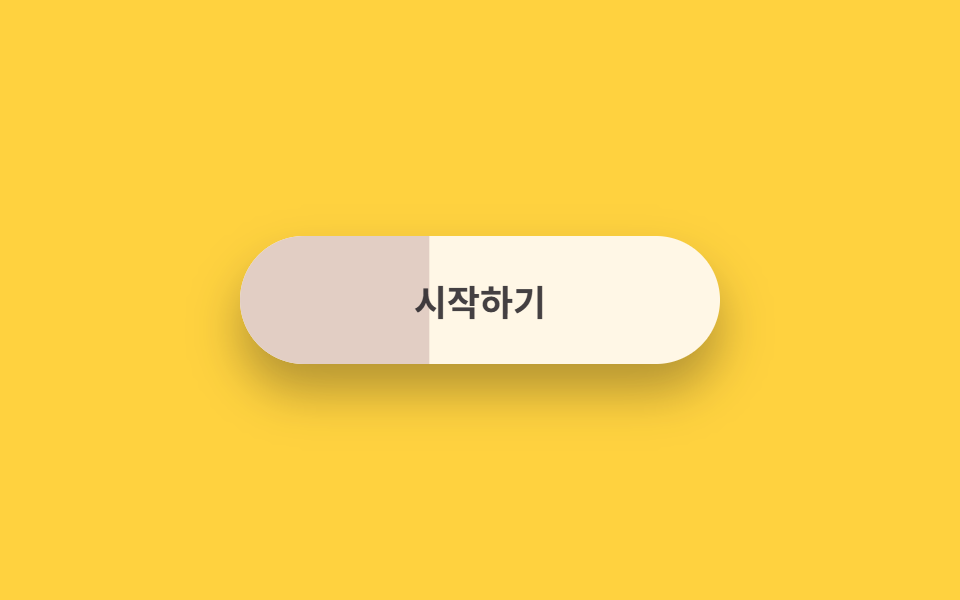
Nút tách thành kem và đào, lớp dưới trải từ trái bằng scaleX nên màu lật toàn bộ như nước màu loang, màu chữ cũng lật theo.
Dùng choNút bắt đầu trên thẻ so sánh giá, nút tham dự sự kiện
scaleX 레이어 와이프transform-origin: leftcolor 전환
<main class="stage is-demo">
  <button class="btn" type="button">
    <span class="btn__wash" aria-hidden="true"></span>
    <span class="btn__labels">
      <span class="btn__t-on-dark">Bắt đầu</span>
      <span class="btn__t-on-light">Bắt đầu</span>
    </span>
  </button>
</main>
@use "../../../../site/static/demo-tokens" as *;
// ── 변수 3개 ──────────────────────────────────────────
$duration: $dur-loop; // 2s — 와이프 한 주기
$easing: $ease-spring;
$color: #e2cec4; // 피치 (아래에 깔리는 색)
@include stage($stage-yellow);
.btn {
box-sizing: border-box;
position: relative;
width: 240px;
height: 64px;
border: none;
border-radius: $r-pill;
background: $subject-cream; // 위에 보이는 색
font-family: -apple-system, "Segoe UI", "Noto Sans KR", sans-serif;
font-weight: 700;
font-size: 18px;
cursor: pointer;
overflow: hidden;
box-shadow: $shadow-raised;
}
// 아래 색 레이어 — scaleX 로 왼쪽에서 펼쳐진다
.btn__wash {
position: absolute;
inset: 0;
background: $color;
transform: scaleX(0);
transform-origin: left; // 규칙8: 듀오톤 와이프 좌측 전개
transition: transform $dur-base $easing;
}
// 글자 두 벌 — 바탕색에 따라 보이는 쪽이 바뀐다
.btn__labels {
position: absolute;
inset: 0;
display: grid;
place-items: center;
}
.btn__t-on-dark,
.btn__t-on-light {
grid-area: 1 / 1;
transition: opacity $dur-quick $easing;
}
.btn__t-on-dark { color: $subject-cream; opacity: 0; }
.btn__t-on-light { color: $subject-ink; }
// 실사용: 올리면 피치가 좌에서 우로 번지고 글자도 뒤집힌다
.btn:hover .btn__wash { transform: scaleX(1); }
.btn:hover .btn__t-on-dark { opacity: 1; }
.btn:hover .btn__t-on-light { opacity: 0; }
.btn:focus-visible { outline: 3px solid $subject-ink; outline-offset: 4px; }
// 격자 미리보기: 번짐 → 물러남 루프
.stage.is-demo .btn__wash { animation: wash $duration $easing infinite; }
.stage.is-demo .btn__t-on-dark { animation: swap-in $duration $easing infinite; }
.stage.is-demo .btn__t-on-light { animation: swap-out $duration $easing infinite; }
@keyframes wash {
0%, 12% { transform: scaleX(0); }
48%, 70% { transform: scaleX(1); }
100% { transform: scaleX(0); }
}
@keyframes swap-in {
0%, 18% { opacity: 0; }
48%, 70% { opacity: 1; }
88%,100% { opacity: 0; }
}
@keyframes swap-out {
0%, 18% { opacity: 1; }
48%, 70% { opacity: 0; }
88%,100% { opacity: 1; }
}
@media (prefers-reduced-motion: reduce) {
.stage.is-demo .btn__wash { animation: none; transform: scaleX(1); }
.stage.is-demo .btn__t-on-dark { animation: none; opacity: 1; }
.stage.is-demo .btn__t-on-light { animation: none; opacity: 0; }
}html, body {
margin: 0;
overflow: hidden;
}
.stage {
box-sizing: border-box;
min-height: 100vh;
display: grid;
place-items: center;
margin: 0;
background: #ffd23f;
font-family: -apple-system, "Segoe UI", "Noto Sans KR", sans-serif;
padding: clamp(8px, 4vw, 24px);
}
.btn {
box-sizing: border-box;
position: relative;
width: 240px;
height: 64px;
border: none;
border-radius: 999px;
background: #fff7e6;
font-family: -apple-system, "Segoe UI", "Noto Sans KR", sans-serif;
font-weight: 700;
font-size: 18px;
cursor: pointer;
overflow: hidden;
box-shadow: 0 14px 24px rgba(23, 20, 26, 0.32);
}
.btn__wash {
position: absolute;
inset: 0;
background: #e2cec4;
transform: scaleX(0);
transform-origin: left;
transition: transform 300ms cubic-bezier(0.2, 0.8, 0.2, 1);
}
.btn__labels {
position: absolute;
inset: 0;
display: grid;
place-items: center;
}
.btn__t-on-dark,
.btn__t-on-light {
grid-area: 1/1;
transition: opacity 220ms cubic-bezier(0.2, 0.8, 0.2, 1);
}
.btn__t-on-dark {
color: #fff7e6;
opacity: 0;
}
.btn__t-on-light {
color: #17141a;
}
.btn:hover .btn__wash {
transform: scaleX(1);
}
.btn:hover .btn__t-on-dark {
opacity: 1;
}
.btn:hover .btn__t-on-light {
opacity: 0;
}
.btn:focus-visible {
outline: 3px solid #17141a;
outline-offset: 4px;
}
.stage.is-demo .btn__wash {
animation: wash 2s cubic-bezier(0.2, 0.8, 0.2, 1) infinite;
}
.stage.is-demo .btn__t-on-dark {
animation: swap-in 2s cubic-bezier(0.2, 0.8, 0.2, 1) infinite;
}
.stage.is-demo .btn__t-on-light {
animation: swap-out 2s cubic-bezier(0.2, 0.8, 0.2, 1) infinite;
}
@keyframes wash {
0%, 12% {
transform: scaleX(0);
}
48%, 70% {
transform: scaleX(1);
}
100% {
transform: scaleX(0);
}
}
@keyframes swap-in {
0%, 18% {
opacity: 0;
}
48%, 70% {
opacity: 1;
}
88%, 100% {
opacity: 0;
}
}
@keyframes swap-out {
0%, 18% {
opacity: 1;
}
48%, 70% {
opacity: 0;
}
88%, 100% {
opacity: 1;
}
}
@media (prefers-reduced-motion: reduce) {
.stage.is-demo .btn__wash {
animation: none;
transform: scaleX(1);
}
.stage.is-demo .btn__t-on-dark {
animation: none;
opacity: 1;
}
.stage.is-demo .btn__t-on-light {
animation: none;
opacity: 0;
}
}import type { CSSProperties } from "react";
import styles from "./DuotoneWipeButton.module.scss";
export type DuotoneWipeButtonProps = {
duration?: number;
easing?: string;
color?: string;
label?: string;
};
export default function DuotoneWipeButton({
duration = 300,
easing = "cubic-bezier(.2, .8, .2, 1)",
color = "#ff9d6f",
label = "시작하기",
}: DuotoneWipeButtonProps) {
const vars: CSSProperties = { "--duration": `${duration}ms`, "--easing": easing, "--color": color } as CSSProperties;
return (
<button className={styles.btn} style={vars} type="button">
<span className={styles.wash} aria-hidden="true" />
<span className={styles.labels}>
<span className={styles.tOnDark}>{label}</span>
<span className={styles.tOnLight}>{label}</span>
</span>
</button>
);
}06 Nút hai màu quét — Diện tích đo được 10.103% · khung hình chuyển động 16/23Nguyên tác GODRICH · SCSS và React nằm trong tệp zip · 9 css button design ideas — dán một file là chạy
Bài viết chứa demo này
 9 css button design ideas — dán một file là chạycss button design là quyết định màu, hình dáng nút và cách nó phản ứng với chuột, chỉ bằng vài dòng code. Muốn nút gradi Xem tất cả demo trong bài này