09Nút pill có loader
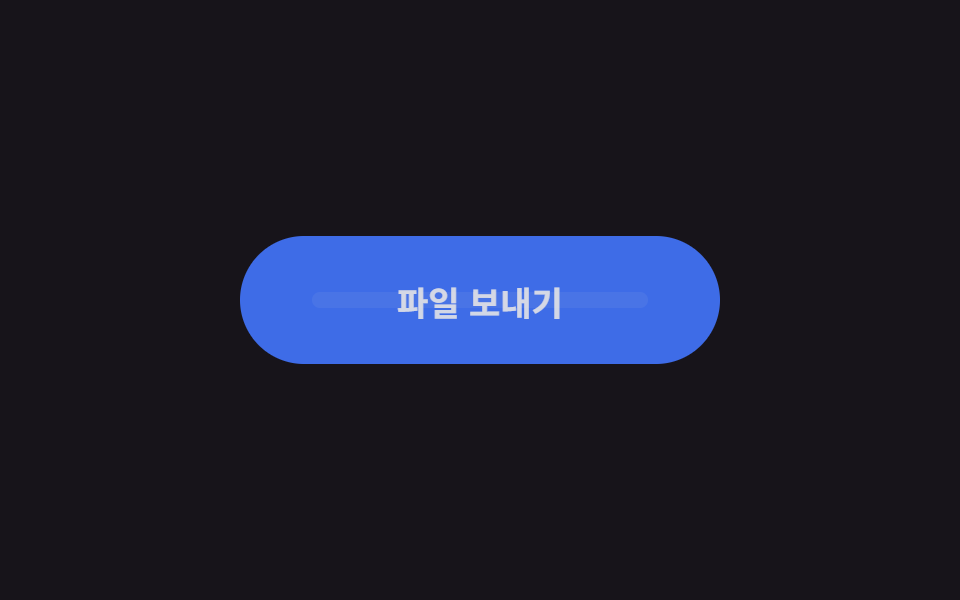
Khi bấm nhãn mờ dần, nút giữ hình viên thuốc nhưng chuyển sang màu đậm như bị khoá, một thanh ngắn trượt qua lại bên trong báo hiệu đang chờ.
Dùng choNút đăng nhập và đăng ký, xác nhận tải tệp lên
라벨 opacity 스왑translateX 로더 막대$dur-loop 주기
<main class="stage is-demo">
  <button class="btn" type="button">
    <span class="btn__label">Gửi tệp</span>
    <span class="btn__loader" aria-hidden="true">
      <span class="btn__track"><span class="btn__bar"></span></span>
    </span>
  </button>
</main>
@use "../../../../site/static/demo-tokens" as *;
// ── 변수 3개 ──────────────────────────────────────────
$duration: $dur-loop; // 2s — 기다림 한 주기
$easing: ease-in-out;
$color: $subject-blue; // 버튼 색
$busy: #6f67b4; // 기다리는 동안 잠기는 진한 색
@include stage($stage-ink);
.btn {
box-sizing: border-box;
position: relative;
width: 240px;
height: 64px;
border: none;
border-radius: $r-pill;
background: $color;
color: $subject-cream;
font-family: -apple-system, "Segoe UI", "Noto Sans KR", sans-serif;
font-weight: 700;
font-size: 17px;
cursor: pointer;
transition: background-color $dur-quick $easing;
}
.btn__label {
position: absolute;
inset: 0;
display: grid;
place-items: center;
}
// 로더 — 라벨이 사라진 자리에 나타난다
.btn__loader {
position: absolute;
inset: 0;
display: grid;
place-items: center;
opacity: 0;
}
.btn__track {
position: relative;
width: 168px; // 버튼의 70%
height: 8px;
border-radius: $r-pill;
background: rgba($subject-cream, .25);
overflow: hidden;
}
.btn__bar {
position: absolute;
top: 0; bottom: 0;
width: 60px;
border-radius: $r-pill;
background: $subject-cream;
transform: translateX(-60px);
}
// 실사용: 보내는 동안 is-busy 클래스를 붙인다
.btn.is-busy { background: $busy; }
.btn.is-busy .btn__label { opacity: 0; }
.btn.is-busy .btn__loader { opacity: 1; }
.btn__label, .btn__loader { transition: opacity $dur-quick $easing; }
.btn.is-busy .btn__bar { animation: bar-run 1s $easing infinite; }
.btn:focus-visible { outline: 3px solid $stage-yellow; outline-offset: 4px; }
// 격자 미리보기: 라벨 사라짐 → 잠김 → 막대 두 번 왕복 → 복귀
.stage.is-demo .btn { animation: busy-bg $duration $easing infinite; }
.stage.is-demo .btn__label { animation: label-out $duration $easing infinite; }
.stage.is-demo .btn__loader { animation: loader-in $duration $easing infinite; }
.stage.is-demo .btn__bar { animation: bar-run 1s $easing infinite; }
@keyframes busy-bg {
0%, 15% { background: $color; }
25%, 85% { background: $busy; }
95%,100% { background: $color; }
}
@keyframes label-out {
0%, 15% { opacity: 1; }
25%, 85% { opacity: 0; }
95%,100% { opacity: 1; }
}
@keyframes loader-in {
0%, 15% { opacity: 0; }
25%, 85% { opacity: 1; }
95%,100% { opacity: 0; }
}
@keyframes bar-run {
0% { transform: translateX(-60px); }
100% { transform: translateX(168px); }
}
@media (prefers-reduced-motion: reduce) {
.stage.is-demo .btn, .stage.is-demo .btn__label,
.stage.is-demo .btn__loader, .stage.is-demo .btn__bar { animation: none; }
.stage.is-demo .btn__bar { transform: translateX(54px); } // 가운데 정지
}html, body {
margin: 0;
overflow: hidden;
}
.stage {
box-sizing: border-box;
min-height: 100vh;
display: grid;
place-items: center;
margin: 0;
background: #17141a;
font-family: -apple-system, "Segoe UI", "Noto Sans KR", sans-serif;
padding: clamp(8px, 4vw, 24px);
}
.btn {
box-sizing: border-box;
position: relative;
width: 240px;
height: 64px;
border: none;
border-radius: 999px;
background: #2f6df6;
color: #fff7e6;
font-family: -apple-system, "Segoe UI", "Noto Sans KR", sans-serif;
font-weight: 700;
font-size: 17px;
cursor: pointer;
transition: background-color 220ms ease-in-out;
}
.btn__label {
position: absolute;
inset: 0;
display: grid;
place-items: center;
}
.btn__loader {
position: absolute;
inset: 0;
display: grid;
place-items: center;
opacity: 0;
}
.btn__track {
position: relative;
width: 168px;
height: 8px;
border-radius: 999px;
background: rgba(255, 247, 230, 0.25);
overflow: hidden;
}
.btn__bar {
position: absolute;
top: 0;
bottom: 0;
width: 60px;
border-radius: 999px;
background: #fff7e6;
transform: translateX(-60px);
}
.btn.is-busy {
background: #6f67b4;
}
.btn.is-busy .btn__label {
opacity: 0;
}
.btn.is-busy .btn__loader {
opacity: 1;
}
.btn__label, .btn__loader {
transition: opacity 220ms ease-in-out;
}
.btn.is-busy .btn__bar {
animation: bar-run 1s ease-in-out infinite;
}
.btn:focus-visible {
outline: 3px solid #ffd23f;
outline-offset: 4px;
}
.stage.is-demo .btn {
animation: busy-bg 2s ease-in-out infinite;
}
.stage.is-demo .btn__label {
animation: label-out 2s ease-in-out infinite;
}
.stage.is-demo .btn__loader {
animation: loader-in 2s ease-in-out infinite;
}
.stage.is-demo .btn__bar {
animation: bar-run 1s ease-in-out infinite;
}
@keyframes busy-bg {
0%, 15% {
background: #2f6df6;
}
25%, 85% {
background: #6f67b4;
}
95%, 100% {
background: #2f6df6;
}
}
@keyframes label-out {
0%, 15% {
opacity: 1;
}
25%, 85% {
opacity: 0;
}
95%, 100% {
opacity: 1;
}
}
@keyframes loader-in {
0%, 15% {
opacity: 0;
}
25%, 85% {
opacity: 1;
}
95%, 100% {
opacity: 0;
}
}
@keyframes bar-run {
0% {
transform: translateX(-60px);
}
100% {
transform: translateX(168px);
}
}
@media (prefers-reduced-motion: reduce) {
.stage.is-demo .btn, .stage.is-demo .btn__label,
.stage.is-demo .btn__loader, .stage.is-demo .btn__bar {
animation: none;
}
.stage.is-demo .btn__bar {
transform: translateX(54px);
}
}import type { CSSProperties } from "react";
import styles from "./PillLoaderButton.module.scss";
export type PillLoaderButtonProps = {
duration?: number;
easing?: string;
color?: string;
busyColor?: string;
busy?: boolean;
label?: string;
};
export default function PillLoaderButton({
duration = 1000,
easing = "ease-in-out",
color = "#2f6df6",
busyColor = "#3a2bb8",
busy = false,
label = "파일 보내기",
}: PillLoaderButtonProps) {
const vars: CSSProperties = {
"--duration": `${duration}ms`,
"--easing": easing,
"--color": color,
"--busy": busyColor,
} as CSSProperties;
return (
<button className={styles.btn} style={vars} data-busy={busy || undefined} type="button">
<span className={styles.label}>{label}</span>
<span className={styles.loader} aria-hidden="true">
<span className={styles.track}><span className={styles.bar} /></span>
</span>
</button>
);
}09 Nút pill có loader — Diện tích đo được 10.092% · khung hình chuyển động 15/23Nguyên tác GODRICH · SCSS và React nằm trong tệp zip · 9 css button design ideas — dán một file là chạy
Bài viết chứa demo này
 9 css button design ideas — dán một file là chạycss button design là quyết định màu, hình dáng nút và cách nó phản ứng với chuột, chỉ bằng vài dòng code. Muốn nút gradi Xem tất cả demo trong bài này