08Nút pill giãn khi hover
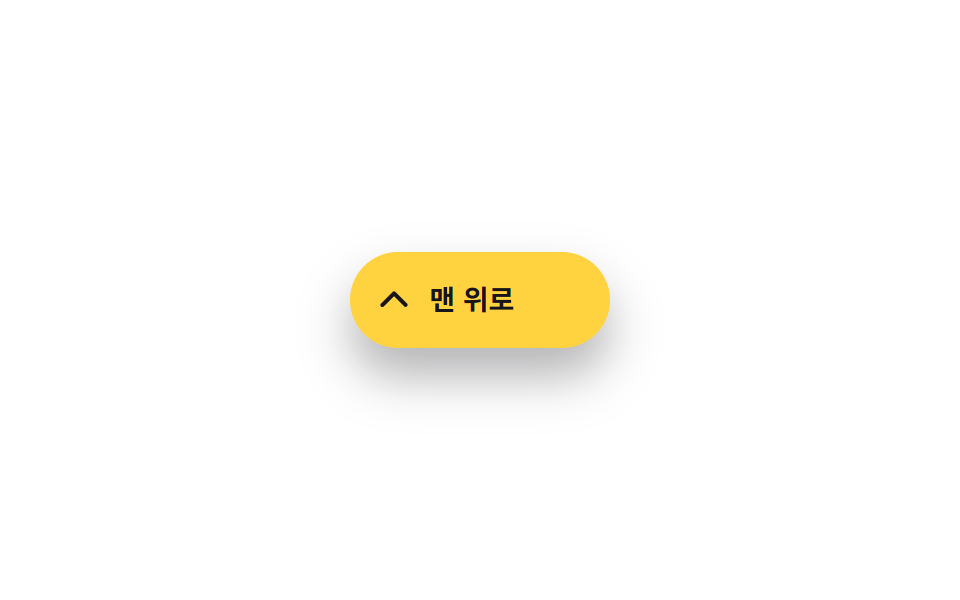
Lúc thường là nút tròn chỉ có icon; hover lên là nó giãn ngang ra, hé thêm nhãn "Back to top" cạnh mũi tên.
Dùng choNút riêng cho desktop, nút muốn ghi rõ mục đích bằng nhãn
width transition:hover·:focus-visible220ms
<main class="stage">
  <button type="button" class="totop" aria-label="Lên đầu trang">
    <svg class="totop__arrow" viewBox="0 0 24 24" aria-hidden="true"><polyline points="5,15 12,8 19,15"/></svg>
    <span class="totop__label">Lên đầu trang</span>
  </button>
</main>
@use "../../../../site/static/demo-tokens" as *;
// ── 변수 3개 ──────────────────────────────────────────
$duration: 220ms;
$easing: $ease-out;
$color: $subject-ink; // 글자·화살표 색
@include stage($stage-paper);
.totop {
display: inline-flex;
align-items: center;
gap: $sp-2;
width: 48px;
height: 48px;
padding: 0 $sp-3;
border: 0;
border-radius: $r-pill;
background: $stage-yellow;
overflow: hidden;
box-shadow: $shadow-raised;
cursor: pointer;
transition: width $duration $easing;
}
// 실제 사용: 마우스를 올리거나 포커스하면 폭이 넓어져 라벨이 드러난다
.totop:hover,
.totop:focus-visible,
.totop.is-demo-open { width: 132px; }
.totop__arrow {
flex: none;
width: 20px; height: 20px;
fill: none;
stroke: $color;
stroke-width: 2.4;
stroke-linecap: round;
stroke-linejoin: round;
}
.totop__label {
font: 600 clamp(13px, 3.6vw, 14px)/1 -apple-system, "Segoe UI", "Noto Sans KR", sans-serif;
color: $color;
white-space: nowrap;
}
@media (prefers-reduced-motion: reduce) {
.totop { transition: none; }
}html, body {
margin: 0;
overflow: hidden;
}
.stage {
box-sizing: border-box;
min-height: 100vh;
display: grid;
place-items: center;
margin: 0;
background: #ffffff;
font-family: -apple-system, "Segoe UI", "Noto Sans KR", sans-serif;
padding: clamp(8px, 4vw, 24px);
}
.totop {
display: inline-flex;
align-items: center;
gap: 8px;
width: 48px;
height: 48px;
padding: 0 12px;
border: 0;
border-radius: 999px;
background: #ffd23f;
overflow: hidden;
box-shadow: 0 14px 24px rgba(23, 20, 26, 0.32);
cursor: pointer;
transition: width 220ms ease-out;
}
.totop:hover,
.totop:focus-visible,
.totop.is-demo-open {
width: 132px;
}
.totop__arrow {
flex: none;
width: 20px;
height: 20px;
fill: none;
stroke: #17141a;
stroke-width: 2.4;
stroke-linecap: round;
stroke-linejoin: round;
}
.totop__label {
font: 600 clamp(13px, 3.6vw, 14px)/1 -apple-system, "Segoe UI", "Noto Sans KR", sans-serif;
color: #17141a;
white-space: nowrap;
}
@media (prefers-reduced-motion: reduce) {
.totop {
transition: none;
}
}// .is-demo 자동 재생: 진짜 :hover·:focus-visible 규칙을 그대로 타도록 is-demo-open 만 오간다.
// 500ms 간격 — 2초 측정 창 안에 전이(220ms)가 4번 들어가야 움직인 프레임 하한(6)에 여유가 생긴다
// (실측 2026-09-10: 1000ms 간격은 전이 2번뿐이라 5~6 프레임 경계에서 흔들렸다)
var btn = document.querySelector('.totop');
var t = function () { btn.classList.toggle('is-demo-open'); };
t(); setInterval(t, 500);import type { CSSProperties } from "react";
import styles from "./PillExpandButton.module.scss";
export type PillExpandButtonProps = {
label?: string;
/** 폭이 넓어지는 시간 (기본 220ms) */
duration?: number;
easing?: string;
};
type Vars = CSSProperties & { "--duration"?: string; "--easing"?: string };
// 실제 사용: 마우스를 올리거나 포커스하면 폭이 넓어져 라벨이 드러난다. 상태 없이 CSS 로 처리한다
export default function PillExpandButton({
label = "맨 위로",
duration = 220,
easing = "ease-out",
}: PillExpandButtonProps) {
const vars: Vars = { "--duration": `${duration}ms`, "--easing": easing };
return (
<button
type="button"
className={styles.totop}
style={vars}
aria-label={label}
onClick={() => window.scrollTo({ top: 0, behavior: "smooth" })}
>
<svg className={styles.arrow} viewBox="0 0 24 24" aria-hidden="true">
<polyline points="5,15 12,8 19,15" />
</svg>
<span className={styles.label}>{label}</span>
</button>
);
}08 Nút pill giãn khi hover — Diện tích đo được 5.592% · khung hình chuyển động 15/23Nguyên tác GODRICH · SCSS và React nằm trong tệp zip · 9 nút back to top button css — hiện khi cuộn
Bài viết chứa demo này
 9 nút back to top button css — hiện khi cuộnNút back to top button css là nút nhỏ đưa bạn về đầu trang khi đã cuộn xuống sâu. Chín kiểu dưới đây chạy từ bản không A Xem tất cả demo trong bài này