07Rung xác nhận khi chạm
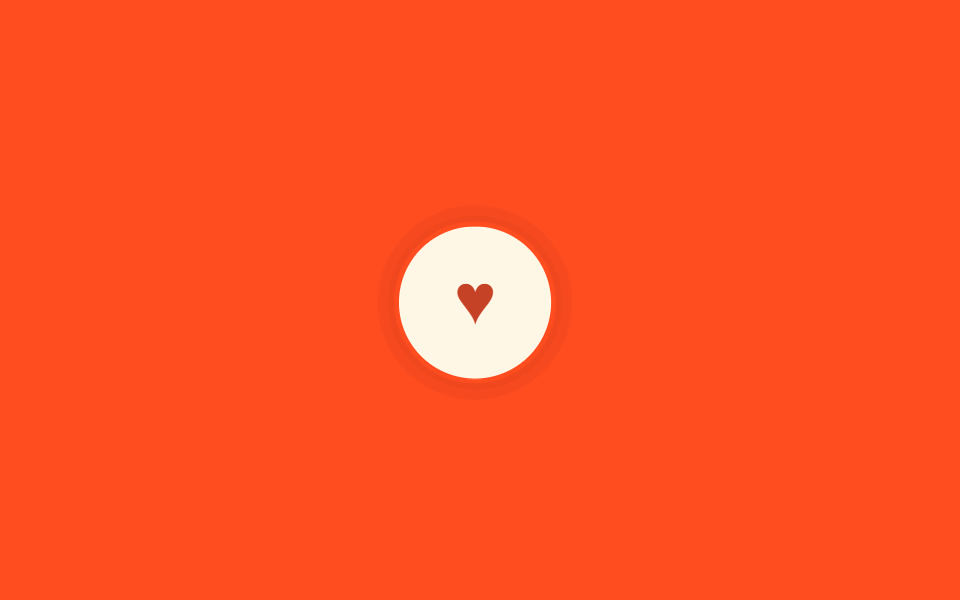
Ngay sau khi chạm, nút rung ±2px trong 140ms trong khi icon trái tim đổi từ màu nhạt sang màu đậm — biên độ nhỏ hơn hẳn và mục đích cũng khác kiểu rung báo lỗi lắc ba lần.
Dùng choNút thích hoặc lưu yêu thích, cần một xác nhận thành công ngắn gọn ngay khi chạm.
translate 지터:active0.14초
<main class="stage">
<button class="btn is-demo" type="button" aria-label="Thích">
<span class="btn__icon" aria-hidden="true">♥</span>
</button>
</main>@use "../../../../site/static/demo-tokens" as *;
$duration: $dur-instant; // 지터가 끝나는 시간 (140ms — 아주 짧게)
$easing: $ease-pop;
$color: $subject-cream; // 버튼 색
@include stage($stage-orange);
.btn {
position: relative;
border: 0;
width: 64px;
height: 64px;
border-radius: $r-pill;
display: grid;
place-items: center;
background: $color;
cursor: pointer;
-webkit-tap-highlight-color: transparent;
// 규칙8 한 겹: 지터와 함께 버튼 바깥으로 두 겹 링이 불규칙하게 번지다 감쇠
&::after {
content: "";
position: absolute;
inset: -2px;
border-radius: inherit;
box-shadow: 0 0 0 0 rgba($error, .42), 0 0 0 0 rgba($error, .24);
opacity: 0;
pointer-events: none;
}
}
.btn__icon {
font-size: 28px;
line-height: 1;
color: rgba($error, .72); // AA: 크림 면 위 큰 아이콘 3:1 — 3.26:1
transition: color $dur-quick;
}
// 좌우로 세 번 크게 흔드는 오류 표시(다른 편의 "shake")와 달리,
// 여기는 ±2px 폭의 아주 짧은 지터 + 하트 채움으로 "탭이 됐다"만 확인시킨다
.btn:active { animation: jitter $duration $easing; }
.btn:active::after { animation: ripple-wave $dur-quick $easing; }
.btn:active .btn__icon { color: $error; }
.btn.is-demo { animation: jitter-loop $dur-loop $easing infinite; }
.btn.is-demo::after { animation: ripple-loop $dur-loop $easing infinite; }
.btn.is-demo .btn__icon { animation: fill-loop $dur-loop $easing infinite; }
@keyframes jitter {
0% { transform: scale(1) translate(0, 0); }
25% { transform: scale(1.18) translate(-2px, 1px); }
50% { transform: scale(1.1) translate(2px, -1px); }
75% { transform: scale(1.16) translate(-1px, 1px); }
100% { transform: scale(1) translate(0, 0); }
}
@keyframes jitter-loop {
0%, 30% { transform: scale(1) translate(0, 0); }
38% { transform: scale(1.18) translate(-2px, 1px); }
46% { transform: scale(1.1) translate(2px, -1px); }
54% { transform: scale(1.16) translate(-1px, 1px); }
62%, 100% { transform: scale(1) translate(0, 0); }
}
@keyframes fill-loop {
0%, 30% { color: rgba($error, .72); }
50%, 100% { color: $error; }
}
@keyframes ripple-wave {
0% { box-shadow: 0 0 0 0 rgba($error, .42), 0 0 0 0 rgba($error, .24); opacity: 1; }
40% { box-shadow: 0 0 0 8px rgba($error, .18), 0 0 0 3px rgba($error, .22); opacity: .6; }
100% { box-shadow: 0 0 0 16px rgba($error, 0), 0 0 0 12px rgba($error, 0); opacity: 0; }
}
@keyframes ripple-loop {
0%, 30% { box-shadow: 0 0 0 0 rgba($error, .42), 0 0 0 0 rgba($error, .24); opacity: 1; }
46% { box-shadow: 0 0 0 8px rgba($error, .18), 0 0 0 3px rgba($error, .22); opacity: .6; }
62%, 100% { box-shadow: 0 0 0 16px rgba($error, 0), 0 0 0 12px rgba($error, 0); opacity: 0; }
}
@media (prefers-reduced-motion: reduce) {
.btn:active { animation: none; }
.btn:active::after { animation: none !important; opacity: 0; }
.btn:active .btn__icon { color: $error; }
.btn.is-demo, .btn.is-demo .btn__icon { animation: none; }
.btn.is-demo::after { animation: none !important; opacity: 0; }
}html, body {
margin: 0;
overflow: hidden;
}
.stage {
box-sizing: border-box;
min-height: 100vh;
display: grid;
place-items: center;
margin: 0;
background: #ff4d1f;
font-family: -apple-system, "Segoe UI", "Noto Sans KR", sans-serif;
padding: clamp(8px, 4vw, 24px);
}
.btn {
position: relative;
border: 0;
width: 64px;
height: 64px;
border-radius: 999px;
display: grid;
place-items: center;
background: #fff7e6;
cursor: pointer;
-webkit-tap-highlight-color: transparent;
}
.btn::after {
content: "";
position: absolute;
inset: -2px;
border-radius: inherit;
box-shadow: 0 0 0 0 rgba(194, 54, 26, 0.42), 0 0 0 0 rgba(194, 54, 26, 0.24);
opacity: 0;
pointer-events: none;
}
.btn__icon {
font-size: 28px;
line-height: 1;
color: rgba(194, 54, 26, 0.72);
transition: color 220ms;
}
.btn:active {
animation: jitter 140ms cubic-bezier(0.2, 1.4, 0.4, 1);
}
.btn:active::after {
animation: ripple-wave 220ms cubic-bezier(0.2, 1.4, 0.4, 1);
}
.btn:active .btn__icon {
color: #c2361a;
}
.btn.is-demo {
animation: jitter-loop 2s cubic-bezier(0.2, 1.4, 0.4, 1) infinite;
}
.btn.is-demo::after {
animation: ripple-loop 2s cubic-bezier(0.2, 1.4, 0.4, 1) infinite;
}
.btn.is-demo .btn__icon {
animation: fill-loop 2s cubic-bezier(0.2, 1.4, 0.4, 1) infinite;
}
@keyframes jitter {
0% {
transform: scale(1) translate(0, 0);
}
25% {
transform: scale(1.18) translate(-2px, 1px);
}
50% {
transform: scale(1.1) translate(2px, -1px);
}
75% {
transform: scale(1.16) translate(-1px, 1px);
}
100% {
transform: scale(1) translate(0, 0);
}
}
@keyframes jitter-loop {
0%, 30% {
transform: scale(1) translate(0, 0);
}
38% {
transform: scale(1.18) translate(-2px, 1px);
}
46% {
transform: scale(1.1) translate(2px, -1px);
}
54% {
transform: scale(1.16) translate(-1px, 1px);
}
62%, 100% {
transform: scale(1) translate(0, 0);
}
}
@keyframes fill-loop {
0%, 30% {
color: rgba(194, 54, 26, 0.72);
}
50%, 100% {
color: #c2361a;
}
}
@keyframes ripple-wave {
0% {
box-shadow: 0 0 0 0 rgba(194, 54, 26, 0.42), 0 0 0 0 rgba(194, 54, 26, 0.24);
opacity: 1;
}
40% {
box-shadow: 0 0 0 8px rgba(194, 54, 26, 0.18), 0 0 0 3px rgba(194, 54, 26, 0.22);
opacity: 0.6;
}
100% {
box-shadow: 0 0 0 16px rgba(194, 54, 26, 0), 0 0 0 12px rgba(194, 54, 26, 0);
opacity: 0;
}
}
@keyframes ripple-loop {
0%, 30% {
box-shadow: 0 0 0 0 rgba(194, 54, 26, 0.42), 0 0 0 0 rgba(194, 54, 26, 0.24);
opacity: 1;
}
46% {
box-shadow: 0 0 0 8px rgba(194, 54, 26, 0.18), 0 0 0 3px rgba(194, 54, 26, 0.22);
opacity: 0.6;
}
62%, 100% {
box-shadow: 0 0 0 16px rgba(194, 54, 26, 0), 0 0 0 12px rgba(194, 54, 26, 0);
opacity: 0;
}
}
@media (prefers-reduced-motion: reduce) {
.btn:active {
animation: none;
}
.btn:active::after {
animation: none !important;
opacity: 0;
}
.btn:active .btn__icon {
color: #c2361a;
}
.btn.is-demo, .btn.is-demo .btn__icon {
animation: none;
}
.btn.is-demo::after {
animation: none !important;
opacity: 0;
}
}import type { CSSProperties } from "react";
import styles from "./HapticLikeButton.module.scss";
export type HapticLikeButtonProps = {
/** 지터가 끝나는 시간 — 아주 짧게 (기본 140ms) */
duration?: number;
easing?: string;
ariaLabel?: string;
};
type Vars = CSSProperties & { "--duration"?: string; "--easing"?: string };
export default function HapticLikeButton({
duration = 140,
easing = "cubic-bezier(.2,1.4,.4,1)",
ariaLabel = "좋아요",
}: HapticLikeButtonProps) {
const vars: Vars = { "--duration": `${duration}ms`, "--easing": easing };
return (
<button type="button" className={styles.btn} style={vars} aria-label={ariaLabel}>
<span className={styles.icon} aria-hidden="true">♥</span>
</button>
);
}07 Rung xác nhận khi chạm — Diện tích đo được 1.997% · khung hình chuyển động 9/23Nguyên tác GODRICH · SCSS và React nằm trong tệp zip · 9 CSS Button Click Feedback, dán 1 dòng chạy ngay
Bài viết chứa demo này
 9 CSS Button Click Feedback, dán 1 dòng chạy ngayCSS button click feedback là chuyển động CSS ngắn xuất hiện khi bạn nhấn hoặc chạm vào một nút, báo hiệu rằng thao tác đ Xem tất cả demo trong bài này