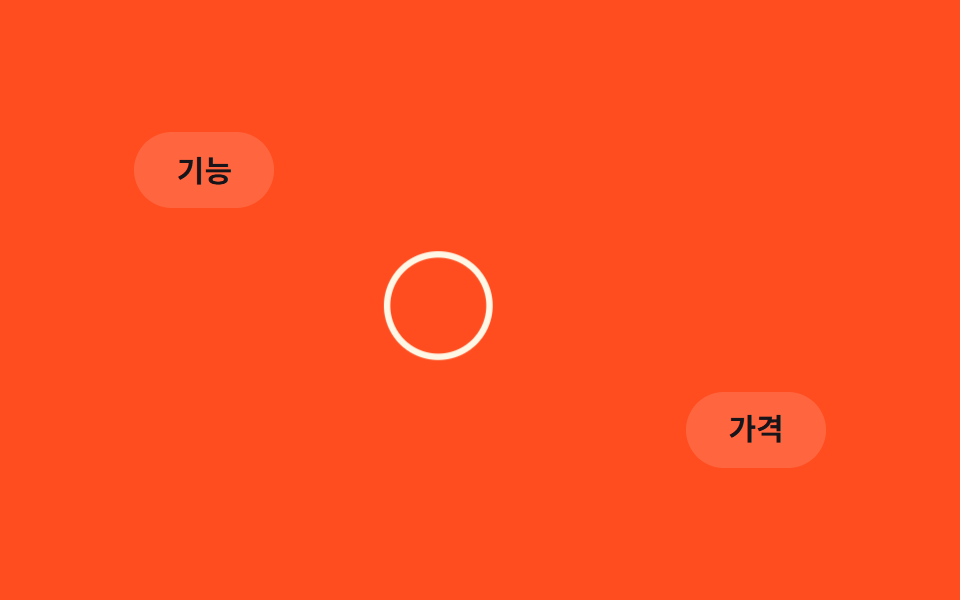
07Vòng tròn phóng to khi hover
Khi con trỏ dạng vòng tròn đi qua một phần tử có thể click, giá trị scale tăng lên, báo hiệu bằng hình ảnh rằng phần tử đó tương tác được.
Dùng choDanh sách link dạng card, thanh công cụ dày đặc icon
:hover 감지transform: scale0.2초
<main class="stage">
  <a class="link link--a" href="#">Tính năng</a>
  <a class="link link--b" href="#">Bảng giá</a>
  <div class="cursor-pos is-demo" aria-hidden="true"><div class="ring"></div></div>
</main>
@use "../../../../site/static/demo-tokens" as *;
$duration: $dur-loop; // 링이 두 링크를 도는 한 바퀴
$easing: $ease-spring;
$color: $subject-cream; // 링 색
@include stage($stage-orange);
.stage { position: relative; overflow: hidden; cursor: none; }
.link {
position: absolute;
padding: clamp(8px, 2.4vw, 12px) clamp(16px, 4.4vw, 22px);
border-radius: $r-pill;
background: rgba(255, 255, 255, .14);
color: $subject-ink; // AA: 주황 면(흰 14% 겹침 #d2ada4) 위 5.96:1
font-weight: 700; font-size: clamp(12px, 3.2vw, 15px); line-height: 1; font-family: inherit;
text-decoration: none;
}
.link--a { top: 22%; left: 14%; }
.link--b { bottom: 22%; right: 14%; }
.cursor-pos {
position: absolute;
top: 0;
left: 0;
pointer-events: none;
&.is-demo { animation: cursor-path $duration $easing infinite; }
}
.ring {
width: 30px;
height: 30px;
margin: -15px 0 0 -15px;
border: 2px solid $color;
border-radius: 50%;
transition: transform 180ms $easing;
}
// 실제 조작: 링크 위에 실제 포인터가 있으면 :has() 로 링을 키운다
.stage:has(.link:hover) .ring { transform: scale(1.6); }
.cursor-pos.is-demo .ring { animation: ring-grow $duration $easing infinite; }
@keyframes cursor-path {
0% { transform: translate(90px, 60px); }
40% { transform: translate(90px, 60px); } // link--a 위
50% { transform: translate(300px, 210px); }
90% { transform: translate(300px, 210px); } // link--b 위
100% { transform: translate(90px, 60px); }
}
@keyframes ring-grow {
0%, 100% { transform: scale(1); }
20%, 40% { transform: scale(1.6); }
50%, 70% { transform: scale(1.6); }
80% { transform: scale(1); }
}
@media (pointer: coarse) {
.cursor-pos { display: none; }
.stage { cursor: auto; }
}
@media (prefers-reduced-motion: reduce) {
.cursor-pos.is-demo { animation: none; transform: translate(90px, 60px); }
.cursor-pos.is-demo .ring { animation: none; }
}html, body {
margin: 0;
overflow: hidden;
}
.stage {
box-sizing: border-box;
min-height: 100vh;
display: grid;
place-items: center;
margin: 0;
background: #ff4d1f;
font-family: -apple-system, "Segoe UI", "Noto Sans KR", sans-serif;
padding: clamp(8px, 4vw, 24px);
}
.stage {
position: relative;
overflow: hidden;
cursor: none;
}
.link {
position: absolute;
padding: clamp(8px, 2.4vw, 12px) clamp(16px, 4.4vw, 22px);
border-radius: 999px;
background: rgba(255, 255, 255, 0.14);
color: #17141a;
font-weight: 700;
font-size: clamp(12px, 3.2vw, 15px);
line-height: 1;
font-family: inherit;
text-decoration: none;
}
.link--a {
top: 22%;
left: 14%;
}
.link--b {
bottom: 22%;
right: 14%;
}
.cursor-pos {
position: absolute;
top: 0;
left: 0;
pointer-events: none;
}
.cursor-pos.is-demo {
animation: cursor-path 2s cubic-bezier(0.2, 0.8, 0.2, 1) infinite;
}
.ring {
width: 30px;
height: 30px;
margin: -15px 0 0 -15px;
border: 2px solid #fff7e6;
border-radius: 50%;
transition: transform 180ms cubic-bezier(0.2, 0.8, 0.2, 1);
}
.stage:has(.link:hover) .ring {
transform: scale(1.6);
}
.cursor-pos.is-demo .ring {
animation: ring-grow 2s cubic-bezier(0.2, 0.8, 0.2, 1) infinite;
}
@keyframes cursor-path {
0% {
transform: translate(90px, 60px);
}
40% {
transform: translate(90px, 60px);
}
50% {
transform: translate(300px, 210px);
}
90% {
transform: translate(300px, 210px);
}
100% {
transform: translate(90px, 60px);
}
}
@keyframes ring-grow {
0%, 100% {
transform: scale(1);
}
20%, 40% {
transform: scale(1.6);
}
50%, 70% {
transform: scale(1.6);
}
80% {
transform: scale(1);
}
}
@media (pointer: coarse) {
.cursor-pos {
display: none;
}
.stage {
cursor: auto;
}
}
@media (prefers-reduced-motion: reduce) {
.cursor-pos.is-demo {
animation: none;
transform: translate(90px, 60px);
}
.cursor-pos.is-demo .ring {
animation: none;
}
}// 실제 포인터가 움직이면 링이 좌표를 따라가고, 링크 위에서는 :has() 로 링이 커진다.
if (matchMedia('(pointer: fine)').matches) {
var stage = document.querySelector('.stage'), pos = document.querySelector('.cursor-pos');
stage.addEventListener('pointermove', function (e) {
pos.classList.remove('is-demo');
var r = stage.getBoundingClientRect();
pos.style.transform = 'translate(' + (e.clientX - r.left) + 'px,' + (e.clientY - r.top) + 'px)';
});
}import { useState } from "react";
import type { CSSProperties, PointerEvent } from "react";
import styles from "./HoverGrowRing.module.scss";
export type HoverGrowRingProps = {
links?: string[];
duration?: number;
easing?: string;
color?: string;
};
type Vars = CSSProperties & { "--duration"?: string; "--easing"?: string; "--color"?: string };
export default function HoverGrowRing({
links = ["기능", "가격"],
duration = 2000,
easing = "cubic-bezier(.2,.8,.2,1)",
color = "#fff7e6",
}: HoverGrowRingProps) {
const [demo, setDemo] = useState(true);
const [pos, setPos] = useState({ x: 90, y: 60 });
const [grow, setGrow] = useState(false);
const move = (e: PointerEvent<HTMLDivElement>) => {
setDemo(false);
const r = e.currentTarget.getBoundingClientRect();
setPos({ x: e.clientX - r.left, y: e.clientY - r.top });
setGrow((e.target as HTMLElement).closest("a") !== null);
};
const vars: Vars = { "--duration": `${duration}ms`, "--easing": easing, "--color": color };
return (
<div className={styles.stage} style={vars} onPointerMove={move}>
<a className={`${styles.link} ${styles.linkA}`} href="#">{links[0]}</a>
<a className={`${styles.link} ${styles.linkB}`} href="#">{links[1]}</a>
<div
className={demo ? `${styles.cursorPos} ${styles.isDemo}` : styles.cursorPos}
style={demo ? undefined : { transform: `translate(${pos.x}px,${pos.y}px)` }}
aria-hidden="true"
>
<div className={grow ? `${styles.ring} ${styles.ringGrow}` : styles.ring} />
</div>
</div>
);
}07 Vòng tròn phóng to khi hover — Diện tích đo được 3.167% · khung hình chuyển động 12/23Nguyên tác GODRICH · SCSS và React nằm trong tệp zip · 9 hiệu ứng custom cursor css — copy dán một dòng
Bài viết chứa demo này
 9 hiệu ứng custom cursor css — copy dán một dòngCustom cursor css là cách thay mũi tên mặc định của trình duyệt bằng một phần tử tự vẽ, bám theo toạ độ chuột thật qua p Xem tất cả demo trong bài này