02Nút phát sáng khi hover
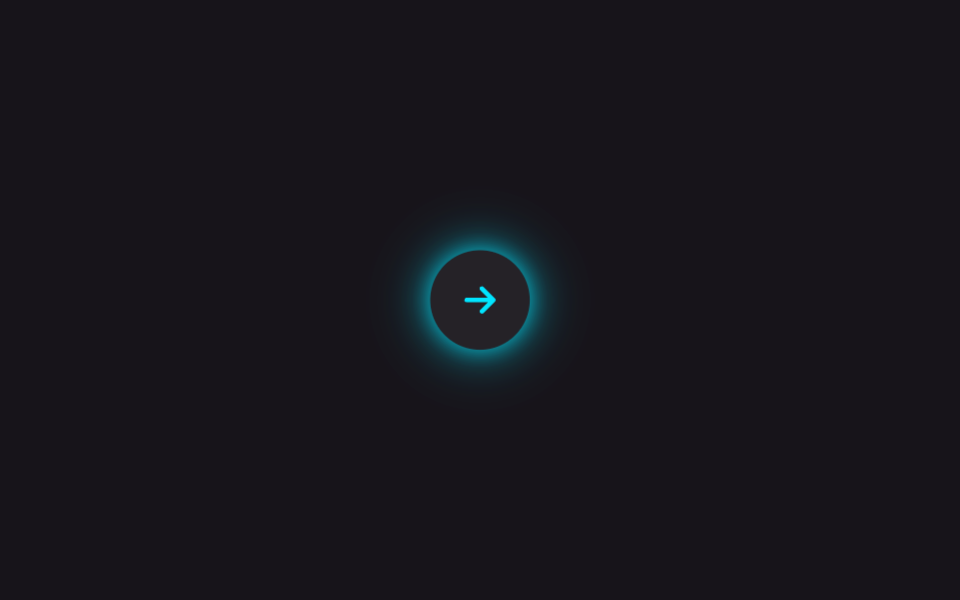
Vệt box-shadow mờ nằm sau nút lúc bình thường, đến khi hover hoặc focus thì bán kính và độ đậm tăng lên, hắt sáng cả vùng xung quanh.
Dùng choNút CTA chính như thanh toán hay đăng ký, nút hero của trang landing dark mode
box-shadow:hover · :focus-visible@keyframes
<main class="stage is-demo">
  <button class="btn" type="button" aria-label="Tiếp theo">
    <svg viewBox="0 0 24 24" width="22" height="22" fill="none" aria-hidden="true">
      <path d="M5 12h13M13 6l6 6-6 6" stroke="currentColor" stroke-width="2.4" stroke-linecap="round" stroke-linejoin="round"/>
    </svg>
  </button>
</main>
@use "../../../../site/static/demo-tokens" as *;
// ── 변수 3개 ──────────────────────────────────────────
$duration: $dur-loop; // 2s — 호버 루프 한 주기
$easing: $ease-out;
$color: #00e5ff; // 네온 시안
@include stage($stage-ink);
.btn {
display: grid; place-items: center;
width: $sp-12; height: $sp-12;
border: 0; border-radius: 50%;
background: rgba($stage-paper, .06);
color: $color;
cursor: pointer; -webkit-tap-highlight-color: transparent;
box-shadow: 0 0 $sp-2 rgba($color, .3), 0 0 $sp-4 rgba($color, .12);
transition: box-shadow $dur-base $easing, transform $dur-base $easing, background $dur-base $easing;
}
.btn:hover,
.btn:focus-visible {
background: rgba($stage-paper, .1);
box-shadow: 0 0 $sp-3 $color, 0 0 $sp-8 rgba($color, .65), 0 0 $sp-12 rgba($color, .3);
transform: scale(1.06);
outline: none;
}
// box-shadow·transform 만 바뀐다 — 레이아웃은 그대로
.stage.is-demo .btn {
animation: hover-loop $duration $easing infinite;
}
@keyframes hover-loop {
0%, 12%, 100% {
box-shadow: 0 0 $sp-2 rgba($color, .3), 0 0 $sp-4 rgba($color, .12);
transform: scale(1);
}
35%, 75% {
box-shadow: 0 0 $sp-3 $color, 0 0 $sp-8 rgba($color, .65), 0 0 $sp-12 rgba($color, .3);
transform: scale(1.06);
}
92% {
box-shadow: 0 0 $sp-2 rgba($color, .3), 0 0 $sp-4 rgba($color, .12);
transform: scale(1);
}
}
@media (prefers-reduced-motion: reduce) {
.stage.is-demo .btn { animation: none; }
.btn { transition-duration: 1ms; }
}html, body {
margin: 0;
overflow: hidden;
}
.stage {
box-sizing: border-box;
min-height: 100vh;
display: grid;
place-items: center;
margin: 0;
background: #17141a;
font-family: -apple-system, "Segoe UI", "Noto Sans KR", sans-serif;
padding: clamp(8px, 4vw, 24px);
}
.btn {
display: grid;
place-items: center;
width: 48px;
height: 48px;
border: 0;
border-radius: 50%;
background: rgba(255, 255, 255, 0.06);
color: #00e5ff;
cursor: pointer;
-webkit-tap-highlight-color: transparent;
box-shadow: 0 0 8px rgba(0, 229, 255, 0.3), 0 0 16px rgba(0, 229, 255, 0.12);
transition: box-shadow 300ms ease-out, transform 300ms ease-out, background 300ms ease-out;
}
.btn:hover,
.btn:focus-visible {
background: rgba(255, 255, 255, 0.1);
box-shadow: 0 0 12px #00e5ff, 0 0 32px rgba(0, 229, 255, 0.65), 0 0 48px rgba(0, 229, 255, 0.3);
transform: scale(1.06);
outline: none;
}
.stage.is-demo .btn {
animation: hover-loop 2s ease-out infinite;
}
@keyframes hover-loop {
0%, 12%, 100% {
box-shadow: 0 0 8px rgba(0, 229, 255, 0.3), 0 0 16px rgba(0, 229, 255, 0.12);
transform: scale(1);
}
35%, 75% {
box-shadow: 0 0 12px #00e5ff, 0 0 32px rgba(0, 229, 255, 0.65), 0 0 48px rgba(0, 229, 255, 0.3);
transform: scale(1.06);
}
92% {
box-shadow: 0 0 8px rgba(0, 229, 255, 0.3), 0 0 16px rgba(0, 229, 255, 0.12);
transform: scale(1);
}
}
@media (prefers-reduced-motion: reduce) {
.stage.is-demo .btn {
animation: none;
}
.btn {
transition-duration: 1ms;
}
}// 실제 사람이 누르면 강제 루프를 떼고 :hover · :focus-visible 에 맡긴다.
document.querySelector('.btn').addEventListener('pointerdown', function () {
document.querySelector('.stage').classList.remove('is-demo');
});import type { CSSProperties, MouseEvent } from "react";
import styles from "./ButtonGlowHover.module.scss";
export type ButtonGlowHoverProps = {
duration?: number;
easing?: string;
color?: string;
label?: string;
onClick?: (e: MouseEvent<HTMLButtonElement>) => void;
};
export default function ButtonGlowHover({
duration = 300,
easing = "ease-out",
color = "#00e5ff",
label = "다음",
onClick,
}: ButtonGlowHoverProps) {
const vars: CSSProperties = { "--duration": `${duration}ms`, "--easing": easing, "--color": color } as CSSProperties;
return (
<button className={styles.btn} type="button" style={vars} aria-label={label} onClick={onClick}>
<svg viewBox="0 0 24 24" width={22} height={22} fill="none" aria-hidden="true">
<path d="M5 12h13M13 6l6 6-6 6" stroke="currentColor" strokeWidth={2.4} strokeLinecap="round" strokeLinejoin="round" />
</svg>
</button>
);
}02 Nút phát sáng khi hover — Diện tích đo được 4.303% · khung hình chuyển động 11/23Nguyên tác GODRICH · SCSS và React nằm trong tệp zip · 9 css glow effect — nút chữ phát sáng như neon
Bài viết chứa demo này
 9 css glow effect — nút chữ phát sáng như neoncss glow effect là lớp trang trí tạo vầng sáng lan ra quanh nút hoặc dòng chữ, trông như biển neon nhưng chỉ làm bằng và Xem tất cả demo trong bài này