04Card glow đèn rọi
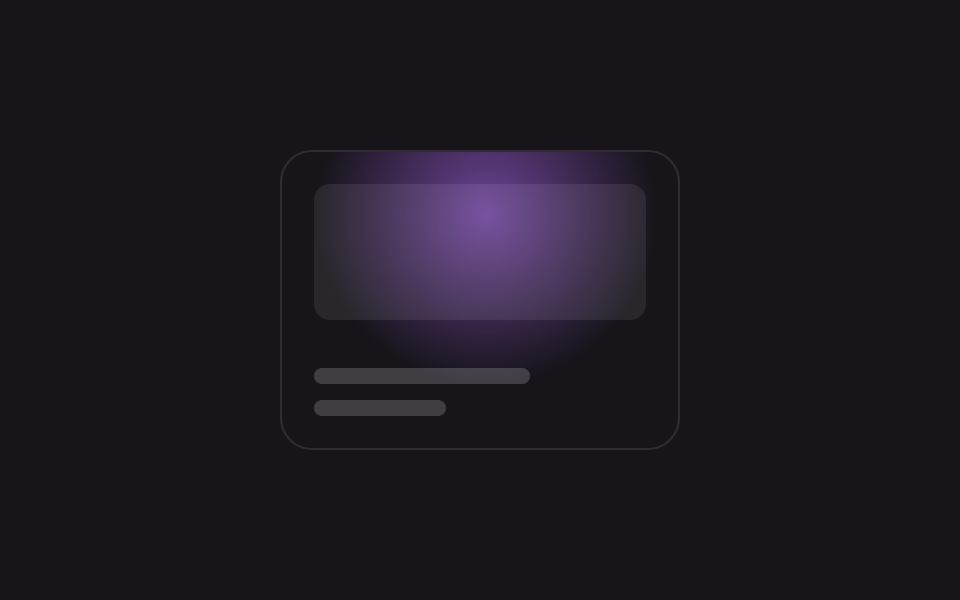
Cặp biến --x --y đăng ký bằng @property dời tâm radial-gradient trên card, và khi không có con trỏ thì chính keyframes lái hai biến đó để vệt sáng tự quét.
Dùng choCard dự án portfolio, hover card bảng giá
@propertyradial-gradient@keyframes sweep
<main class="stage is-demo">
  <div class="card">
    <span class="thumb" aria-hidden="true"></span>
    <span class="bar bar--lg" aria-hidden="true"></span>
    <span class="bar bar--sm" aria-hidden="true"></span>
  </div>
</main>
@use "../../../../site/static/demo-tokens" as *;
// ── 변수 3개 ──────────────────────────────────────────
$duration: $dur-loop; // 2s — 스포트라이트 한 바퀴
$easing: ease-in-out;
$color: #b36bff; // 네온 바이올렛
@include stage($stage-ink);
// 등록 없는 커스텀 프로퍼티는 키프레임으로 보간이 안 된다 — 반드시 @property 로 등록한다 (원리 섹션 재료)
@property --x { syntax: '<percentage>'; inherits: false; initial-value: 50%; }
@property --y { syntax: '<percentage>'; inherits: false; initial-value: 50%; }
.card {
position: relative;
overflow: hidden;
box-sizing: border-box;
width: clamp(200px, 62vmin, 300px);
aspect-ratio: 4 / 3;
border-radius: $r-card;
background: $stage-ink;
border: 1px solid rgba($stage-paper, .1);
padding: $sp-4;
display: flex; flex-direction: column; justify-content: flex-end; gap: $sp-2;
}
.card::before {
content: '';
position: absolute; inset: 0;
background: radial-gradient(circle at var(--x) var(--y), rgba($color, .55), transparent 55%);
pointer-events: none;
}
.thumb { position: absolute; top: $sp-4; left: $sp-4; right: $sp-4; height: 46%; border-radius: $r-sm; background: rgba($stage-paper, .08); }
.bar { display: block; height: $sp-2; border-radius: $r-xs; background: rgba($stage-paper, .18); }
.bar--lg { width: 65%; }
.bar--sm { width: 40%; }
// --x·--y 만 움직인다 — @property 등록 덕에 keyframes 가 보간할 수 있다
.stage.is-demo .card::before {
animation: sweep $duration $easing infinite;
}
@keyframes sweep {
0% { --x: 18%; --y: 20%; }
25% { --x: 85%; --y: 22%; }
50% { --x: 78%; --y: 80%; }
75% { --x: 20%; --y: 76%; }
100% { --x: 18%; --y: 20%; }
}
@media (prefers-reduced-motion: reduce) {
.stage.is-demo .card::before { animation: none; --x: 50%; --y: 50%; }
}html, body {
margin: 0;
overflow: hidden;
}
.stage {
box-sizing: border-box;
min-height: 100vh;
display: grid;
place-items: center;
margin: 0;
background: #17141a;
font-family: -apple-system, "Segoe UI", "Noto Sans KR", sans-serif;
padding: clamp(8px, 4vw, 24px);
}
@property --x {
syntax: "<percentage>";
inherits: false;
initial-value: 50%;
}
@property --y {
syntax: "<percentage>";
inherits: false;
initial-value: 50%;
}
.card {
position: relative;
overflow: hidden;
box-sizing: border-box;
width: clamp(200px, 62vmin, 300px);
aspect-ratio: 4/3;
border-radius: 16px;
background: #17141a;
border: 1px solid rgba(255, 255, 255, 0.1);
padding: 16px;
display: flex;
flex-direction: column;
justify-content: flex-end;
gap: 8px;
}
.card::before {
content: "";
position: absolute;
inset: 0;
background: radial-gradient(circle at var(--x) var(--y), rgba(179, 107, 255, 0.55), transparent 55%);
pointer-events: none;
}
.thumb {
position: absolute;
top: 16px;
left: 16px;
right: 16px;
height: 46%;
border-radius: 8px;
background: rgba(255, 255, 255, 0.08);
}
.bar {
display: block;
height: 8px;
border-radius: 4px;
background: rgba(255, 255, 255, 0.18);
}
.bar--lg {
width: 65%;
}
.bar--sm {
width: 40%;
}
.stage.is-demo .card::before {
animation: sweep 2s ease-in-out infinite;
}
@keyframes sweep {
0% {
--x: 18%;
--y: 20%;
}
25% {
--x: 85%;
--y: 22%;
}
50% {
--x: 78%;
--y: 80%;
}
75% {
--x: 20%;
--y: 76%;
}
100% {
--x: 18%;
--y: 20%;
}
}
@media (prefers-reduced-motion: reduce) {
.stage.is-demo .card::before {
animation: none;
--x: 50%;
--y: 50%;
}
}// 실제 커서가 카드 위를 지나가면 --x·--y 를 좌표로 갱신하고 데모 루프를 뗀다 (8줄).
(function () {
var card = document.querySelector('.card');
card.addEventListener('pointermove', function (e) {
var r = card.getBoundingClientRect();
card.style.setProperty('--x', ((e.clientX - r.left) / r.width * 100) + '%');
card.style.setProperty('--y', ((e.clientY - r.top) / r.height * 100) + '%');
document.querySelector('.stage').classList.remove('is-demo');
});
})();import { useCallback, useRef } from "react";
import type { CSSProperties, PointerEvent } from "react";
import styles from "./CardSpotlightGlow.module.scss";
export type CardSpotlightGlowProps = {
duration?: number;
easing?: string;
color?: string;
};
export default function CardSpotlightGlow({
duration = 2000,
easing = "ease-in-out",
color = "#b36bff",
}: CardSpotlightGlowProps) {
const cardRef = useRef<HTMLDivElement | null>(null);
const onPointerMove = useCallback((e: PointerEvent<HTMLDivElement>) => {
const el = cardRef.current;
if (!el) return;
const r = el.getBoundingClientRect();
el.style.setProperty("--x", `${((e.clientX - r.left) / r.width) * 100}%`);
el.style.setProperty("--y", `${((e.clientY - r.top) / r.height) * 100}%`);
}, []);
const vars: CSSProperties = { "--duration": `${duration}ms`, "--easing": easing, "--color": color } as CSSProperties;
return (
<div ref={cardRef} className={styles.card} style={vars} onPointerMove={onPointerMove}>
<span className={styles.thumb} aria-hidden="true" />
<span className={`${styles.bar} ${styles.barLg}`} />
<span className={`${styles.bar} ${styles.barSm}`} />
</div>
);
}04 Card glow đèn rọi — Diện tích đo được 20.233% · khung hình chuyển động 16/23Nguyên tác GODRICH · SCSS và React nằm trong tệp zip · 9 css glow effect — nút chữ phát sáng như neon
Bài viết chứa demo này
 9 css glow effect — nút chữ phát sáng như neoncss glow effect là lớp trang trí tạo vầng sáng lan ra quanh nút hoặc dòng chữ, trông như biển neon nhưng chỉ làm bằng và Xem tất cả demo trong bài này