03Glow bằng :has(:focus)
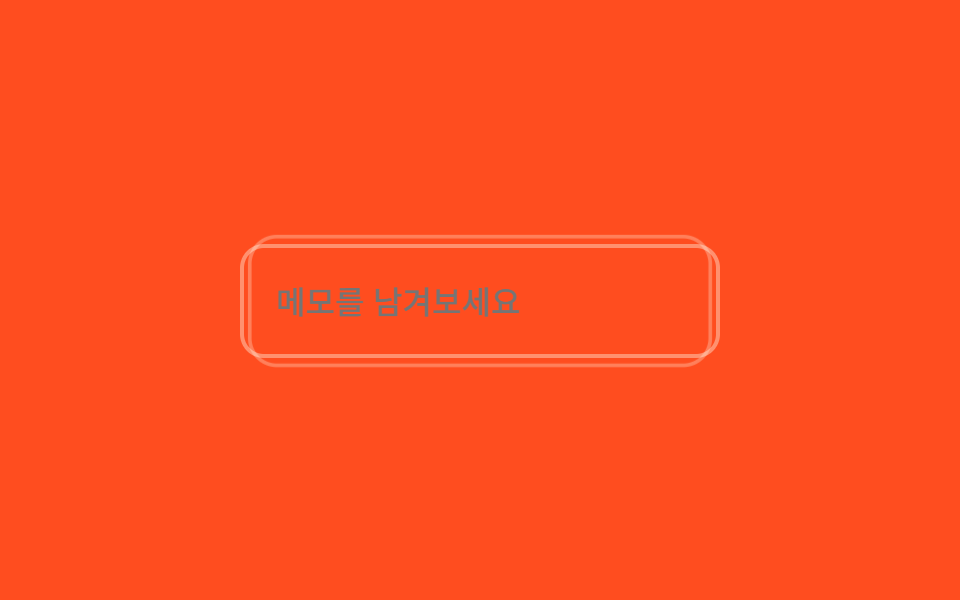
Vòng glow nằm ngoài input, không phải sibling của nó, được phần tử cha phát hiện qua :has(:focus) rồi phồng to xẹp nhỏ liên tục như đang thở suốt lúc focus.
Dùng choÔ ghi chú hoặc bình luận, form một trường cần được nhấn mạnh
:has()opacity scale2s 루프
<main class="stage">
  <div class="fg is-demo">
    <input class="fg__input" type="text" placeholder="Để lại ghi chú">
    <span class="fg__glow" aria-hidden="true"></span>
  </div>
</main>
@use "../../../../site/static/demo-tokens" as *;
// ── 변수 3개 ──────────────────────────────────────────
$duration: $dur-loop; // 글로우가 한 번 숨쉬는 시간
$easing: $ease-out;
$color: $subject-cream; // 글로우 링 색
@include stage($stage-orange);
.fg { position: relative; width: min(240px, 82vw); }
.fg__input {
box-sizing: border-box;
width: 100%;
border: 2px solid rgba($subject-cream, .4);
border-radius: $r-control;
padding: $sp-4 $sp-4;
font-weight: 500;
font-size: clamp(14px, 4vw, 16px);
line-height: 1;
font-family: inherit;
color: $subject-cream;
background: transparent;
position: relative;
z-index: 1;
&:focus { outline: none; }
}
.fg__glow {
position: absolute;
inset: -$sp-2;
border-radius: $r-card;
border: 2px solid $color;
opacity: 0;
transform: scale(.92);
pointer-events: none;
}
// :has() 로 부모(.fg)가 자식 입력의 실제 포커스 여부를 안다 — 형제가 아니어도 스타일링된다
.fg:has(.fg__input:focus) .fg__glow {
animation: glow-in $dur-base cubic-bezier(.3, 1.6, .4, 1) both,
glow-pulse $duration $easing $dur-base infinite;
}
// 스프링 오버슛 등장 — 링이 1.08 까지 뻗었다가 1 로 감아 들어간 뒤 숨쉬기로 넘어간다
@keyframes glow-in {
0% { opacity: 0; transform: scale(.8); }
60% { opacity: .95; transform: scale(1.08); }
100% { opacity: .35; transform: scale(.92); }
}
@keyframes glow-pulse {
0%, 100% { opacity: .35; transform: scale(.92); }
50% { opacity: .9; transform: scale(1.04); }
}
@media (prefers-reduced-motion: reduce) {
.fg:has(.fg__input:focus) .fg__glow { animation: none; opacity: .7; transform: scale(1); }
}html, body {
margin: 0;
overflow: hidden;
}
.stage {
box-sizing: border-box;
min-height: 100vh;
display: grid;
place-items: center;
margin: 0;
background: #ff4d1f;
font-family: -apple-system, "Segoe UI", "Noto Sans KR", sans-serif;
padding: clamp(8px, 4vw, 24px);
}
.fg {
position: relative;
width: min(240px, 82vw);
}
.fg__input {
box-sizing: border-box;
width: 100%;
border: 2px solid rgba(255, 247, 230, 0.4);
border-radius: 12px;
padding: 16px 16px;
font-weight: 500;
font-size: clamp(14px, 4vw, 16px);
line-height: 1;
font-family: inherit;
color: #fff7e6;
background: transparent;
position: relative;
z-index: 1;
}
.fg__input:focus {
outline: none;
}
.fg__glow {
position: absolute;
inset: -8px;
border-radius: 16px;
border: 2px solid #fff7e6;
opacity: 0;
transform: scale(0.92);
pointer-events: none;
}
.fg:has(.fg__input:focus) .fg__glow {
animation: glow-in 300ms cubic-bezier(0.3, 1.6, 0.4, 1) both, glow-pulse 2s ease-out 300ms infinite;
}
@keyframes glow-in {
0% {
opacity: 0;
transform: scale(0.8);
}
60% {
opacity: 0.95;
transform: scale(1.08);
}
100% {
opacity: 0.35;
transform: scale(0.92);
}
}
@keyframes glow-pulse {
0%, 100% {
opacity: 0.35;
transform: scale(0.92);
}
50% {
opacity: 0.9;
transform: scale(1.04);
}
}
@media (prefers-reduced-motion: reduce) {
.fg:has(.fg__input:focus) .fg__glow {
animation: none;
opacity: 0.7;
transform: scale(1);
}
}// .is-demo 자동 재생: 진짜 focus 를 오가며 :has(:focus) 를 그대로 탄다 (3줄)
var el = document.querySelector('.is-demo .fg__input');
var t = function () { document.activeElement === el ? el.blur() : el.focus({ preventScroll: true }); }; // preventScroll — iframe 안 포커스가 홈 그리드의 부모 스크롤을 끌어당기지 않게 (사용자 2026-09-10 실측)
t(); setInterval(t, 1600);import { useState } from "react";
import type { CSSProperties, ChangeEvent } from "react";
import styles from "./FocusGlow.module.scss";
export type FocusGlowProps = {
placeholder?: string;
duration?: number;
easing?: string;
color?: string;
};
type Vars = CSSProperties & { "--duration"?: string; "--easing"?: string; "--color"?: string };
export default function FocusGlow({
placeholder = "Leave a note",
duration = 2000,
easing = "ease-out",
color = "#fff7e6",
}: FocusGlowProps) {
const [value, setValue] = useState("");
const vars: Vars = { "--duration": `${duration}ms`, "--easing": easing, "--color": color };
return (
<div className={styles.fg} style={vars}>
<input
className={styles.input}
type="text"
placeholder={placeholder}
value={value}
onChange={(e: ChangeEvent<HTMLInputElement>) => setValue(e.target.value)}
/>
<span className={styles.glow} aria-hidden="true" />
</div>
);
}03 Glow bằng :has(:focus) — Diện tích đo được 6.35% · khung hình chuyển động 23/23Nguyên tác GODRICH · SCSS và React nằm trong tệp zip · 9 CSS Input Focus Animation — dán 1 dòng là chạy
Bài viết chứa demo này
 9 CSS Input Focus Animation — dán 1 dòng là chạyCSS input focus animation là các hiệu ứng dùng thẳng trạng thái trình duyệt đã có sẵn — :focus, :focus-within, :placehol Xem tất cả demo trong bài này