06Popover xác nhận
Ô xác nhận nhỏ hiện cạnh nút, dùng Popover API + anchor.
Dùng choXác nhận xóa, chỉnh sửa inline
anchor위쪽화살표 없이
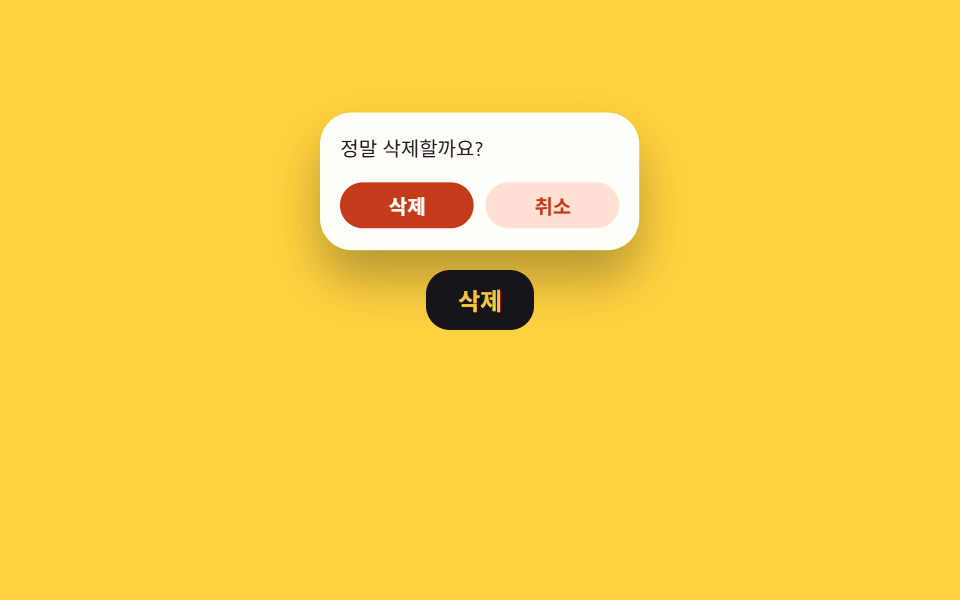
<main class="stage">
  <div class="anchor is-demo">
    <button class="trigger" type="button" aria-label="Xóa">Xóa</button>
    <div class="confirm" role="dialog" aria-label="Xác nhận xóa">
      <p>Bạn chắc chắn muốn xóa?</p>
      <div class="confirm__row">
        <button class="confirm__yes" type="button">Xóa</button>
        <button class="confirm__no" type="button">Hủy</button>
      </div>
    </div>
  </div>
</main>
@use "../../../../site/static/demo-tokens" as *;
// ── 변수 3개 ──────────────────────────────────────────
$duration: $dur-quick; // 뜨는 시간
$easing: $ease-pop; // 살짝 튀며 나타난다
$color: $subject-ink; // 강조색(버튼)
@include stage($stage-yellow);
.anchor { position: relative; display: inline-block; }
.trigger {
border: 0; border-radius: $r-control;
padding: clamp(9px, 3vmin, 12px) clamp(16px, 5.4vmin, 22px);
font-weight: 600;
font-size: clamp(12px, 3.6vmin, 15px);
line-height: 1;
font-family: inherit;
color: $stage-yellow; background: $color;
cursor: pointer; -webkit-tap-highlight-color: transparent;
}
// popover 속성이 없을 때(데모 기본값)는 평범한 상자로 그린다 — 화살표 없이, 버튼 바로 위
.confirm {
position: absolute; left: 50%; bottom: calc(100% + 10px);
transform: translateX(-50%) translateY(6px) scale(.92);
opacity: 0; pointer-events: none;
width: clamp(140px, 46vmin, 190px);
padding: clamp(10px, 3.4vmin, 14px);
border-radius: $r-card; background: $stage-paper; color: $stage-ink;
box-shadow: $shadow-raised;
transition: opacity $duration $easing, transform $duration $easing;
margin: 0; border: 0;
p { margin: 0 0 10px; font-size: clamp(10px, 3.2vmin, 12px); }
}
// 진짜 Popover API 로 켜졌을 때는 top layer 위에서 같은 자리에 뜨게 좌표만 다시 잡는다
.confirm:popover-open {
position: fixed; inset: auto;
opacity: 1; transform: translateX(-50%) translateY(0) scale(1);
}
.confirm__row { display: flex; gap: clamp(6px, 2vmin, 8px); }
.confirm__yes, .confirm__no {
flex: 1; border: 0; border-radius: $r-control;
padding: clamp(6px, 2.2vmin, 8px) 0;
font-weight: 600;
font-size: clamp(10px, 3vmin, 12px);
line-height: 1;
font-family: inherit;
cursor: pointer;
}
.confirm__yes { background: $error; color: $stage-paper; }
.confirm__no { background: $error-soft; color: $error; }
.anchor.is-demo .confirm { animation: confirm-loop $dur-loop $easing infinite; }
@keyframes confirm-loop {
0% { opacity: 0; transform: translateX(-50%) translateY(6px) scale(.92); }
15% { opacity: 1; transform: translateX(-50%) translateY(0) scale(1); }
70% { opacity: 1; transform: translateX(-50%) translateY(0) scale(1); }
85% { opacity: 0; transform: translateX(-50%) translateY(6px) scale(.92); }
100% { opacity: 0; transform: translateX(-50%) translateY(6px) scale(.92); }
}
@media (prefers-reduced-motion: reduce) {
.anchor.is-demo .confirm { animation: none; }
.confirm { transition-duration: 1ms; }
}html, body {
margin: 0;
overflow: hidden;
}
.stage {
box-sizing: border-box;
min-height: 100vh;
display: grid;
place-items: center;
margin: 0;
background: #ffd23f;
font-family: -apple-system, "Segoe UI", "Noto Sans KR", sans-serif;
padding: clamp(8px, 4vw, 24px);
}
.anchor {
position: relative;
display: inline-block;
}
.trigger {
border: 0;
border-radius: 12px;
padding: clamp(9px, 3vmin, 12px) clamp(16px, 5.4vmin, 22px);
font-weight: 600;
font-size: clamp(12px, 3.6vmin, 15px);
line-height: 1;
font-family: inherit;
color: #ffd23f;
background: #17141a;
cursor: pointer;
-webkit-tap-highlight-color: transparent;
}
.confirm {
position: absolute;
left: 50%;
bottom: calc(100% + 10px);
transform: translateX(-50%) translateY(6px) scale(0.92);
opacity: 0;
pointer-events: none;
width: clamp(140px, 46vmin, 190px);
padding: clamp(10px, 3.4vmin, 14px);
border-radius: 16px;
background: #ffffff;
color: #17141a;
box-shadow: 0 14px 24px rgba(23, 20, 26, 0.32);
transition: opacity 220ms cubic-bezier(0.2, 1.4, 0.4, 1), transform 220ms cubic-bezier(0.2, 1.4, 0.4, 1);
margin: 0;
border: 0;
}
.confirm p {
margin: 0 0 10px;
font-size: clamp(10px, 3.2vmin, 12px);
}
.confirm:popover-open {
position: fixed;
inset: auto;
opacity: 1;
transform: translateX(-50%) translateY(0) scale(1);
}
.confirm__row {
display: flex;
gap: clamp(6px, 2vmin, 8px);
}
.confirm__yes, .confirm__no {
flex: 1;
border: 0;
border-radius: 12px;
padding: clamp(6px, 2.2vmin, 8px) 0;
font-weight: 600;
font-size: clamp(10px, 3vmin, 12px);
line-height: 1;
font-family: inherit;
cursor: pointer;
}
.confirm__yes {
background: #c2361a;
color: #ffffff;
}
.confirm__no {
background: #ffe0d8;
color: #c2361a;
}
.anchor.is-demo .confirm {
animation: confirm-loop 2s cubic-bezier(0.2, 1.4, 0.4, 1) infinite;
}
@keyframes confirm-loop {
0% {
opacity: 0;
transform: translateX(-50%) translateY(6px) scale(0.92);
}
15% {
opacity: 1;
transform: translateX(-50%) translateY(0) scale(1);
}
70% {
opacity: 1;
transform: translateX(-50%) translateY(0) scale(1);
}
85% {
opacity: 0;
transform: translateX(-50%) translateY(6px) scale(0.92);
}
100% {
opacity: 0;
transform: translateX(-50%) translateY(6px) scale(0.92);
}
}
@media (prefers-reduced-motion: reduce) {
.anchor.is-demo .confirm {
animation: none;
}
.confirm {
transition-duration: 1ms;
}
}// 데모는 anchor 에 .is-demo 를 걸어 keyframes 로 반복. 실제 클릭은 진짜 Popover API 로 전환한다.
(function () {
var anchor = document.querySelector('.anchor');
var trigger = document.querySelector('.trigger');
var confirm = document.querySelector('.confirm');
var yes = document.querySelector('.confirm__yes');
var no = document.querySelector('.confirm__no');
function stopDemo() { anchor.classList.remove('is-demo'); }
function show() {
stopDemo();
if (!confirm.hasAttribute('popover')) confirm.setAttribute('popover', 'manual');
confirm.showPopover();
}
function hide() { if (confirm.hasAttribute('popover')) confirm.hidePopover(); }
trigger.addEventListener('click', show);
no.addEventListener('click', hide);
yes.addEventListener('click', hide);
})();import { useRef, useState } from "react";
import type { CSSProperties } from "react";
import styles from "./PopoverConfirm.module.scss";
export type PopoverConfirmProps = {
triggerLabel: string;
question: string;
confirmLabel: string;
cancelLabel: string;
onConfirm?: () => void;
/** 뜨는 시간 (기본 220ms) */
duration?: number;
easing?: string;
color?: string;
};
type Vars = CSSProperties & { "--duration"?: string; "--easing"?: string; "--color"?: string };
export default function PopoverConfirm({
triggerLabel,
question,
confirmLabel,
cancelLabel,
onConfirm,
duration = 220,
easing = "cubic-bezier(.2,1.4,.4,1)",
color = "#17141a",
}: PopoverConfirmProps) {
const ref = useRef<HTMLDivElement>(null);
const [open, setOpen] = useState(false);
const vars: Vars = { "--duration": `${duration}ms`, "--easing": easing, "--color": color };
function show() {
const el = ref.current as (HTMLDivElement & { showPopover?: () => void }) | null;
if (el) {
if (!el.hasAttribute("popover")) el.setAttribute("popover", "manual");
el.showPopover?.();
}
setOpen(true);
}
function hide() {
const el = ref.current as (HTMLDivElement & { hidePopover?: () => void }) | null;
el?.hidePopover?.();
setOpen(false);
}
return (
<div className={styles.anchor} style={vars}>
<button type="button" className={styles.trigger} onClick={show}>
{triggerLabel}
</button>
<div ref={ref} className={open ? `${styles.confirm} ${styles.isOpen}` : styles.confirm}>
<p>{question}</p>
<div className={styles.row}>
<button
type="button"
className={styles.yes}
onClick={() => {
onConfirm?.();
hide();
}}
>
{confirmLabel}
</button>
<button type="button" className={styles.no} onClick={hide}>
{cancelLabel}
</button>
</div>
</div>
</div>
);
}06 Popover xác nhận — Diện tích đo được 10.85% · khung hình chuyển động 6/23Nguyên tác GODRICH · SCSS và React nằm trong tệp zip · 9 hiệu ứng css modal animation gọn nhẹ
Bài viết chứa demo này
 9 hiệu ứng css modal animation gọn nhẹMột css modal animation là chuyển động khi hộp thoại xuất hiện và biến mất, thay vì bật thẳng từ ẩn sang hiện. Chín kiểu Xem tất cả demo trong bài này