02Nút hút nam châm
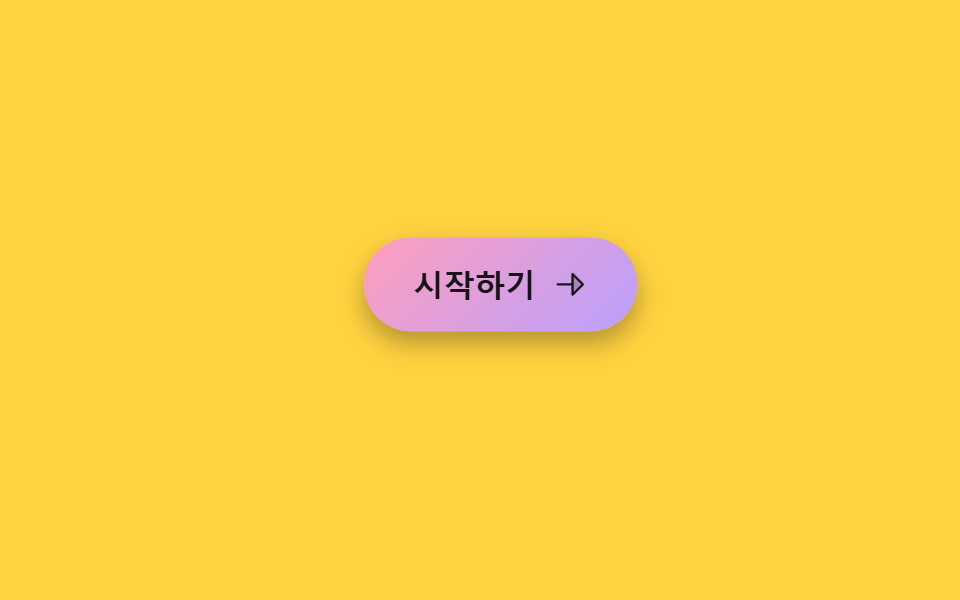
Đưa con trỏ đến gần nút sẽ kéo nút hơi lệch về phía đó, rời xa thì bật trở lại vị trí cũ.
Dùng choNút CTA trang landing, nút trên bảng giá
pointermove 거리×계수transform: translatepointerleave 리셋
<main class="stage">
  <div class="mg-zone is-demo">
    <button class="mg-btn" type="button" tabindex="-1">
      <span>Bắt đầu</span>
      <svg viewBox="0 0 256 256" aria-hidden="true"><g fill="currentColor"><path d="m216 128l-72 72V56Z" opacity=".2"/><path d="m221.66 122.34l-72-72A8 8 0 0 0 136 56v64H40a8 8 0 0 0 0 16h96v64a8 8 0 0 0 13.66 5.66l72-72a8 8 0 0 0 0-11.32M152 180.69V75.31L204.69 128Z"/></g></svg>
    </button>
  </div>
</main>
@use "../../../../site/static/demo-tokens" as *;
$duration: $dur-base; // 자석에 끌려오는 시간
$easing: $ease-spring;
$color: $subject-pink;
@include stage($stage-yellow);
.mg-zone {
width: min(230px, 76vw);
height: 140px;
display: grid;
place-items: center;
}
.mg-btn {
display: inline-flex;
align-items: center;
gap: $sp-2;
padding: $sp-3 $sp-6;
border: 0;
border-radius: $r-pill;
background: linear-gradient(135deg, $subject-pink, $subject-lilac);
color: $subject-ink; // 파스텔 면 위 흰 글자는 2.09:1 — 잉크로 8.73:1
font-size: 15px;
font-weight: 800;
box-shadow: $shadow-press;
cursor: pointer;
transition: transform $duration $easing;
will-change: transform;
}
.mg-btn svg { width: 18px; height: 18px; }
@media (hover: none), (pointer: coarse) {
.mg-btn { transition: none; } // 터치엔 hover 좌표가 없다 — 그냥 보통 버튼으로 동작
}
// 데모 강제 루프 — 가상의 포인터가 버튼 오른쪽 위에서 다가왔다 멀어지는 것을 흉내
.mg-zone.is-demo .mg-btn { animation: mg-pull $dur-loop $easing infinite; }
@keyframes mg-pull {
0%, 10% { transform: translate(0, 0) scale(1); }
32%, 55% { transform: translate(20px, -15px) scale(1.04); }
82%, 100% { transform: translate(0, 0) scale(1); }
}
@media (prefers-reduced-motion: reduce) {
.mg-btn { animation: none !important; transition: none !important; }
}html, body {
margin: 0;
overflow: hidden;
}
.stage {
box-sizing: border-box;
min-height: 100vh;
display: grid;
place-items: center;
margin: 0;
background: #ffd23f;
font-family: -apple-system, "Segoe UI", "Noto Sans KR", sans-serif;
padding: clamp(8px, 4vw, 24px);
}
.mg-zone {
width: min(230px, 76vw);
height: 140px;
display: grid;
place-items: center;
}
.mg-btn {
display: inline-flex;
align-items: center;
gap: 8px;
padding: 12px 24px;
border: 0;
border-radius: 999px;
background: linear-gradient(135deg, #ff9ebb, #b9a0ff);
color: #17141a;
font-size: 15px;
font-weight: 800;
box-shadow: 0 6px 12px rgba(23, 20, 26, 0.32);
cursor: pointer;
transition: transform 300ms cubic-bezier(0.2, 0.8, 0.2, 1);
will-change: transform;
}
.mg-btn svg {
width: 18px;
height: 18px;
}
@media (hover: none), (pointer: coarse) {
.mg-btn {
transition: none;
}
}
.mg-zone.is-demo .mg-btn {
animation: mg-pull 2s cubic-bezier(0.2, 0.8, 0.2, 1) infinite;
}
@keyframes mg-pull {
0%, 10% {
transform: translate(0, 0) scale(1);
}
32%, 55% {
transform: translate(20px, -15px) scale(1.04);
}
82%, 100% {
transform: translate(0, 0) scale(1);
}
}
@media (prefers-reduced-motion: reduce) {
.mg-btn {
animation: none !important;
transition: none !important;
}
}(function () {
var zone = document.querySelector('.mg-zone');
var btn = zone.querySelector('.mg-btn');
var STRENGTH = 0.4; // 자석 세기 — 0에 가까울수록 덜 끌려온다
zone.addEventListener('pointermove', function (e) {
if (zone.classList.contains('is-demo')) return;
var r = zone.getBoundingClientRect();
var dx = e.clientX - (r.left + r.width / 2);
var dy = e.clientY - (r.top + r.height / 2);
btn.style.transform = 'translate(' + dx * STRENGTH + 'px,' + dy * STRENGTH + 'px)';
});
zone.addEventListener('pointerleave', function () { btn.style.transform = ''; });
})();import { useRef, type CSSProperties, type PointerEvent } from "react";
import styles from "./CursorMagneticPullButton.module.scss";
export type CursorMagneticPullButtonProps = {
label?: string;
duration?: number;
easing?: string;
color?: string;
};
type Vars = CSSProperties & { "--duration"?: string; "--easing"?: string; "--color"?: string };
const STRENGTH = 0.4;
/** 버튼 히트 존 안에서 pointermove 좌표로 자석처럼 끌려오는 translate 를 계산한다 */
export default function CursorMagneticPullButton({
label = "시작하기",
duration = 300,
easing = "cubic-bezier(.2,.8,.2,1)",
color = "#ff9ebb",
}: CursorMagneticPullButtonProps) {
const btnRef = useRef<HTMLButtonElement>(null);
const vars: Vars = { "--duration": `${duration}ms`, "--easing": easing, "--color": color };
const move = (e: PointerEvent<HTMLDivElement>) => {
const btn = btnRef.current;
if (!btn) return;
const r = e.currentTarget.getBoundingClientRect();
const dx = e.clientX - (r.left + r.width / 2);
const dy = e.clientY - (r.top + r.height / 2);
btn.style.transform = `translate(${dx * STRENGTH}px,${dy * STRENGTH}px)`;
};
const leave = () => { if (btnRef.current) btnRef.current.style.transform = ""; };
return (
<div className={styles.zone} style={vars} onPointerMove={move} onPointerLeave={leave}>
<button ref={btnRef} className={styles.btn} type="button">
<span>{label}</span>
<svg viewBox="0 0 256 256" aria-hidden="true"><g fill="currentColor"><path d="m216 128l-72 72V56Z" opacity=".2" /><path d="m221.66 122.34l-72-72A8 8 0 0 0 136 56v64H40a8 8 0 0 0 0 16h96v64a8 8 0 0 0 13.66 5.66l72-72a8 8 0 0 0 0-11.32M152 180.69V75.31L204.69 128Z" /></g></svg>
</button>
</div>
);
}02 Nút hút nam châm — Diện tích đo được 6.596% · khung hình chuyển động 11/23Nguyên tác GODRICH · SCSS và React nằm trong tệp zip · 9 hiệu ứng chuột máy tính bạn có thể copy-paste
Bài viết chứa demo này
 9 hiệu ứng chuột máy tính bạn có thể copy-pasteHiệu ứng chuột máy tính là tương tác nhỏ phản ứng theo cách con trỏ di chuyển, click, kéo hoặc cuộn. Chỉ mới di chuyển c Xem tất cả demo trong bài này