09Bộ đếm ngược thời gian
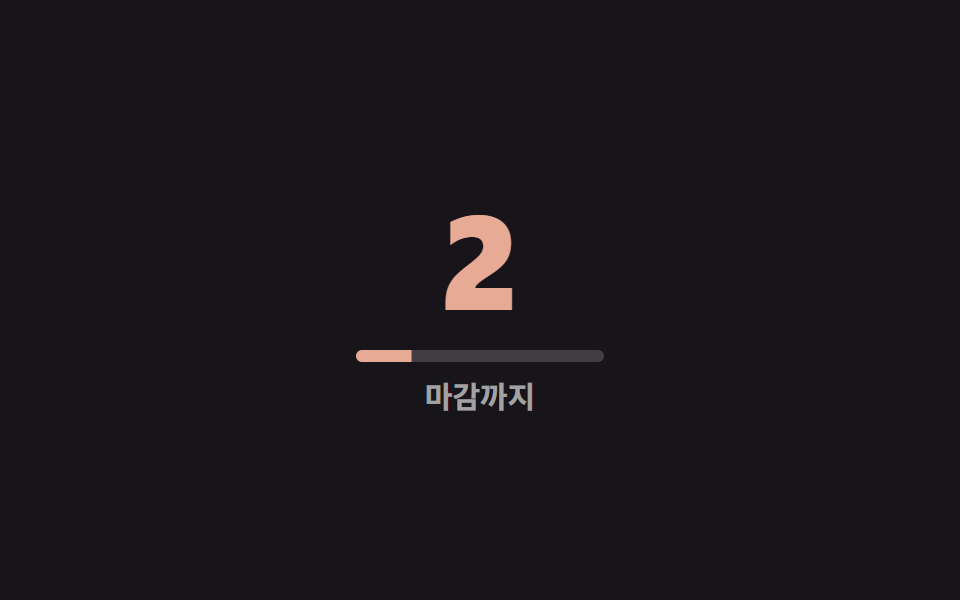
Custom property @property số nguyên đếm ngược về 0 thay vì đếm lên mục tiêu, chuyển dần sang màu cảnh báo khi số còn lại giảm.
Dùng choHạn chót số lượng có hạn, sự kiện sắp kết thúc, cảnh báo sắp hết hàng
역방향 카운트0으로 수렴경고색 전환
<main class="stage">
  <div class="counter is-demo">
    <span class="counter__num" aria-hidden="true"></span>
    <span class="counter__sr">0</span>
    <span class="counter__bar" aria-hidden="true"></span>
    <span class="counter__label">Còn lại</span>
  </div>
</main>
@use "../../../../site/static/demo-tokens" as *;
// ── 변수 3개 ──────────────────────────────────────────
$duration: $dur-loop;
$easing: $ease-out;
$color: $subject-cream;
@include stage($stage-ink);
@property --t {
syntax: '<integer>';
initial-value: 9;
inherits: true; // 숫자와 아래 바 둘 다 같은 값을 읽는다
}
.counter {
--t: 9;
text-align: center;
color: $color; // 남은 수가 줄어들수록 이 색이 경고색으로 바뀐다
&__num {
counter-reset: t var(--t);
display: block;
font-weight: 800; font-size: clamp(44px, 14vw, 72px); line-height: 1; font-family: inherit;
font-variant-numeric: tabular-nums;
color: inherit;
&::before { content: counter(t); }
}
&__sr {
position: absolute;
width: 1px; height: 1px;
overflow: hidden;
clip-path: inset(50%);
white-space: nowrap;
}
// 남은 수만큼 채워진 바 — 숫자가 줄어드는 만큼 짧아져 변한 픽셀 면적을 키운다
&__bar {
display: block;
width: clamp(90px, 26vw, 130px);
height: 6px;
margin: clamp(10px, 3vw, 14px) auto 0;
border-radius: $r-pill;
background: rgba(255, 255, 255, .18);
overflow: hidden;
&::after {
content: "";
display: block;
height: 100%;
background: currentColor; // 부모(.counter)의 color 를 그대로 따라간다
transform-origin: left; // 규칙8: 남은 시간 왼쪽 기준 바
transform: scaleX(calc(var(--t) / 9));
}
}
&__label {
display: block;
margin-top: clamp(6px, 2vw, 10px);
font-weight: 600; font-size: clamp(12px, 3.4vw, 15px); line-height: 1; font-family: inherit;
color: rgba(255, 255, 255, .6);
}
}
// 목표값이 아니라 0을 향해 거꾸로 센다. 색은 부모에서 함께 애니메이션해 숫자·바가 같이 바뀐다
.counter.is-demo {
animation: count-down $duration $easing infinite;
}
@keyframes count-down {
0% { --t: 9; color: $color; }
60% { --t: 3; color: $color; }
85% { --t: 0; color: $error; }
100% { --t: 0; color: $error; }
}
@media (prefers-reduced-motion: reduce) {
.counter.is-demo { animation: none; --t: 0; color: $error; }
}html, body {
margin: 0;
overflow: hidden;
}
.stage {
box-sizing: border-box;
min-height: 100vh;
display: grid;
place-items: center;
margin: 0;
background: #17141a;
font-family: -apple-system, "Segoe UI", "Noto Sans KR", sans-serif;
padding: clamp(8px, 4vw, 24px);
}
@property --t {
syntax: "<integer>";
initial-value: 9;
inherits: true;
}
.counter {
--t: 9;
text-align: center;
color: #fff7e6;
}
.counter__num {
counter-reset: t var(--t);
display: block;
font-weight: 800;
font-size: clamp(44px, 14vw, 72px);
line-height: 1;
font-family: inherit;
font-variant-numeric: tabular-nums;
color: inherit;
}
.counter__num::before {
content: counter(t);
}
.counter__sr {
position: absolute;
width: 1px;
height: 1px;
overflow: hidden;
clip-path: inset(50%);
white-space: nowrap;
}
.counter__bar {
display: block;
width: clamp(90px, 26vw, 130px);
height: 6px;
margin: clamp(10px, 3vw, 14px) auto 0;
border-radius: 999px;
background: rgba(255, 255, 255, 0.18);
overflow: hidden;
}
.counter__bar::after {
content: "";
display: block;
height: 100%;
background: currentColor;
transform-origin: left;
transform: scaleX(calc(var(--t) / 9));
}
.counter__label {
display: block;
margin-top: clamp(6px, 2vw, 10px);
font-weight: 600;
font-size: clamp(12px, 3.4vw, 15px);
line-height: 1;
font-family: inherit;
color: rgba(255, 255, 255, 0.6);
}
.counter.is-demo {
animation: count-down 2s ease-out infinite;
}
@keyframes count-down {
0% {
--t: 9;
color: #fff7e6;
}
60% {
--t: 3;
color: #fff7e6;
}
85% {
--t: 0;
color: #c2361a;
}
100% {
--t: 0;
color: #c2361a;
}
}
@media (prefers-reduced-motion: reduce) {
.counter.is-demo {
animation: none;
--t: 0;
color: #c2361a;
}
}import type { CSSProperties } from "react";
import styles from "./CountdownTimer.module.scss";
export type CountdownTimerProps = {
/** 몇에서 시작해 0으로 향할지 */
from: number;
label: string;
duration?: number;
easing?: string;
color?: string;
};
type Vars = CSSProperties & { "--duration"?: string; "--easing"?: string; "--color"?: string; "--t-start"?: number };
export default function CountdownTimer({
from, label, duration = 2000, easing = "ease-out", color = "#fff7e6",
}: CountdownTimerProps) {
const vars: Vars = {
"--duration": `${duration}ms`,
"--easing": easing,
"--color": color,
"--t-start": from,
};
return (
<div className={styles.counter} style={vars}>
<span className={styles.num} aria-hidden="true" />
<span className={styles.sr}>0</span>
<span className={styles.bar} aria-hidden="true" />
<span className={styles.label}>{label}</span>
</div>
);
}09 Bộ đếm ngược thời gian — Diện tích đo được 1.755% · khung hình chuyển động 12/23Nguyên tác GODRICH · SCSS và React nằm trong tệp zip · 9 CSS Number Counter Animation — dán 1 dòng
Bài viết chứa demo này
 9 CSS Number Counter Animation — dán 1 dòngCSS number counter animation là chữ số tự tăng từ 0 lên một giá trị đích bằng thuộc tính CSS, không cần JavaScript. Chín Xem tất cả demo trong bài này


