08Parallax theo chuột
Các lớp bám theo hướng con trỏ di chuyển với biên độ khác nhau, tạo cảm giác nổi khối.
Dùng choShowcase sản phẩm, hero portfolio
pointermove레이어별 배율translate
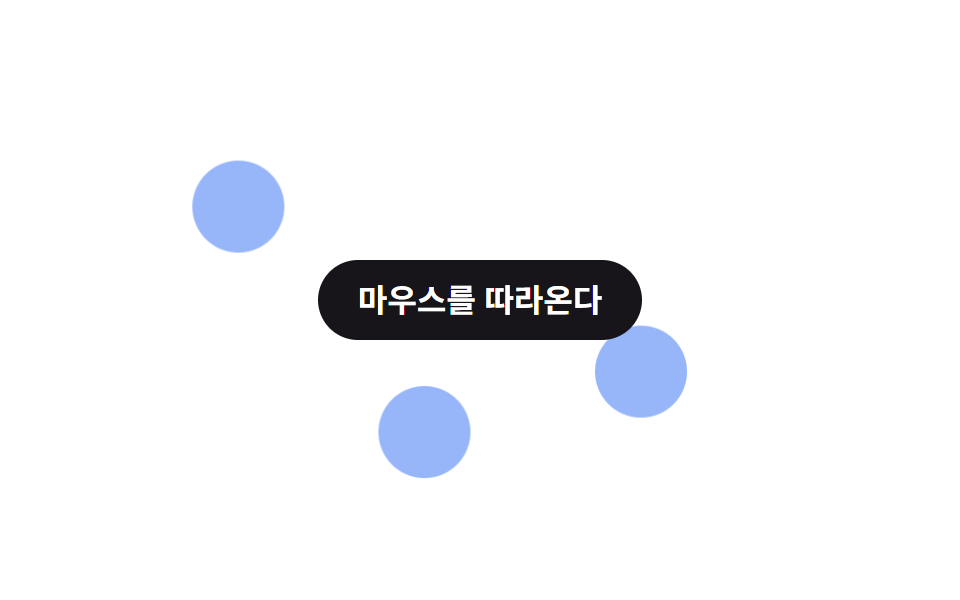
<main class="stage is-demo">
  <div class="mousepar">
    <div class="mousepar__layer mousepar__layer--a" style="--depth:.3" aria-hidden="true"></div>
    <div class="mousepar__layer mousepar__layer--b" style="--depth:.6" aria-hidden="true"></div>
    <div class="mousepar__layer mousepar__layer--c" style="--depth:1" aria-hidden="true"></div>
    <p class="mousepar__label">Bám theo con trỏ</p>
  </div>
</main>
@use "../../../../site/static/demo-tokens" as *;
// ── 변수 3개. 변형은 이것만 바꾼다 ──────────────────────────
$amp: 22px; // 커서 정규화값 1당 이동량
$duration: $dur-loop; // 데모 왕복 주기
$color: $subject-blue; // 레이어 색 (paper 무대라 blue)
@include stage($stage-paper);
.mousepar {
position: relative;
width: 100%;
height: 100%;
display: grid;
place-items: center;
}
.mousepar__layer {
position: absolute;
width: 46px;
height: 46px;
border-radius: 50%;
background: rgba($color, .5);
transition: transform 120ms $ease-out;
// ── 실제 사용 코드: pointermove 로 받은 --mx·--my 에 레이어별 --depth 를 곱해 이동한다 ──
&--a { left: 18%; top: 24%; transform: translate(calc(var(--mx, 0) * var(--depth) * #{$amp}), calc(var(--my, 0) * var(--depth) * #{$amp})); }
&--b { left: 62%; top: 54%; transform: translate(calc(var(--mx, 0) * var(--depth) * #{$amp}), calc(var(--my, 0) * var(--depth) * #{$amp})); }
&--c { left: 40%; top: 68%; transform: translate(calc(var(--mx, 0) * var(--depth) * #{$amp}), calc(var(--my, 0) * var(--depth) * #{$amp})); }
}
.mousepar__label {
position: relative;
z-index: 1;
margin: 0;
padding: 12px 20px;
border-radius: $r-pill;
background: $stage-ink;
color: #fff;
font: 700 clamp(13px, 4.2vw, 16px)/1 -apple-system, "Segoe UI", "Noto Sans KR", sans-serif;
}
// ── 데모(.is-demo): 커서 대신 2초 루프로 흉내 ────────
.stage.is-demo .mousepar__layer--a { animation: loop-a $duration ease-in-out infinite; }
.stage.is-demo .mousepar__layer--b { animation: loop-b $duration ease-in-out infinite; }
.stage.is-demo .mousepar__layer--c { animation: loop-c $duration ease-in-out infinite; }
@keyframes loop-a { 0%, 100% { transform: translate(-10px, -6px); } 50% { transform: translate(10px, 6px); } }
@keyframes loop-b { 0%, 100% { transform: translate(16px, 10px); } 50% { transform: translate(-16px, -10px); } }
@keyframes loop-c { 0%, 100% { transform: translate(-24px, -14px); } 50% { transform: translate(24px, 14px); } }
@media (prefers-reduced-motion: reduce) {
.mousepar__layer,
.stage.is-demo .mousepar__layer--a, .stage.is-demo .mousepar__layer--b, .stage.is-demo .mousepar__layer--c {
animation: none !important;
transform: none !important;
transition: none;
}
}html, body {
margin: 0;
overflow: hidden;
}
.stage {
box-sizing: border-box;
min-height: 100vh;
display: grid;
place-items: center;
margin: 0;
background: #ffffff;
font-family: -apple-system, "Segoe UI", "Noto Sans KR", sans-serif;
padding: clamp(8px, 4vw, 24px);
}
.mousepar {
position: relative;
width: 100%;
height: 100%;
display: grid;
place-items: center;
}
.mousepar__layer {
position: absolute;
width: 46px;
height: 46px;
border-radius: 50%;
background: rgba(47, 109, 246, 0.5);
transition: transform 120ms ease-out;
}
.mousepar__layer--a {
left: 18%;
top: 24%;
transform: translate(calc(var(--mx, 0) * var(--depth) * 22px), calc(var(--my, 0) * var(--depth) * 22px));
}
.mousepar__layer--b {
left: 62%;
top: 54%;
transform: translate(calc(var(--mx, 0) * var(--depth) * 22px), calc(var(--my, 0) * var(--depth) * 22px));
}
.mousepar__layer--c {
left: 40%;
top: 68%;
transform: translate(calc(var(--mx, 0) * var(--depth) * 22px), calc(var(--my, 0) * var(--depth) * 22px));
}
.mousepar__label {
position: relative;
z-index: 1;
margin: 0;
padding: 12px 20px;
border-radius: 999px;
background: #17141a;
color: #fff;
font: 700 clamp(13px, 4.2vw, 16px)/1 -apple-system, "Segoe UI", "Noto Sans KR", sans-serif;
}
.stage.is-demo .mousepar__layer--a {
animation: loop-a 2s ease-in-out infinite;
}
.stage.is-demo .mousepar__layer--b {
animation: loop-b 2s ease-in-out infinite;
}
.stage.is-demo .mousepar__layer--c {
animation: loop-c 2s ease-in-out infinite;
}
@keyframes loop-a {
0%, 100% {
transform: translate(-10px, -6px);
}
50% {
transform: translate(10px, 6px);
}
}
@keyframes loop-b {
0%, 100% {
transform: translate(16px, 10px);
}
50% {
transform: translate(-16px, -10px);
}
}
@keyframes loop-c {
0%, 100% {
transform: translate(-24px, -14px);
}
50% {
transform: translate(24px, 14px);
}
}
@media (prefers-reduced-motion: reduce) {
.mousepar__layer,
.stage.is-demo .mousepar__layer--a, .stage.is-demo .mousepar__layer--b, .stage.is-demo .mousepar__layer--c {
animation: none !important;
transform: none !important;
transition: none;
}
}// 실제 사용: 커서 위치를 -0.5~0.5 로 정규화해 CSS 변수로 넘긴다. 레이어는 --depth 로 배율만 다르게 받는다.
var el = document.querySelector('.mousepar');
el.addEventListener('pointermove', function (e) {
var r = el.getBoundingClientRect();
el.style.setProperty('--mx', ((e.clientX - r.left) / r.width - 0.5).toFixed(3));
el.style.setProperty('--my', ((e.clientY - r.top) / r.height - 0.5).toFixed(3));
});import { useCallback, useRef } from "react";
import type { CSSProperties, PointerEvent, ReactNode } from "react";
import styles from "./MouseParallax.module.scss";
export type MouseParallaxProps = {
children: ReactNode;
/** 커서 정규화값 1당 이동량 (기본 22px) */
amp?: number;
/** 레이어 색 */
color?: string;
className?: string;
};
type Vars = CSSProperties & { "--amp"?: string; "--color"?: string; "--mx"?: string; "--my"?: string };
export default function MouseParallax({ children, amp = 22, color = "#2f6df6", className = "" }: MouseParallaxProps) {
const ref = useRef<HTMLDivElement>(null);
const handle = useCallback((e: PointerEvent<HTMLDivElement>) => {
const r = e.currentTarget.getBoundingClientRect();
ref.current?.style.setProperty("--mx", `${(e.clientX - r.left) / r.width - 0.5}`);
ref.current?.style.setProperty("--my", `${(e.clientY - r.top) / r.height - 0.5}`);
}, []);
const vars: Vars = { "--amp": `${amp}px`, "--color": color };
return (
<div ref={ref} className={`${styles.wrap} ${className}`} style={vars} onPointerMove={handle}>
<div className={styles.layer} style={{ "--depth": ".3", left: "18%", top: "24%" } as Vars} aria-hidden="true" />
<div className={styles.layer} style={{ "--depth": ".6", left: "62%", top: "54%" } as Vars} aria-hidden="true" />
<div className={styles.layer} style={{ "--depth": "1", left: "40%", top: "68%" } as Vars} aria-hidden="true" />
<p className={styles.label}>{children}</p>
</div>
);
}08 Parallax theo chuột — Diện tích đo được 6.447% · khung hình chuyển động 23/23Nguyên tác GODRICH · SCSS và React nằm trong tệp zip · 9 hiệu ứng css parallax scrolling, không cần JS
Bài viết chứa demo này
 9 hiệu ứng css parallax scrolling, không cần JSCSS parallax scrolling là cách tạo cảm giác chiều sâu khi cuộn trang, bằng cách cho các lớp — nền, chữ, thẻ — di chuyển Xem tất cả demo trong bài này