04Chuyển trạng thái bằng toggle class
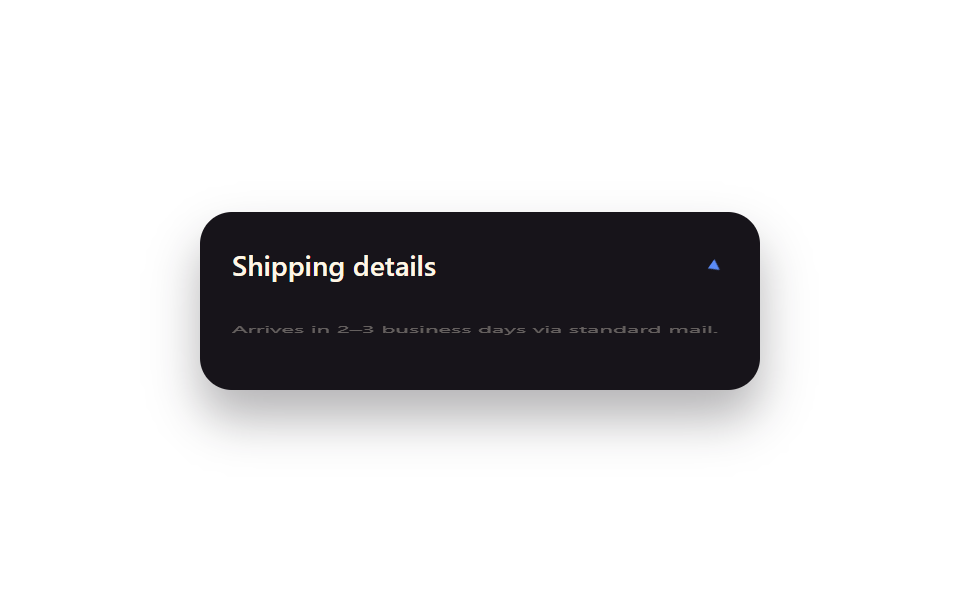
Một state boolean ánh xạ thẳng thành một className, còn mọi vận động ở giữa do CSS transition đảm nhiệm — 'state quyết định class, CSS quyết định chuyển động' là pattern phổ biến nhất trong React.
Dùng choPanel mở/gập, mục nav đang chọn, dialog đang mở
useStateclassNametransition
<main class="stage">
  <div class="tg-panel is-demo">
    <div class="tg-panel__head">
      <span class="tg-panel__label">Shipping details</span>
      <span class="tg-panel__chevron">▾</span>
    </div>
    <div class="tg-panel__body">Arrives in 2–3 business days via standard mail.</div>
  </div>
</main>
@use "../../../../site/static/demo-tokens" as *;
// ── 변수 3개 ──────────────────────────────────────────
$duration: $dur-base;
$easing: $ease-spring;
$color: $subject-blue-light; // 잉크 면 위 파란 글자 전용 토큰 — $subject-blue 는 4.03:1
@include stage($stage-paper);
.tg-panel {
width: min(280px, 88vw);
box-sizing: border-box;
border-radius: $r-card;
background: $subject-ink;
color: $subject-cream;
box-shadow: $shadow-raised;
overflow: hidden;
font-family: -apple-system, "Segoe UI", sans-serif;
}
.tg-panel__head {
display: flex;
align-items: center;
justify-content: space-between;
padding: $sp-4 $sp-4;
}
.tg-panel__label { font-weight: 600; font-size: 14px; line-height: 1; font-family: inherit; }
.tg-panel__chevron {
display: inline-block;
color: $color;
transition: transform $duration $easing;
}
.tg-panel__body {
padding: 0 $sp-4 $sp-4;
font-weight: 400;
font-size: 12px;
line-height: 1.5;
font-family: inherit;
opacity: .85;
transform-origin: top; // 규칙8: 패널 위변 scaleY 펼침
transition: opacity $duration $easing, transform $duration $easing;
}
// 실사용 원리: isOpen 상태 하나가 className="is-open" 하나로 매핑되고, 사이 움직임은
// 전부 CSS transition 이 맡는다 (React state → class, class → motion).
.tg-panel:not(.is-open) .tg-panel__chevron { transform: rotate(-90deg); }
.tg-panel:not(.is-open) .tg-panel__body { opacity: 0; transform: scaleY(0); }
// 캡처용 루프: 닫힘 → 열림 → 닫힘을 2초에 걸쳐 반복
@keyframes tg-chevron { 0%, 15% { transform: rotate(-90deg); } 45%, 70% { transform: rotate(0deg); } 100% { transform: rotate(-90deg); } }
@keyframes tg-body { 0%, 15% { opacity: 0; transform: scaleY(0); } 45%, 70% { opacity: .85; transform: scaleY(1); } 100% { opacity: 0; transform: scaleY(0); } }
.tg-panel.is-demo .tg-panel__chevron { animation: tg-chevron $dur-loop $easing infinite; }
.tg-panel.is-demo .tg-panel__body { animation: tg-body $dur-loop $easing infinite; }
@media (prefers-reduced-motion: reduce) {
.tg-panel__chevron, .tg-panel__body { transition: none; }
.tg-panel.is-demo .tg-panel__chevron,
.tg-panel.is-demo .tg-panel__body { animation: none !important; opacity: .85; transform: none; }
}html, body {
margin: 0;
overflow: hidden;
}
.stage {
box-sizing: border-box;
min-height: 100vh;
display: grid;
place-items: center;
margin: 0;
background: #ffffff;
font-family: -apple-system, "Segoe UI", "Noto Sans KR", sans-serif;
padding: clamp(8px, 4vw, 24px);
}
.tg-panel {
width: min(280px, 88vw);
box-sizing: border-box;
border-radius: 16px;
background: #17141a;
color: #fff7e6;
box-shadow: 0 14px 24px rgba(23, 20, 26, 0.32);
overflow: hidden;
font-family: -apple-system, "Segoe UI", sans-serif;
}
.tg-panel__head {
display: flex;
align-items: center;
justify-content: space-between;
padding: 16px 16px;
}
.tg-panel__label {
font-weight: 600;
font-size: 14px;
line-height: 1;
font-family: inherit;
}
.tg-panel__chevron {
display: inline-block;
color: #5b8cf8;
transition: transform 300ms cubic-bezier(0.2, 0.8, 0.2, 1);
}
.tg-panel__body {
padding: 0 16px 16px;
font-weight: 400;
font-size: 12px;
line-height: 1.5;
font-family: inherit;
opacity: 0.85;
transform-origin: top;
transition: opacity 300ms cubic-bezier(0.2, 0.8, 0.2, 1), transform 300ms cubic-bezier(0.2, 0.8, 0.2, 1);
}
.tg-panel:not(.is-open) .tg-panel__chevron {
transform: rotate(-90deg);
}
.tg-panel:not(.is-open) .tg-panel__body {
opacity: 0;
transform: scaleY(0);
}
@keyframes tg-chevron {
0%, 15% {
transform: rotate(-90deg);
}
45%, 70% {
transform: rotate(0deg);
}
100% {
transform: rotate(-90deg);
}
}
@keyframes tg-body {
0%, 15% {
opacity: 0;
transform: scaleY(0);
}
45%, 70% {
opacity: 0.85;
transform: scaleY(1);
}
100% {
opacity: 0;
transform: scaleY(0);
}
}
.tg-panel.is-demo .tg-panel__chevron {
animation: tg-chevron 2s cubic-bezier(0.2, 0.8, 0.2, 1) infinite;
}
.tg-panel.is-demo .tg-panel__body {
animation: tg-body 2s cubic-bezier(0.2, 0.8, 0.2, 1) infinite;
}
@media (prefers-reduced-motion: reduce) {
.tg-panel__chevron, .tg-panel__body {
transition: none;
}
.tg-panel.is-demo .tg-panel__chevron,
.tg-panel.is-demo .tg-panel__body {
animation: none !important;
opacity: 0.85;
transform: none;
}
}import { CSSProperties, useState } from "react";
import styles from "./ToggleClassState.module.scss";
export interface ToggleClassStateProps {
duration?: string;
easing?: string;
}
export default function ToggleClassState({
duration = "300ms",
easing = "cubic-bezier(.2, .8, .2, 1)",
}: ToggleClassStateProps) {
// The idiomatic React pattern: one boolean state maps straight onto one className.
// Everything visual in between is CSS's job, not this component's.
const [open, setOpen] = useState(false);
const style: CSSProperties & { "--duration"?: string; "--easing"?: string } = {
"--duration": duration,
"--easing": easing,
};
return (
<div className={`${styles.panel} ${open ? styles.open : ""}`} style={style}>
<button className={styles.head} onClick={() => setOpen((v) => !v)}>
<span className={styles.label}>Shipping details</span>
<span className={styles.chevron}>▾</span>
</button>
<div className={styles.body}>Arrives in 2–3 business days via standard mail.</div>
</div>
);
}04 Chuyển trạng thái bằng toggle class — Diện tích đo được 1.805% · khung hình chuyển động 11/23Nguyên tác GODRICH · SCSS và React nằm trong tệp zip · 9 hiệu ứng react css animation không cần library
Bài viết chứa demo này
 9 hiệu ứng react css animation không cần libraryReact css animation là cách thêm chuyển động cho component bằng chính CSS, không cần cài library. Chín hiệu ứng dưới đây Xem tất cả demo trong bài này