05Ảnh mờ dần rõ
Hiện ảnh cực nhỏ bị mờ trước, rồi nét dần thành ảnh thật.
Dùng choẢnh hero, gallery
20px400ms확대 섞기
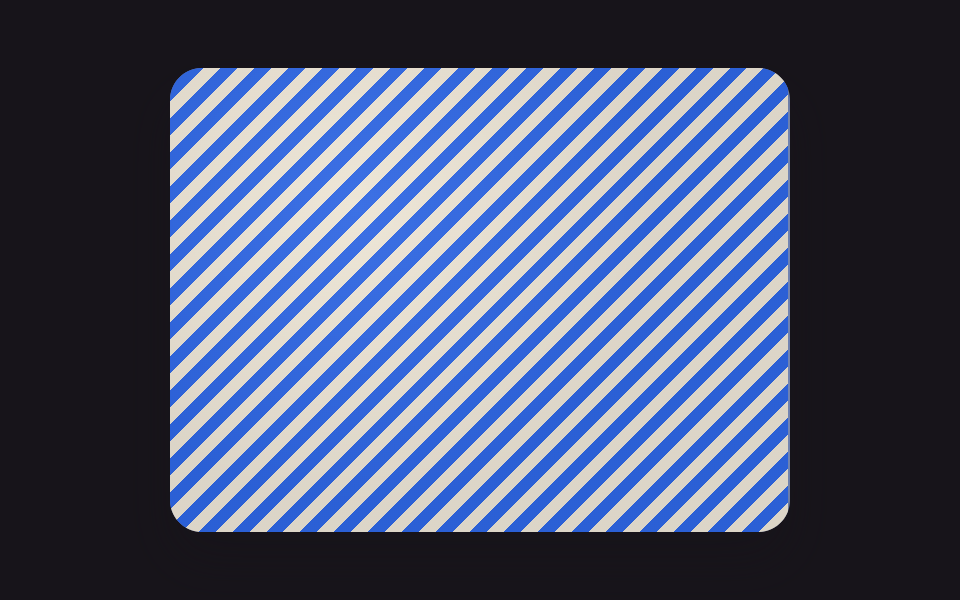
<main class="stage">
  <div class="photo">
    <div class="placeholder"></div>
    <div class="real"></div>
  </div>
</main>
@use "../../../../site/static/demo-tokens" as *;
// ── 변수 3개 ──────────────────────────────────────────
$duration: $dur-loop; // 흐림 → 선명 → 흐림 한 바퀴
$easing: linear; // 스프링·팝은 중간에서 멈춘 듯 보였다 — 고르게 바뀌어야 눈에 계속 보인다
$color: $subject-blue; // 진짜 이미지 쪽의 강조 색
@include stage($stage-ink);
// 진짜 이미지 대신 CSS 그라디언트로 사진 자리를 흉내 낸다 (외부 이미지 의존 0)
.photo {
position: relative;
overflow: hidden;
width: clamp(200px, 70%, 320px);
aspect-ratio: 4 / 3;
border-radius: $r-card;
box-shadow: $shadow-raised;
}
// 결이 있는 무늬라야 "흐림"이 실제로 다르게 보인다 (매끈한 그라디언트는 흐려도 거의 같은 색이다)
.placeholder, .real {
position: absolute;
inset: 0;
background-image:
repeating-linear-gradient(135deg, rgba($subject-cream, .85) 0 6px, rgba($color, .85) 6px 12px),
radial-gradient(circle at 30% 30%, rgba($subject-cream, .5), transparent 55%);
background-color: $stage-ink;
}
// 아주 작은 원본을 흐리게 미리 깐다 (20px, 고정값 — 이 레이어는 움직이지 않는다). 결이 뭉개져 평평한 색 덩어리가 된다
.placeholder {
filter: blur(20px);
transform: scale(1.15); // 블러 가장자리가 비치지 않게 살짝 키운다
}
// 진짜 이미지가 흐림 위로 나타났다 사라지길 반복한다 (렌더용 루프)
.real {
opacity: 0;
transform: scale(1.04);
animation: reveal $duration $easing infinite;
}
@keyframes reveal {
0% { opacity: 0; transform: scale(1.04); } // 흐림만 보인다
50% { opacity: 1; transform: scale(1); } // 가장 선명한 순간
100% { opacity: 0; transform: scale(1.04); } // 다시 흐림으로 — 한 바퀴가 곧 로딩 한 번
}
// ── 접근성: 흐림-선명 반복 대신 선명한 최종 상태만 고정으로 보여준다 ──
@media (prefers-reduced-motion: reduce) {
.real { animation: none !important; opacity: 1; transform: scale(1); }
}html, body {
margin: 0;
overflow: hidden;
}
.stage {
box-sizing: border-box;
min-height: 100vh;
display: grid;
place-items: center;
margin: 0;
background: #17141a;
font-family: -apple-system, "Segoe UI", "Noto Sans KR", sans-serif;
padding: clamp(8px, 4vw, 24px);
}
.photo {
position: relative;
overflow: hidden;
width: clamp(200px, 70%, 320px);
aspect-ratio: 4/3;
border-radius: 16px;
box-shadow: 0 14px 24px rgba(23, 20, 26, 0.32);
}
.placeholder, .real {
position: absolute;
inset: 0;
background-image: repeating-linear-gradient(135deg, rgba(255, 247, 230, 0.85) 0 6px, rgba(47, 109, 246, 0.85) 6px 12px), radial-gradient(circle at 30% 30%, rgba(255, 247, 230, 0.5), transparent 55%);
background-color: #17141a;
}
.placeholder {
filter: blur(20px);
transform: scale(1.15);
}
.real {
opacity: 0;
transform: scale(1.04);
animation: reveal 2s linear infinite;
}
@keyframes reveal {
0% {
opacity: 0;
transform: scale(1.04);
}
50% {
opacity: 1;
transform: scale(1);
}
100% {
opacity: 0;
transform: scale(1.04);
}
}
@media (prefers-reduced-motion: reduce) {
.real {
animation: none !important;
opacity: 1;
transform: scale(1);
}
}import { useCallback, useState } from "react";
import type { CSSProperties } from "react";
import styles from "./ImageBlurUp.module.scss";
export type ImageBlurUpProps = {
/** 진짜 이미지 */
src: string;
/** 아주 작은(20px 안팎) 미리 준비한 흐린 이미지 */
placeholderSrc: string;
alt: string;
/** 흐림 → 선명 전환 시간 (기본 400ms) */
duration?: number;
easing?: string;
className?: string;
};
export default function ImageBlurUp({
src,
placeholderSrc,
alt,
duration = 400,
easing = "cubic-bezier(.2,.8,.2,1)",
className = "",
}: ImageBlurUpProps) {
const [loaded, setLoaded] = useState(false);
const onLoad = useCallback(() => setLoaded(true), []);
const vars = { "--duration": `${duration}ms`, "--easing": easing } as CSSProperties;
return (
<div className={`${styles.photo} ${className}`} style={vars}>
<img className={styles.placeholder} src={placeholderSrc} alt="" aria-hidden="true" />
<img
className={`${styles.real} ${loaded ? styles.loaded : ""}`}
src={src}
alt={alt}
onLoad={onLoad}
/>
</div>
);
}05 Ảnh mờ dần rõ — Diện tích đo được 49.817% · khung hình chuyển động 22/23Nguyên tác GODRICH · SCSS và React nằm trong tệp zip · 9 hiệu ứng css skeleton loading copy-paste
Bài viết chứa demo này
 9 hiệu ứng css skeleton loading copy-pasteCss skeleton loading là kỹ thuật hiện khối xám giữ đúng hình dạng của nội dung thật trong lúc chờ dữ liệu, thay cho màn Xem tất cả demo trong bài này


