08Lấp lánh theo hàng
Mỗi hàng lấp lánh trễ hơn một chút, tạo cảm giác như sóng.
Dùng choDanh sách dài
60ms역방향2열
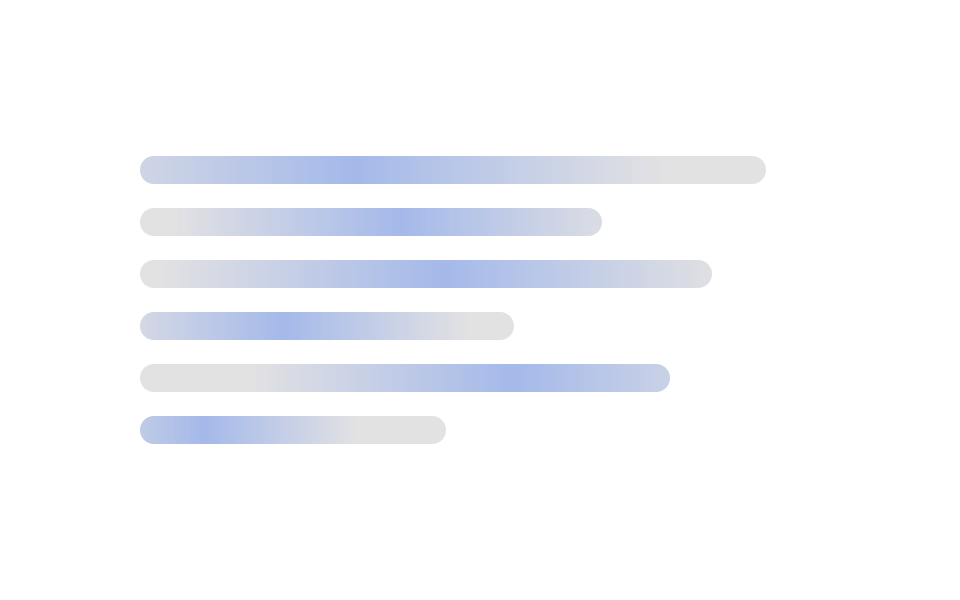
<main class="stage">
  <div class="rows">
    <div class="bar"></div>
    <div class="bar"></div>
    <div class="bar"></div>
    <div class="bar"></div>
    <div class="bar"></div>
    <div class="bar"></div>
  </div>
</main>
@use "../../../../site/static/demo-tokens" as *;
// ── 변수 3개 ──────────────────────────────────────────
$duration: $dur-loop; // 줄 하나가 훑는 시간 (지연은 이 값의 일부)
$easing: $ease-out;
$color: $subject-ink; // 막대 색 (흰 무대라 잉크 톤)
@include stage($stage-paper);
.rows {
width: clamp(200px, 78%, 340px);
display: grid;
gap: clamp(8px, 2.6vw, 12px);
}
.bar {
position: relative;
overflow: hidden;
height: clamp(11px, 3.2vw, 14px);
border-radius: $r-control;
background: rgba($color, .12);
&::after {
content: "";
position: absolute;
inset: 0;
background: linear-gradient(90deg, transparent, rgba($subject-blue, .35), transparent);
transform: translateX(-120%);
animation: shimmer $duration $easing infinite;
}
}
.bar:nth-child(1) { width: 92%; }
.bar:nth-child(2) { width: 68%; }
.bar:nth-child(3) { width: 84%; }
.bar:nth-child(4) { width: 55%; }
.bar:nth-child(5) { width: 78%; }
.bar:nth-child(6) { width: 45%; }
// 줄마다 60ms 씩 늦게 시작해 파도처럼 보인다. 음수 지연 = 렌더 첫 프레임부터 이미 진행 중
@for $i from 1 through 6 {
.bar:nth-child(#{$i})::after { animation-delay: -($i - 1) * 60ms; }
}
// 짝수 줄은 반대 방향으로 훑어 파도가 갈라지는 느낌을 준다
.bar:nth-child(even)::after { animation-name: shimmer-reverse; }
@keyframes shimmer {
to { transform: translateX(120%); }
}
@keyframes shimmer-reverse {
from { transform: translateX(120%); }
to { transform: translateX(-120%); }
}
@media (prefers-reduced-motion: reduce) {
.bar::after { animation: none !important; opacity: .4; transform: translateX(0); }
}html, body {
margin: 0;
overflow: hidden;
}
.stage {
box-sizing: border-box;
min-height: 100vh;
display: grid;
place-items: center;
margin: 0;
background: #ffffff;
font-family: -apple-system, "Segoe UI", "Noto Sans KR", sans-serif;
padding: clamp(8px, 4vw, 24px);
}
.rows {
width: clamp(200px, 78%, 340px);
display: grid;
gap: clamp(8px, 2.6vw, 12px);
}
.bar {
position: relative;
overflow: hidden;
height: clamp(11px, 3.2vw, 14px);
border-radius: 12px;
background: rgba(23, 20, 26, 0.12);
}
.bar::after {
content: "";
position: absolute;
inset: 0;
background: linear-gradient(90deg, transparent, rgba(47, 109, 246, 0.35), transparent);
transform: translateX(-120%);
animation: shimmer 2s ease-out infinite;
}
.bar:nth-child(1) {
width: 92%;
}
.bar:nth-child(2) {
width: 68%;
}
.bar:nth-child(3) {
width: 84%;
}
.bar:nth-child(4) {
width: 55%;
}
.bar:nth-child(5) {
width: 78%;
}
.bar:nth-child(6) {
width: 45%;
}
.bar:nth-child(1)::after {
animation-delay: -0ms;
}
.bar:nth-child(2)::after {
animation-delay: -60ms;
}
.bar:nth-child(3)::after {
animation-delay: -120ms;
}
.bar:nth-child(4)::after {
animation-delay: -180ms;
}
.bar:nth-child(5)::after {
animation-delay: -240ms;
}
.bar:nth-child(6)::after {
animation-delay: -300ms;
}
.bar:nth-child(even)::after {
animation-name: shimmer-reverse;
}
@keyframes shimmer {
to {
transform: translateX(120%);
}
}
@keyframes shimmer-reverse {
from {
transform: translateX(120%);
}
to {
transform: translateX(-120%);
}
}
@media (prefers-reduced-motion: reduce) {
.bar::after {
animation: none !important;
opacity: 0.4;
transform: translateX(0);
}
}import type { CSSProperties } from "react";
import styles from "./WaveStaggerSkeleton.module.scss";
export type WaveStaggerSkeletonProps = {
duration?: number;
easing?: string;
color?: string;
/** 줄 수 (기본 6) */
rows?: number;
/** 줄 사이 시차 (기본 60ms) */
stagger?: number;
className?: string;
};
const WIDTHS = ["92%", "68%", "84%", "55%", "78%", "45%"];
export default function WaveStaggerSkeleton({
duration = 2000,
easing = "ease-out",
color = "#2f6df6",
rows = 6,
stagger = 60,
className = "",
}: WaveStaggerSkeletonProps) {
const vars = { "--duration": `${duration}ms`, "--easing": easing, "--color": color } as CSSProperties;
return (
<div className={`${styles.rows} ${className}`} style={vars}>
{Array.from({ length: rows }).map((_, i) => (
<div
key={i}
className={styles.bar}
style={{
width: WIDTHS[i % WIDTHS.length],
animationDelay: `${-i * stagger}ms`,
animationDirection: i % 2 ? "reverse" : "normal",
} as CSSProperties}
/>
))}
</div>
);
}08 Lấp lánh theo hàng — Diện tích đo được 13.818% · khung hình chuyển động 17/23Nguyên tác GODRICH · SCSS và React nằm trong tệp zip · 9 hiệu ứng css skeleton loading copy-paste
Bài viết chứa demo này
 9 hiệu ứng css skeleton loading copy-pasteCss skeleton loading là kỹ thuật hiện khối xám giữ đúng hình dạng của nội dung thật trong lúc chờ dữ liệu, thay cho màn Xem tất cả demo trong bài này