03Gạch chân tab theo cuộn
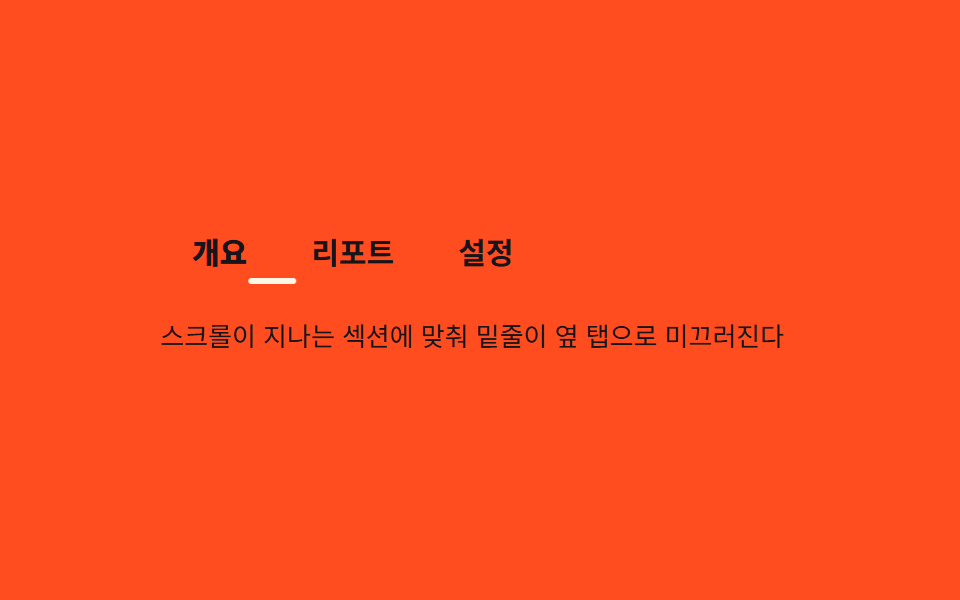
Một đường gạch chân duy nhất bên dưới các tab anchor trong header trượt sang tab ứng với section đang đi qua tầm nhìn.
Dùng choTab anchor của trang chi tiết sản phẩm, nav theo section của trang tài liệu
translateX 고정폭@keyframes tus-loopflex:0 0 auto
<main class="stage">
  <div class="tus is-demo">
    <nav class="tus__nav" id="tusNav">
      <a class="tus__tab is-active" href="#overview" data-i="0">Tổng quan</a>
      <a class="tus__tab" href="#report" data-i="1">Báo cáo</a>
      <a class="tus__tab" href="#setting" data-i="2">Cài đặt</a>
      <span class="tus__underline" aria-hidden="true"></span>
    </nav>
    <div class="tus__panel">Gạch chân trượt sang tab ứng với section đang cuộn qua</div>
  </div>
</main>
@use "../../../../site/static/demo-tokens" as *;
// ── 변수 3개. 변형은 이것만 바꾼다 ──────────────────────────
$duration: $dur-base; // 밑줄이 미끄러지는 시간
$easing: $ease-spring;
$color: $subject-cream; // 밑줄·활성 탭 색
@include stage($stage-orange);
.tus { width: min(320px, 88vw); }
.tus__nav {
position: relative;
display: flex;
// 탭마다 내용 폭만큼만 차지해야 실측 offsetLeft·offsetWidth 가 의미 있다 (BD19) — 균등분배 금지
flex-wrap: nowrap;
}
.tus__tab {
flex: 0 0 auto;
padding: $sp-2 $sp-4;
text-decoration: none;
white-space: nowrap;
font-weight: 600;
font-size: clamp(13px, 3.6vw, 15px);
line-height: 1;
font-family: inherit;
color: $subject-ink; // 주황 무대 위 탭 글자 — AA 4.5 (rgba(cream,.65) 는 2.04:1 이었다)
&.is-active { color: $subject-ink; font-weight: 800; }
}
// 폭은 고정(칩 "translateX 고정폭") — 탭마다 넓어지지 않는다. translateX 만 탭 중심으로 움직인다
.tus__underline {
position: absolute; left: 0; bottom: 0;
width: 24px;
height: 3px;
background: $color;
border-radius: $r-pill;
transform: translateX(18.7265625px);
transition: transform $duration $easing;
}
// ── 데모(.is-demo): 세 탭 중심을 옮겨 다니는 2초 루프 ──────────────
// translateX 값 = 480×300 렌더에서 Playwright getBoundingClientRect 로 실측한 탭 left+width/2 - 밑줄폭/2
// (탭0 개요 left 0·폭 61.453125 / 탭1 리포트 left 61.453125·폭 76.171875 / 탭2 설정 left 137.625·폭 61.453125 — 짐작 56/76/56 류 금지, BD19)
.tus.is-demo .tus__underline { animation: tus-loop $dur-loop $easing infinite; }
@keyframes tus-loop {
0%, 15% { transform: translateX(18.7265625px); }
33%, 48% { transform: translateX(87.5390625px); }
66%, 81% { transform: translateX(156.3515625px); }
100% { transform: translateX(18.7265625px); }
}
.tus__panel {
margin-top: $sp-4;
min-height: 32px;
font-weight: 400;
font-size: clamp(12px, 3.2vw, 13px);
line-height: 1.5;
font-family: inherit;
color: $subject-ink; // 주황 무대 위 패널 글자 — AA 4.5
}
// ── 접근성 ──────────────────────────────────────────
@media (prefers-reduced-motion: reduce) {
.tus__underline { transition: none; }
.tus.is-demo .tus__underline { animation: none !important; transform: translateX(18.7265625px); }
}html, body {
margin: 0;
overflow: hidden;
}
.stage {
box-sizing: border-box;
min-height: 100vh;
display: grid;
place-items: center;
margin: 0;
background: #ff4d1f;
font-family: -apple-system, "Segoe UI", "Noto Sans KR", sans-serif;
padding: clamp(8px, 4vw, 24px);
}
.tus {
width: min(320px, 88vw);
}
.tus__nav {
position: relative;
display: flex;
flex-wrap: nowrap;
}
.tus__tab {
flex: 0 0 auto;
padding: 8px 16px;
text-decoration: none;
white-space: nowrap;
font-weight: 600;
font-size: clamp(13px, 3.6vw, 15px);
line-height: 1;
font-family: inherit;
color: #17141a;
}
.tus__tab.is-active {
color: #17141a;
font-weight: 800;
}
.tus__underline {
position: absolute;
left: 0;
bottom: 0;
width: 24px;
height: 3px;
background: #fff7e6;
border-radius: 999px;
transform: translateX(18.7265625px);
transition: transform 300ms cubic-bezier(0.2, 0.8, 0.2, 1);
}
.tus.is-demo .tus__underline {
animation: tus-loop 2s cubic-bezier(0.2, 0.8, 0.2, 1) infinite;
}
@keyframes tus-loop {
0%, 15% {
transform: translateX(18.7265625px);
}
33%, 48% {
transform: translateX(87.5390625px);
}
66%, 81% {
transform: translateX(156.3515625px);
}
100% {
transform: translateX(18.7265625px);
}
}
.tus__panel {
margin-top: 16px;
min-height: 32px;
font-weight: 400;
font-size: clamp(12px, 3.2vw, 13px);
line-height: 1.5;
font-family: inherit;
color: #17141a;
}
@media (prefers-reduced-motion: reduce) {
.tus__underline {
transition: none;
}
.tus.is-demo .tus__underline {
animation: none !important;
transform: translateX(18.7265625px);
}
}// 실제 페이지: IntersectionObserver 로 지금 통과 중인 섹션을 찾아 그 탭에 밑줄을 옮긴다.
// 탭 폭이 서로 달라 offsetLeft·offsetWidth 를 실측해 옮긴다 — 짐작 px 금지 (BD19)
var nav = document.getElementById('tusNav');
var tabs = nav.querySelectorAll('.tus__tab');
var underline = nav.querySelector('.tus__underline');
function moveTo(tab) {
var w = underline.offsetWidth;
underline.style.transform = 'translateX(' + (tab.offsetLeft + tab.offsetWidth / 2 - w / 2) + 'px)';
}
tabs.forEach(function (t) { t.addEventListener('click', function (e) { e.preventDefault(); document.querySelector('.tus').classList.remove('is-demo'); moveTo(t); }); });import { useEffect, useRef, useState } from "react";
import type { CSSProperties, MouseEvent } from "react";
import styles from "./TabUnderlineSync.module.scss";
export type TabUnderlineSyncTab = { key: string; label: string; href: string };
export type TabUnderlineSyncProps = {
tabs: TabUnderlineSyncTab[];
/** 밑줄이 미끄러지는 시간 (기본 300ms) */
duration?: number;
easing?: string;
color?: string;
};
type Vars = CSSProperties & { "--duration"?: string; "--easing"?: string; "--color"?: string };
export default function TabUnderlineSync({
tabs,
duration = 300,
easing = "cubic-bezier(.2,.8,.2,1)",
color = "#fff7e6",
}: TabUnderlineSyncProps) {
const navRef = useRef<HTMLElement>(null);
const [active, setActive] = useState(0);
const [x, setX] = useState(0);
const vars: Vars = { "--duration": `${duration}ms`, "--easing": easing, "--color": color };
// 탭 폭이 서로 달라 offsetLeft·offsetWidth 를 실측해 밑줄 중심을 옮긴다 — 짐작 px 금지 (BD19)
useEffect(() => {
const nav = navRef.current;
if (!nav) return;
const tab = nav.querySelectorAll("a")[active] as HTMLElement | undefined;
const underline = nav.querySelector<HTMLElement>("[data-underline]");
if (tab && underline) {
const w = underline.offsetWidth;
setX(tab.offsetLeft + tab.offsetWidth / 2 - w / 2);
}
}, [active, tabs]);
return (
<nav ref={navRef} className={styles.nav} style={vars}>
{tabs.map((t, i) => (
<a
key={t.key}
href={t.href}
className={i === active ? `${styles.tab} ${styles.isActive}` : styles.tab}
onClick={(e: MouseEvent<HTMLAnchorElement>) => { e.preventDefault(); setActive(i); }}
>
{t.label}
</a>
))}
<span data-underline className={styles.underline} style={{ transform: `translateX(${x}px)` }} />
</nav>
);
}03 Gạch chân tab theo cuộn — Diện tích đo được 0.308% · khung hình chuyển động 14/23Nguyên tác GODRICH · SCSS và React nằm trong tệp zip · 9 mẫu css sticky header — copy-paste là chạy
Bài viết chứa demo này
 9 mẫu css sticky header — copy-paste là chạyCss sticky header là cách giữ hàng menu trên cùng bám mãi trên màn hình dù cuộn xuống đâu, chỉ một dòng position: sticky Xem tất cả demo trong bài này