07Sticky kết hợp parallax
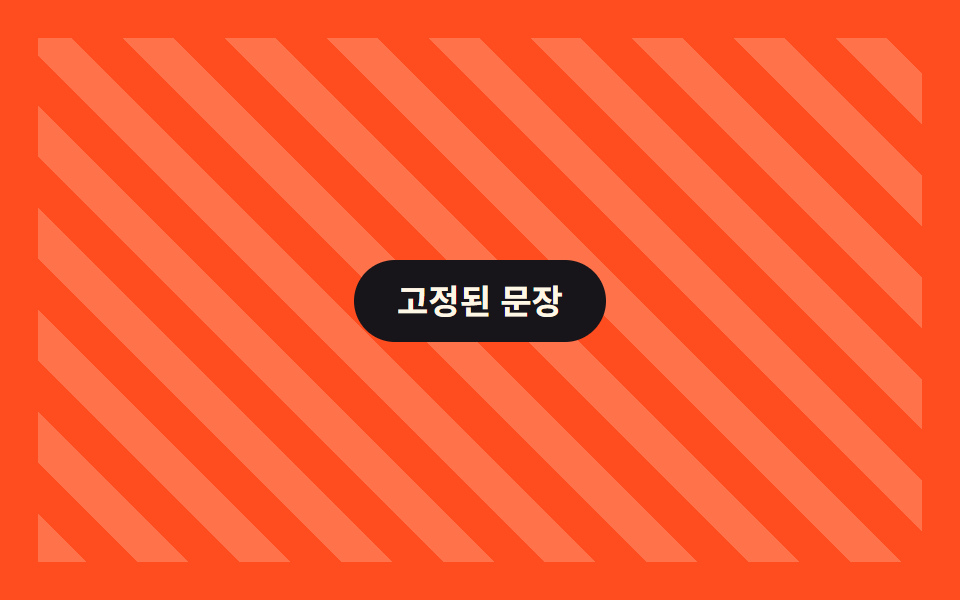
Chữ phía trước dính cố định trên màn hình, chỉ nền phía sau tiếp tục trôi qua.
Dùng choSection kể chuyện, giải thích thông số sản phẩm
position sticky배경만 이동고정+흐름
<main class="stage is-demo">
  <div class="stickypar">
    <div class="stickypar__bg" aria-hidden="true"></div>
    <p class="stickypar__caption">Chữ đứng yên</p>
  </div>
</main>
@use "../../../../site/static/demo-tokens" as *;
// ── 변수 3개. 변형은 이것만 바꾼다 ──────────────────────────
$bg-shift: 40px; // 뒤 배경 이동량
$duration: $dur-loop; // 데모 왕복 주기
$color: $subject-cream; // 배경 결·문장 글자 색 (orange 무대라 cream)
@include stage($stage-orange);
.stickypar {
position: relative;
width: 100%;
height: 100%;
overflow: hidden;
display: grid;
place-items: center;
}
.stickypar__bg {
position: absolute;
inset: -20% 0;
background: repeating-linear-gradient(45deg, rgba($color, .22) 0 18px, transparent 18px 36px);
// ── 실제 사용 코드: 앞 문장은 sticky 로 붙박이, 뒤 배경만 흘러간다 ──
@supports (animation-timeline: scroll()) {
animation: bg-drift linear both;
animation-timeline: scroll(root);
}
@supports not (animation-timeline: scroll()) { transform: none; }
}
.stickypar__caption {
position: sticky;
top: 40%;
z-index: 1;
margin: 0;
padding: 12px 22px;
border-radius: $r-pill;
background: $stage-ink;
color: $color;
font: 700 clamp(14px, 4.4vw, 17px)/1 -apple-system, "Segoe UI", "Noto Sans KR", sans-serif;
}
@keyframes bg-drift { from { transform: translateY(0); } to { transform: translateY(-#{$bg-shift}); } }
// ── 데모(.is-demo): 왕복 루프로 흉내 ────────
.stage.is-demo .stickypar__bg { animation: bg-loop $duration ease-in-out infinite; }
@keyframes bg-loop { 0%, 100% { transform: translateY($bg-shift); } 50% { transform: translateY(-$bg-shift); } }
@media (prefers-reduced-motion: reduce) {
.stickypar__bg, .stage.is-demo .stickypar__bg { animation: none !important; transform: none; }
}html, body {
margin: 0;
overflow: hidden;
}
.stage {
box-sizing: border-box;
min-height: 100vh;
display: grid;
place-items: center;
margin: 0;
background: #ff4d1f;
font-family: -apple-system, "Segoe UI", "Noto Sans KR", sans-serif;
padding: clamp(8px, 4vw, 24px);
}
.stickypar {
position: relative;
width: 100%;
height: 100%;
overflow: hidden;
display: grid;
place-items: center;
}
.stickypar__bg {
position: absolute;
inset: -20% 0;
background: repeating-linear-gradient(45deg, rgba(255, 247, 230, 0.22) 0 18px, transparent 18px 36px);
}
@supports (animation-timeline: scroll()) {
.stickypar__bg {
animation: bg-drift linear both;
animation-timeline: scroll(root);
}
}
@supports not (animation-timeline: scroll()) {
.stickypar__bg {
transform: none;
}
}
.stickypar__caption {
position: sticky;
top: 40%;
z-index: 1;
margin: 0;
padding: 12px 22px;
border-radius: 999px;
background: #17141a;
color: #fff7e6;
font: 700 clamp(14px, 4.4vw, 17px)/1 -apple-system, "Segoe UI", "Noto Sans KR", sans-serif;
}
@keyframes bg-drift {
from {
transform: translateY(0);
}
to {
transform: translateY(-40px);
}
}
.stage.is-demo .stickypar__bg {
animation: bg-loop 2s ease-in-out infinite;
}
@keyframes bg-loop {
0%, 100% {
transform: translateY(40px);
}
50% {
transform: translateY(-40px);
}
}
@media (prefers-reduced-motion: reduce) {
.stickypar__bg, .stage.is-demo .stickypar__bg {
animation: none !important;
transform: none;
}
}import type { CSSProperties, ReactNode } from "react";
import styles from "./StickyParallax.module.scss";
export type StickyParallaxProps = {
children: ReactNode;
/** 뒤 배경 이동량 (기본 40px) */
bgShift?: number;
/** 배경 결·문장 글자 색 */
color?: string;
className?: string;
};
type Vars = CSSProperties & { "--bg-shift"?: string; "--color"?: string };
export default function StickyParallax({
children,
bgShift = 40,
color = "#fff7e6",
className = "",
}: StickyParallaxProps) {
const vars: Vars = { "--bg-shift": `${bgShift}px`, "--color": color };
return (
<div className={`${styles.wrap} ${className}`} style={vars}>
<div className={styles.bg} aria-hidden="true" />
<p className={styles.caption}>{children}</p>
</div>
);
}07 Sticky kết hợp parallax — Diện tích đo được 77.093% · khung hình chuyển động 23/23Nguyên tác GODRICH · SCSS và React nằm trong tệp zip · 9 hiệu ứng css parallax scrolling, không cần JS
Bài viết chứa demo này
 9 hiệu ứng css parallax scrolling, không cần JSCSS parallax scrolling là cách tạo cảm giác chiều sâu khi cuộn trang, bằng cách cho các lớp — nền, chữ, thẻ — di chuyển Xem tất cả demo trong bài này