01Marker tô sáng
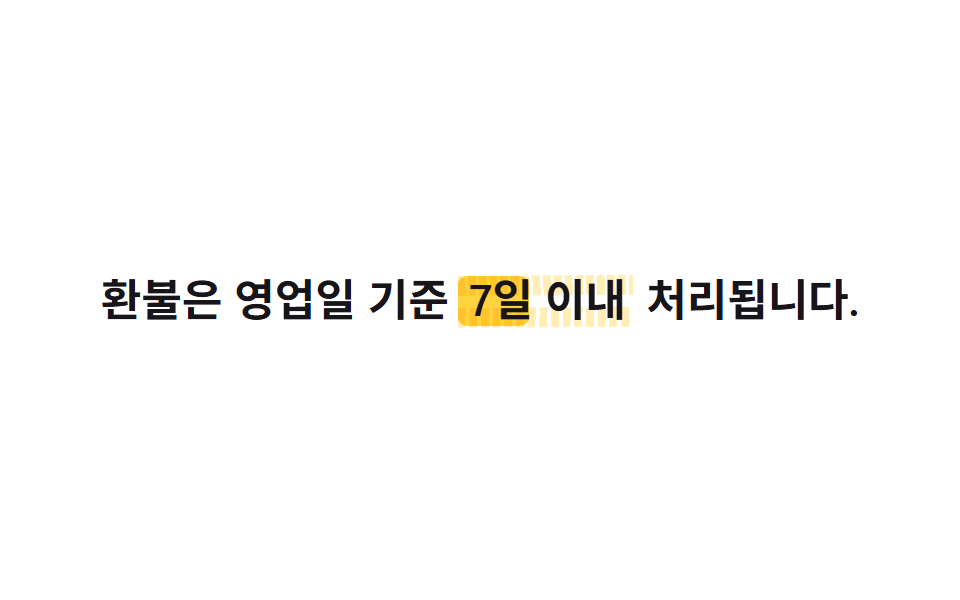
Một khối ::before màu vàng nằm sau từ khoá, mọc rộng từ trái sang phải qua transform: scaleX(0 → 1) rồi mix-blend-mode: multiply đặt nó lên trên chữ như vừa tô marker xong.
Dùng choCụm từ then chốt trong điều khoản hay thông báo, từ được nhấn mạnh trong bài hướng dẫn
transform:scaleXmix-blend-mode2s
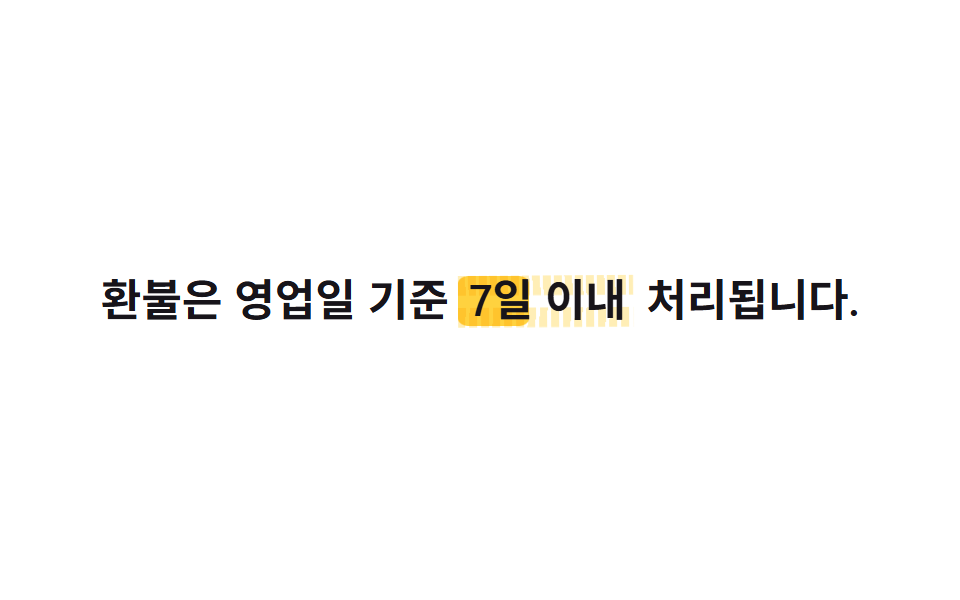
<main class="stage">
  <p class="line">Hoàn tiền được xử lý trong vòng <span class="hl">7 ngày làm việc</span> kể từ khi yêu cầu.</p>
</main>
@use "../../../../site/static/demo-tokens" as *;
// ── 변수 3개. 변형은 이것만 바꾼다 ──────────────────────
$duration: $dur-loop; // 형광펜이 한 번 칠해졌다 지워지는 한 주기
$easing: $ease-spring; // 칠할 때는 빠르게 시작해 부드럽게 멈춘다
$color: $stage-yellow; // 형광펜 색
// ── 데모 무대 ───────────────────────────────
@include stage($stage-paper);
// ── 문장: 키워드 뒤에 형광펜 블록을 겹친다 ─────────────
.line {
max-width: 92%;
margin: 0;
color: $stage-ink;
font-weight: 600;
font-size: clamp(16px, 4.6vw, 22px);
line-height: 1.6;
font-family: inherit;
text-align: center;
}
.hl {
position: relative;
isolation: isolate; // z-index:-1 을 이 안에 가둬 무대 배경 뒤로 숨지 않게 한다
padding: 0 $sp-1;
// 형광펜 블록: 글자 뒤(z-index -1)에서 왼쪽부터 차오른다
&::before {
content: "";
position: absolute;
inset: 12% -2% 6%;
background: $color;
border-radius: $r-xs;
transform: scaleX(0);
transform-origin: left center; // 규칙8: 형광펜 왼쪽에서 칠함
mix-blend-mode: multiply; // 종이 위에 형광펜을 겹친 것처럼 밑 색과 섞인다
z-index: -1;
animation: mark $duration $easing infinite, mark-fill-noise $duration ease-in-out infinite;
}
// 한 겹: 노이즈 가장자리 레이어 — 같은 색을 낮은 불투명도로 위·아래 미세 지그재그
// 가장자리에 깔아 ::before 보다 0.08s 늦게 같은 scaleX 로 펴진다. 두 겹의 시차와
// 지그재그가 겹쳐 펜 두께가 불규칙하게 요동치는 스트로크로 보인다
&::after {
content: "";
position: absolute;
inset: 10.5% -2.2% 4.5%;
background:
repeating-linear-gradient(88deg, $color 0 4px, transparent 4px 5.5px) top / 100% 38% no-repeat,
repeating-linear-gradient(92deg, $color 0 4px, transparent 4px 6px) bottom / 100% 38% no-repeat;
opacity: .38;
transform: scaleX(0);
transform-origin: left center; // 규칙8: ::before 와 같은 방향, 0.08s 위상 차
mix-blend-mode: multiply;
z-index: -1;
rotate: .2deg; // rotate 는 개별 속성 — mark 의 transform(scaleX) 과 충돌 없음
animation: mark $duration $easing infinite .08s, stroke-wobble 1.3s ease-in-out infinite;
}
}
@keyframes mark {
0% { transform: scaleX(0); }
20% { transform: scaleX(1); }
75% { transform: scaleX(1); }
100% { transform: scaleX(0); }
}
// scaleX 확장 중 border-radius 가 출렁인다 — 균일한 사각 블록이 아니게 (transform 아님)
@keyframes mark-fill-noise {
0% { border-radius: 6%; }
30% { border-radius: 20%; }
60% { border-radius: 10%; }
85% { border-radius: 16%; }
100% { border-radius: 6%; }
}
// 노이즈 레이어의 미세 각도 진동 — rotate 개별 속성이라 mark 의 transform 과 병렬 가능
@keyframes stroke-wobble {
0% { rotate: .3deg; }
25% { rotate: -.4deg; }
50% { rotate: .2deg; }
75% { rotate: -.25deg; }
100% { rotate: .3deg; }
}
// ── 접근성: 움직임 줄이기 설정이면 처음부터 칠해진 채로 고정 ──
@media (prefers-reduced-motion: reduce) {
.hl::before { animation: none; transform: scaleX(1); }
.hl::after { animation: none; transform: scaleX(1); rotate: 0deg; }
}html, body {
margin: 0;
overflow: hidden;
}
.stage {
box-sizing: border-box;
min-height: 100vh;
display: grid;
place-items: center;
margin: 0;
background: #ffffff;
font-family: -apple-system, "Segoe UI", "Noto Sans KR", sans-serif;
padding: clamp(8px, 4vw, 24px);
}
.line {
max-width: 92%;
margin: 0;
color: #17141a;
font-weight: 600;
font-size: clamp(16px, 4.6vw, 22px);
line-height: 1.6;
font-family: inherit;
text-align: center;
}
.hl {
position: relative;
isolation: isolate;
padding: 0 4px;
}
.hl::before {
content: "";
position: absolute;
inset: 12% -2% 6%;
background: #ffd23f;
border-radius: 4px;
transform: scaleX(0);
transform-origin: left center;
mix-blend-mode: multiply;
z-index: -1;
animation: mark 2s cubic-bezier(0.2, 0.8, 0.2, 1) infinite, mark-fill-noise 2s ease-in-out infinite;
}
.hl::after {
content: "";
position: absolute;
inset: 10.5% -2.2% 4.5%;
background: repeating-linear-gradient(88deg, #ffd23f 0 4px, transparent 4px 5.5px) top/100% 38% no-repeat, repeating-linear-gradient(92deg, #ffd23f 0 4px, transparent 4px 6px) bottom/100% 38% no-repeat;
opacity: 0.38;
transform: scaleX(0);
transform-origin: left center;
mix-blend-mode: multiply;
z-index: -1;
rotate: 0.2deg;
animation: mark 2s cubic-bezier(0.2, 0.8, 0.2, 1) infinite 0.08s, stroke-wobble 1.3s ease-in-out infinite;
}
@keyframes mark {
0% {
transform: scaleX(0);
}
20% {
transform: scaleX(1);
}
75% {
transform: scaleX(1);
}
100% {
transform: scaleX(0);
}
}
@keyframes mark-fill-noise {
0% {
border-radius: 6%;
}
30% {
border-radius: 20%;
}
60% {
border-radius: 10%;
}
85% {
border-radius: 16%;
}
100% {
border-radius: 6%;
}
}
@keyframes stroke-wobble {
0% {
rotate: 0.3deg;
}
25% {
rotate: -0.4deg;
}
50% {
rotate: 0.2deg;
}
75% {
rotate: -0.25deg;
}
100% {
rotate: 0.3deg;
}
}
@media (prefers-reduced-motion: reduce) {
.hl::before {
animation: none;
transform: scaleX(1);
}
.hl::after {
animation: none;
transform: scaleX(1);
rotate: 0deg;
}
}import type { CSSProperties, ReactNode } from "react";
import styles from "./HighlightMarker.module.scss";
export type HighlightMarkerProps = {
/** 강조어 앞 글자 */
before: ReactNode;
/** 형광펜이 칠해지는 단어 */
keyword: ReactNode;
/** 강조어 뒤 글자 */
after?: ReactNode;
/** 칠해지는 데 걸리는 시간 (기본 2000ms) */
duration?: number;
/** CSS easing */
easing?: string;
/** 형광펜 색 */
color?: string;
};
type Vars = CSSProperties & {
"--duration"?: string;
"--easing"?: string;
"--color"?: string;
};
export default function HighlightMarker({
before,
keyword,
after,
duration = 2000,
easing = "cubic-bezier(.2,.8,.2,1)",
color = "#ffd23f",
}: HighlightMarkerProps) {
const vars: Vars = {
"--duration": `${duration}ms`,
"--easing": easing,
"--color": color,
};
return (
<p className={styles.line}>
{before} <span className={styles.hl} style={vars}>{keyword}</span> {after}
</p>
);
}01 Marker tô sáng — Diện tích đo được 1.458% · khung hình chuyển động 22/23Nguyên tác GODRICH · SCSS và React nằm trong tệp zip · 9 CSS Text Highlight Animation: dán 1 dòng là chạy
Bài viết chứa demo này
 9 CSS Text Highlight Animation: dán 1 dòng là chạyCSS text highlight animation là hiệu ứng CSS thuần giúp tô sáng, gạch chân hoặc gạch ngang một từ trong câu ngay khi tra Xem tất cả demo trong bài này