01Bung chi tiết trong dòng
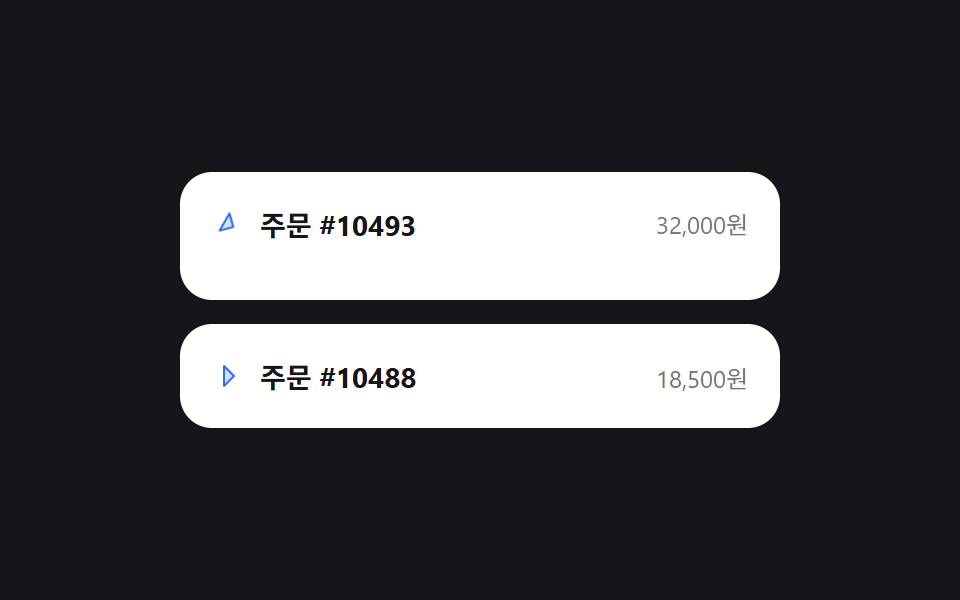
Bấm vào một dòng sẽ xoay mũi tên 90 độ và mở mượt nội dung chi tiết bên dưới, bấm lại thì thu gọn.
Dùng choChi tiết dòng lịch sử đơn hàng, danh sách mục kiểu FAQ
grid-template-rows 0fr→1fraria-expandedcaret rotate transform

<main class="stage">
  <ul class="rowx-list" aria-label="Lịch sử đơn hàng">
    <li class="rowx-item">
      <button class="rowx-item__head is-demo" type="button" aria-expanded="false">
        <svg class="rowx-item__caret" viewBox="0 0 256 256" aria-hidden="true"><g fill="currentColor"><path d="m176 128l-80 80V48Z" opacity=".2"/><path d="m181.66 122.34l-80-80A8 8 0 0 0 88 48v160a8 8 0 0 0 13.66 5.66l80-80a8 8 0 0 0 0-11.32M104 188.69V67.31L164.69 128Z"/></g></svg>
        <span class="rowx-item__title">Đơn hàng #10493</span>
        <span class="rowx-item__meta">32.000₩</span>
      </button>
      <div class="rowx-item__body">
        <div class="rowx-item__body-inner">
          <p>Giao đến Gangnam, Seoul · Thanh toán KakaoPay</p>
          <p>Dự kiến đến 2026-09-08</p>
        </div>
      </div>
    </li>
    <li class="rowx-item">
      <button class="rowx-item__head" type="button" aria-expanded="false">
        <svg class="rowx-item__caret" viewBox="0 0 256 256" aria-hidden="true"><g fill="currentColor"><path d="m176 128l-80 80V48Z" opacity=".2"/><path d="m181.66 122.34l-80-80A8 8 0 0 0 88 48v160a8 8 0 0 0 13.66 5.66l80-80a8 8 0 0 0 0-11.32M104 188.69V67.31L164.69 128Z"/></g></svg>
        <span class="rowx-item__title">Đơn hàng #10488</span>
        <span class="rowx-item__meta">18.500₩</span>
      </button>
      <div class="rowx-item__body">
        <div class="rowx-item__body-inner">
          <p>Giao đến Seongnam, Gyeonggi · Thanh toán thẻ</p>
          <p>Đã giao 2026-09-05</p>
        </div>
      </div>
    </li>
  </ul>
</main>@use "../../../../site/static/demo-tokens" as *;
$duration: $dur-base; // 펼침 시간
$easing: $ease-spring;
$color: $subject-blue; // 캐럿·강조색
@include stage($stage-ink);
.rowx-list {
list-style: none;
margin: 0;
padding: 0;
width: min(300px, 84vw);
display: flex;
flex-direction: column;
gap: $sp-3;
}
.rowx-item {
border-radius: $r-card;
background: $stage-paper;
overflow: hidden;
}
.rowx-item__head {
width: 100%;
display: flex;
align-items: center;
gap: $sp-2;
padding: $sp-4;
border: 0;
background: none;
cursor: pointer;
text-align: left;
font-family: inherit;
}
.rowx-item__head:focus-visible { outline: 2px solid $color; outline-offset: -2px; border-radius: $r-card; }
.rowx-item__caret {
width: 16px;
height: 16px;
flex: 0 0 auto;
color: $color;
transition: transform $duration $easing;
}
.rowx-item.is-open .rowx-item__caret { transform: rotate(90deg); }
.rowx-item__title { flex: 1 1 auto; font-weight: 700; font-size: 14px; color: $stage-ink; }
.rowx-item__meta { font-size: 12px; color: rgba(23, 20, 26, .6); }
.rowx-item__body {
display: grid;
grid-template-rows: 0fr;
transition: grid-template-rows $duration $easing;
}
.rowx-item.is-open .rowx-item__body { grid-template-rows: 1fr; }
.rowx-item__body-inner {
overflow: hidden;
visibility: hidden; // 접힌 상태(0fr) 에서 글자가 겹쳐 보이는 것을 막는다 — 열리면 보임
padding: 0 $sp-4;
display: flex;
flex-direction: column;
gap: $sp-1;
}
.rowx-item.is-open .rowx-item__body-inner { padding: 0 $sp-4 $sp-4; visibility: visible; }
.rowx-item__body-inner p { margin: 0; font-size: 12px; color: rgba(23, 20, 26, .72); }
// 데모 강제 루프 — 첫 항목만 열림/닫힘을 keyframes 로 반복 (document.getAnimations() 가 잡도록 transition 이 아니라 animation)
.rowx-item__head.is-demo { pointer-events: none; }
.rowx-item__head.is-demo .rowx-item__caret { animation: rowx-caret-loop $dur-loop $easing infinite; }
.rowx-item:has(.rowx-item__head.is-demo) .rowx-item__body { animation: rowx-rows-loop $dur-loop $easing infinite; }
@keyframes rowx-caret-loop {
0%, 10% { transform: rotate(0deg); }
40%, 65% { transform: rotate(90deg); }
95%, 100% { transform: rotate(0deg); }
}
@keyframes rowx-rows-loop {
0%, 10% { grid-template-rows: 0fr; }
40%, 65% { grid-template-rows: 1fr; }
95%, 100% { grid-template-rows: 0fr; }
}
@media (prefers-reduced-motion: reduce) {
.rowx-item__caret, .rowx-item__body { transition: none; }
}html, body {
margin: 0;
overflow: hidden;
}
.stage {
box-sizing: border-box;
min-height: 100vh;
display: grid;
place-items: center;
margin: 0;
background: #17141a;
font-family: -apple-system, "Segoe UI", "Noto Sans KR", sans-serif;
padding: clamp(8px, 4vw, 24px);
}
.rowx-list {
list-style: none;
margin: 0;
padding: 0;
width: min(300px, 84vw);
display: flex;
flex-direction: column;
gap: 12px;
}
.rowx-item {
border-radius: 16px;
background: #ffffff;
overflow: hidden;
}
.rowx-item__head {
width: 100%;
display: flex;
align-items: center;
gap: 8px;
padding: 16px;
border: 0;
background: none;
cursor: pointer;
text-align: left;
font-family: inherit;
}
.rowx-item__head:focus-visible {
outline: 2px solid #2f6df6;
outline-offset: -2px;
border-radius: 16px;
}
.rowx-item__caret {
width: 16px;
height: 16px;
flex: 0 0 auto;
color: #2f6df6;
transition: transform 300ms cubic-bezier(0.2, 0.8, 0.2, 1);
}
.rowx-item.is-open .rowx-item__caret {
transform: rotate(90deg);
}
.rowx-item__title {
flex: 1 1 auto;
font-weight: 700;
font-size: 14px;
color: #17141a;
}
.rowx-item__meta {
font-size: 12px;
color: rgba(23, 20, 26, 0.6);
}
.rowx-item__body {
display: grid;
grid-template-rows: 0fr;
transition: grid-template-rows 300ms cubic-bezier(0.2, 0.8, 0.2, 1);
}
.rowx-item.is-open .rowx-item__body {
grid-template-rows: 1fr;
}
.rowx-item__body-inner {
overflow: hidden;
visibility: hidden;
padding: 0 16px;
display: flex;
flex-direction: column;
gap: 4px;
}
.rowx-item.is-open .rowx-item__body-inner {
padding: 0 16px 16px;
visibility: visible;
}
.rowx-item__body-inner p {
margin: 0;
font-size: 12px;
color: rgba(23, 20, 26, 0.72);
}
.rowx-item__head.is-demo {
pointer-events: none;
}
.rowx-item__head.is-demo .rowx-item__caret {
animation: rowx-caret-loop 2s cubic-bezier(0.2, 0.8, 0.2, 1) infinite;
}
.rowx-item:has(.rowx-item__head.is-demo) .rowx-item__body {
animation: rowx-rows-loop 2s cubic-bezier(0.2, 0.8, 0.2, 1) infinite;
}
@keyframes rowx-caret-loop {
0%, 10% {
transform: rotate(0deg);
}
40%, 65% {
transform: rotate(90deg);
}
95%, 100% {
transform: rotate(0deg);
}
}
@keyframes rowx-rows-loop {
0%, 10% {
grid-template-rows: 0fr;
}
40%, 65% {
grid-template-rows: 1fr;
}
95%, 100% {
grid-template-rows: 0fr;
}
}
@media (prefers-reduced-motion: reduce) {
.rowx-item__caret, .rowx-item__body {
transition: none;
}
}(function () {
document.querySelectorAll('.rowx-item__head').forEach(function (btn) {
var item = btn.closest('.rowx-item');
btn.addEventListener('click', function () {
btn.classList.remove('is-demo');
var open = item.classList.toggle('is-open');
btn.setAttribute('aria-expanded', open ? 'true' : 'false');
});
});
})();import { useState, type CSSProperties } from "react";
import styles from "./RowExpandInlineDetail.module.scss";
export type OrderRow = { title: string; meta: string; lines: string[] };
export type RowExpandInlineDetailProps = {
rows: OrderRow[];
/** 펼침 시간 (기본 300ms) */
duration?: number;
easing?: string;
/** 캐럿·강조색 */
color?: string;
};
type Vars = CSSProperties & { "--duration"?: string; "--easing"?: string; "--color"?: string };
/** 클릭한 행의 인덱스를 열림 상태로 토글. grid-template-rows 0fr→1fr 로 높이를 부드럽게 편다 */
export default function RowExpandInlineDetail({
rows,
duration = 300,
easing = "cubic-bezier(.2,.8,.2,1)",
color = "#2f6df6",
}: RowExpandInlineDetailProps) {
const [openIdx, setOpenIdx] = useState<number | null>(null);
const vars: Vars = { "--duration": `${duration}ms`, "--easing": easing, "--color": color };
return (
<ul className={styles.list} style={vars}>
{rows.map((row, i) => {
const open = openIdx === i;
return (
<li key={row.title} className={styles.item}>
<button
className={styles.head}
type="button"
aria-expanded={open}
onClick={() => setOpenIdx(open ? null : i)}
>
<svg className={styles.caret} style={{ transform: open ? "rotate(90deg)" : undefined }} viewBox="0 0 256 256" aria-hidden="true">
<g fill="currentColor"><path d="m176 128l-80 80V48Z" opacity=".2" /><path d="m181.66 122.34l-80-80A8 8 0 0 0 88 48v160a8 8 0 0 0 13.66 5.66l80-80a8 8 0 0 0 0-11.32M104 188.69V67.31L164.69 128Z" /></g>
</svg>
<span className={styles.title}>{row.title}</span>
<span className={styles.meta}>{row.meta}</span>
</button>
<div className={styles.body} style={{ gridTemplateRows: open ? "1fr" : "0fr" }}>
<div className={styles.bodyInner} style={{ visibility: open ? "visible" : "hidden" }}>
{row.lines.map((line) => <p key={line}>{line}</p>)}
</div>
</div>
</li>
);
})}
</ul>
);
}01 Bung chi tiết trong dòng — Diện tích đo được 19.034% · khung hình chuyển động 14/23Nguyên tác GODRICH · SCSS và React nằm trong tệp zip · 9 mẫu List UI: accordion list css và checklist
Bài viết chứa demo này
 9 mẫu List UI: accordion list css và checklistAccordion list css là kiểu danh sách mà khi bạn bấm vào một dòng, chiều cao của nó tự giãn ra để lộ nội dung chi tiết — Xem tất cả demo trong bài này