06Sắp xếp lại có vạch báo vị trí thả
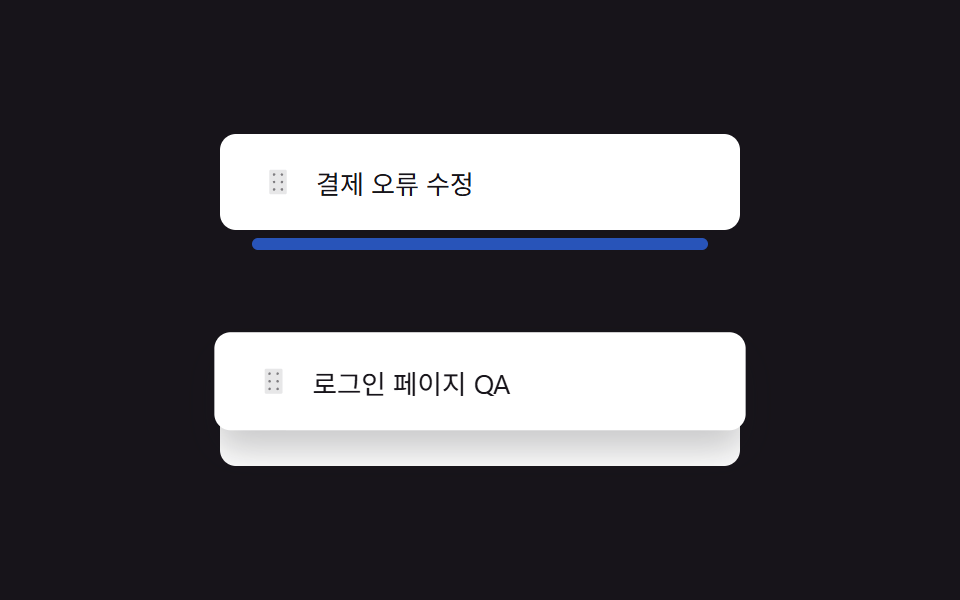
Kéo tay cầm sáu chấm sẽ hiện một vạch trống màu xanh báo trước vị trí sẽ thả, thay vì chỉ đẩy các dòng khác.
Dùng choSắp xếp lại độ ưu tiên công việc, chỉnh sửa thứ tự playlist
drop-indicator 엘리먼트pointermove 중간 인덱스 계산화살표 키보드 이동
<main class="stage">
  <ul class="rd-list is-demo" aria-label="Danh sách ưu tiên. Trên tay cầm, dùng Alt+Lên/Xuống để sắp xếp">
    <li class="rd-item" data-i="0">
      <button class="rd-item__handle" type="button" aria-label="Sắp xếp lại, mũi tên lên/xuống">
        <svg viewBox="0 0 256 256" aria-hidden="true"><g fill="currentColor"><path d="M208 32v192a16 16 0 0 1-16 16H64a16 16 0 0 1-16-16V32a16 16 0 0 1 16-16h128a16 16 0 0 1 16 16" opacity=".2"/><path d="M104 60a12 12 0 1 1-12-12a12 12 0 0 1 12 12m60 12a12 12 0 1 0-12-12a12 12 0 0 0 12 12m-72 44a12 12 0 1 0 12 12a12 12 0 0 0-12-12m72 0a12 12 0 1 0 12 12a12 12 0 0 0-12-12m-72 68a12 12 0 1 0 12 12a12 12 0 0 0-12-12m72 0a12 12 0 1 0 12 12a12 12 0 0 0-12-12"/></g></svg>
      </button>
      <span>Sửa lỗi thanh toán</span>
    </li>
    <li class="rd-drop-indicator" aria-hidden="true"></li>
    <li class="rd-item rd-item--lifted" data-i="1">
      <button class="rd-item__handle" type="button" aria-label="Sắp xếp lại, mũi tên lên/xuống">
        <svg viewBox="0 0 256 256" aria-hidden="true"><g fill="currentColor"><path d="M208 32v192a16 16 0 0 1-16 16H64a16 16 0 0 1-16-16V32a16 16 0 0 1 16-16h128a16 16 0 0 1 16 16" opacity=".2"/><path d="M104 60a12 12 0 1 1-12-12a12 12 0 0 1 12 12m60 12a12 12 0 1 0-12-12a12 12 0 0 0 12 12m-72 44a12 12 0 1 0 12 12a12 12 0 0 0-12-12m72 0a12 12 0 1 0 12 12a12 12 0 0 0-12-12m-72 68a12 12 0 1 0 12 12a12 12 0 0 0-12-12m72 0a12 12 0 1 0 12 12a12 12 0 0 0-12-12"/></g></svg>
      </button>
      <span>QA trang đăng nhập</span>
    </li>
    <li class="rd-item" data-i="2">
      <button class="rd-item__handle" type="button" aria-label="Sắp xếp lại, mũi tên lên/xuống">
        <svg viewBox="0 0 256 256" aria-hidden="true"><g fill="currentColor"><path d="M208 32v192a16 16 0 0 1-16 16H64a16 16 0 0 1-16-16V32a16 16 0 0 1 16-16h128a16 16 0 0 1 16 16" opacity=".2"/><path d="M104 60a12 12 0 1 1-12-12a12 12 0 0 1 12 12m60 12a12 12 0 1 0-12-12a12 12 0 0 0 12 12m-72 44a12 12 0 1 0 12 12a12 12 0 0 0-12-12m72 0a12 12 0 1 0 12 12a12 12 0 0 0-12-12m-72 68a12 12 0 1 0 12 12a12 12 0 0 0-12-12m72 0a12 12 0 1 0 12 12a12 12 0 0 0-12-12"/></g></svg>
      </button>
      <span>Sắp xếp tài liệu triển khai</span>
    </li>
  </ul>
</main>
@use "../../../../site/static/demo-tokens" as *;
$duration: $dur-base; // 들어올림·이동 시간
$easing: $ease-spring;
$color: $subject-blue; // 드롭 인디케이터 색
@include stage($stage-ink);
.rd-list {
list-style: none;
margin: 0;
padding: 0;
width: min(260px, 82vw);
display: flex;
flex-direction: column;
}
.rd-item {
display: flex;
align-items: center;
gap: $sp-2;
padding: $sp-3 $sp-4;
margin: $sp-1 0;
border-radius: $r-sm;
background: $stage-paper;
transition: transform $duration $easing, box-shadow $duration $easing;
}
.rd-item span { font-size: 13px; color: $stage-ink; }
.rd-item.is-dragging {
position: relative;
z-index: 2;
box-shadow: $shadow-raised;
transition: none;
cursor: grabbing;
}
.rd-item__handle {
width: 24px;
height: 24px;
display: grid;
place-items: center;
border: 0;
background: none;
color: rgba(23, 20, 26, .5);
cursor: grab;
flex: 0 0 auto;
touch-action: none;
}
.rd-item__handle svg { width: 14px; height: 14px; }
.rd-item__handle:focus-visible { outline: 2px solid $color; outline-offset: 2px; border-radius: $r-xs; }
.rd-drop-indicator {
height: 0;
margin: 0 $sp-4;
border-radius: $r-xs;
background: $color;
opacity: 0;
transition: height $duration $easing, opacity $duration $easing;
}
.rd-list.is-dragging .rd-drop-indicator { height: 8px; opacity: 1; }
// 데모 강제 루프 — 가운데 항목이 들리고, 그 아래 자리에 드롭 인디케이터가 나타났다 정리되는 흐름
.rd-list.is-demo .rd-item--lifted {
animation: rd-lift-loop $dur-loop $easing infinite;
}
.rd-list.is-demo .rd-drop-indicator {
animation: rd-gap-loop $dur-loop $easing infinite;
}
@keyframes rd-lift-loop {
0%, 10% { transform: translateY(0) scale(1); box-shadow: none; }
40%, 65% { transform: translateY(52px) scale(1.03); box-shadow: $shadow-raised; }
95%, 100% { transform: translateY(0) scale(1); box-shadow: none; }
}
@keyframes rd-gap-loop {
0%, 10% { height: 0; opacity: 0; }
40%, 65% { height: 8px; opacity: 1; }
95%, 100% { height: 0; opacity: 0; }
}
@media (prefers-reduced-motion: reduce) {
.rd-item, .rd-drop-indicator { transition: none; }
}html, body {
margin: 0;
overflow: hidden;
}
.stage {
box-sizing: border-box;
min-height: 100vh;
display: grid;
place-items: center;
margin: 0;
background: #17141a;
font-family: -apple-system, "Segoe UI", "Noto Sans KR", sans-serif;
padding: clamp(8px, 4vw, 24px);
}
.rd-list {
list-style: none;
margin: 0;
padding: 0;
width: min(260px, 82vw);
display: flex;
flex-direction: column;
}
.rd-item {
display: flex;
align-items: center;
gap: 8px;
padding: 12px 16px;
margin: 4px 0;
border-radius: 8px;
background: #ffffff;
transition: transform 300ms cubic-bezier(0.2, 0.8, 0.2, 1), box-shadow 300ms cubic-bezier(0.2, 0.8, 0.2, 1);
}
.rd-item span {
font-size: 13px;
color: #17141a;
}
.rd-item.is-dragging {
position: relative;
z-index: 2;
box-shadow: 0 14px 24px rgba(23, 20, 26, 0.32);
transition: none;
cursor: grabbing;
}
.rd-item__handle {
width: 24px;
height: 24px;
display: grid;
place-items: center;
border: 0;
background: none;
color: rgba(23, 20, 26, 0.5);
cursor: grab;
flex: 0 0 auto;
touch-action: none;
}
.rd-item__handle svg {
width: 14px;
height: 14px;
}
.rd-item__handle:focus-visible {
outline: 2px solid #2f6df6;
outline-offset: 2px;
border-radius: 4px;
}
.rd-drop-indicator {
height: 0;
margin: 0 16px;
border-radius: 4px;
background: #2f6df6;
opacity: 0;
transition: height 300ms cubic-bezier(0.2, 0.8, 0.2, 1), opacity 300ms cubic-bezier(0.2, 0.8, 0.2, 1);
}
.rd-list.is-dragging .rd-drop-indicator {
height: 8px;
opacity: 1;
}
.rd-list.is-demo .rd-item--lifted {
animation: rd-lift-loop 2s cubic-bezier(0.2, 0.8, 0.2, 1) infinite;
}
.rd-list.is-demo .rd-drop-indicator {
animation: rd-gap-loop 2s cubic-bezier(0.2, 0.8, 0.2, 1) infinite;
}
@keyframes rd-lift-loop {
0%, 10% {
transform: translateY(0) scale(1);
box-shadow: none;
}
40%, 65% {
transform: translateY(52px) scale(1.03);
box-shadow: 0 14px 24px rgba(23, 20, 26, 0.32);
}
95%, 100% {
transform: translateY(0) scale(1);
box-shadow: none;
}
}
@keyframes rd-gap-loop {
0%, 10% {
height: 0;
opacity: 0;
}
40%, 65% {
height: 8px;
opacity: 1;
}
95%, 100% {
height: 0;
opacity: 0;
}
}
@media (prefers-reduced-motion: reduce) {
.rd-item, .rd-drop-indicator {
transition: none;
}
}(function () {
var list = document.querySelector('.rd-list');
var indicator = list.querySelector('.rd-drop-indicator');
function order() { return Array.prototype.slice.call(list.querySelectorAll('.rd-item')); }
order().forEach(function (item) {
var handle = item.querySelector('.rd-item__handle');
var dragging = false, startY = 0;
handle.addEventListener('pointerdown', function (e) {
list.classList.remove('is-demo');
dragging = true;
startY = e.clientY;
item.classList.add('is-dragging');
list.classList.add('is-dragging');
handle.setPointerCapture(e.pointerId);
});
handle.addEventListener('pointermove', function (e) {
if (!dragging) return;
item.style.transform = 'translateY(' + (e.clientY - startY) + 'px)';
var rest = order().filter(function (r) { return r !== item; });
var target = rest.filter(function (r) {
var rect = r.getBoundingClientRect();
return e.clientY < rect.top + rect.height / 2;
})[0];
if (target) list.insertBefore(indicator, target);
else list.insertBefore(indicator, null);
});
function drop() {
if (!dragging) return;
dragging = false;
item.style.transform = '';
item.classList.remove('is-dragging');
list.classList.remove('is-dragging');
list.insertBefore(item, indicator);
}
handle.addEventListener('pointerup', drop);
handle.addEventListener('pointercancel', drop);
handle.addEventListener('keydown', function (e) {
if ((e.key !== 'ArrowUp' && e.key !== 'ArrowDown') || !e.altKey) return;
e.preventDefault();
list.classList.remove('is-demo');
var o = order();
var idx = o.indexOf(item);
var targetIdx = e.key === 'ArrowUp' ? idx - 1 : idx + 1;
if (targetIdx < 0 || targetIdx >= o.length) return;
if (e.key === 'ArrowUp') list.insertBefore(item, o[targetIdx]);
else list.insertBefore(item, o[targetIdx].nextSibling);
handle.focus({ preventScroll: true });
});
});
})();import { useRef, useState, type CSSProperties } from "react";
import styles from "./ReorderIndicatorDropGap.module.scss";
export type ReorderIndicatorDropGapProps = {
items: string[];
/** 들어올림·이동 시간 (기본 300ms) */
duration?: number;
easing?: string;
/** 드롭 인디케이터 색 */
color?: string;
};
type Vars = CSSProperties & { "--duration"?: string; "--easing"?: string; "--color"?: string };
/**
* 손잡이를 드래그하면 항목이 통째로 밀리는 대신 놓일 자리에 빈 줄 인디케이터가 먼저 나타난다.
* 마우스를 못 쓰는 사람은 손잡이 포커스 후 Alt+화살표로 같은 순서 변경을 할 수 있다.
*/
export default function ReorderIndicatorDropGap({
items,
duration = 300,
easing = "cubic-bezier(.2,.8,.2,1)",
color = "#2f6df6",
}: ReorderIndicatorDropGapProps) {
const [order, setOrder] = useState(items);
const [dragIdx, setDragIdx] = useState<number | null>(null);
const [dragY, setDragY] = useState(0);
const [dropIdx, setDropIdx] = useState<number | null>(null);
const rowRefs = useRef<Array<HTMLLIElement | null>>([]);
const startY = useRef(0);
const vars: Vars = { "--duration": `${duration}ms`, "--easing": easing, "--color": color };
const move = (i: number, dir: -1 | 1) => {
const j = i + dir;
if (j < 0 || j >= order.length) return;
const next = order.slice();
[next[i], next[j]] = [next[j], next[i]];
setOrder(next);
};
const down = (i: number, e: any) => {
setDragIdx(i);
setDropIdx(i);
startY.current = e.clientY;
e.currentTarget.setPointerCapture(e.pointerId);
};
const dragMove = (e: any) => {
if (dragIdx === null) return;
setDragY(e.clientY - (startY.current ?? e.clientY));
let target = order.length;
const refs = rowRefs.current ?? [];
for (let k = 0; k < order.length; k++) {
const el = refs[k];
if (!el || k === dragIdx) continue;
const rect = el.getBoundingClientRect();
if (e.clientY < rect.top + rect.height / 2) { target = k; break; }
}
setDropIdx(target);
};
const drop = () => {
if (dragIdx === null || dropIdx === null) { setDragIdx(null); return; }
const next = order.slice();
const [moved] = next.splice(dragIdx, 1);
next.splice(dropIdx > dragIdx ? dropIdx - 1 : dropIdx, 0, moved);
setOrder(next);
setDragIdx(null); setDropIdx(null); setDragY(0);
};
const rows = order.flatMap((label, i) => {
const nodes = [];
if (dropIdx === i && dragIdx !== null) {
nodes.push(<li key={`gap-${label}`} className={styles.indicator} aria-hidden="true" />);
}
nodes.push(
<li
key={label}
ref={(el: HTMLLIElement | null) => { if (rowRefs.current) rowRefs.current[i] = el; }}
className={`${styles.item} ${dragIdx === i ? styles.dragging : ""}`}
style={dragIdx === i ? { transform: `translateY(${dragY}px)` } : undefined}
>
<button
className={styles.handle}
type="button"
aria-label="순서 변경, 위/아래 화살표"
onPointerDown={(e: any) => down(i, e)}
onPointerMove={dragMove}
onPointerUp={drop}
onPointerCancel={drop}
onKeyDown={(e: any) => {
if ((e.key === "ArrowUp" || e.key === "ArrowDown") && e.altKey) {
e.preventDefault();
move(i, e.key === "ArrowUp" ? -1 : 1);
}
}}
>
<svg viewBox="0 0 256 256" aria-hidden="true"><g fill="currentColor"><path d="M208 32v192a16 16 0 0 1-16 16H64a16 16 0 0 1-16-16V32a16 16 0 0 1 16-16h128a16 16 0 0 1 16 16" opacity=".2" /><path d="M104 60a12 12 0 1 1-12-12a12 12 0 0 1 12 12m60 12a12 12 0 1 0-12-12a12 12 0 0 0 12 12m-72 44a12 12 0 1 0 12 12a12 12 0 0 0-12-12m72 0a12 12 0 1 0 12 12a12 12 0 0 0-12-12m-72 68a12 12 0 1 0 12 12a12 12 0 0 0-12-12m72 0a12 12 0 1 0 12 12a12 12 0 0 0-12-12" /></g></svg>
</button>
<span>{label}</span>
</li>
);
return nodes;
});
return (
<ul className={styles.list} style={vars} aria-label="우선순위 목록. 손잡이에서 화살표 키(Alt+위/아래)로 순서 변경">
{rows}
{dropIdx === order.length && dragIdx !== null && <li className={styles.indicator} aria-hidden="true" />}
</ul>
);
}06 Sắp xếp lại có vạch báo vị trí thả — Diện tích đo được 19.851% · khung hình chuyển động 16/23Nguyên tác GODRICH · SCSS và React nằm trong tệp zip · 9 mẫu List UI: accordion list css và checklist
Bài viết chứa demo này
 9 mẫu List UI: accordion list css và checklistAccordion list css là kiểu danh sách mà khi bạn bấm vào một dòng, chiều cao của nó tự giãn ra để lộ nội dung chi tiết — Xem tất cả demo trong bài này
Nếu bạn thích hiệu ứng này - demo tương tự
 Giao diện danh sách · bảng04 Kéo để sắp xếp lại9 mẫu List UI: swipe to delete css và phân trang
 Giao diện nhập liệu01 Tự chuyển sang ô kế tiếpOTP Input UI: 9 tình huống kèm validation
 Giao diện đăng nhập · xác thực01 Thẻ đăng nhập kiểu kính mờ (glassmorphism)9 mẫu form đăng ký & đăng nhập copy-paste được