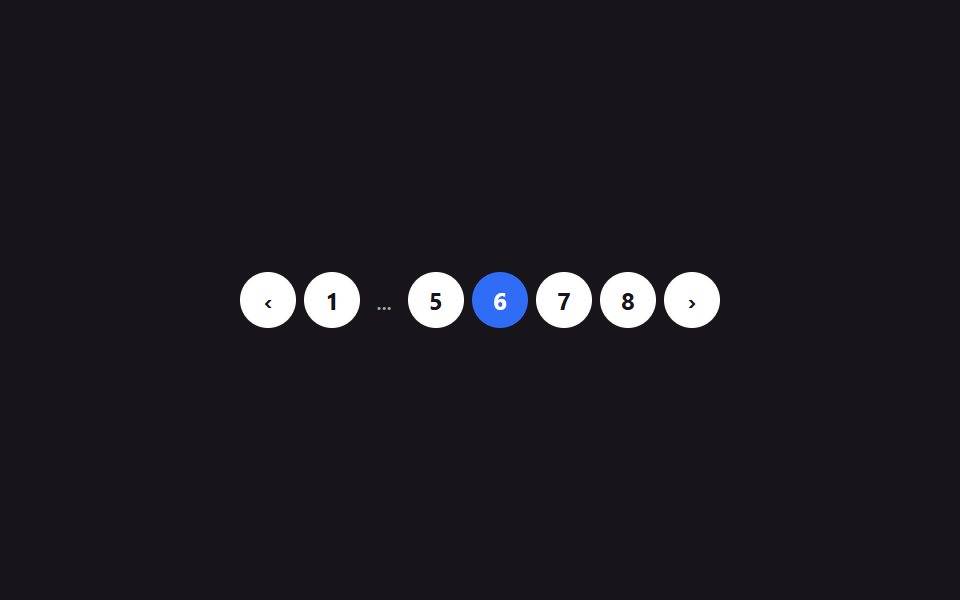
09Phân trang dạng số
Các nút số trang xếp thành hàng, khi quá nhiều trang thì phần giữa gộp lại thành dấu ba chấm, chỉ trang hiện tại được làm nổi bật.
Dùng choChân danh sách diễn đàn, điều hướng trang kết quả tìm kiếm
current page stateellipsis collapse 계산prev/next disabled
<main class="stage">
  <nav class="pg-nav is-demo" aria-label="Trang">
    <button class="pg-nav__prev" type="button" aria-label="Trang trước">‹</button>
    <ul class="pg-nav__list"></ul>
    <button class="pg-nav__next" type="button" aria-label="Trang sau">›</button>
  </nav>
</main>
@use "../../../../site/static/demo-tokens" as *;
$duration: $dur-instant; // 버튼 강조가 바뀌는 시간
$easing: $ease-out;
$color: $subject-blue; // 현재 페이지 강조 색
@include stage($stage-ink);
.pg-nav {
display: flex;
align-items: center;
gap: $sp-1;
}
.pg-nav__list {
display: flex;
align-items: center;
gap: $sp-1;
list-style: none;
margin: 0;
padding: 0;
}
.pg-nav__prev, .pg-nav__next, .pg-nav__num {
min-width: 28px;
height: 28px;
padding: 0 $sp-1;
border: 0;
border-radius: $r-pill;
background: $stage-paper;
color: $stage-ink;
font-size: 12px;
font-weight: 700;
font-family: inherit;
cursor: pointer;
transition: background-color $duration $easing, color $duration $easing;
}
.pg-nav__prev:disabled, .pg-nav__next:disabled { opacity: .35; cursor: default; }
.pg-nav__num[aria-current="page"] { background: $color; color: $stage-paper; }
.pg-nav__num:focus-visible, .pg-nav__prev:focus-visible, .pg-nav__next:focus-visible {
outline: 2px solid $stage-yellow; outline-offset: 2px;
}
.pg-nav__ellipsis { color: rgba($stage-paper, .6); font-size: 12px; padding: 0 $sp-1; }
@media (prefers-reduced-motion: reduce) {
.pg-nav__prev, .pg-nav__next, .pg-nav__num { transition: none; }
}html, body {
margin: 0;
overflow: hidden;
}
.stage {
box-sizing: border-box;
min-height: 100vh;
display: grid;
place-items: center;
margin: 0;
background: #17141a;
font-family: -apple-system, "Segoe UI", "Noto Sans KR", sans-serif;
padding: clamp(8px, 4vw, 24px);
}
.pg-nav {
display: flex;
align-items: center;
gap: 4px;
}
.pg-nav__list {
display: flex;
align-items: center;
gap: 4px;
list-style: none;
margin: 0;
padding: 0;
}
.pg-nav__prev, .pg-nav__next, .pg-nav__num {
min-width: 28px;
height: 28px;
padding: 0 4px;
border: 0;
border-radius: 999px;
background: #ffffff;
color: #17141a;
font-size: 12px;
font-weight: 700;
font-family: inherit;
cursor: pointer;
transition: background-color 140ms ease-out, color 140ms ease-out;
}
.pg-nav__prev:disabled, .pg-nav__next:disabled {
opacity: 0.35;
cursor: default;
}
.pg-nav__num[aria-current=page] {
background: #2f6df6;
color: #ffffff;
}
.pg-nav__num:focus-visible, .pg-nav__prev:focus-visible, .pg-nav__next:focus-visible {
outline: 2px solid #ffd23f;
outline-offset: 2px;
}
.pg-nav__ellipsis {
color: rgba(255, 255, 255, 0.6);
font-size: 12px;
padding: 0 4px;
}
@media (prefers-reduced-motion: reduce) {
.pg-nav__prev, .pg-nav__next, .pg-nav__num {
transition: none;
}
}(function () {
var nav = document.querySelector('.pg-nav');
var list = nav.querySelector('.pg-nav__list');
var prev = nav.querySelector('.pg-nav__prev');
var next = nav.querySelector('.pg-nav__next');
var total = 8, current = 3, timer = null;
function pages() {
var out = [];
for (var p = 1; p <= total; p++) {
if (p === 1 || p === total || Math.abs(p - current) <= 1) out.push(p);
else if (out[out.length - 1] !== '...') out.push('...');
}
return out;
}
function render() {
list.innerHTML = '';
pages().forEach(function (p) {
var li = document.createElement('li');
if (p === '...') {
li.className = 'pg-nav__ellipsis'; li.textContent = '...'; li.setAttribute('aria-hidden', 'true');
} else {
var b = document.createElement('button');
b.type = 'button'; b.className = 'pg-nav__num'; b.textContent = String(p);
if (p === current) { b.setAttribute('aria-current', 'page'); }
b.addEventListener('click', function () { stop(); current = p; render(); });
li.appendChild(b);
}
list.appendChild(li);
});
prev.disabled = current === 1;
next.disabled = current === total;
}
function stop() { nav.classList.remove('is-demo'); if (timer) { clearInterval(timer); timer = null; } }
prev.addEventListener('click', function () { stop(); if (current > 1) { current--; render(); } });
next.addEventListener('click', function () { stop(); if (current < total) { current++; render(); } });
render();
if (!window.matchMedia('(prefers-reduced-motion: reduce)').matches) {
timer = setInterval(function () {
current = current < total ? current + 1 : 1;
render();
}, 260);
}
})();import { useState, type CSSProperties } from "react";
import styles from "./NumberedPagination.module.scss";
export type NumberedPaginationProps = {
total: number;
initial?: number;
/** 현재 페이지 강조 색 */
color?: string;
};
type Vars = CSSProperties & { "--color"?: string };
type Token = number | "...";
function pages(total: number, current: number): Token[] {
const out: Token[] = [];
for (let p = 1; p <= total; p++) {
if (p === 1 || p === total || Math.abs(p - current) <= 1) out.push(p);
else if (out[out.length - 1] !== "...") out.push("...");
}
return out;
}
export default function NumberedPagination({ total, initial = 1, color = "#2f6df6" }: NumberedPaginationProps) {
const [current, setCurrent] = useState(initial);
const vars: Vars = { "--color": color };
return (
<nav className={styles.nav} style={vars} aria-label="페이지">
<button
className={styles.prev}
type="button"
aria-label="이전 페이지"
disabled={current === 1}
onClick={() => setCurrent((c) => Math.max(1, c - 1))}
>‹</button>
<ul className={styles.list}>
{pages(total, current).map((p, i) =>
p === "..." ? (
<li className={styles.ellipsis} key={`e${i}`} aria-hidden="true">...</li>
) : (
<li key={p}>
<button
className={styles.num}
type="button"
aria-current={p === current ? "page" : undefined}
onClick={() => setCurrent(p)}
>{p}</button>
</li>
)
)}
</ul>
<button
className={styles.next}
type="button"
aria-label="다음 페이지"
disabled={current === total}
onClick={() => setCurrent((c) => Math.min(total, c + 1))}
>›</button>
</nav>
);
}09 Phân trang dạng số — Diện tích đo được 4.884% · khung hình chuyển động 10/23Nguyên tác GODRICH · SCSS và React nằm trong tệp zip · 9 mẫu List UI: swipe to delete css và phân trang
Bài viết chứa demo này
 9 mẫu List UI: swipe to delete css và phân trangSwipe to delete css là vuốt một dòng để lộ nút xóa phía sau — thao tác bạn hay thấy trong app, giờ có luôn trên web. Bài Xem tất cả demo trong bài này
Nếu bạn thích hiệu ứng này - demo tương tự
 Giao diện danh sách · bảng01 Bung chi tiết trong dòng9 mẫu List UI: accordion list css và checklist
 Giao diện nhập liệu01 Tự chuyển sang ô kế tiếpOTP Input UI: 9 tình huống kèm validation
 Giao diện đăng nhập · xác thực01 Thẻ đăng nhập kiểu kính mờ (glassmorphism)9 mẫu form đăng ký & đăng nhập copy-paste được